
Giới thiệu
This manual provides essential information for the safe and efficient operation of your SCULPFUN S9 PRO 10W Laser Engraver. The S9 PRO features 10W laser beam shaping technology, offering a 0.06mm ultra-fine laser focus for strong cutting penetration and precision. It is capable of cutting materials such as 15mm thick wood and 10mm acrylic, and engraving ceramics and stainless steel. Please read this manual thoroughly before use to ensure proper setup, operation, and maintenance.

Thông tin an toàn
Vận hành máy khắc laser tiềm ẩn nhiều nguy cơ gây hại. Hãy tuân thủ mọi hướng dẫn an toàn để tránh thương tích hoặc hư hỏng.
- Bảo vệ mắt: Always wear appropriate laser safety glasses when operating the machine. The integrated laser filter on the S9 PRO blocks 98% of ultraviolet light, allowing observation without additional safety glasses for bystanders, but direct laser exposure should always be avoided.
- Công tắc điện: The machine is equipped with a secure power switch. Always turn off the machine when not in use or during maintenance.
- Vị trí an toàn: Utilize the fastening holes on the four feet and frame structure to secure the machine and data cables, preventing accidental movement.
- Bảo vệ bề mặt: Use the provided A4-sized steel pad to protect your work surface from laser damage.
- Thông gió: Ensure adequate ventilation in your workspace to dissipate fumes produced during engraving and cutting.
- Vật liệu dễ cháy: Do not engrave or cut highly flammable materials without proper precautions.
- Trẻ em và vật nuôi: Keep children and pets away from the operating area. The laser point can attract attention, but direct exposure is dangerous.

Nội dung gói
Xác minh rằng tất cả các thành phần đều có sẵn khi mở hộp:
- 1 x SCULPFUN S9 Pro 10 W Laser Engraver
- A4-sized steel pad
- Bộ đổi nguồn
- Cáp USB
- Công cụ lắp ráp
- Hướng dẫn sử dụng (tài liệu này)
Hướng dẫn thiết lập
1. Lắp ráp
The SCULPFUN S9 PRO features a fast assembly design, allowing for installation typically within 10 to 20 minutes. Follow the steps below:
- Bước 1: Assemble the main frame components.
- Bước 2: Attach the X-axis and laser module to the frame.
- Bước 3: Kết nối tất cả các loại cáp cần thiết.
- Hoàn thành: Ensure all connections are secure and the frame is stable.
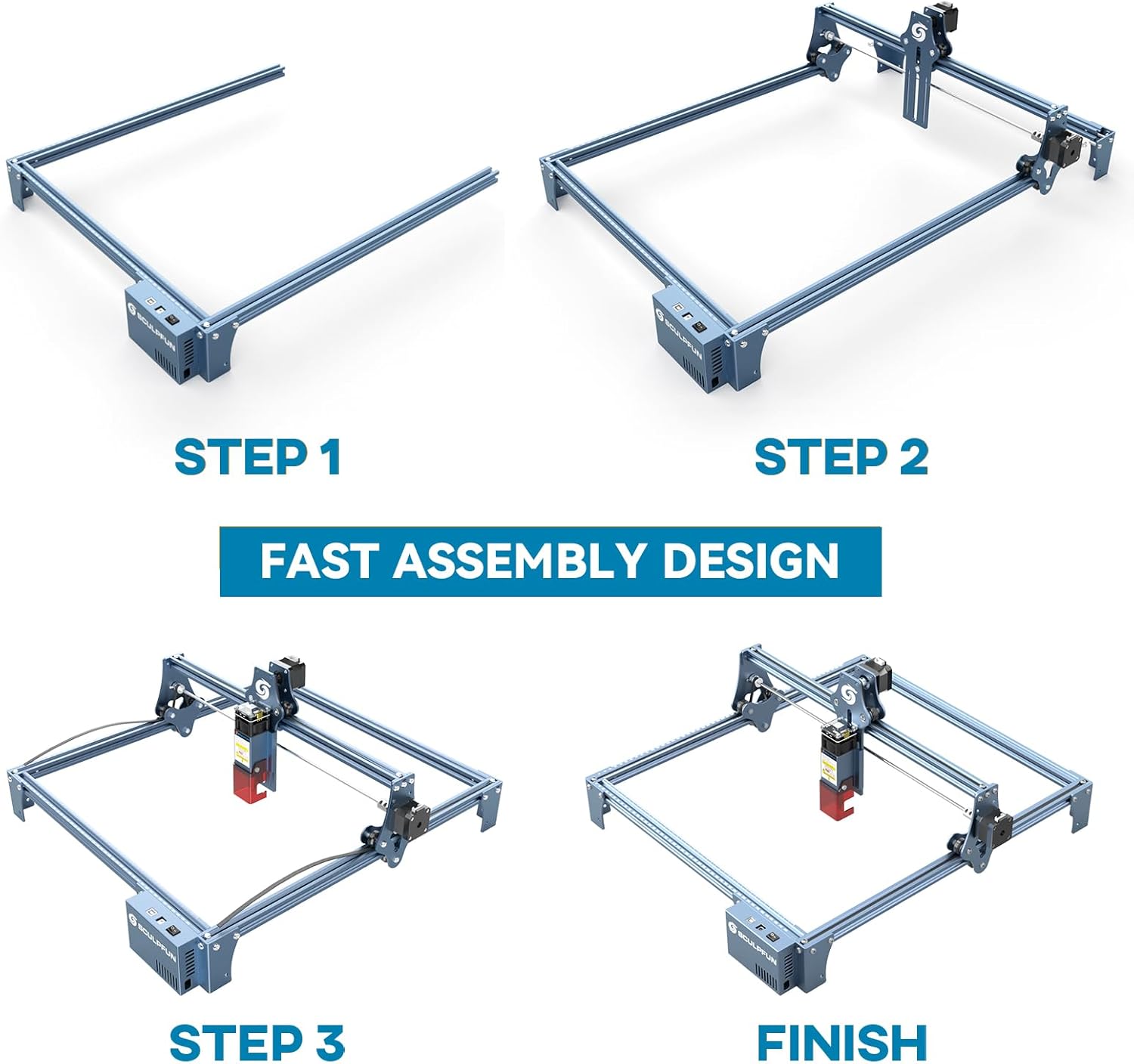
The full-metal structure enhances robustness and engraving accuracy. The X and Y axes include precise scale lines, forming a rectangular measuring ruler for quick object sizing.


2. Điều chỉnh tiêu điểm
The S9 PRO features a quick fixed-focus design. The laser combines a fixed-focus lens with a sliding design for easy adjustment.
- Place the laser module over your material.
- Move the laser module up or down until the focus is achieved.
- Siết chặt các ốc vít để cố định mô-đun laser vào đúng vị trí.

Hướng dẫn sử dụng
1. Khả năng tương thích của phần mềm
The SCULPFUN S9 PRO is compatible with various advanced engraving software:
- LaserGRBL (Windows)
- LightBurn (Windows, macOS, Linux)
- Benbox
- GrblController
- LiteFire
It supports engraving in PWM mode and various file Các định dạng bao gồm JPG, PNG, DXF, SVG, AI, G-code, NC và BMP.

2. Material Capabilities
The 10W laser module provides strong cutting and engraving capabilities across a wide range of materials:
- Cắt: Up to 15mm thick wood, 10mm black acrylic.
- Khắc: Wood, leather, ceramics, stainless steel, aluminum oxide, PCB board, paper, cardboard, dark stone, and more.


3. General Operation Workflow
- Thiết kế: Create or import your design using compatible software (e.g., LightBurn, LaserGRBL).
- Vị trí vật liệu: Place your material on the work surface, ensuring it is flat and secure. Use the integrated rulers for precise positioning.
- Điều chỉnh tiêu điểm: Adjust the laser focus as described in the Setup section.
- Cài đặt phần mềm: Configure laser power, speed, and passes in your chosen software according to the material and desired effect. Refer to software documentation for detailed settings.
- Bắt đầu hoạt động: Khởi động quá trình khắc hoặc cắt từ phần mềm. Giám sát máy trong quá trình hoạt động.
- Hoàn thành: Once the process is complete, turn off the machine and carefully remove your finished piece.
BẢO TRÌ
Regular maintenance ensures optimal performance and extends the lifespan of your SCULPFUN S9 PRO.
- Vệ sinh ống kính laser: Periodically clean the laser lens with a soft, lint-free cloth and lens cleaning solution to maintain laser precision.
- Clean the Work Area: Remove debris and dust from the engraving area after each use to prevent interference with machine movement.
- Inspect Belts and Rails: Check the drive belts for tension and wear. Keep the guide rails clean and lubricated if necessary to ensure smooth movement of the laser module.
- Cập nhật chương trình cơ sở: Hãy kiểm tra trang web chính thức của SCULPFUN. webHãy truy cập trang web để tìm các bản cập nhật phần mềm khả dụng, đảm bảo máy của bạn luôn có các tính năng và cải tiến mới nhất.
Xử lý sự cố
Phần này giải quyết những vấn đề phổ biến mà bạn có thể gặp phải.
- Tia laser không bắn:
- Check if the power cable is securely connected and the power switch is on.
- Verify that the USB cable is connected to your computer and the machine.
- Ensure the software is correctly configured and sending commands.
- Check the laser module connection.
- Chất lượng khắc/cắt kém:
- Re-check the laser focus. An incorrect focus is a common cause of poor quality.
- Adjust laser power and speed settings in your software. Different materials require different settings.
- Hãy đảm bảo vật liệu được trải phẳng và đặt chắc chắn.
- Nếu thấy ống kính laser bị bẩn, hãy lau sạch.
- Máy không hoạt động đúng cách:
- Check for any obstructions on the rails or belts.
- Ensure belts are properly tensioned and not slipping.
- Kiểm tra xem tất cả các dây cáp đã được kết nối chắc chắn chưa.
- Khởi động lại phần mềm và máy.
- Sự cố kết nối phần mềm:
- Ensure the correct COM port is selected in your software.
- Try restarting your computer and the engraver.
- Reinstall the software or drivers if necessary.
For persistent issues, refer to the SCULPFUN support webtrang web hoặc liên hệ với dịch vụ khách hàng.
Thông số kỹ thuật
| Thương hiệu | Điêu khắc |
| Số hiệu mẫu | S9PRO10W-ELE |
| Công suất Laser | 10W (Diode Laser) |
| Tập trung tia laser | 0.06mm (Ultrafine) |
| Độ chính xác khắc | 0.01mm |
| Khu vực khắc | 400 x 410mm |
| Nguồn điện | AC |
| Kích thước gói hàng | 61.79 x 38.4 x 13.4cm |
| Trọng lượng gói hàng | 4.95kg |
| Các thành phần bao gồm | 1 x SCULPFUN S9 Pro 10 W laser engraver |
| Khả năng tương thích của phần mềm | LaserGRBL, LightBurn, Benbox, GrblController, LiteFire |
| Hệ điều hành được hỗ trợ | Windows, macOS, Linux |
| Được hỗ trợ File Định dạng | JPG, PNG, DXF, SVG, AI, G-code, NC, BMP |
Bảo hành và Hỗ trợ
For warranty information, technical support, or service inquiries, please contact SCULPFUN customer support through their official webtrang web hoặc nhà bán lẻ nơi bạn mua sản phẩm. Hãy giữ lại hóa đơn mua hàng để làm bằng chứng mua hàng.
Nhà sản xuất: Điêu khắc
Ngày đầu tiên có sẵn: Ngày 29 tháng 2024 năm XNUMX