
1. Giới thiệu
The MiBOXER HZ5 5-in-1 LED Controller is a versatile device designed for managing various LED lighting systems. It supports both Zigbee 3.0 and 2.4G wireless communication, offering flexible control for single color, dual white (CCT), RGB, RGBW, and RGB+CCT LED lights. This controller integrates seamlessly with compatible smart home systems and offers precise control over brightness, color, and color temperature.
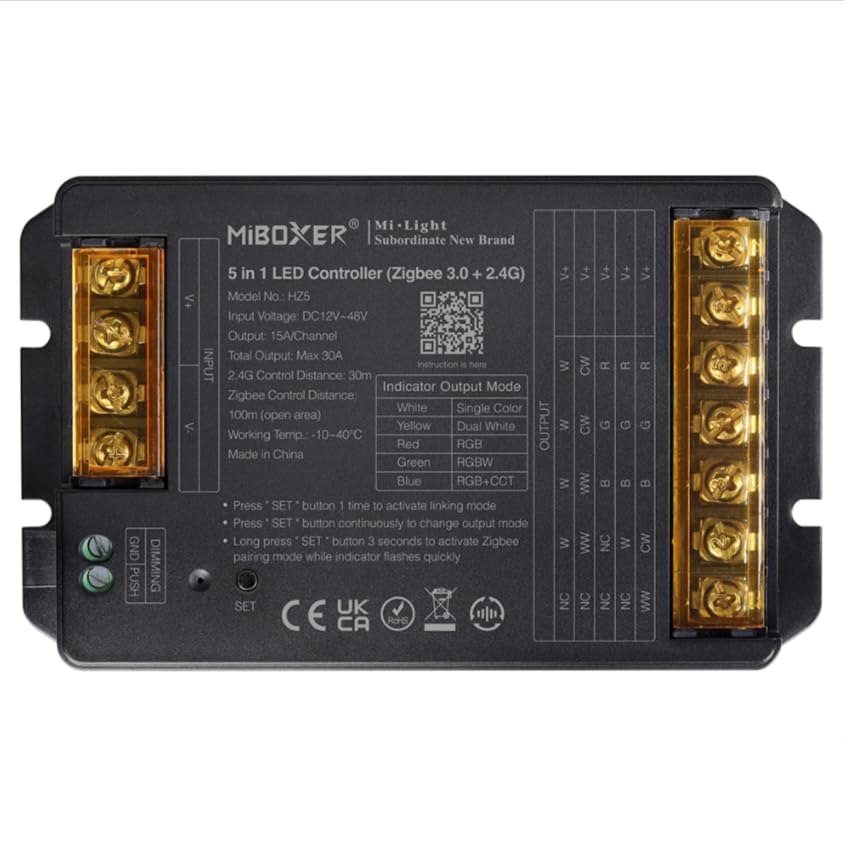
Image 1: MiBOXER HZ5 5-in-1 LED Controller device.
2. Thông tin an toàn
- Always disconnect power before installing or performing maintenance on the controller or connected LED strips.
- Đảm bảo âm lượng đầu vàotage (DC12-24V) and output current (Max 6A/Channel, Total Max 12A) ratings are strictly observed to prevent damage to the device or LED strips.
- Do not expose the controller to moisture, water, or extreme temperatures (-10~40°C).
- Thiết bị này chỉ được sử dụng trong nhà.
- Nếu bạn không chắc chắn về bất kỳ bước lắp đặt nào, hãy tham khảo ý kiến của thợ điện có chuyên môn.
3. Tính năng sản phẩm
- Giao thức chuẩn Zigbee 3.0: Ensures broad compatibility with Zigbee-enabled smart home hubs.
- Khả năng tương thích 5 trong 1: Supports single color, dual white (CCT), RGB, RGBW, and RGB+CCT LED lights.
- Extensive Color Control: Offers 16 million colors adjustable, saturation adjustable, and color temperature adjustable.
- Hỗ trợ điều chỉnh độ sáng bằng nút nhấn: Allows for simple brightness adjustment using a push switch.
- Chế độ động: Built-in 18 dynamic modes with jumping and gradually changing effects (for 2.4G remote control).
- Công nghệ không dây 2.4G: Provides stable control with a range of up to 30 meters.
- Điều khiển bằng ứng dụng và giọng nói: Compatible with smart apps and voice assistants like Alexa and Google Assistant.
4. Thiết lập và Cài đặt
4.1 Hướng dẫn đấu dây
Proper wiring is crucial for the correct operation of the LED controller. Refer to the diagrams below for different LED strip configurations. Always ensure power is disconnected before making any connections.
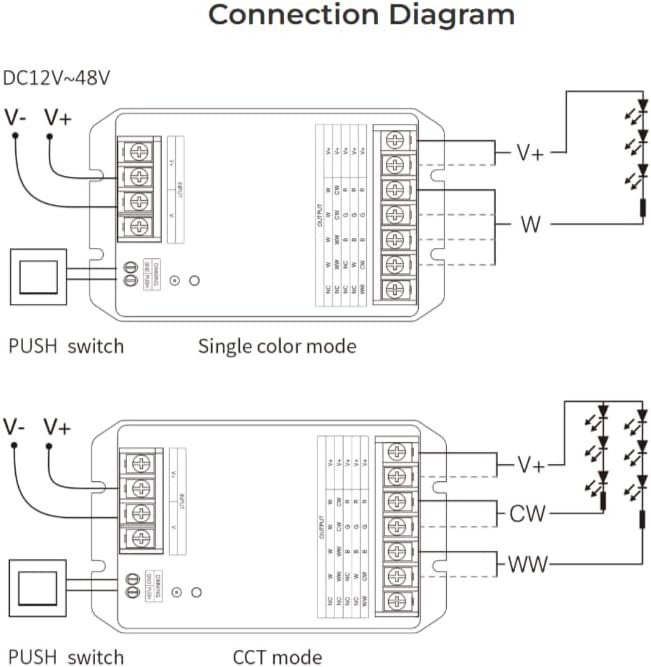
Image 2: Wiring diagrams for Single Color and CCT (Dual White) LED strips. Connect the V+ and V- terminals for power input. For Single Color, connect the LED strip's positive to V+ and negative to W. For CCT, connect the LED strip's positive to V+, warm white to WW, and cool white to CW.

Image 3: Wiring diagrams for RGB, RGBW, and RGB+CCT LED strips. Connect the V+ and V- terminals for power input. For RGB, connect the LED strip's positive to V+, Red to R, Green to G, and Blue to B. For RGBW, add the White channel to W. For RGB+CCT, add Warm White to WW and Cool White to CW.
4.2 Pairing and App Integration
The HZ5 controller supports both 2.4G remote control and smart app integration via Zigbee 3.0. To pair the device with a remote or app, follow these steps:
- Bật nguồn thiết bị.
- Activate Linking Mode: Press the 'SET' button on the controller once to activate linking mode. The indicator light will flash.
- Kích hoạt chế độ ghép nối WiFi: For app control, long press the 'SET' button for 3 seconds. The indicator light will flash quickly, indicating it's ready for WiFi pairing.
- Cài đặt ứng dụng: Open your compatible smart home app (e.g., MiBoxer Smart app), select 'Add Device', and follow the on-screen instructions to discover and add the controller. Ensure Bluetooth is enabled on your phone for easier device discovery.
Video 1: This video demonstrates the wiring instructions for a MiBOXER controller, which is applicable to the HZ5 model for proper connection of LED strips.

Hình ảnh 4: Ví dụample of the mobile application interface for controlling LED lighting, showing color selection and brightness adjustment.

Image 5: The MiBOXER HZ5 controller is compatible with popular voice assistants such as Amazon Alexa and Google Assistant for convenient hands-free operation.
5. Hướng dẫn vận hành
5.1 Switching Output Modes
The HZ5 controller can operate in different output modes depending on the connected LED strip type. The indicator light on the controller changes color to show the current output mode:
- Màu đỏ: Chế độ RGB
- Màu xanh lá: Chế độ RGBW
- Màu xanh da trời: RGB+CCT mode
- Màu vàng: Single Color mode
- Lục lam: Dual White (CCT) mode
To change the output mode, press the 'SET' button continuously until the desired indicator color is displayed.
5.2 Điều khiển qua ứng dụng
Once paired with the smart app, you can control your LED lighting with various functions:
- Lựa chọn màu sắc: Use the color wheel to choose from 16 million colors.
- Điều chỉnh độ sáng: Adjust the brightness level from 1% to 100%.
- Nhiệt độ màu: For CCT and RGB+CCT strips, adjust the color temperature from warm white to cool white.
- Cảnh động: Select from pre-programmed dynamic modes or create custom scenes.
- Đồng bộ nhạc: Some apps may offer music synchronization features.
- Lên lịch: Set timers and schedules for automatic on/off or scene changes.
Video 2: This video demonstrates app control for a similar 5-in-1 LED strip controller (WL5), showcasing color, brightness, and scene adjustments. The functionality is comparable to the HZ5 model.
Video 3: Another demonstration of app control for a MiBOXER 5-in-1 LED strip controller (WL5), highlighting various color and mode selections. This provides a visual guide to the HZ5's app capabilities.
6. Bảo trì
- Vệ sinh: Hãy dùng khăn mềm, khô để lau sạch bộ điều khiển. Không sử dụng hóa chất mạnh hoặc chất tẩy rửa có tính mài mòn.
- Kho: Bảo quản bộ điều khiển ở nơi khô ráo, thoáng mát, tránh ánh nắng trực tiếp và nhiệt độ cao khi không sử dụng trong thời gian dài.
- Cập nhật chương trình cơ sở: Periodically check the MiBOXER app for any available firmware updates to ensure optimal performance and access to new features.
KHAI THÁC. Xử lý sự cố
- Không có điện: Ensure the power adapter is correctly connected and providing the specified DC12-24V. Check all wiring connections.
- Đèn LED không phản hồi: Verify that the LED strip is correctly wired to the controller according to the specific mode (Single Color, CCT, RGB, RGBW, RGB+CCT). Check if the correct output mode is selected on the controller.
- Vấn đề ghép nối: If the controller fails to pair with the app or remote, ensure the device is in the correct pairing mode (single press for linking, long press for WiFi pairing). Try resetting the controller by disconnecting and reconnecting power, then re-attempt pairing.
- Điều khiển gián đoạn: Check for potential interference from other 2.4G devices. Ensure the controller is within the 30-meter control distance from the remote or WiFi router.
- Màu sắc không chính xác: If RGB/RGBW/RGB+CCT colors are incorrect, double-check the wiring of the R, G, B, W, CW, WW channels to ensure they match the LED strip's configuration.
8. Thông số kỹ thuật
| Tính năng | Chi tiết |
|---|---|
| Số hiệu mẫu | HZ5 |
| Đầu vào Voltage | DC12-24V |
| Dòng điện đầu ra | 6A/Kênh |
| Tổng sản lượng | Tối đa 12A |
| Control Distance (2.4G) | 30 phút |
| Nhiệt độ làm việc | -10~40°C |
| Kích thước (D x R x C) | 134mm x 81mm x 24mm (xấp xỉ) |
| Trọng lượng sản phẩm | 6.2 ounce |

Image 6: Technical drawing showing the dimensions of the MiBOXER HZ5 controller.
9. Bảo hành và Hỗ trợ
This product is typically covered by a standard manufacturer's warranty against defects in materials and workmanship. Please refer to your purchase documentation or contact the retailer for specific warranty terms and duration.
For technical support, troubleshooting assistance, or further inquiries, please contact MiBOXER customer service or visit their official webtrang web. Giữ lại biên lai mua hàng làm bằng chứng mua hàng khi yêu cầu bảo hành.