
1. Giới thiệu
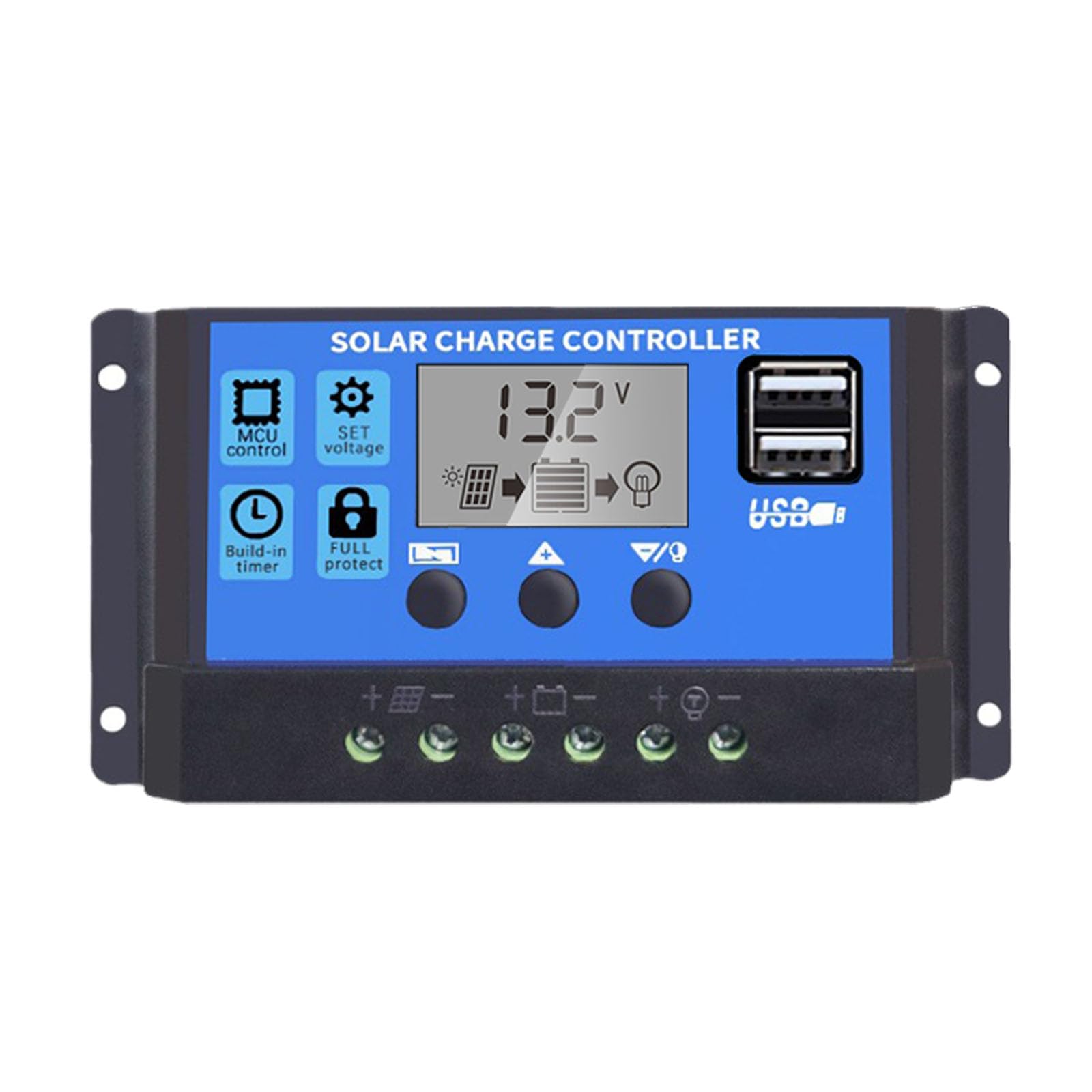
This manual provides essential instructions for the safe and efficient operation of your Saooer Solar Charge Controller. This device is designed to manage the power flow from your solar panel to your battery, ensuring optimal charging and protecting your battery from overcharge and over-discharge. It is compatible with both 12V and 24V solar systems and features a 30A discharge current capacity.
2. Hướng dẫn an toàn
Please read all safety instructions carefully before installation and operation. Failure to follow these instructions may result in damage to the controller, battery, or other components, and may cause personal injury.
- Đảm bảo lượng pintage is sufficient for the controller to recognize the battery type before the first installation.
- The charge controller is suitable for lead-acid batteries (OPEN, AGM, GEL) and lithium-ion batteries. Do not use it for other battery types.
- Install the charge controller indoors, away from direct sunlight, high temperatures, and humid environments.
- The controller will heat up during operation; ensure good ventilation.
- The controller's positive and negative terminals should be connected correctly. Reverse connection may damage the device.
- Always connect the battery first, then the solar panel, and finally the load. Disconnect in the reverse order: load, then solar panel, then battery.
3. Tính năng sản phẩm
- Hệ thống Voltage Khả năng tương thích: Automatically detects 12V or 24V systems.
- Dòng xả: Công suất 30A.
- Integrated Micro Controller: Manages solar panel and battery operation efficiently.
- Cổng USB kép: Supports mobile phone charging (5V/2A output).
- Bảo vệ toàn diện: Includes short-circuit protection, open-circuit protection, reverse polarity protection, and over-load protection to enhance system efficiency and battery lifespan.
- Màn hình LCD: Provides clear indication of status and data, allowing for convenient mode switching and parameter configuration.
- Các thông số có thể điều chỉnh: User-configurable settings for various battery types and operational needs.
- Hẹn giờ tích hợp: For load control.
4. Nội dung gói hàng
- 1x Saooer Solar Charge Controller (30A)
5. Thiết lập và Cài đặt
Follow these steps for proper installation of the solar charge controller. Incorrect connection order can damage the controller.
- Kết nối pin: Connect the battery to the charge regulator first. Ensure correct polarity (positive to positive, negative to negative). This allows the controller to recognize the battery voltage.
- Kết nối tấm pin mặt trời: Connect the solar panel to the solar charge controller. Ensure correct polarity.
- Kết nối tải: Connect the consumer or load to the charge controller regulator. Ensure correct polarity.
Important Disconnection Note:
When disconnecting the system, always remove the solar panel connection first, then the load connection, and finally the battery connection. This prevents potential damage to the controller.

6. Hướng dẫn vận hành
The controller features an LCD display and three buttons for operation: THỰC ĐƠN, UP, Và XUỐNG.
6.1. Màn hình LCD
The LCD display shows real-time system status and data, including battery voltage, charging current, discharging current, and various parameter settings.
6.2. Chức năng nút
- Nút MENU: Press to cycle through different display modes and enter parameter setting mode. Long press to exit setting mode.
- Nút lên: In setting mode, press to increase the parameter value.
- Nút XUỐNG: In setting mode, press to decrease the parameter value.
6.3. Cài đặt Tham số
To adjust parameters (e.g., battery type, charge/discharge voltage limits, load timer settings):
- Nhấn nút THỰC ĐƠN button until the desired parameter display appears.
- Nhấn và giữ THỰC ĐƠN button until the displayed value starts flashing.
- Sử dụng UP Và XUỐNG các nút để điều chỉnh giá trị.
- Once the desired value is set, long press the THỰC ĐƠN button again to save the setting and exit the flashing state.
Refer to the specific icons on the LCD for detailed parameter identification.

7. Bảo trì
Bảo trì thường xuyên sẽ đảm bảo tuổi thọ và hiệu suất tối ưu cho bộ điều khiển sạc năng lượng mặt trời của bạn.
- Độ sạch sẽ: Giữ bộ điều khiển sạch sẽ, không bụi bẩn. Dùng khăn khô để lau chùi.
- Kết nối: Periodically check all wiring connections to ensure they are tight and free from corrosion. Loose connections can cause power loss and overheating.
- Thông gió: Ensure the installation area has adequate ventilation to prevent overheating of the controller.
- Điều tra: Inspect the controller for any signs of physical damage or unusual operation.
KHAI THÁC. Xử lý sự cố
If you encounter issues with your solar charge controller, consider the following common troubleshooting steps:
- Không hiển thị/Không có nguồn: Kiểm tra các kết nối pin và đảm bảo pin có đủ điện áp.tage. Verify all wiring is correct and secure.
- Pin không sạc: Kiểm tra các kết nối của tấm pin mặt trời và đảm bảo tấm pin nhận được đủ ánh sáng mặt trời. Xác minh điện áp của tấm pin mặt trời.tage and current. Ensure the controller's charging parameters are correctly set for your battery type.
- Tải không hoạt động: Check load connections. Ensure the load is not exceeding the controller's rated current. Check the load timer settings if applicable. The controller may have entered protection mode due to over-discharge or over-load; check the display for error codes or indicators.
- Quá voltage / Under-Voltage Báo động: Kiểm tra dung lượng pintage. Ensure solar panel open-circuit voltage không vượt quá điện áp đầu vào tối đa của bộ điều khiển.tage.
Nếu sự cố vẫn tiếp diễn sau khi thực hiện các bước kiểm tra này, vui lòng liên hệ với bộ phận hỗ trợ khách hàng.
9. Thông số kỹ thuật
| Tính năng | Đặc điểm kỹ thuật |
|---|---|
| Thương hiệu | Saooer |
| Người mẫu | Bộ điều khiển sạc năng lượng mặt trời 30A |
| Hệ thống Voltage | Tự động nhận diện điện áp 12V / 24V |
| Dòng xả | 30A |
| Vật liệu | Kim loại, Nhựa |
| Kiểu hiển thị | Màn hình tinh thể lỏng |
| Đầu ra USB | Dual USB, 5V/2A |
| Các thành phần bao gồm | 1x Solar Charge Controller |

10. Bảo hành và Hỗ trợ
For warranty information, please refer to the documentation provided with your purchase or contact your retailer. For technical support or inquiries, please contact Saooer customer service through their official channels.