
1. Giới thiệu và kết thúcview
This manual provides essential information for the setup, operation, and maintenance of your CHUWI Hi10 X2 Tablet Keyboard with Touchpad. Designed specifically for the CHUWI Hi10 X2 and Hi10 X1 Windows tablets, this 2-in-1 magnetic keyboard transforms your tablet into a versatile laptop, enhancing productivity and convenience.
The keyboard features a magnetic docking interface for seamless connection, eliminating the need for separate charging or Bluetooth pairing. Its ultra-slim and portable design makes it ideal for various uses, from business and education to everyday tasks and gaming.
2. Tính năng sản phẩm
- Magnetic Docking Interface: Designed for CHUWI Hi10 X2 / Hi10 X1 Windows tablets, ensuring easy and stable connection.
- No Charging or Pairing Required: The docking magnetic suction design provides energy efficiency and a faster input response time compared to Bluetooth keyboards.
- Bàn di chuột tích hợp: Supports multi-touch gestures for responsive navigation and control.
- Trải nghiệm đánh máy nâng cao: Features a borderless keyboard with well-spaced keys and optimized key travel for accuracy and comfort.
- Chức năng 2 trong 1: Transforms your tablet into a versatile laptop instantly, complete with a sturdy stand for optimal viewgóc nghiêng.
- Ultra Slim and Portable: Lightweight and easy to attach or remove, making it convenient for travel and daily use.

Image: The CHUWI Hi10 X2 Tablet Keyboard provides an enhanced typing experience with its well-spaced keys, designed for comfort and precision.

Image: The high-precision touchpad supports multi-touch gestures for responsive navigation and control.
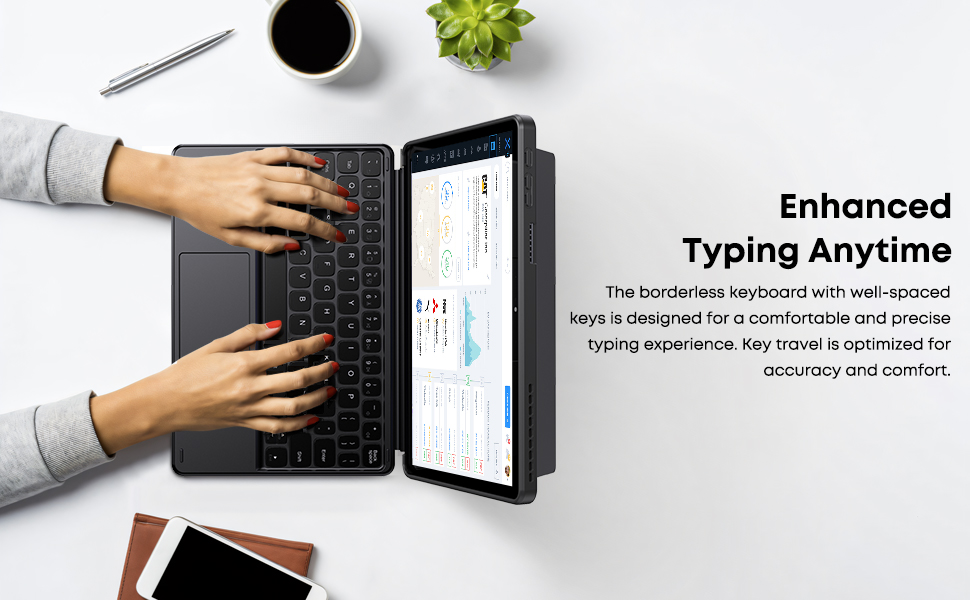
Image: The Smart Keyboard attaches magnetically to the Hi10 X1/X2 tablet, providing instant power and a great typing experience without needing charging or pairing.
3. Thiết lập
- Gắn bàn phím: Align the magnetic docking interface of the keyboard with the corresponding pins on your CHUWI Hi10 X2 or Hi10 X1 tablet. The magnets will guide the keyboard into place, establishing an instant connection.
- Sử dụng chân chống: The keyboard case includes a built-in stand. Fold out the stand from the back of the case to prop up your tablet at a comfortable viewgóc gõ hoặc đánh máy.
- Sử dụng ban đầu: No initial charging or Bluetooth pairing is required for the keyboard to function with your compatible CHUWI tablet once magnetically docked.
Video: This video demonstrates the installation of the CHUWI Hi10 X1 keyboard and showcases the protective case. It illustrates how to attach the tablet to the keyboard and utilize the case's features.
4. Hướng dẫn vận hành
- Đánh máy: Begin typing immediately after docking your tablet. The keyboard provides a familiar layout for efficient text input.
- Hướng dẫn sử dụng bàn di chuột: The integrated touchpad supports standard mouse functions and multi-touch gestures.
- Chạm bằng một ngón tay: Ấn chuột trái.
- Chạm bằng hai ngón tay: Click chuột phải.
- Cuộn bằng hai ngón tay: Di chuyển lên hoặc xuống.
- Chụm để phóng to: Sử dụng hai ngón tay để phóng to hoặc thu nhỏ.
- Detaching the Keyboard: Gently pull the tablet away from the magnetic docking interface to detach the keyboard.
5. Bảo trì
- Vệ sinh: Use a soft, dry, lint-free cloth to clean the keyboard and touchpad surfaces. For stubborn marks, slightly dampLau vải bằng nước. Tránh sử dụng hóa chất mạnh hoặc vật liệu mài mòn.
- Kho: When not in use, keep the keyboard attached to the tablet to protect the screen and keys. Store in a cool, dry place away from direct sunlight and extreme temperatures.
- Xử lý: Avoid placing heavy objects on the keyboard or bending it excessively to prevent damage to the keys or internal components.
KHAI THÁC. Xử lý sự cố
- Bàn phím không phản hồi:
- Ensure the tablet is correctly docked to the magnetic interface.
- Tháo và gắn lại bàn phím để thiết lập lại kết nối.
- Restart your CHUWI tablet.
- Bàn di chuột không hoạt động:
- Check if the touchpad has been accidentally disabled (refer to your tablet's settings for input devices).
- Ensure the touchpad surface is clean and free from obstructions.
- Try detaching and reattaching the keyboard.
- Keys Sticking or Unresponsive:
- Clean around the affected keys with a soft, dry brush or compressed air to remove any debris.
- Tránh làm đổ chất lỏng lên bàn phím.
7. Thông số kỹ thuật
| Thương hiệu: | CHUWI |
| Số hiệu mẫu: | CHUWI Hi10 X1 Tablet Keyboard (Compatible with Hi10 X2) |
| Thiết bị tương thích: | Hi10 X1 tablet, Hi10 X2 tablet |
| Công nghệ kết nối: | Magnetic Docking Interface (faster than Bluetooth) |
| Mô tả bàn phím: | Numeric (Standard QWERTY layout with touchpad) |
| Tính năng đặc biệt: | Foldable, Lightweight, Portable, Integrated Touchpad, Magnetic Connection |
| Màu sắc: | Đen |
| Vật liệu: | Silicon |
| Trọng lượng sản phẩm: | 9.9 ounce |
| Kích thước gói hàng: | 9.88 x 7.8 x 0.67 inch |
| Các thành phần bao gồm: | Hi10 X1 Tablet Keyboard |
8. Bảo hành và Hỗ trợ
Your CHUWI Hi10 X2 Tablet Keyboard is covered by a 1-year service period, valid immediately after purchase. CHUWI is committed to providing high-quality products and excellent service.
For any questions or support needs, CHUWI offers lifetime factory professional support and 24-hour online assistance. Please refer to the contact information provided with your tablet or visit the official CHUWI webtrang web để biết thêm chi tiết.