
1. Giới thiệu
Welcome to the user manual for your Emerson CKSS7071 Sunrise Smartset Alarm Clock Radio. This device is designed to enhance your daily routine with its unique features, including a sunrise simulation, soothing sound options, Bluetooth connectivity, and an 8-color dimmable LED display. Please read this manual thoroughly to understand the full functionality and ensure proper use and care of your new alarm clock radio.
PHIM 1: Quaview of the Emerson CKSS7071 Sunrise Smartset Alarm Clock Radio. This video demonstrates the key features and design of the product.
2. Thông tin an toàn quan trọng
- Đọc tất cả các hướng dẫn trước khi vận hành thiết bị.
- Giữ lại những hướng dẫn này để tham khảo sau này.
- Không sử dụng thiết bị này gần nước.
- Chỉ lau sạch bằng vải khô.
- Không chặn bất kỳ lỗ thông gió nào. Lắp đặt theo hướng dẫn của nhà sản xuất.
- Không lắp đặt gần bất kỳ nguồn nhiệt nào như bộ tản nhiệt, thanh nhiệt, bếp lò hoặc các thiết bị khác (bao gồm amplò phản ứng) tạo ra nhiệt.
- Bảo vệ dây nguồn khỏi bị dẫm lên hoặc kẹp, đặc biệt là ở phích cắm, ổ cắm tiện lợi và điểm chúng thoát ra khỏi thiết bị.
- Chỉ sử dụng các phụ kiện/tập tin đính kèm do nhà sản xuất chỉ định.
- Rút phích cắm của thiết bị này khi có sấm sét hoặc khi không sử dụng trong thời gian dài.
- Tham khảo mọi dịch vụ bảo dưỡng cho nhân viên bảo dưỡng có trình độ. Cần bảo dưỡng khi thiết bị bị hư hỏng theo bất kỳ cách nào, chẳng hạn như dây nguồn hoặc phích cắm bị hỏng, chất lỏng bị đổ hoặc có vật rơi vào thiết bị, thiết bị bị mưa hoặc ẩm ướt, không hoạt động bình thường hoặc bị rơi.
3. Nội dung gói hàng
Kiểm tra xem tất cả các mặt hàng có đầy đủ hay không khi mở gói hàng:
- Emerson CKSS7071 Sunrise Smartset Alarm Clock Radio
- Bộ đổi nguồn AC
- Hướng dẫn sử dụng
4. Sản phẩm hếtview
4.1 Mặt trước View

Hình ảnh 1: Đằng trước view of the alarm clock, featuring the digital time display and the sunrise simulation light panel.
The front of the unit features the main 1.2-inch LED time display and the large circular light panel for sunrise simulation and ambient lighting. Indicators for AM/PM, Alarm 1/2, and Bluetooth status are also visible.
4.2 Mặt View (Điều khiển)
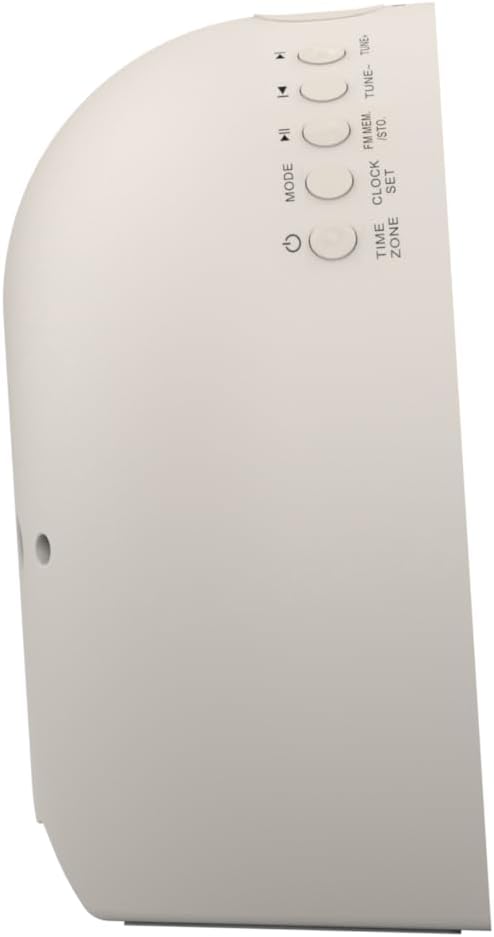
Hình ảnh 2: Bên view of the alarm clock, highlighting the control buttons for various functions.
The side panel houses the primary control buttons, including Power, Mode, Clock Set, Time Zone, Tune/Skip, and Volume controls. These buttons are used for setting time, alarms, and navigating audio functions.
4.3 Phía sau View

Hình ảnh 3: Ở phía sau view of the alarm clock, showing the speaker grille and power connection port.
The rear of the unit features the main speaker grille and the power input port for connecting the AC adapter.
5. Thiết lập
5.1 kết nối nguồn
- Plug the AC power adapter into the DC IN jack located on the back of the unit.
- Plug the other end of the adapter into a standard wall outlet (AC 100-240V, 50/60Hz).
- Thiết bị sẽ tự động bật nguồn.
5.2 SmartSet Automatic Time Setting
The SmartSet system automatically sets the correct time and date as soon as you plug in the unit. It also maintains time and alarm settings during power disruptions or outages, provided the button cell battery is installed.
5.3 Lắp đặt bộ lưu điện
A button cell battery (CR2032, included) is required for battery backup. This ensures that time and alarm settings are retained during a power outage.
- Xác định vị trí ngăn chứa pin ở phía dưới của thiết bị.
- Mở nắp ngăn chứa pin.
- Lắp một viên pin cúc áo CR2032, đảm bảo đúng cực (+/-).
- Đóng chặt nắp ngăn chứa pin.
6. Hướng dẫn vận hành
6.1 Setting the Clock Manually
- Nhấn và giữ BỘ ĐỒNG HỒ cái nút. Các chữ số giờ sẽ nhấp nháy.
- Sử dụng TUNE - / + các nút để điều chỉnh giờ. Nhấn BỘ ĐỒNG HỒ để xác nhận.
- Các chữ số chỉ phút sẽ nhấp nháy. Sử dụng TUNE - / + Các nút để điều chỉnh phút. Nhấn BỘ ĐỒNG HỒ để xác nhận.
- Tiếp tục quy trình này để thiết lập năm, tháng và ngày.
- Nhấn BỘ ĐỒNG HỒ Nhấn lại để thoát khỏi chế độ cài đặt thời gian.
6.2 Cài đặt báo thức (Báo thức 1 & Báo thức 2)
The unit features dual alarms. Follow these steps for each alarm:
- Nhấn và giữ BÁO ĐỘNG 1 or BÁO ĐỘNG 2 nhấn nút. Các chữ số hiển thị giờ báo thức sẽ nhấp nháy.
- Sử dụng TUNE - / + buttons to adjust the alarm hour. Press the respective BÁO THỨC nút để xác nhận.
- Các chữ số hiển thị phút báo thức sẽ nhấp nháy. Sử dụng TUNE - / + buttons to adjust the alarm minutes. Press the respective BÁO THỨC nút để xác nhận.
- Select the alarm source (Buzzer, FM Radio, or Soothing Sound). Press the respective BÁO THỨC nút để xác nhận.
- Điều chỉnh âm lượng báo thức bằng cách sử dụng... VOL - / + các nút. Nhấn các nút tương ứng BÁO THỨC nút để xác nhận.
- The alarm is now set. The alarm indicator (AL1 or AL2) will appear on the display.
6.3 Mô phỏng bình minh
The sunrise simulation feature gradually brightens the light panel before your set alarm time, mimicking a natural sunrise to gently wake you.
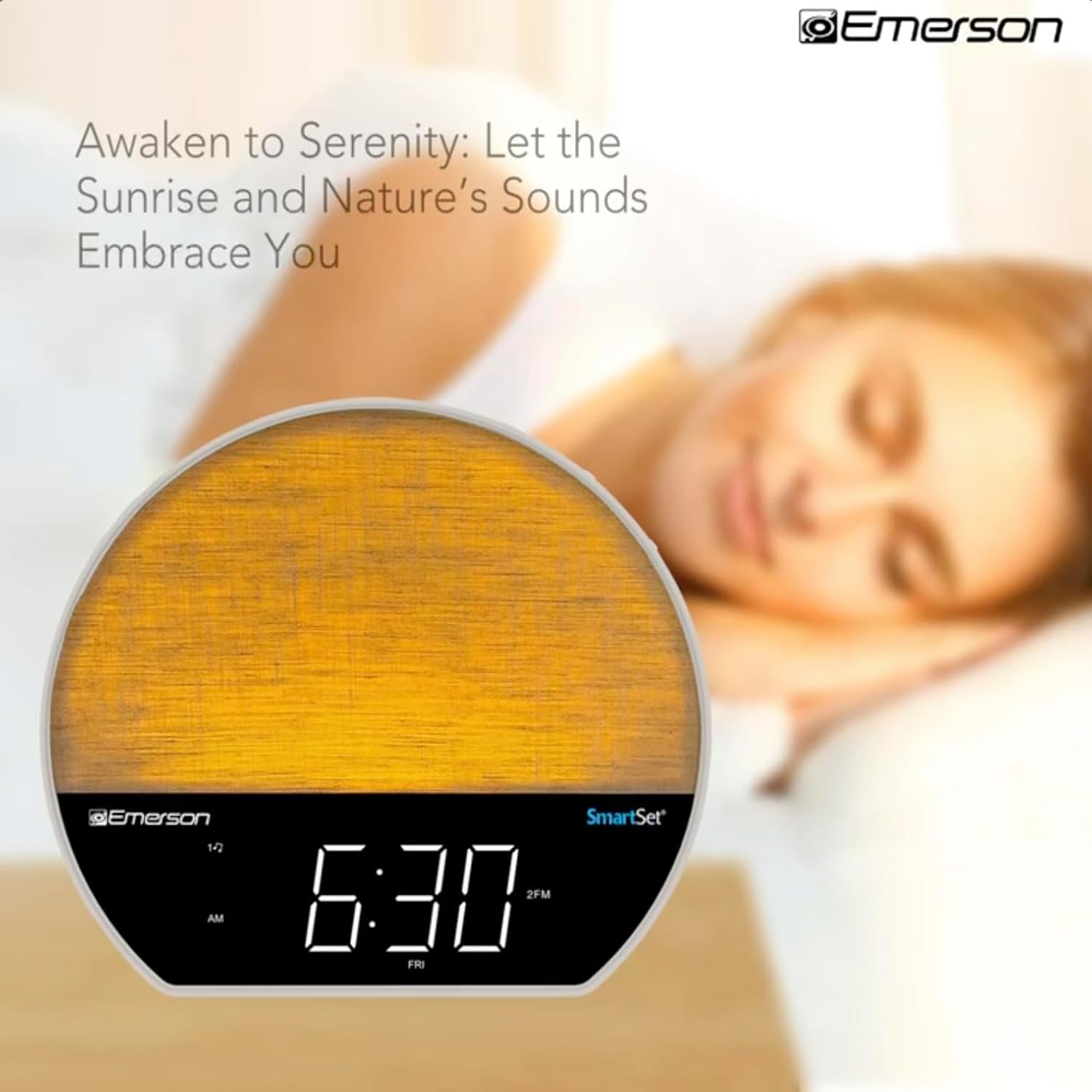
Hình ảnh 4: The alarm clock simulating a sunrise with a warm, increasing cường độ ánh sáng.
To activate, ensure the sunrise option is selected during alarm setup. The light will begin to brighten 30 minutes before the alarm sounds.
6.4 Soothing Sounds and White Noise
The unit includes 6 soothing sounds and white noise to help with relaxation or waking up.
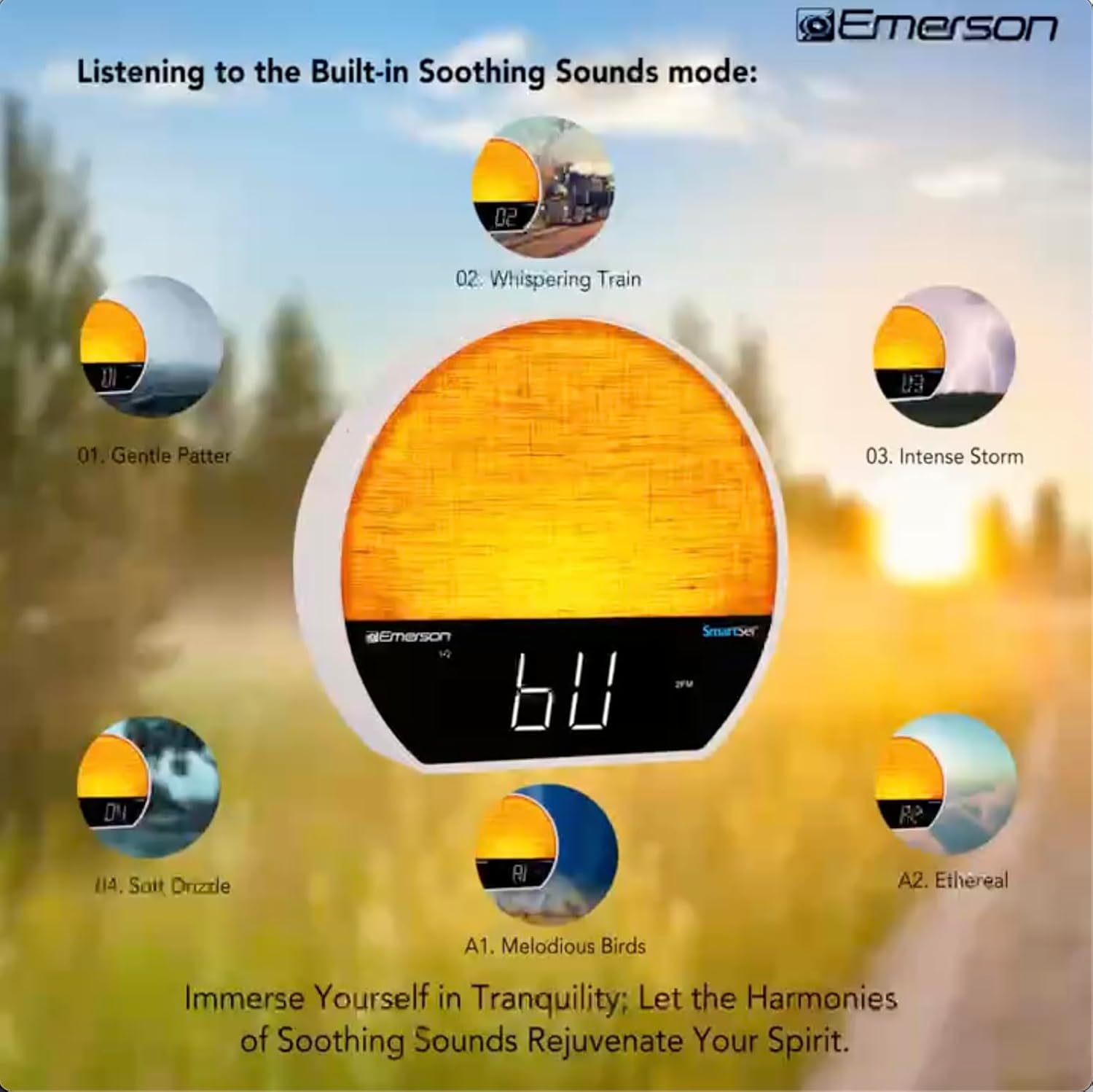
Hình ảnh 5: Visual representation of the six soothing sound modes available on the alarm clock.
- Nhấn nút CÁCH THỨC button repeatedly until the Soothing Sound mode is selected.
- Sử dụng TUNE - / + buttons to cycle through the available sounds (e.g., Gentle Patter, Whispering Train, Intense Storm, Soft Drizzle, Melodious Birds, Ethereal, White Noise).
- Điều chỉnh âm lượng bằng cách sử dụng VOL - / + nút bấm.
6.5 Chức năng loa Bluetooth
Kết nối điện thoại thông minh hoặc thiết bị hỗ trợ Bluetooth khác để phát âm thanh không dây.

Hình ảnh 6: The alarm clock in Bluetooth mode, paired with a mobile device for audio streaming.
- Nhấn nút CÁCH THỨC button until 'BT' appears on the display, indicating Bluetooth mode.
- On your device, enable Bluetooth and search for 'Emerson CKSS7071'.
- Select the device to pair. A confirmation tone will sound upon successful pairing.
- Giờ đây, bạn có thể phát âm thanh từ thiết bị của mình qua loa của đồng hồ báo thức.
Hoạt động của đài phát thanh FM 6.6
Hãy dò đài FM yêu thích của bạn.
- Nhấn nút CÁCH THỨC nhấn nút cho đến khi chữ 'FM' xuất hiện trên màn hình.
- Nhấn nút TUNE - / + buttons briefly to manually tune to a station.
- Nhấn và giữ TUNE - / + các nút để tự động quét tìm trạm tiếp theo có sẵn.
- Để lưu một trạm, hãy nhấn và giữ nút. FM MEM nhấn nút cho đến khi số được cài đặt sẵn nhấp nháy. Sử dụng TUNE - / + để chọn một số cài đặt trước, sau đó nhấn FM MEM một lần nữa để tiết kiệm.
6.7 LED Decor and Dimmer Control
Customize the ambient light with 8 different colors and adjust the brightness.

Hình ảnh 7: The alarm clock demonstrating its 8-color dimmable LED decor options.
- Nhấn nút ÁNH SÁNG button to cycle through the 8 available colors or turn the light off.
- To adjust the brightness of the LED decor light, press and hold the ÁNH SÁNG button. The brightness will cycle through 5 levels. Release the button at your desired brightness.
6.8 Điều khiển độ sáng màn hình
Adjust the brightness of the 1.2-inch LED time display.

Hình ảnh 8: The alarm clock illustrating the five distinct levels of display luminescence.
Nhấn nút ĐIỀU CHỈNH button (often combined with another function, refer to button labels) to cycle through 4 levels of display brightness (Bright, Moderate, Dim, Faint).
6.9 Hẹn giờ ngủ
Set a timer for the audio to automatically turn off after a specified duration.

Hình ảnh 9: The alarm clock set for a sunset sleep timer, providing a harmonious end to the day.
- While audio is playing (FM or Soothing Sound), press the NGỦ cái nút.
- Nhấn liên tục NGỦ button to cycle through available sleep timer durations (e.g., 15, 30, 60, 90 minutes, or OFF).
- The audio will automatically turn off after the selected time.
6.10 Chức năng báo lại
Khi có báo động, hãy nhấn nút GIẤC NGŨ NGẮN button (usually a large button on top) to temporarily silence the alarm for a few minutes. The alarm will sound again after the snooze period.
7. Bảo trì
7.1 Vệ sinh
- Luôn rút thiết bị ra khỏi ổ cắm điện trước khi vệ sinh.
- Sử dụng vải mềm, khô để lau sạch bề mặt bên ngoài.
- Do not use liquid cleaners, abrasive cleaners, or chemical sprays, as these may damage the finish.
7.2 Thay thế pin
If the time and alarm settings are not retained during a power outage, the button cell backup battery may need to be replaced. Follow the instructions in section 5.3 to replace the CR2032 battery.
KHAI THÁC. Xử lý sự cố
| Vấn đề | Nguyên nhân có thể | Giải pháp |
|---|---|---|
| Thiết bị không bật nguồn. | Bộ đổi nguồn không được kết nối hoặc bị lỗi. | Hãy đảm bảo bộ chuyển đổi nguồn AC được cắm chắc chắn vào thiết bị và ổ cắm điện hoạt động tốt. |
| Cài đặt thời gian/báo thức bị mất sau khi mất điện.tage. | Pin dự phòng đã hết điện hoặc chưa được lắp đặt. | Install or replace the CR2032 button cell battery (see section 5.3). |
| Chuông báo động không kêu. | Chuông báo thức không được kích hoạt hoặc âm lượng quá nhỏ. | Ensure the alarm is set and activated (AL1/AL2 indicator on). Increase alarm volume. |
| Thiết bị Bluetooth không thể ghép nối. | Unit not in Bluetooth mode or device too far. | Ensure the unit is in Bluetooth mode ('BT' displayed). Move your device closer to the unit. Try unpairing and re-pairing. |
| Thu sóng radio FM kém. | Ăng-ten không được kéo dài hoặc không bị nhiễu. | Extend the FM wire antenna fully and reposition it for better reception. Avoid placing near other electronic devices. |
| Màn hình quá sáng/quá tối. | Display dimmer setting needs adjustment. | Nhấn nút ĐIỀU CHỈNH button to cycle through brightness levels (see section 6.8). |
9. Thông số kỹ thuật
| Tính năng | Chi tiết |
|---|---|
| Số hiệu mẫu | CKSS7071 |
| Nguồn điện | AC 100-240V, 50/60Hz (via AC adapter) |
| Pin dự phòng | 1 x CR2032 Button Cell Battery (included) |
| Kiểu hiển thị | Màn hình LED 1.2 inch |
| Phiên bản Bluetooth | V5.4 |
| Âm thanh êm dịu | 6 Nature Sounds + White Noise |
| LED Decor Colors | 8 Dimmable Colors |
| Kích thước sản phẩm (W x D x H) | 7.09" x 3.15" x 6.37" |
| Cân nặng | Không xác định |
10. Thông tin bảo hành
Emerson products are manufactured to the highest quality standards. This product is covered by a limited warranty against defects in materials and workmanship for a period of one (1) year from the original date of purchase. This warranty does not cover damage caused by misuse, accident, unauthorized modification, or normal wear and tear. Proof of purchase is required for all warranty claims. Please retain your receipt.
11. Hỗ trợ khách hàng
If you have any questions, require assistance, or experience issues with your Emerson CKSS7071 Sunrise Smartset Alarm Clock Radio, please contact our customer support team.
- Webđịa điểm: Ghé thăm Emerson chính thức webtrang web dành cho các câu hỏi thường gặp và tài nguyên hỗ trợ.
- E-mail: Tham khảo bao bì sản phẩm của bạn hoặc chính thức webTrang web này dùng để liên hệ qua email dịch vụ khách hàng.
- Điện thoại: Tham khảo bao bì sản phẩm của bạn hoặc chính thức webtrang web cung cấp số điện thoại dịch vụ khách hàng.
Please have your model number (CKSS7071) and proof of purchase ready when contacting support.


