
1. Giới thiệu
The MiBOXER TRI-PW 500W AC Triac Dimmer is designed for precise control of lighting systems in residential and commercial environments. This device integrates WiFi and 2.4GHz technology, allowing for remote operation via compatible applications and MiBOXER remote controls. It supports triac dimming, ensuring compatibility with a wide range of lighting fixtures, including LED, halogen, and incandescent lights, for smooth and consistent dimming from full brightness to a soft glow.
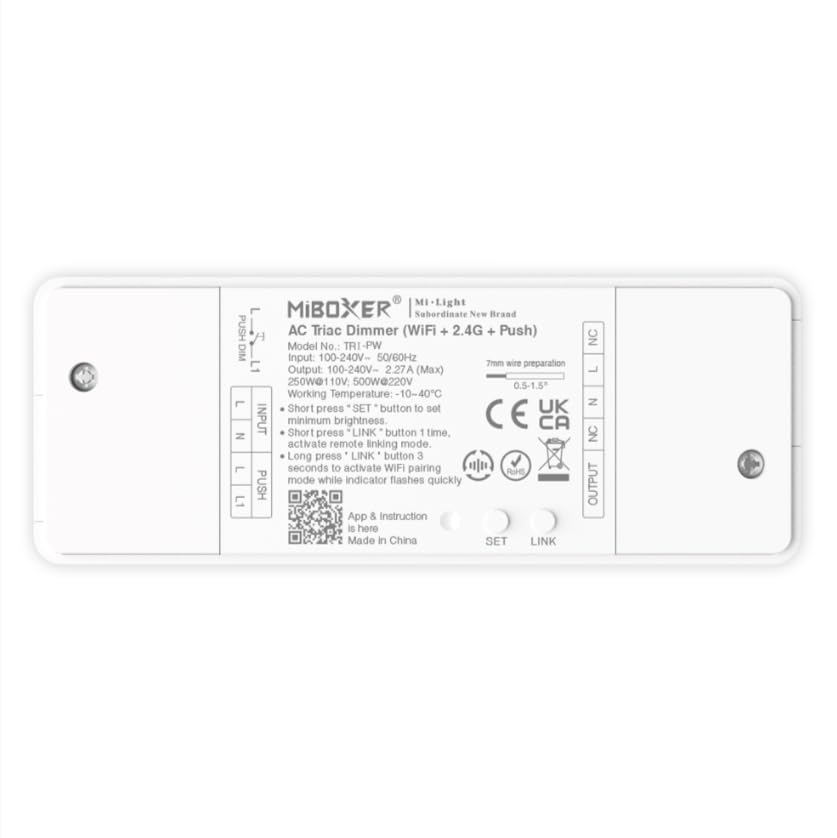
Hình 1.1: Hếtview of the MiBOXER TRI-PW 500W AC Triac Dimmer unit.
2. Thông tin an toàn
- Lắp đặt điện: Installation should be performed by a qualified electrician in accordance with local electrical codes and regulations.
- Ngắt kết nối nguồn: Luôn ngắt nguồn điện tại cầu dao trước khi lắp đặt hoặc bảo dưỡng bộ điều chỉnh độ sáng.
- Tậptage Khả năng tương thích: Đảm bảo âm lượng đầu vàotage matches the dimmer's specifications (100-240V AC).
- Sức chịu tải: Do not exceed the maximum load capacity of 500W. Overloading can cause damage or fire.
- Chỉ sử dụng trong nhà: This device is intended for indoor use in dry locations. Avoid exposure to moisture or extreme temperatures.
- Khả năng tương thích: Use only with compatible dimmable lighting fixtures (LED, halogen, incandescent).
3. Nội dung gói hàng
Xác minh rằng tất cả các thành phần đều có trong gói:
- MiBOXER TRI-PW 500W AC Triac Dimmer Unit
- User Manual (may be included as a separate document)

Image 3.1: MiBOXER TRI-PW Dimmer unit shown with its packaging and a user manual.
4. Tính năng sản phẩm
- Powerful 500W Capacity: Supports high-power loads, suitable for various lighting fixtures.
- Triac Dimming Technology: Provides flicker-free dimming for LED, halogen, and incandescent lights.
- WiFi & 2.4GHz Control: Integrates with WiFi and MiBOXER 2.4GHz systems for smartphone or remote control.
- Push Control Compatibility: Allows for quick, on-site dimming adjustments via a push button.
- Ứng dụng và điều khiển bằng giọng nói: Compatible with major smart home platforms for app-based and voice command control.
- Chức năng bộ nhớ: Retains previous lighting settings after power cycles.
5. Thông số kỹ thuật
| Tính năng | Chi tiết |
|---|---|
| Thương hiệu | MIBOXER |
| Tên mẫu | TRI-PW |
| Tính năng đặc biệt | Bộ điều chỉnh độ sáng AC Triac 500W |
| Lớp băng tần | Băng tần đơn |
| Tiêu chuẩn giao tiếp không dây | 802.11b |
| Thiết bị tương thích | Hỗ trợ làm mờ PUSH |
| Sử dụng được đề xuất | Home lighting systems |
| Công nghệ kết nối | Wi-Fi |
| Khả năng tương thích của nhà thông minh | Smart Home Compatible (e.g., Amazon Alexa, Google Assistant) |
| Phạm vi phủ sóng | LED, halogen, incandescent, high-power loads |
| Tính thường xuyên | 2.4 GHz |
| Kích thước (Xấp xỉ) | 117mm (Dài) x 45mm (Rộng) x 24mm (Cao) |
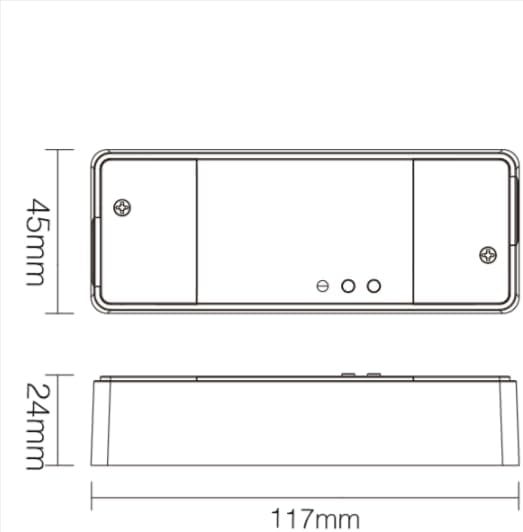
Image 5.1: Technical drawing showing the approximate dimensions of the TRI-PW dimmer.

Image 5.2: Packaging dimensions for the MiBOXER TRI-PW dimmer.
6. Thiết lập và Cài đặt
Quan trọng: Đảm bảo ngắt nguồn điện tại cầu dao trước khi bắt đầu lắp đặt.
Sơ đồ đấu dây
The MiBOXER TRI-PW dimmer supports two primary wiring methods for integration with a push switch. Both methods are suitable for triac dimming LED lights, traditional filament lamps, và halogen lamps.

Image 6.1: Wiring diagrams for connecting the MiBOXER TRI-PW dimmer with a push switch.
Method 1: Single-Wire Push Switch Connection
- Connect the Live (L) and Neutral (N) input wires from your power supply (100-240V~) to the corresponding 'INPUT' terminals on the dimmer.
- Connect the Live (L) and Neutral (N) output wires to your lighting fixture (100-240V~) from the 'OUTPUT' terminals.
- Connect one wire from the push switch to the 'PUSH' terminal on the dimmer.
- Connect the other wire from the push switch to the Live (L) input terminal.
Method 2: Two-Wire Push Switch Connection
- Connect the Live (L) and Neutral (N) input wires from your power supply (100-240V~) to the corresponding 'INPUT' terminals on the dimmer.
- Connect the Live (L) and Neutral (N) output wires to your lighting fixture (100-240V~) from the 'OUTPUT' terminals.
- Connect the two wires from the push switch directly to the 'PUSH' terminals on the dimmer.
After wiring, secure the dimmer in a suitable electrical box or enclosure. Restore power at the circuit breaker.
7. Hướng dẫn vận hành
7.1. Push Switch Control
- Nhấn nhanh: Turn the lights ON or OFF.
- Nhấn lâu: Adjust the brightness level. Release the button to set the desired brightness.
7.2. Điều khiển bằng ứng dụng WiFi
The TRI-PW dimmer supports control via a smart app (e.g., Tuya Smart app). No additional 2.4G gateway is required for app control.
- Download the compatible smart home app from your device's app store.
- Đăng ký hoặc đăng nhập vào tài khoản của bạn.
- Put the dimmer into pairing mode (refer to the app's instructions or the dimmer's specific pairing procedure, usually involving a long press of the 'SET' button or power cycling).
- Follow the in-app instructions to add the device to your network.
- Once connected, you can control the dimmer's ON/OFF state and brightness from your smartphone.
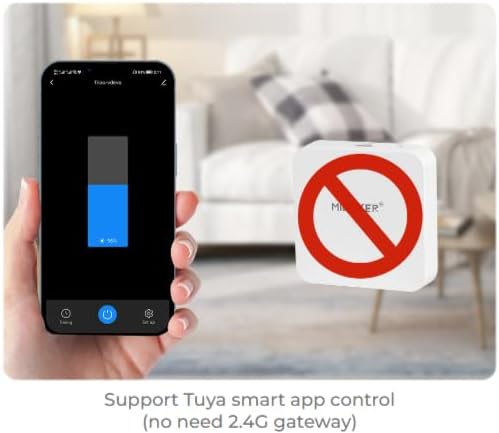
Hình ảnh 7.1: Ví dụample of controlling the dimmer using a smartphone application.
7.3. 2.4GHz Remote Control
The dimmer can be paired with MiBOXER 2.4GHz remote controls for direct wireless control.
- Hãy đảm bảo công tắc điều chỉnh độ sáng đã được bật nguồn.
- Refer to your MiBOXER 2.4GHz remote control's manual for specific pairing instructions. Typically, this involves pressing a "Link" or "Pair" button on the remote within a few seconds of powering on the dimmer or pressing the dimmer's 'SET' button.
- A successful pairing is usually indicated by the connected light flashing.
7.4. Điều khiển bằng giọng nói (Alexa/Google Assistant)
The TRI-PW dimmer is compatible with smart home voice assistants like Amazon Alexa and Google Assistant when integrated through a compatible smart home app.
- Ensure your dimmer is successfully connected to the smart home app (e.g., Tuya Smart).
- Mở ứng dụng Amazon Alexa hoặc Google Home của bạn.
- Enable the skill or service for the smart home app you are using (e.g., "Tuya Smart" skill).
- Discover devices. Your dimmer should appear in the list.
- Assign a name to your dimmer (e.g., "Living Room Light").
- You can now control your light using voice commands, such as "Alexa, turn on Living Room Light" or "Hey Google, dim Living Room Light to 50%."

Image 7.2: The dimmer is compatible with voice control platforms like Amazon Alexa and Google Assistant.
8. Bảo trì
- Vệ sinh: Disconnect power before cleaning. Wipe the dimmer with a soft, dry cloth. Do not use liquid cleaners or aerosols.
- Điều tra: Thường xuyên kiểm tra độ chắc chắn của các mối nối dây điện xem có dấu hiệu hao mòn hoặc hư hỏng hay không.
- Cập nhật chương trình cơ sở: If available, check the smart home app for firmware updates to ensure optimal performance and security.
KHAI THÁC. Xử lý sự cố
| Vấn đề | Nguyên nhân có thể | Giải pháp |
|---|---|---|
| Đèn không bật. | No power, incorrect wiring, faulty bulb, dimmer not paired. | Check circuit breaker. Verify wiring according to diagrams. Test bulb. Re-pair dimmer with app/remote. |
| Đèn nhấp nháy hoặc phát ra tiếng vo ve. | Incompatible bulb, overloaded circuit, loose wiring. | Ensure bulbs are dimmable and compatible with triac dimmers. Reduce load. Check wiring connections. |
| Dimmer not responding to app/remote. | Dimmer out of range, WiFi issue, not paired. | Ensure dimmer is within WiFi/2.4GHz range. Check WiFi router. Re-pair dimmer with app/remote. |
| Không thể kết nối WiFi. | Incorrect WiFi password, 5GHz network, dimmer not in pairing mode. | Verify WiFi password. Ensure you are connecting to a 2.4GHz network. Put dimmer into WiFi pairing mode. |
10. Bảo hành và Hỗ trợ
This MiBOXER TRI-PW dimmer comes with a Bảo hành 2 năm kể từ ngày mua. Bảo hành này bao gồm các lỗi về vật liệu và tay nghề trong quá trình sử dụng bình thường.
The warranty does not cover damage caused by improper installation, misuse, unauthorized modifications, or acts of nature.
For technical support or warranty claims, please contact your retailer or the manufacturer directly. Please have your purchase receipt and product model number (TRI-PW) available when contacting support.
Để biết thêm thông tin, bạn có thể truy cập Cửa hàng MiBOXER trên Amazon.