
1. Giới thiệu
This manual provides essential information for setting up, operating, maintaining, and troubleshooting your Acer Nitro V ANV15-41 gaming laptop. Please read this manual thoroughly to ensure proper use and to maximize the performance and longevity of your device.

Hình 1.1: Mặt trước view of the Acer Nitro V ANV15-41 Gaming Laptop.
2. Bắt đầu
2.1 Mở hộp và thiết lập ban đầu
- Cẩn thận lấy máy tính xách tay và tất cả phụ kiện ra khỏi bao bì.
- Verify that all components listed in the 'What's in the Box' section are present.
- Connect the power adapter to the laptop's power connector and then to an electrical outlet.
- Mở nắp máy tính xách tay và nhấn nút nguồn để bật thiết bị.
- Hãy làm theo hướng dẫn trên màn hình để hoàn tất quá trình thiết lập ban đầu cho Windows 11 Home.
2.2 Có gì trong hộp
- Acer Nitro V ANV15-41 Laptop
- Bộ đổi nguồn
- Pin (tích hợp)
3. Hết phần cứngview
3.1 Hiển thị
The laptop features a 15.6-inch (39.6 cm) Full HD (1920 x 1080) IPS display with a 165 Hz refresh rate. It includes Acer ComfyView technology for reduced glare and enhanced viewing thoải mái.

Figure 3.1: The laptop's 15.6-inch Full HD IPS display with a high refresh rate.
3.2 Bàn phím và bàn di chuột
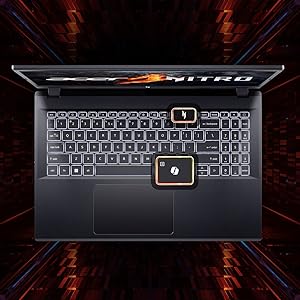
The Acer Nitro V ANV15-41 is equipped with a backlit keyboard, offering visibility in low-light conditions. It includes a dedicated NitroSense key for quick access to system performance settings and a Copilot key for AI assistance.
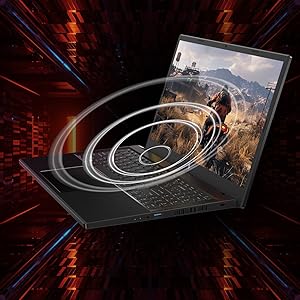
Figure 3.2: Keyboard layout highlighting the NitroSense and Copilot keys.
3.3 Cổng và đầu nối
The laptop provides various ports for connectivity:
- 2 cổng USB 3.2 Gen 1
- 1 x USB 3.2 Gen 1 port with power-off charging
- 1 cổng USB 4
- 1 x cổng HDMI 2.1
- 1 cổng Ethernet (RJ-45)
- 1 x Headset/speaker jack
- Power connector (DC-in)
- Khe khóa Kensington
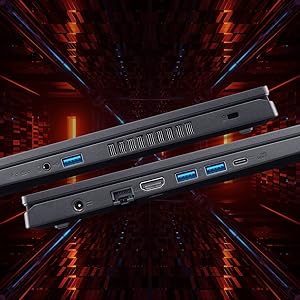
Hình 3.3: Mặt bên view illustrating the available ports and connectors.
4. Tính năng hiệu suất
4.1 Bộ xử lý và card đồ họa
The laptop is powered by an AMD Ryzen 5 6600H hexa-core processor and features an NVIDIA GeForce RTX 3050 GPU with 6 GB of dedicated GDDR6 VRAM for graphics processing.
4.2 Bộ nhớ và lưu trữ
It comes with 16 GB of DDR5 system memory, upgradable up to 32 GB. Storage is provided by a 512 GB PCIe Gen4 NVMe SSD, with support for up to two 1 TB drives.
4.3 Hệ thống làm mát
The Acer Nitro V ANV15-41 incorporates a dual-fan cooling system designed to maintain optimal operating temperatures during intensive use.
Hình 4.1: Minh họa hệ thống làm mát bằng hai quạt.
5. Audio and Visual
5.1 Công nghệ âm thanh
The laptop features DTS:X Ultra Audio for an immersive sound experience. Acer PurifiedVoice technology, with AI-powered noise reduction, enhances clarity for built-in microphones.

Figure 5.1: Visual representation of DTS:X Ultra Audio and Acer PurifiedVoice technologies.
5.2 Webcam
A T-Type HD camera is integrated for video conferencing and communication.
6. Bảo trì và chăm sóc
- Vệ sinh: Use a soft, lint-free cloth to clean the screen and exterior. Avoid harsh chemicals.
- Thông gió: Ensure the laptop's ventilation openings are clear and unobstructed to prevent overheating.
- Cập nhật phần mềm: Regularly update your operating system and drivers to ensure optimal performance and security.
- Chăm sóc pin: To prolong battery life, avoid extreme temperatures and fully discharging the battery frequently.
- Kho: Store the laptop in a cool, dry place when not in use.
KHAI THÁC. Xử lý sự cố
7.1 Các vấn đề thường gặp và giải pháp
| Vấn đề | Giải pháp khả thi |
|---|---|
| Máy tính xách tay không bật nguồn. | Ensure the power adapter is securely connected and the outlet is functional. Check battery charge level. |
| Hệ thống chậm hoặc không phản hồi | Close unnecessary applications. Check for background processes. Ensure sufficient free storage space. Update drivers. |
| Quá nhiệt | Ensure ventilation openings are clear. Use the laptop on a hard, flat surface. Consider using NitroSense software to adjust fan speeds. |
| Lỗi hiển thị (không có hình ảnh, nhấp nháy) | Check display cable connections if using an external monitor. Restart the laptop. Update graphics drivers. |
| Đèn nền bàn phím không hoạt động | Check keyboard backlight settings in Windows or via dedicated function keys. |
8. Thông số kỹ thuật
| Tính năng | Đặc điểm kỹ thuật |
|---|---|
| Thương hiệu | Acer |
| Tên mẫu | Nitro V |
| Số hiệu mẫu | ANV15-41 |
| Kích thước màn hình | 15.6 inch |
| Độ phân giải màn hình | 1920 x 1080 (Full HD) |
| Công nghệ hiển thị | IPS, LED, 165 Hz Refresh Rate |
| Bộ xử lý | AMD Ryzen 5 6600H hexa-core (3.3 GHz base, up to 4.5 GHz max boost) |
| Card đồ họa | Card đồ họa NVIDIA GeForce RTX 3050 với 6 GB VRAM GDDR6. |
| Bộ nhớ RAM | 16 GB DDR5 (4800 MHz), upgradable to 32 GB |
| Kho | 512 GB NVMe SSD (PCIe Gen4) |
| Hệ điều hành | Windows 11 Trang chủ |
| Kết nối không dây | Wi-Fi 6 (802.11ax), Bluetooth |
| Cổng | 2x USB 3.2 Gen 1, 1x USB 3.2 Gen 1 (power-off charging), 1x USB 4, 1x HDMI 2.1, 1x RJ-45, 1x Headset/speaker jack |
| Webcam | T-Type HD camera |
| Bàn phím | Bàn phím có đèn nền, bàn phím số |
| Hàm lượng năng lượng của pin | 57 Watt Hours (Lithium Ion) |
| Trọng lượng sản phẩm | 2.1 Kilôgam |
| Kích thước (Dài x Rộng x Dày) | 24L x 36.2W x 2.4Th Centimeters |
9. Bảo hành và Hỗ trợ
9.1 Thông tin bảo hành
This product comes with a 1-Year Manufacturer's Limited Warranty. Please refer to the warranty card included with your product for detailed terms and conditions.
9.2 Manufacturer and Importer Information
Nhà sản xuất: Acer, Compal Electronics Pvt Ltd, No.D01, Zone D, Air Port Section of LiangLu CunTan Free Trade Port Area, YuBei District, Chongqing, China
Người nhập khẩu: ACER INDIA PRIVATE LIMITED Embassy Heights, 6th Floor, No. 13 Magrath Road, Next to HOSMAT Hospital, Bangalore, INDIA – 560025
For technical support or service inquiries, please contact your local Acer support center or visit the official Acer webđịa điểm.