
1. Giới thiệu
The BOYA V35 is a compact and easy-to-use 2.4GHz wireless microphone system designed for capturing clear, high-quality audio. It is ideal for content creators, journalists, and anyone needing a reliable wireless audio solution for cameras and camcorders with a 3.5mm input. This manual provides detailed instructions for setting up, operating, and maintaining your BOYA V35 system.
2. Có gì trong hộp
Vui lòng kiểm tra nội dung gói hàng để đảm bảo có đầy đủ tất cả các mục:
- BY-V35 Transmitter (TX) x 2
- BY-V35 RX Receiver x 1
- BY-V35 Foam Windscreen x 2
- USB-C to USB-A Charging Cable x 1
- Cáp âm thanh TRS sang TRS 3.5 mm x 1
- Hộp sạc x 1
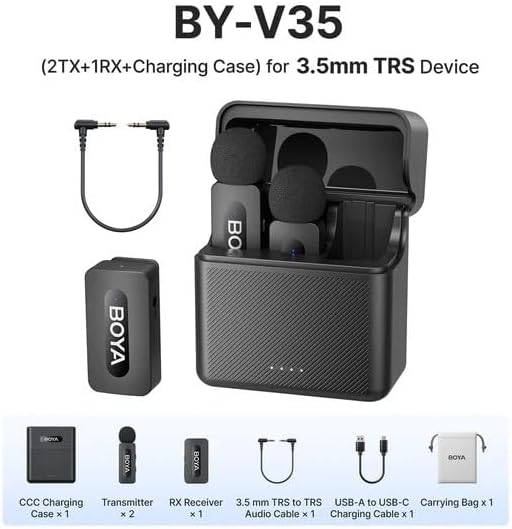
Hình 2.1: Diagram showing all components included in the BOYA V35 package, including two transmitters, one receiver, a charging case, foam windscreens, and cables.
3. Sản phẩm hếtview
3.1. Máy phát (TX)

Hình 3.1: Đằng trước view of the BY-V35 Transmitter with the foam windscreen attached, showing the BOYA logo and indicator light.

Hình 3.2: Bên view of the BY-V35 Transmitter, illustrating the integrated clip for attachment to clothing and the foam windscreen.
The transmitter is a compact unit with an integrated microphone and clip. It features a power button, a status indicator light, and a USB-C charging port. The omnidirectional microphone is designed to capture sound from all directions.
3.2. Máy thu (RX)

Hình 3.3: Bên view of the BY-V35 Receiver, showing the USB-C port, power button, and 3.5mm output jack.
The receiver connects to your recording device (camera, camcorder). It includes a 3.5mm TRS output jack, a power button, a status indicator light, and a USB-C charging port. The receiver is designed for easy connection and stable signal reception.
3.3. Hộp sạc
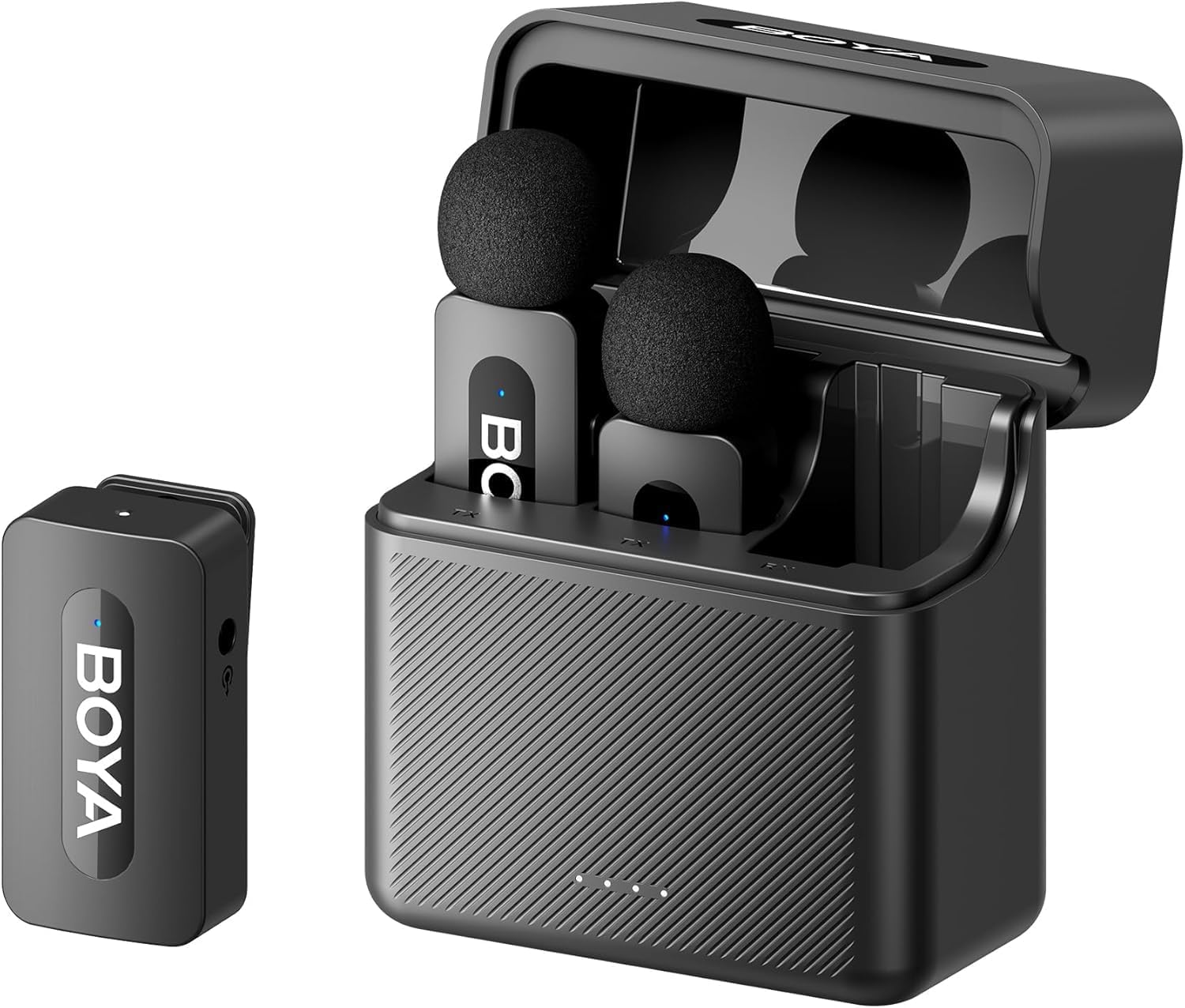
Hình 3.4: The complete BOYA V35 system, including the charging case, two transmitters, and one receiver, ready for storage or charging.
The charging case provides convenient storage and charging for both transmitters and the receiver. It has its own USB-C charging port and LED indicators to show the charging status of the case and the devices inside.
4. Hướng dẫn cài đặt
4.1. Sạc thiết bị
- Place the transmitters and receiver into the charging case.
- Connect the USB-C to USB-A charging cable to the charging case and a USB power adapter (not included).
- The LED indicators on the charging case will show the charging status. The device indicators will also light up during charging.
- Ensure all devices are fully charged before first use for optimal battery life.
4.2. Bật nguồn và ghép nối
- Press and hold the power button on both the transmitter(s) and the receiver for a few seconds until the indicator lights turn on.
- The devices will automatically attempt to pair. A solid blue light on both the transmitter and receiver indicates a successful connection. A blinking light indicates searching for a connection.
4.3. Kết nối với thiết bị ghi âm
- Connect one end of the 3.5mm TRS to TRS audio cable to the 3.5mm output jack on the BY-V35 receiver.
- Connect the other end of the 3.5mm TRS to TRS audio cable to the microphone input jack on your camera or camcorder.
- Ensure your recording device's audio input is set to external microphone if applicable.
4.4. Attaching the Transmitter
- Attach the foam windscreen to the transmitter's microphone to reduce wind noise and plosives.
- Use the integrated clip on the back of the transmitter to securely attach it to the speaker's clothing, ideally about 6-8 inches (15-20 cm) from the mouth.
5. Hướng dẫn vận hành
5.1. Bật/Tắt nguồn
To power on or off the transmitter or receiver, press and hold the power button for approximately 3 seconds. The indicator light will illuminate or turn off accordingly.
5.2. Ghi âm
- Ensure the transmitter(s) and receiver are powered on and successfully paired (solid blue indicator light).
- Start recording on your connected camera or camcorder.
- Monitor the audio levels on your recording device to ensure proper sound capture.
5.3. Status Indicator Lights
- Xanh dương: Device is powered on and successfully paired.
- Màu xanh lam nhấp nháy: Device is powered on and searching for a connection.
- Màu đỏ đặc: Pin yếu.
- Blinking Red (while charging): Đang sạc.
- Solid Green (while charging): Đã sạc đầy.
6. Bảo trì
6.1. Vệ sinh
- Lau sạch thiết bị bằng khăn mềm, khô.
- Không sử dụng hóa chất mạnh hoặc chất tẩy rửa ăn mòn.
- Ensure the foam windscreens are clean and free of debris. Replace if damaged.
6.2. Lưu trữ
- Store the BOYA V35 system in its charging case when not in use to protect it from dust and damage.
- Bảo quản ở nơi khô ráo, thoáng mát, tránh ánh nắng trực tiếp và nhiệt độ khắc nghiệt.
6.3. Chăm sóc pin
- Charge the devices regularly, even if not used frequently, to maintain battery health.
- Tránh để pin bị xả hết hoàn toàn trong thời gian dài.
KHAI THÁC. Xử lý sự cố
| Vấn đề | Nguyên nhân có thể | Giải pháp |
|---|---|---|
| Không có âm thanh hoặc âm lượng nhỏ | Devices not powered on; Not paired; Incorrect cable connection; Recording device volume too low. | Ensure TX and RX are on and paired. Check 3.5mm cable connection. Increase recording device's input volume. |
| Poor sound quality (static, dropouts) | Interference; Out of range; Low battery; Damaged windscreen. | Move closer to the receiver. Charge devices. Replace windscreen. Avoid strong electromagnetic fields. |
| Thiết bị không ghép nối | Devices too far apart; Interference; One device not powered on. | Ensure TX and RX are close to each other. Power cycle both devices. Check battery levels. |
| Charging case not charging devices | Charging case battery empty; Poor contact; Faulty cable. | Charge the charging case. Ensure devices are correctly seated. Try a different USB-C cable. |
8. Thông số kỹ thuật
| Tính năng | Chi tiết |
|---|---|
| Thương hiệu | CHÀNG TRAI |
| Số hiệu mẫu | BY-V35 |
| Công nghệ kết nối | 2.4 GHz không dây |
| Loại đầu nối | Giắc cắm 3.5 mm |
| Mẫu cực | Đa hướng |
| Dải tần số | 20Hz-16kHz |
| Signal-to-Noise Ratio | 80 dB |
| Nguồn điện | Pin chạy bằng |
| Trọng lượng sản phẩm | 0.2 Kilograms (approximate, for entire kit) |
| Kích thước mục | 6.1 x 2.2 x 3.4 inches (approximate, for entire kit) |
| Thiết bị tương thích | Camcorder, Camera |
9. Bảo hành và Hỗ trợ
For warranty information and technical support, please refer to the official BOYA webTruy cập trang web hoặc liên hệ với nhà phân phối địa phương của bạn. Giữ lại bằng chứng mua hàng để sử dụng cho các yêu cầu bảo hành.