
1. Giới thiệu và Tính năng
The Kisnt FD17 Wireless Mechanical Number Pad is designed to enhance productivity and provide a comfortable typing experience. It features dual-mode connectivity, hot-swappable switches, and a practical 17-key layout, making it a versatile addition to any laptop or PC setup.
Các tính năng chính:
- Kết nối chế độ kép: Supports both Bluetooth 5.0 and 2.4G wireless connections for seamless switching between devices.
- 17 Keys Practical Layout: Includes essential keys like ESC, Tab, Backspace, and Calculator for extended functionality.
- Thiết kế lắp gioăng: Engineered with a silicone plate and base dampener, along with sound-dampening foam layers, for a quiet and comfortable typing experience.
- Smooth Linear Switches & Hot-Swappable: Equipped with pre-lubed linear switches, offering a tactile feel. Supports 3-pin or 5-pin hot-swappable switches for customization.
- Khả năng tương thích rộng: Compatible with Windows, Mac OS, and Android operating systems. (Note: Not compatible with ChromeBook and not fully compatible with Mac OS for external function key buttons).
2. Nội dung gói hàng
Vui lòng đảm bảo tất cả các mục đều có trong gói hàng:
- 1x Wireless Mechanical Number Pad
- 1x 2.4 GHz Receiver
- 1x Hướng dẫn sử dụng
3. Hướng dẫn cài đặt
Lắp đặt pin:
The number pad requires one (1) AAA battery (not included).
- Locate the battery compartment on the back of the number pad.
- Trượt nắp ngăn chứa pin.
- Lắp một pin AAA, đảm bảo lắp đúng cực (+/-).
- Đóng chặt nắp ngăn chứa pin.

Hình 3.1: Quay lại view of the number pad with battery compartment and 2.4G USB receiver storage.
Kết nối không dây 2.4G:
- Retrieve the 2.4 GHz USB receiver from its storage slot inside the battery compartment.
- Plug the 2.4 GHz receiver into an available USB-A port on your computer.
- On the top edge of the number pad, slide the mode switch to the '2.4G' position. The indicator light will turn red, signifying a successful connection.
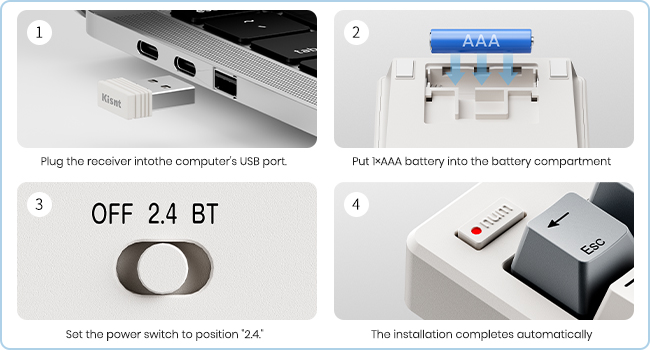
Figure 3.2: Steps for establishing a 2.4G wireless connection.
Kết nối Bluetooth:
- On the top edge of the number pad, slide the mode switch to the 'BT' (Bluetooth) position. The indicator light will flash, indicating it is in pairing mode.
- Trên máy tính hoặc thiết bị của bạn, hãy truy cập vào cài đặt Bluetooth.
- Chọn 'Thêm thiết bị' hoặc 'Ghép nối thiết bị mới'.
- Chọn 'Bluetooth' từ các tùy chọn.
- On the number pad, press and hold the 'Fn' key and the 'Enter' (Pair) key simultaneously for 5 seconds until the indicator light flashes rapidly.
- On your device, select 'BT5.2 KeyPad' from the list of available devices to complete the pairing process. The indicator light on the number pad will turn solid blue when connected.
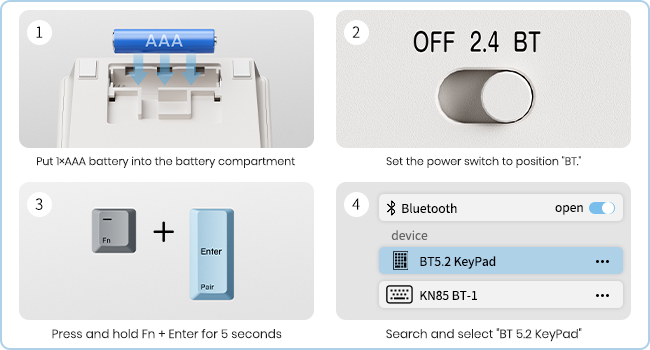
Figure 3.3: Steps for establishing a Bluetooth connection.
4. Hướng dẫn vận hành
Cách sử dụng cơ bản:
Once connected, the number pad functions as a standard numeric keypad. Ensure the 'Numlock' indicator light (top left) is on for numeric input. If off, the keys will function as navigation keys (Home, End, PgUp, PgDn, arrow keys).

Hình 4.1: Trên cùng view of the Kisnt FD17 Number Pad.
Các chức năng phím đặc biệt:
- THOÁT RA: Phím Escape.
- Thẻ: Phím Tab.
- Phím xóa lùi: Xóa ký tự nằm bên trái con trỏ.
- Máy tính: (Windows OS only) Press 'Fn' + '*' (star key) to open the calculator application. This function is not supported on Mac OS.
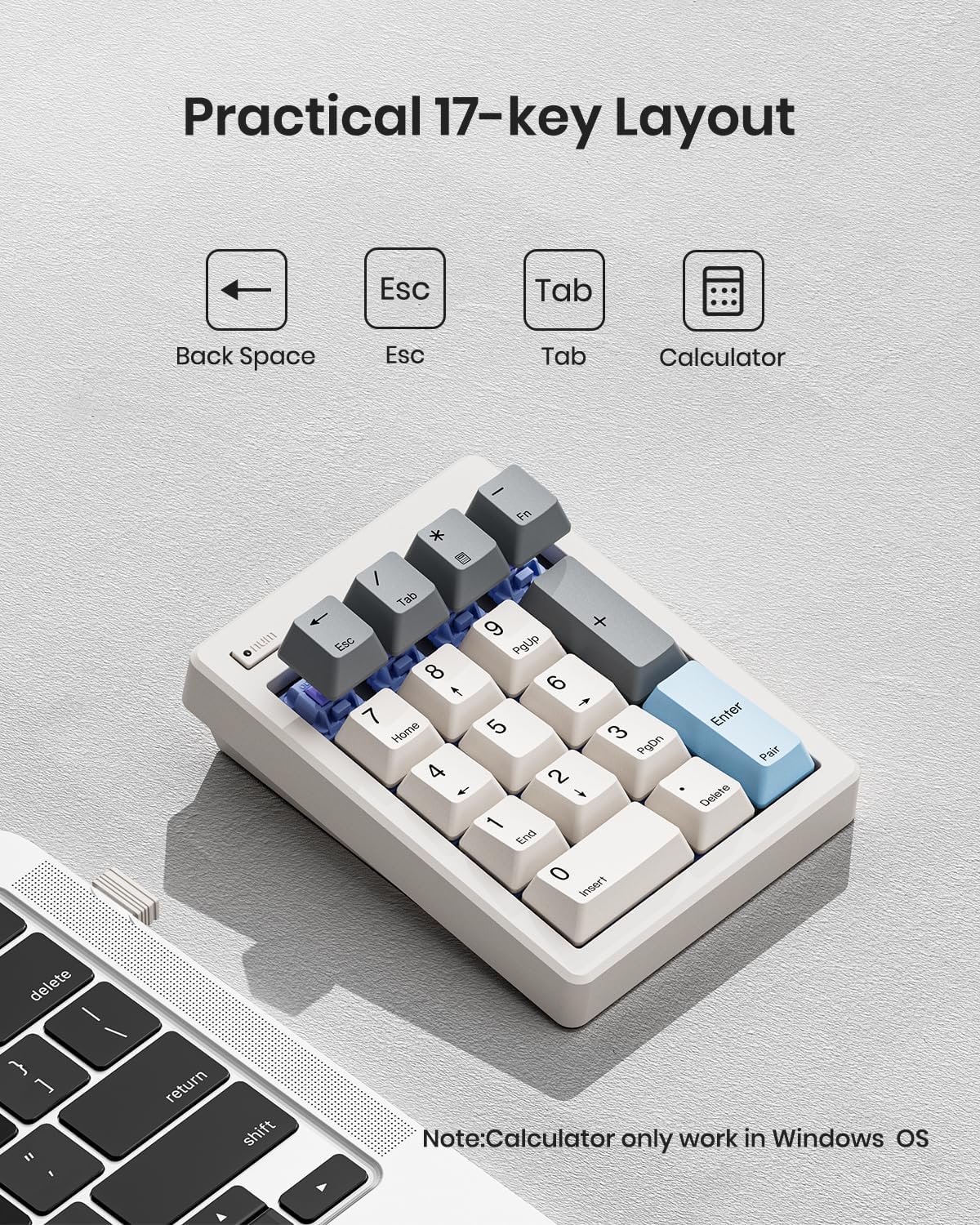
Figure 4.2: Practical 17-key layout with special function keys.
Ghi chú về khả năng tương thích:
- The 10-key is not compatible with ChromeBook.
- Not fully compatible with Mac OS, as Apple products do not support external function key buttons.
5. Bảo trì
Thay thế pin:
When the number pad stops responding or the indicator light dims, it is time to replace the AAA battery. Follow the battery installation steps in Section 3.
Công tắc có thể hoán đổi nóng:
The number pad supports hot-swappable 3-pin or 5-pin mechanical switches. To replace a switch:
- Nhẹ nhàng tháo nắp phím ra khỏi công tắc bằng dụng cụ tháo nắp phím (không kèm theo).
- Sử dụng dụng cụ tháo công tắc (không kèm theo) để cẩn thận tháo công tắc ra khỏi mạch in.
- Căn chỉnh các chân của công tắc mới với các lỗ trên PCB và ấn chặt cho đến khi khớp vào đúng vị trí.
- Lắp lại nắp phím.

Figure 5.1: Hot-swappable linear switches for customization.
Vệ sinh:
Use a soft, dry cloth to wipe the surface of the number pad. For deeper cleaning, remove keycaps and use compressed air to clear debris from between the switches.
KHAI THÁC. Xử lý sự cố
- Thiết bị không kết nối:
- Đảm bảo pin được lắp đúng cách và có đủ điện.
- Hãy kiểm tra xem công tắc chế độ đã được đặt đúng vị trí (2.4G hoặc Bluetooth) chưa.
- Đối với mạng 2.4G, hãy đảm bảo rằng bộ thu USB được cắm chắc chắn vào máy tính.
- For Bluetooth, ensure your device's Bluetooth is enabled and the number pad is in pairing mode (Fn + Enter). Try removing previous pairings from your device's Bluetooth list and re-pairing.
- Phím không phản hồi:
- Check if the Numlock light is on. If not, press the Numlock key to activate numeric input.
- Ensure the number pad is connected to your device.
- If individual keys are not responding, the switch might be faulty or improperly seated. Refer to the 'Hot-Swappable Switches' section for replacement.
- Calculator key not working on Mac OS:
- This is a known compatibility limitation. The calculator function (Fn + *) is only supported on Windows OS.
7. Thông số kỹ thuật
| Kích thước sản phẩm | 4.84 x 3.62 x 1.3 inch (4.84"D x 3.62"R x 1.3"C) |
| Trọng lượng sản phẩm | 7 ounce |
| Nhà sản xuất | kisnt |
| Số hiệu mẫu sản phẩm | FD17 |
| Công nghệ kết nối | Bluetooth 5.0 / Wireless 2.4GHz |
| Mô tả bàn phím | Bàn phím số cơ học |
| Số lượng chìa khóa | 17 |
| Nguồn điện | 1x AAA Battery (NOT INCLUDED) |
| Tính năng đặc biệt | Ergonomic, Creamy Sound, Hot-Swappable, PBT Dye-Sub Keycap |
| Thiết bị tương thích | Máy tính xách tay, PC, Máy tính bảng |
8. Bảo hành và Hỗ trợ
For any issues or inquiries regarding your Kisnt product, please contact us directly. We are committed to addressing all your needs.
- E-mail: kisnt_vip@163.com
- Chính thức Webđịa điểm: http://www.kisnt.cn/