
AKEEYO AKEEYO-EYES-01
AKEEYO EYES 3-Channel Dash Cam User Manual
Model: AKEEYO-EYES-01
1. Giới thiệu
This manual provides comprehensive instructions for the installation, operation, and maintenance of your AKEEYO EYES 3-Channel Dash Cam. This device is designed to enhance driving safety and provide reliable video evidence with its advanced features, including AI driver assistance, multi-lens recording, and 24/7 parking surveillance.
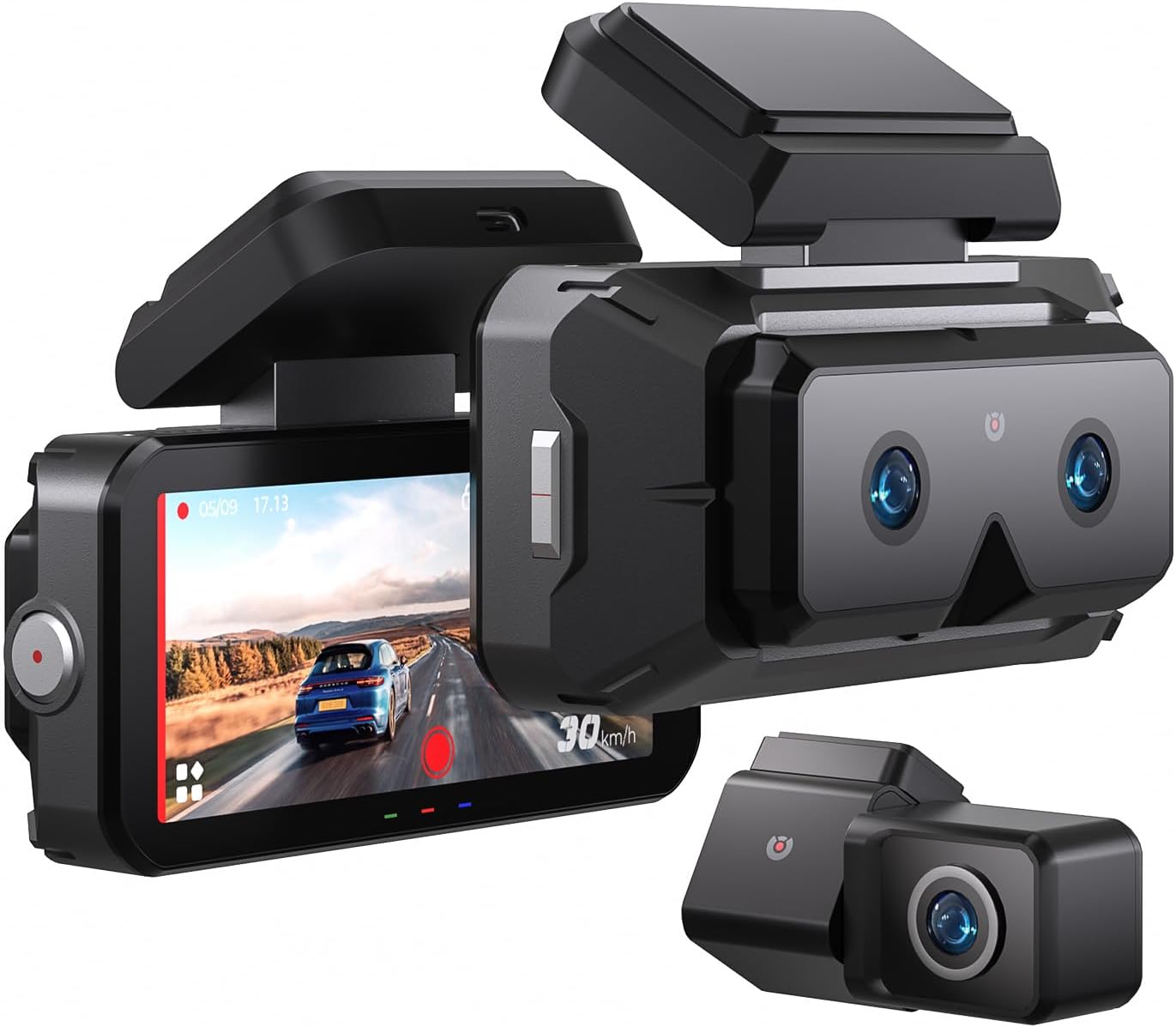
Image 1.1: The AKEEYO EYES 3-Channel Dash Cam, showing the main unit with its 4-inch IPS touchscreen and the separate rear camera.
2. Tính năng sản phẩm
- Ghi âm 3 kênh: Simultaneous recording from front (telephoto and wide-angle) and rear cameras.
- Độ phân giải 2K: High-definition video capture for clear details.
- Màn hình cảm ứng IPS 4 inch: Intuitive interface for live view và điều chỉnh cài đặt.
- AI Driver Assistance (ADAS & BSD): Real-time alerts for collision, lane departure, blind spot detection, pedestrian detection, and front vehicle start reminders.
- Tầm nhìn ban đêm WDR: Enhanced clarity in low-light conditions.
- Điều khiển bằng giọng nói: Hands-free operation for key functions.
- GPS tích hợp: Records speed and location data.
- 5G Wi-Fi Connectivity: Fast data transfer to mobile devices via app.
- Cảm biến G: Automatic emergency recording upon impact.
- Ghi vòng lặp: Continuous recording, overwriting oldest files when storage is full (emergency videos are protected).
- Chế độ đỗ xe 24/7: Monitors vehicle activity when parked (requires separate hardware kit).
- Siêu tụ điện: Provides durability and resistance to extreme temperatures.
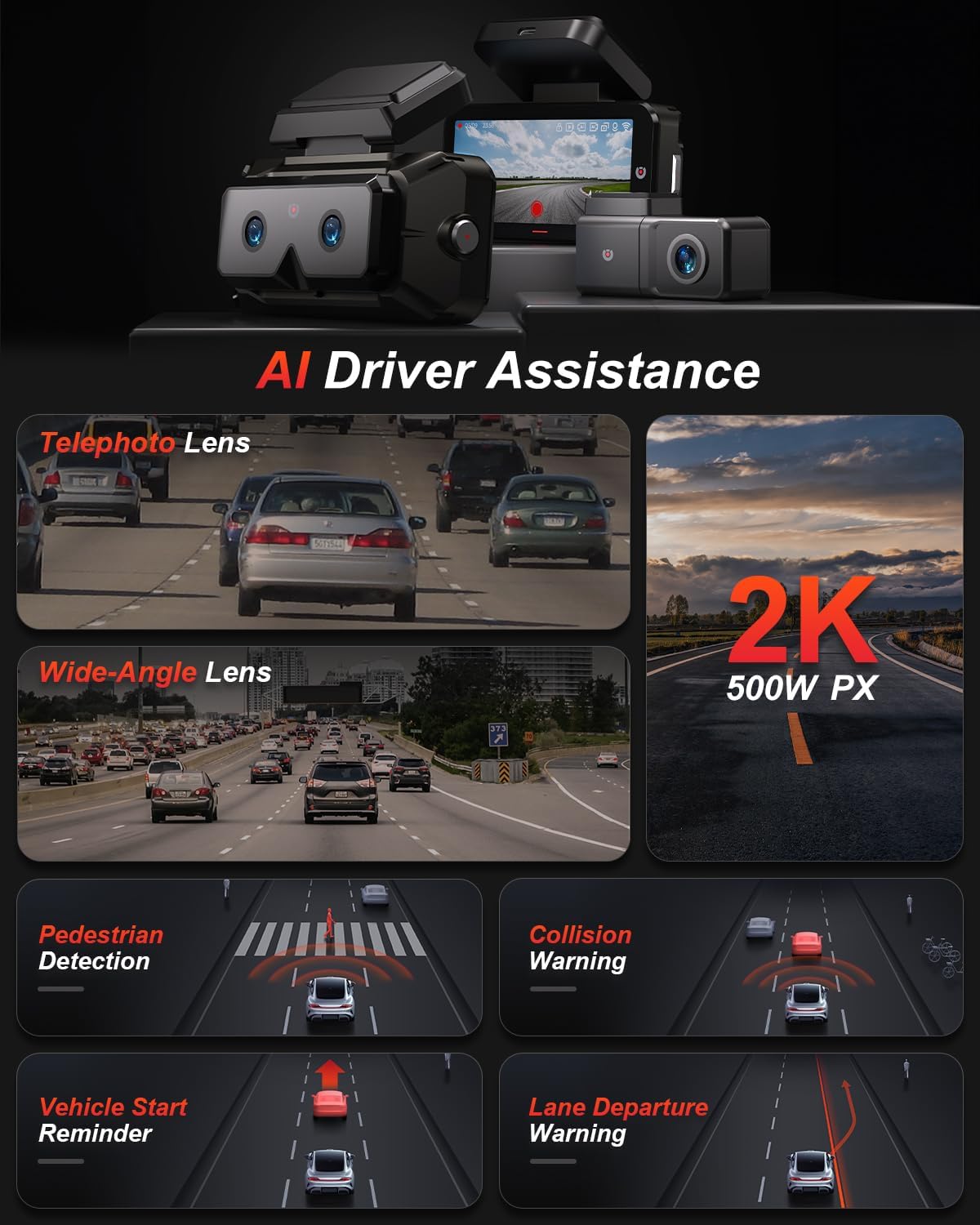
Hình 2.1: Hếtview of AI Driver Assistance features, including ADAS and BSD.

Hình ảnh 2.2: Chi tiết view of the dash cam's main unit and rear camera, highlighting the 3.99-inch display, wide-angle and telephoto lenses, and 360-degree rotating rear camera.
3. Nội dung gói hàng
Xác minh rằng tất cả các mục đều có trong gói hàng:
- AKEEYO EYES Dash Cam (Main Unit)
- Camera sau
- Bộ sạc xe hơi
- Cáp camera phía sau
- PC Data Transmission Wire
- Xà beng (để luồn dây cáp)
- Static Electricity Sticker
- Thân gắn
- Miếng dán 3M

Image 3.1: All components included in the AKEEYO EYES Dash Cam package.
4. Thiết lập và Cài đặt
4.1 Cài đặt thẻ MicroSD
- Đảm bảo camera hành trình đã tắt nguồn.
- Insert a compatible MicroSD card (Class 10 or higher, U3 V30 A2 recommended, up to 256GB) into the designated slot on the main unit until it clicks.
- Để tháo ra, hãy nhẹ nhàng đẩy thẻ cho đến khi thẻ bật ra.
4.2 Front Dash Cam Installation
- Lau sạch khu vực kính chắn gió nơi sẽ lắp camera hành trình.
- Attach the static electricity sticker to the chosen area on the windshield.
- Affix the body mount with 3M adhesive to the static electricity sticker.
- Slide the main dash cam unit onto the body mount.
- Điều chỉnh góc của camera hành trình để đảm bảo hình ảnh rõ nét view của con đường phía trước.
4.3 Lắp đặt camera sau
- Choose a mounting location for the rear camera, either inside the rear window or outside near the license plate (IP67 rated for outdoor use).
- Làm sạch bề mặt lắp đặt kỹ lưỡng.
- Gắn camera sau bằng keo dán 3M được cung cấp kèm theo.
- Route the rear camera cable to the main dash cam unit, ensuring it does not interfere with airbags or vehicle operation. Use the crowbar to tuck cables neatly.
- Kết nối cáp camera sau với cổng AV-IN trên thiết bị chính.
- If the rear camera is installed upside down, detach it from its quick-release mount and reattach it in the correct orientation. No software adjustment is needed.
4.4 kết nối nguồn
- Connect the car charger to the Type-C port on the main dash cam unit.
- Cắm bộ sạc ô tô vào ổ cắm bật lửa trên xe của bạn.
- Route the power cable neatly to avoid obstruction.

Image 4.1: Visual guide for the installation of the dash cam system.
5. Hướng dẫn vận hành
5.1 Bật/Tắt nguồn
- Camera hành trình sẽ tự động bật và bắt đầu ghi hình khi xe được bật đánh lửa.
- Thiết bị sẽ tự động tắt khi tắt chìa khóa điện.
- Để bật/tắt nguồn thủ công, hãy nhấn và giữ nút nguồn.
5.2 Using the 4-inch IPS Touchscreen
The touchscreen allows for easy navigation and viewtrong:
- Sống View: Hiển thị foo thời gian thựctage from the cameras. You can view all three channels simultaneously or focus on a single camera.
- Cài đặt: Access various settings such as resolution, loop recording duration, G-sensor sensitivity, and Wi-Fi.
- Phát lại: Review Video được ghi lại trực tiếp trên màn hình.
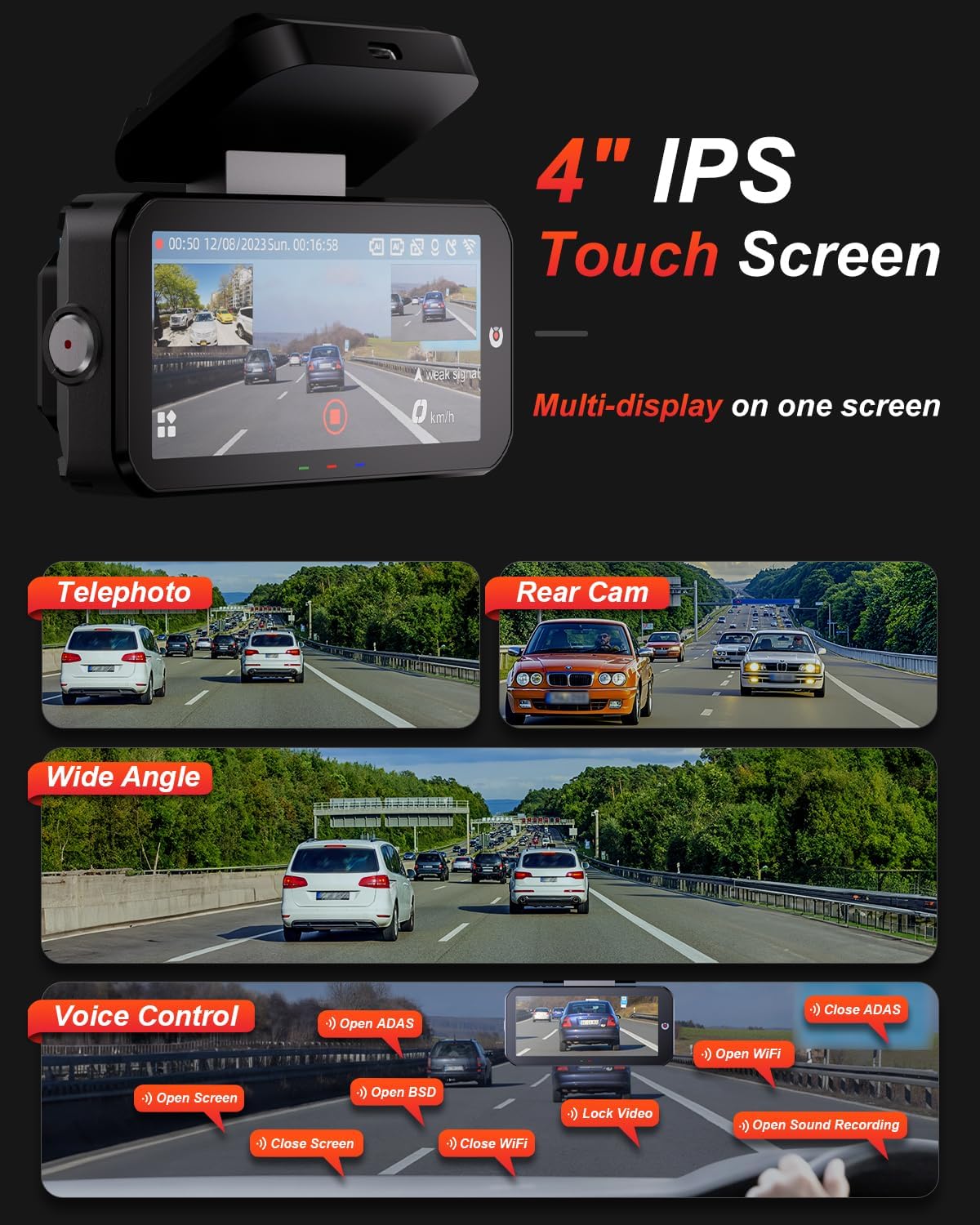
Image 5.1: The dash cam's 4-inch IPS touchscreen interface.
5.3 Điều khiển bằng giọng nói
Operate key functions hands-free using voice commands. Exampbao gồm:
- "Open ADAS" / "Close ADAS"
- "Open BSD" / "Close BSD"
- "Open Screen" / "Close Screen"
- "Open WiFi" / "Close WiFi"
- "Lock Video" (to protect current recording)
- "Open Sound Recording"

Image 5.2: Voice control commands for hands-free operation.
5.4 Chế độ ghi
- Ghi vòng lặp: The dash cam records continuously in segments. When the memory card is full, it automatically overwrites the oldest unlocked files.
- Cảm biến G: In the event of a sudden impact or collision, the built-in G-sensor automatically detects the event and locks the current video segment to prevent it from being overwritten.

Image 5.3: Loop Recording mechanism.
5.5 24/7 Parking Mode
When properly configured with the optional AKEEYO hardware kit (ASIN B0DHZPR4XW, sold separately), the dash cam can monitor your vehicle 24/7. It detects vibrations and records abnormal events, providing security against theft or collisions while parked. Low framerate recording can conserve storage during parking surveillance.

Image 5.4: 24/7 Parking Monitor functionality.
5.6 GPS and Wi-Fi Connectivity
- GPS: The built-in GPS module records your vehicle's speed and location data, which can be reviewed via the mobile app or PC player.
- Wi-Fi 5G: Connect your smartphone to the dash cam via the AKEEYO app (available on App Store and Google Play) using 5G Wi-Fi for fast video download, playback, editing, and sharing.

Image 5.5: 5G Wi-Fi and Global GPS connectivity.
5.7 AI Driver Assistance (ADAS & BSD)
The dash cam provides real-time alerts to enhance driving safety:
- Collision Warning: Alerts you if your vehicle is too close to the vehicle ahead or if a car slows down abruptly.
- Cảnh báo chệch làn đường: Thông báo cho bạn nếu xe của bạn đi chệch khỏi làn đường mà không có tín hiệu báo hiệu.
- Blind Spot Detection (BSD): Monitors vehicles in your blind spots and provides alerts when changing lanes.
- Phát hiện người đi bộ: Identifies pedestrians in front of you at low speeds and issues an alarm.
- Front Vehicle Start Reminder: Reminds you when the vehicle ahead starts to move.

Image 5.6: Collision Warning system in action.

Image 5.7: Blind Spot Detection system.
6. Bảo trì
6.1 Vệ sinh thiết bị
- Hãy dùng khăn mềm, khô để lau sạch thân máy và màn hình camera hành trình.
- For lenses, use a specialized lens cleaning cloth to avoid scratches.
- Không sử dụng chất tẩy rửa hoặc dung môi có tính mài mòn.
6.2 Quản lý thẻ MicroSD
- Regularly format the MicroSD card (at least once a month) through the dash cam's settings to ensure optimal performance and prevent data corruption.
- Replace the MicroSD card periodically, as continuous overwriting can degrade its lifespan.
6.3 Các yếu tố cần xem xét về nhiệt độ
The dash cam is designed to withstand temperatures up to 176°F (80°C). However, prolonged exposure to extreme heat can affect performance. If the device becomes excessively hot, allow it to cool down before handling or removing the SD card.
KHAI THÁC. Xử lý sự cố
- Camera hành trình không bật nguồn: Check the power connection to the car charger and ensure the vehicle's cigarette lighter socket is functional.
- Các vấn đề ghi âm: Ensure a compatible MicroSD card is inserted and formatted. Check if the card is full or corrupted. Try formatting the card or using a new one.
- Camera shutting down randomly: This could be due to a faulty SD card or extreme temperatures. Try replacing the SD card. If the issue persists, contact customer support.
- Rear camera fogging/malfunctioning: Ensure the rear camera is properly sealed if mounted externally. If mounted internally, check for condensation.
- AI features (ADAS/BSD) providing false alerts or not working: Ensure the camera lenses are clean and unobstructed. Calibrate the system if an option is available in settings. Adjust sensitivity if alerts are too frequent.
- Sự cố kết nối Wi-Fi: Ensure Wi-Fi is enabled on the dash cam and your smartphone. Restart both devices and try connecting again.
- GPS không theo dõi được vị trí: Đảm bảo camera hành trình có hình ảnh rõ nét view của bầu trời.
For further assistance, please contact AKEEYO customer support.
8. Thông số kỹ thuật
| Tính năng | Đặc điểm kỹ thuật |
|---|---|
| Kích thước sản phẩm | 10.24 x 7.48 x 2.76 inch |
| Trọng lượng sản phẩm | 2.34 pound |
| Số hiệu mẫu | AKEEYO-EYES-01 |
| Độ phân giải quay video | 1440p (2K) |
| Trưng bày | Màn hình cảm ứng IPS 4 inch |
| Công nghệ kết nối | Powerline, USB, Voice, Wi-Fi (5G) |
| Tính năng đặc biệt | 3-Channel 2K+2K+2K, GPS, Night Vision, Voice Control, Touch Control, AI ADAS & BSD Assistance, Wide-Angle, Loop Recording, G-Sensor, Telephoto Lens, 24H Parking Mode |
| Kiểu lắp đặt | Giá đỡ kính chắn gió |
| Màu sắc | Đen |
| Lĩnh vực View | 160 Feet (Front Telephoto) / 135° (Front Wide-Angle) / 154° (Rear) |
| Hỗ trợ lưu trữ | Up to 256GB MicroSD (Class 10, U3 V30 A2 recommended) |
| Nhiệt độ hoạt động | Lên đến 176 ° F (80 ° C) |
9. Bảo hành và Hỗ trợ
- Bảo hành: The AKEEYO EYES Dash Cam comes with an 18-month warranty.
- Trả về: You are eligible for returns within 30 days of purchase.
- Dịch vụ khách hàng: AKEEYO provides 24-hour customer service. For support, please visit the official AKEEYO webtrang web hoặc liên hệ trực tiếp với nhóm dịch vụ khách hàng của họ.
Tài liệu liên quanAKEEYO-EYES-01


Ask a question about this manual
Ask about setup, troubleshooting, compatibility, parts, safety, or missing instructions. Manuals+ will review the question and use this page’s manual context to help answer it.