
FL ESPORTS CMK98
Hướng dẫn sử dụng Bàn phím chơi game cơ không dây FL ESPORTS CMK98
Mã sản phẩm: CMK98
Giới thiệu
This manual provides comprehensive instructions for the FL ESPORTS CMK98 Wireless Mechanical Gaming Keyboard. Designed for both Windows and Mac systems, this 99-key layout keyboard features tri-mode connectivity, hot-swappable switches, and customizable RGB lighting. Please read this manual thoroughly to ensure proper setup and operation.

Hình ảnh: Một cái kếtview of the FL ESPORTS CMK98 keyboard, highlighting its gasket structure, high-quality silencer fills, hot-swap capability, software support, PBT keycaps, wireless 3-mode connectivity, Win/Mac compatibility, 16.8 million RGB lighting, 4000mAh battery, and 96% compact layout.
Cài đặt
1. Nội dung gói hàng
- FL ESPORTS CMK98 Wireless Mechanical Gaming Keyboard
- Cáp USB-C
- 2.4GHz USB Receiver (stored in keyboard)
- Dụng cụ kéo bàn phím
- Công tắc kéo
- Hướng dẫn sử dụng (tài liệu này)
2. Chế độ kết nối
The CMK98 keyboard supports three connection modes: Bluetooth 5.0, 2.4GHz Wireless, and USB-C Wired.
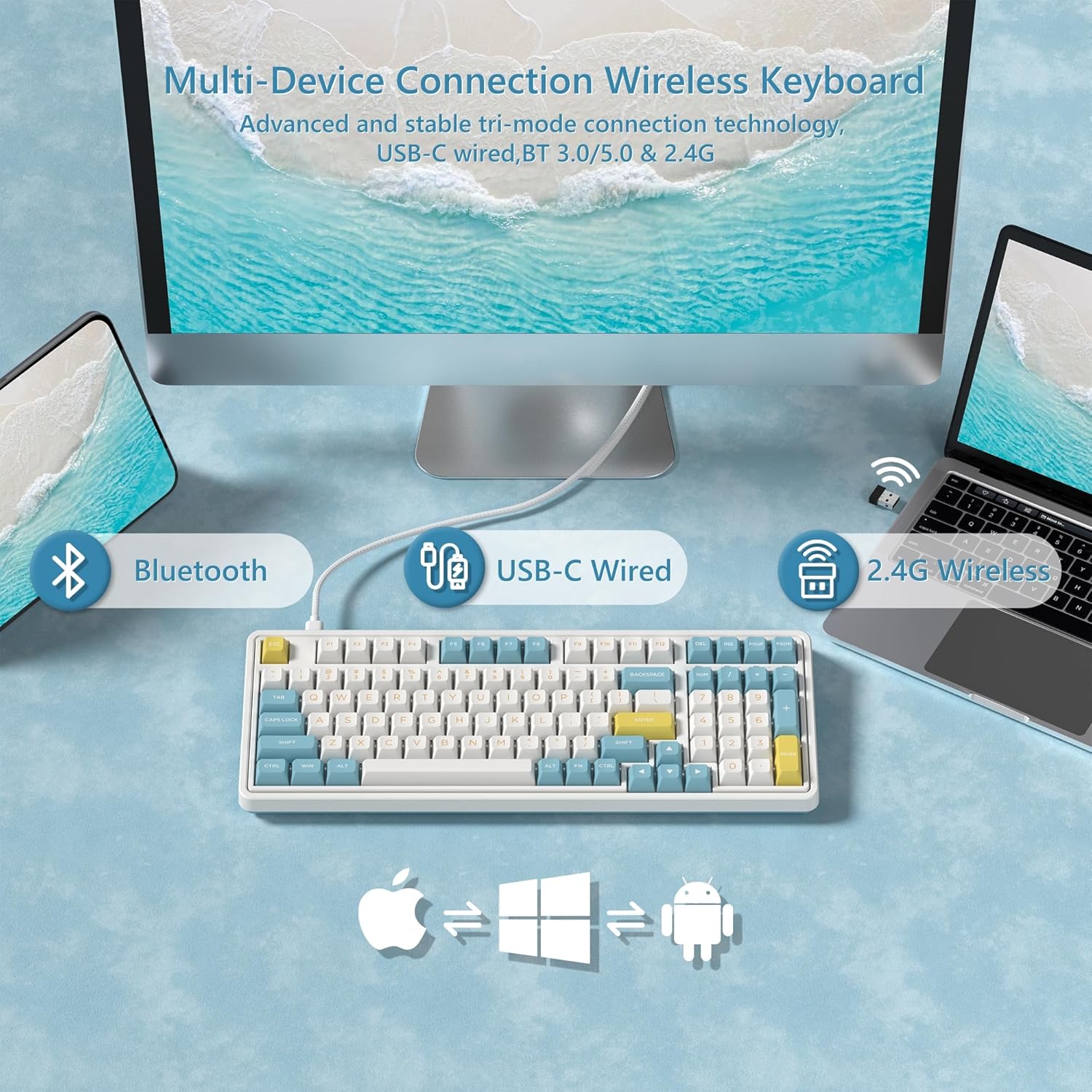
Image: Diagram illustrating the versatile connectivity options of the CMK98 keyboard, demonstrating how it can connect to multiple devices using Bluetooth, a USB-C cable, or the 2.4GHz wireless receiver.
2.1. Chế độ không dây 2.4GHz
- Locate the 2.4GHz USB receiver stored in the compartment on the back of the keyboard.
- Cắm đầu thu USB vào cổng USB có sẵn trên máy tính của bạn.
- On the keyboard's side switch, slide it to the 2.4G wireless icon position.
- Bàn phím sẽ tự động kết nối.
Video: Demonstrates the setup and connection process for the FL ESPORTS CMK98 keyboard, including locating the 2.4GHz receiver and switching modes.

Image: A close-up of the keyboard's side, featuring the toggle switch for selecting between Bluetooth, 2.4GHz wireless, and USB-C wired modes, alongside the USB-C charging port.
2.2. Chế độ Bluetooth
- On the keyboard's side switch, slide it to the Bluetooth icon position.
- Nhấn và giữ FN + Q, FN + W, hoặc FN + E for 3-5 seconds to enter pairing mode (the indicator light will flash rapidly).
- On your device (computer, tablet, phone), open Bluetooth settings and search for "CMK98".
- Select "CMK98" to pair. The indicator light will become solid when connected.
- Bạn có thể ghép nối tối đa ba thiết bị Bluetooth và chuyển đổi giữa chúng bằng cách sử dụng FN + Q/W/E.
2.3. Chế độ có dây USB-C
- Kết nối cáp USB-C đi kèm với cổng USB-C của bàn phím.
- Kết nối đầu còn lại của cáp USB-C vào cổng USB có sẵn trên máy tính của bạn.
- On the keyboard's side switch, slide it to the USB-C wired icon position.
- Bàn phím sẽ hoạt động như một thiết bị có dây và sạc pin đồng thời.
3. Công tắc tương thích hệ điều hành
The keyboard features a switch on the back to toggle between Windows (WIN) and Mac (MAC) compatibility modes. Ensure this switch is set correctly for your operating system to ensure proper key mapping.

Hình ảnh: Một chi tiết view of the keyboard's bottom, highlighting the switch used to select between Mac and Windows operating system compatibility modes.
Hướng dẫn sử dụng
1. Chức năng chính và bố cục
The CMK98 features a 99-key layout, including a dedicated number pad. Standard keyboard functions apply. Use the FN key in combination with other keys for secondary functions, such as media control or lighting adjustments.
Video: Demonstrates the compact 99-key layout of the CMK98 mechanical keyboard and its "creamy" typing sound.
2. Chiếu sáng RGB
The keyboard features 1.68 million customizable RGB backlight options. Specific key combinations with the FN key allow you to cycle through various lighting effects, adjust brightness, and change speed. Refer to the software section for advanced customization.
3. Macro Programming (Pro Software)
All keys support macro customization. Download the dedicated driver software from the official FL ESPORTS website to record and edit macros, customize key functions, and set music rhythm lighting effects. The software also supports N-key rollover for simultaneous key presses.

Image: This image displays the user interface of the CMK98's dedicated software, where users can customize key functions, create macros, and manage RGB lighting effects.
4. Công tắc và phím bấm có thể thay thế nóng
The CMK98 features a hot-swappable PCB, allowing you to easily replace 3-pin or 5-pin mechanical switches without soldering. The included keycap puller and switch puller facilitate this process.
- Sử dụng dụng cụ tháo phím để nhẹ nhàng tháo phím mong muốn.
- Use the switch puller to carefully grip and pull out the switch.
- Căn chỉnh các chân của công tắc mới với các lỗ trên PCB và ấn chặt cho đến khi khớp vào đúng vị trí.
- Thay thế phím bấm.

Hình ảnh: Hình ảnh phóng đại view of a single mechanical switch, illustrating its internal components and design.
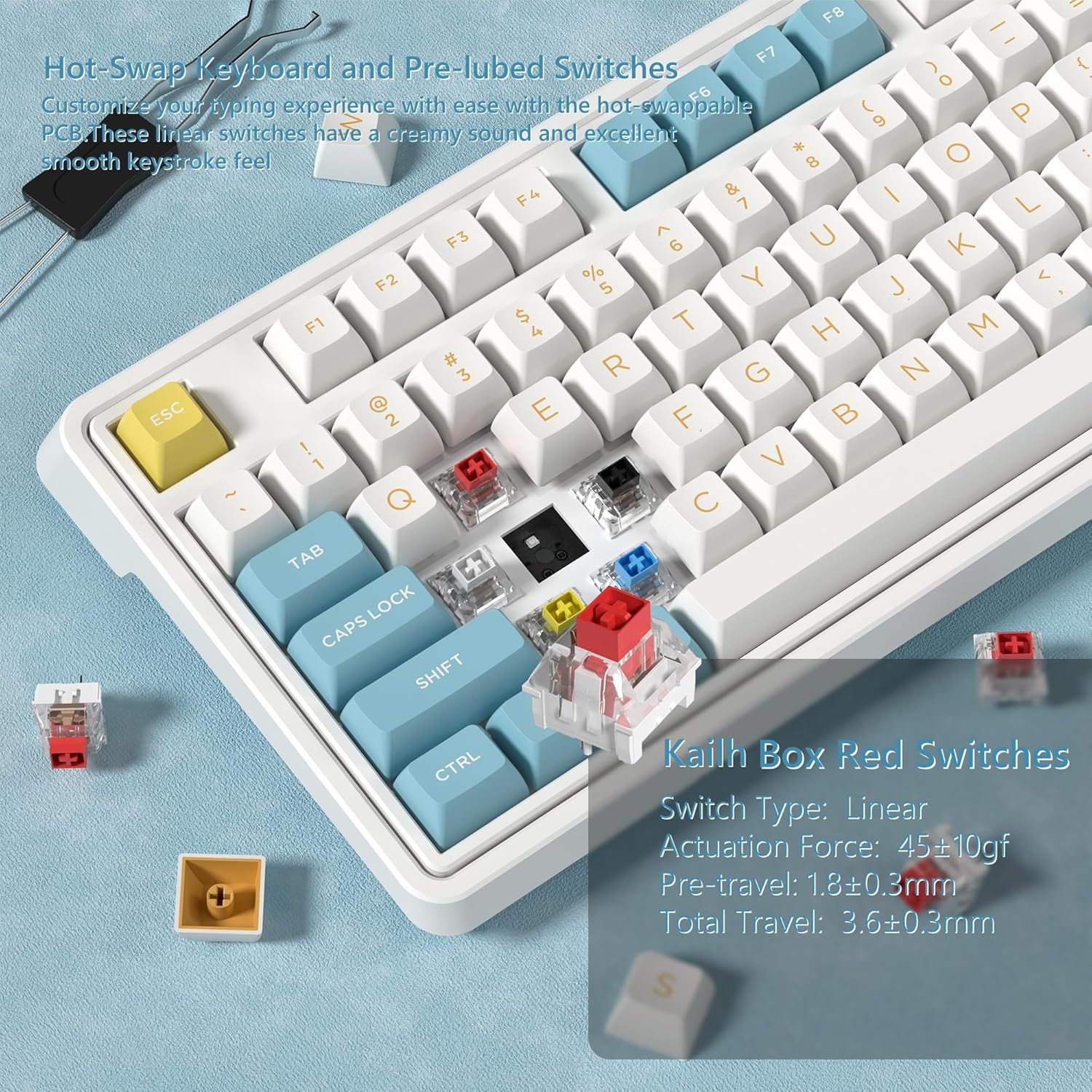
Hình ảnh: Một chi tiết view showing how to remove and install mechanical switches on the hot-swappable PCB of the CMK98 keyboard, along with the tools provided for this process.
5. Quản lý pin
The keyboard is equipped with a built-in 4000mAh lithium polymer battery. Connect the USB-C cable to charge the keyboard. An indicator light will typically show charging status.
- Sạc: Connect the keyboard via USB-C cable to a power source.
- Tuổi thọ pin: Up to 260 hours with backlight off, up to 35 hours with backlight on (usage may vary).

Image: This graphic highlights the keyboard's 4000mAh battery, providing estimated usage times of 260 hours with the backlight off and 35 hours with the backlight on.
BẢO TRÌ
1. Vệ sinh
Để vệ sinh bàn phím, trước tiên hãy ngắt kết nối bàn phím khỏi tất cả các nguồn điện. Sử dụng một miếng vải mềm, không xơ, đã được lau nhẹ.ampened with water or a mild cleaning solution. Avoid harsh chemicals or abrasive materials. For cleaning between keycaps, use compressed air or remove keycaps with the provided puller for thorough cleaning.
2. Switch and Keycap Care
When replacing switches or keycaps, handle them gently to avoid damaging the pins or the PCB sockets. Store spare switches and keycaps in a clean, dry place.
Xử lý sự cố
- Bàn phím không phản hồi:
- Đảm bảo bàn phím đã được sạc.
- Check the connection mode switch (2.4G, Bluetooth, USB-C) is set correctly.
- Đối với tần số 2.4 GHz, hãy đảm bảo bộ thu USB được cắm chắc chắn.
- Đối với Bluetooth, hãy ghép nối lại thiết bị.
- Hãy thử kết nối qua cáp USB-C để loại trừ các sự cố không dây.
- Các phím không đăng ký hoặc gõ hai lần:
- This could indicate a faulty switch. Utilize the hot-swappable feature to replace the affected switch.
- Hãy đảm bảo các phím được lắp đúng vị trí.
- Đèn RGB không hoạt động:
- Check if the lighting is turned off or set to minimum brightness using FN key combinations.
- Ensure the keyboard software is installed and updated for full control.
- Kết nối Bluetooth không ổn định:
- Đảm bảo bàn phím nằm trong phạm vi của thiết bị.
- Giảm thiểu nhiễu từ các thiết bị không dây khác.
- Hãy thử ghép nối lại bàn phím.
Thông số kỹ thuật
| Tính năng | Chi tiết |
|---|---|
| Người mẫu | CMK98 |
| Kết nối | Kết nối không dây 2.4G, Bluetooth 5.0, USB-C có dây |
| Cách trình bày | 99 keys with Number Pad |
| Công tắc | Hot-Swappable (3-pin/5-pin compatible), Pre-lubed Linear Switches |
| Mũ chìa khóa | PBT bắn đôi |
| Đèn nền | 1.68 triệu RGB |
| Ắc quy | Liti Polyme 4000mAh |
| Khả năng tương thích | Windows, Mac |
| Tính năng đặc biệt | Gasket Structure, PCB Single Key Slotting, Macro Customization, N-Key Rollover |
| Kích thước | 16.97 x 8.15 x 2.32 inch |
| Trọng lượng sản phẩm | 4.36 pound |
Bảo hành và Hỗ trợ
For warranty information and technical support, please refer to the official FL ESPORTS webtrang web hoặc liên hệ với bộ phận chăm sóc khách hàng của họ. Giữ lại hóa đơn mua hàng để yêu cầu bảo hành.
Nhà sản xuất: FL ESPORTS
Tài liệu liên quan - CMK98
 |
Bàn phím cơ hiệu năng cao FL980: Chức năng phím và điều khiển đèn nền Hướng dẫn chi tiết về các chức năng chính và điều khiển đèn nền của bàn phím cơ hiệu năng cao FL ESPORTS FL980, bao gồm cả chế độ dành cho Windows và Mac. |
 |
User Manual: 61-Key Tri-Mode Mechanical Keyboard Comprehensive user manual for the LIEI 61-Key Tri-Mode Mechanical Keyboard. Includes setup instructions for Bluetooth, 2.4G wireless, and wired modes, troubleshooting, and maintenance. |
 |
Hướng dẫn sử dụng bàn phím cơ KiiBOOM Phantom 98 Lite Comprehensive user manual for the KiiBOOM Phantom 98 Lite mechanical keyboard. Learn about setup, connectivity, VIA configuration, switch replacement, and warranty details. |
 |
Bàn phím cơ FL ESPORTS GEO75HE, tổ hợp phím FN và tính năng Hướng dẫn chi tiết về tổ hợp phím FN, hệ thống điều khiển và tính năng của Bàn phím cơ trục từ FL ESPORTS GEO75HE. Tìm hiểu về cài đặt đèn nền, chức năng hệ thống, thông số kỹ thuật sản phẩm và mẹo khắc phục sự cố. |
 |
Hướng dẫn sử dụng bàn phím chơi game Blackstorm Phantom RGB Hướng dẫn sử dụng bàn phím chơi game Blackstorm Phantom RGB, bao gồm an toàn, thông số kỹ thuật, cách sử dụng, sạc pin, bảo trì và tái chế. |
 |
YUNZII C98 Tri-Mode Wireless Mechanical Keyboard User Manual and Guide Comprehensive user manual for the YUNZII C98 Tri-Mode Wireless Custom Mechanical Keyboard. Learn about specifications, Bluetooth, 2.4G, and wired connections, shortcut keys, customization options, battery management, and troubleshooting. |
Ask a question about this manual
Ask about setup, troubleshooting, compatibility, parts, safety, or missing instructions. Manuals+ will review the question and use this page’s manual context to help answer it.