
Giới thiệu
This manual provides detailed instructions for the installation, operation, and maintenance of your Aigo Q2507 Mini-Tower PC Case. Please read this manual thoroughly before beginning any installation to ensure proper assembly and safe usage. This PC case is designed to house standard desktop components, supporting M-ATX and ITX motherboards.
Thông tin an toàn
- Always disconnect the power supply from the wall outlet before installing or removing any components to prevent electric shock.
- Hãy đeo dây đeo cổ tay chống tĩnh điện để ngăn ngừa hư hỏng do phóng điện tĩnh (ESD) gây ra cho các linh kiện nhạy cảm.
- Handle components carefully. Avoid touching pins or circuit boards directly.
- Ensure all cables are routed properly and do not obstruct airflow or moving parts.
- Hãy để hộp đựng tránh xa nguồn nhiệt, ánh nắng trực tiếp và hơi ẩm.
- Do not attempt to modify the case structure, as this may void your warranty and pose safety risks.
Nội dung gói
Vui lòng kiểm tra xem có đầy đủ các mục trong gói hàng của bạn không:
- Aigo Q2507 Mini-Tower PC Case
- Bộ phụ kiện (ốc vít, trụ đỡ, dây buộc cáp)
- Hướng dẫn sử dụng (tài liệu này)
Cài đặt
1. Chuẩn bị hồ sơ vụ án
Before installation, remove both side panels of the case. Typically, these are secured with thumbscrews at the rear of the case.

Hình ảnh: Góc cạnh view of the Aigo Q2507 Mini-Tower PC Case, showing the front panel and the side panel removed, revealing the internal structure.
2. Lắp đặt bo mạch chủ
- Install the necessary motherboard standoffs onto the motherboard tray. The Q2507 supports M-ATX and ITX motherboards.
- Cẩn thận đặt bo mạch chủ lên các trụ đỡ, căn chỉnh các lỗ vít.
- Cố định bo mạch chủ bằng các ốc vít được cung cấp. Không siết quá chặt.

Hình ảnh: Nội bộ view of the Aigo Q2507 PC Case, highlighting the motherboard tray area with pre-drilled holes for standoffs.
3. Cài đặt ổ đĩa lưu trữ
The case supports 1 x SSD and 1 x HDD.
- Locate the drive bays. SSDs typically mount on the motherboard tray or dedicated brackets, while HDDs use a cage.
- Secure your SSD(s) and HDD(s) using the appropriate screws from the accessory kit.

Hình ảnh: Nội bộ view of the Aigo Q2507 PC Case, showing the designated areas for installing storage drives (SSD and HDD).
4. Expansion Card Installation (VGA)
The case features 4 expansion slots.
- Remove the necessary slot covers from the rear of the case.
- Insert your graphics card (VGA) or other expansion cards into the corresponding PCIe slots on your motherboard.
- Secure the card(s) with screws. The maximum VGA length supported is 250 mm.

Image: Rear internal view of the Aigo Q2507 PC Case, showing the four expansion slots and the rear fan mount.
5. Lắp đặt quạt làm mát
The case supports one 120 mm fan on the side and one 80 mm fan on the rear.
- Mount the fans to their designated positions using fan screws.
- Connect the fan power cables to your motherboard or power supply.

Image: Angled front-side view of the Aigo Q2507 PC Case, with an internal fan visible through the side panel vent.
6. Kết nối bảng điều khiển phía trước
Connect the front panel cables (USB 2.0, Audio, Microphone, Power button, Reset button, Power LED, HDD LED) to the corresponding headers on your motherboard. Refer to your motherboard manual for header locations.
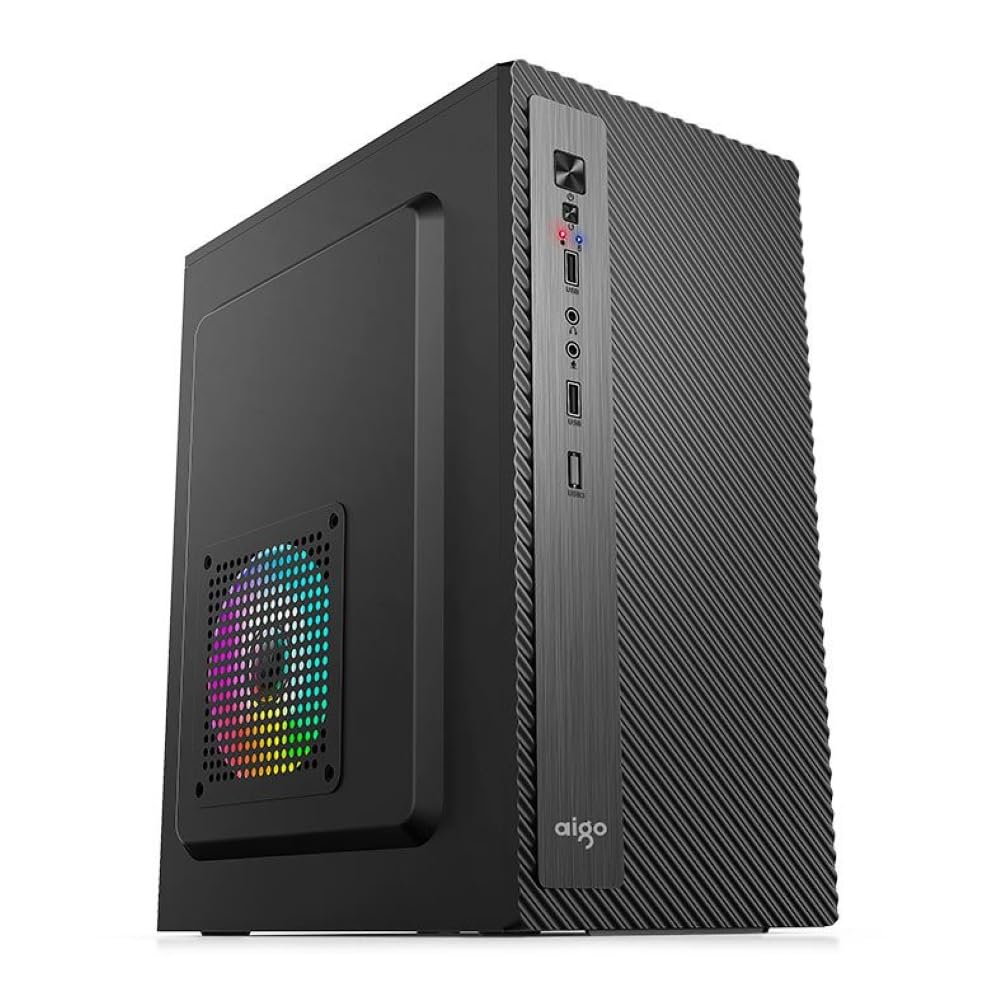
Hình ảnh: Cận cảnh mặt trước view of the Aigo Q2507 PC Case, showing the front I/O panel with USB 2.0 ports, audio jacks, and power/reset buttons.
7. Quản lý cáp
Route all cables neatly behind the motherboard tray or through designated cutouts to improve airflow and aesthetics. Use cable ties if necessary.
8. Kết thúc vụ án
Sau khi lắp đặt tất cả các bộ phận và sắp xếp dây cáp, hãy gắn lại các tấm ốp bên và cố định chúng bằng các ốc vít vặn tay.
Hoạt động
After completing the setup, connect your monitor, keyboard, mouse, and power cable to your assembled PC. Press the power button on the front panel to start your system. Ensure all peripherals are functioning correctly.
BẢO TRÌ
- Vệ sinh: Regularly clean dust from the case interior and fan filters using compressed air or a soft brush. Dust buildup can impede airflow and lead to overheating.
- Luồng không khí: Ensure the case has adequate ventilation. Do not block the air intake or exhaust vents.
- Quản lý cáp: Periodically check cable routing to ensure no cables are interfering with fans or obstructing airflow.
Xử lý sự cố
- Hệ thống không khởi động: Check all power connections, including the power supply to the wall, motherboard 24-pin, and CPU 8-pin connectors. Ensure front panel power switch cable is correctly connected to the motherboard.
- Quá nhiệt: Verify that all fans are spinning correctly and are not obstructed. Clean any dust buildup. Ensure proper thermal paste application on the CPU cooler.
- Không hiển thị: Confirm that your graphics card is properly seated in its PCIe slot and that the monitor cable is securely connected to the graphics card.
- Các cổng USB không hoạt động: Check the front panel USB cable connection to the motherboard header.
Thông số kỹ thuật

Image: Diagram illustrating the dimensions of the Aigo Q2507 Mini-Tower PC Case: 26.5 cm (depth) x 16.5 cm (width) x 34 cm (height).
| Tính năng | Đặc điểm kỹ thuật |
|---|---|
| Thương hiệu | AIGO |
| Tên mẫu | Câu hỏi 2507 |
| Loại trường hợp | Tháp nhỏ |
| Màu sắc | Đen |
| Vật liệu | Steel Alloy, Tempered Glass (0.4mm SPCC) |
| Khả năng tương thích của bo mạch chủ | M-ATX, Mini ITX |
| Khoang ổ đĩa nội bộ | 1 x SSD, 1 x HDD (Total 2) |
| Khe cắm mở rộng | 4 |
| Cổng I / O phía trước | 1 x USB 2.0, Microphone, Audio |
| Phương pháp làm mát | Không khí |
| Người hâm mộ được hỗ trợ | Side: 1 x 120 mm, Rear: 1 x 80 mm (Total 2) |
| Chiều cao tối đa của bộ làm mát CPU | 150mm |
| Độ dài VGA tối đa | 250mm |
| Kích thước (D x R x C) | 26.5cm x 16.5cm x 34cm |
| Thiết bị tương thích | Standard Desktop Components |
Bảo hành
This Aigo Q2507 Mini-Tower PC Case comes with a Bảo hành 12 tháng from the date of purchase. This warranty covers manufacturing defects and material faults under normal use. It does not cover damage caused by misuse, accidents, unauthorized modifications, or improper installation. Please retain your proof of purchase for warranty claims.
Ủng hộ
For technical assistance, warranty claims, or further inquiries, please contact your retailer or visit the official Aigo website for support resources. When contacting support, please have your product model (Q2507) and proof of purchase readily available.
Tài nguyên trực tuyến: www.aigo.com (Bán tạiampVui lòng xác minh liên kết chính thức. webĐịa điểm)