
1. Giới thiệu
The SUNLU FilaDryer S4 is an advanced 3D printer filament dryer designed to maintain optimal filament quality by removing excess moisture. This device is crucial for enhancing drying efficiency and improving printing quality, especially when working with hygroscopic filaments like PETG, ABS, TPU, and Nylon. It features a large 4-spool capacity, efficient PTC heating, and intelligent humidity monitoring to ensure your filaments are always print-ready.
2. Sản phẩm hếtview & Đặc trưng

Hình 2.1: The SUNLU FilaDryer S4, showcasing its sleek black design and capacity for multiple filament spools.
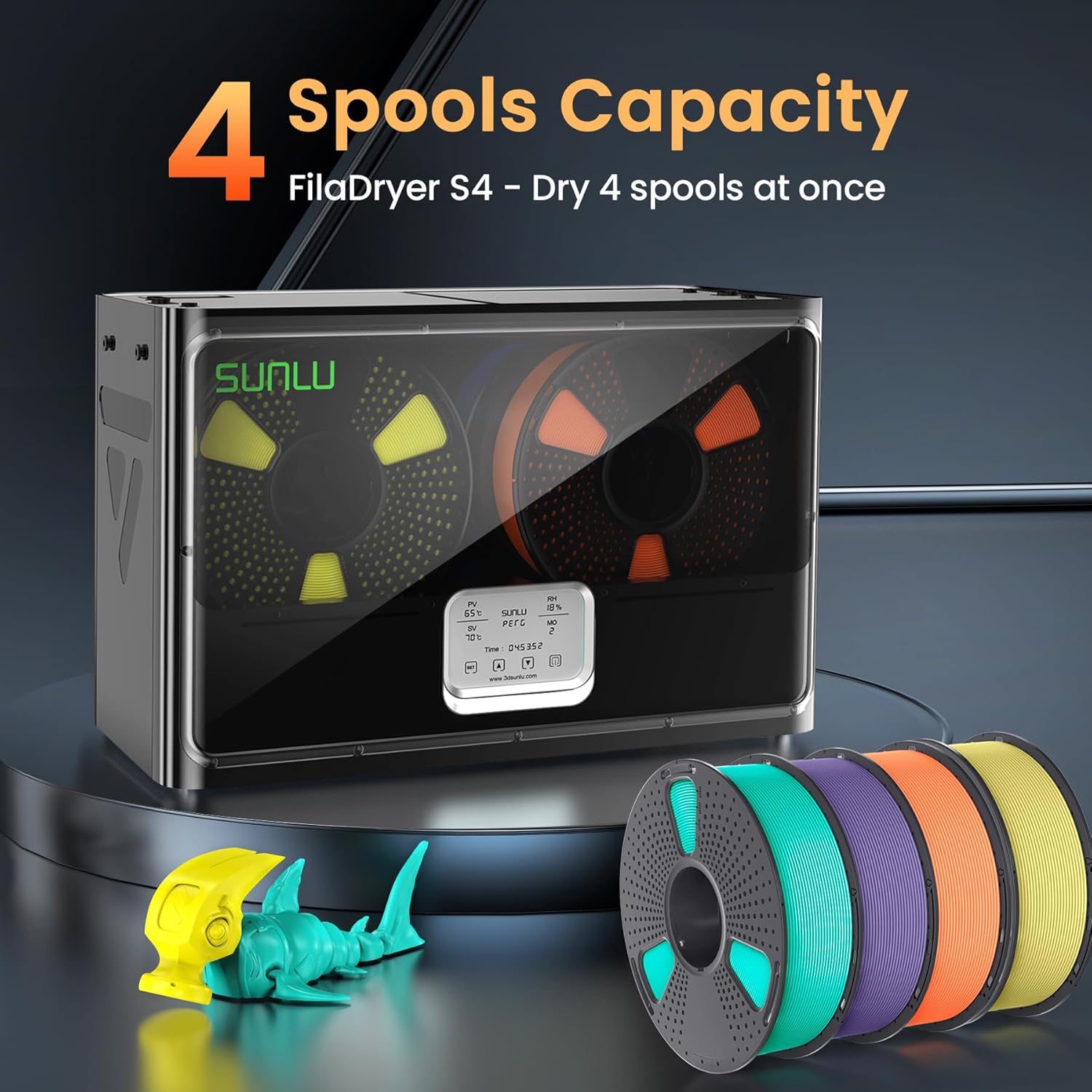
Hình 2.2: The FilaDryer S4, capable of drying up to four 1kg filament spools simultaneously, enhancing drying efficiency and printing quality.
Các tính năng chính:
- 4 Spool Capacity: Dries up to four 1kg 3D printer filaments, allowing for drying while printing and improving overall efficiency.
- Kích thước tối ưu: External size: 460(L) x 220(W) x 310(H)mm; Internal size: 450(L) x 175(W) x 207(H)mm. Net weight: 4KG.
- 8 Filament Exit Holes: Features eight outlets for versatile filament routing, ideal for multiple printers and various loading angles, ensuring smoother printing.
- 350W PTC Heater: Equipped with a powerful 350W PTC heater for safe and highly efficient heating (50% higher efficiency than FilaDryer S2).
- 3 Circulation Fans: Three high-quality fans ensure consistent temperature and 360° surround heating for even drying throughout the entire area.
- Nhiệt độ và hẹn giờ có thể điều chỉnh: Temperature range: 35-70°C; Timer range: 0-99 hours. Parameters can be adjusted to suit specific filament conditions.
- Khả năng tương thích cao: Supports a wide range of materials including PLA, PLA Plus, PLA Meta, PETG, ABS, TPU, PA, PC, Nylon, compatible with 1.75mm, 2.85mm, and 3.00mm filament diameters.
- Giám sát thông minh: Real-time humidity and temperature monitoring with automatic stop (RH≤25%), power-saving storage mode (25%
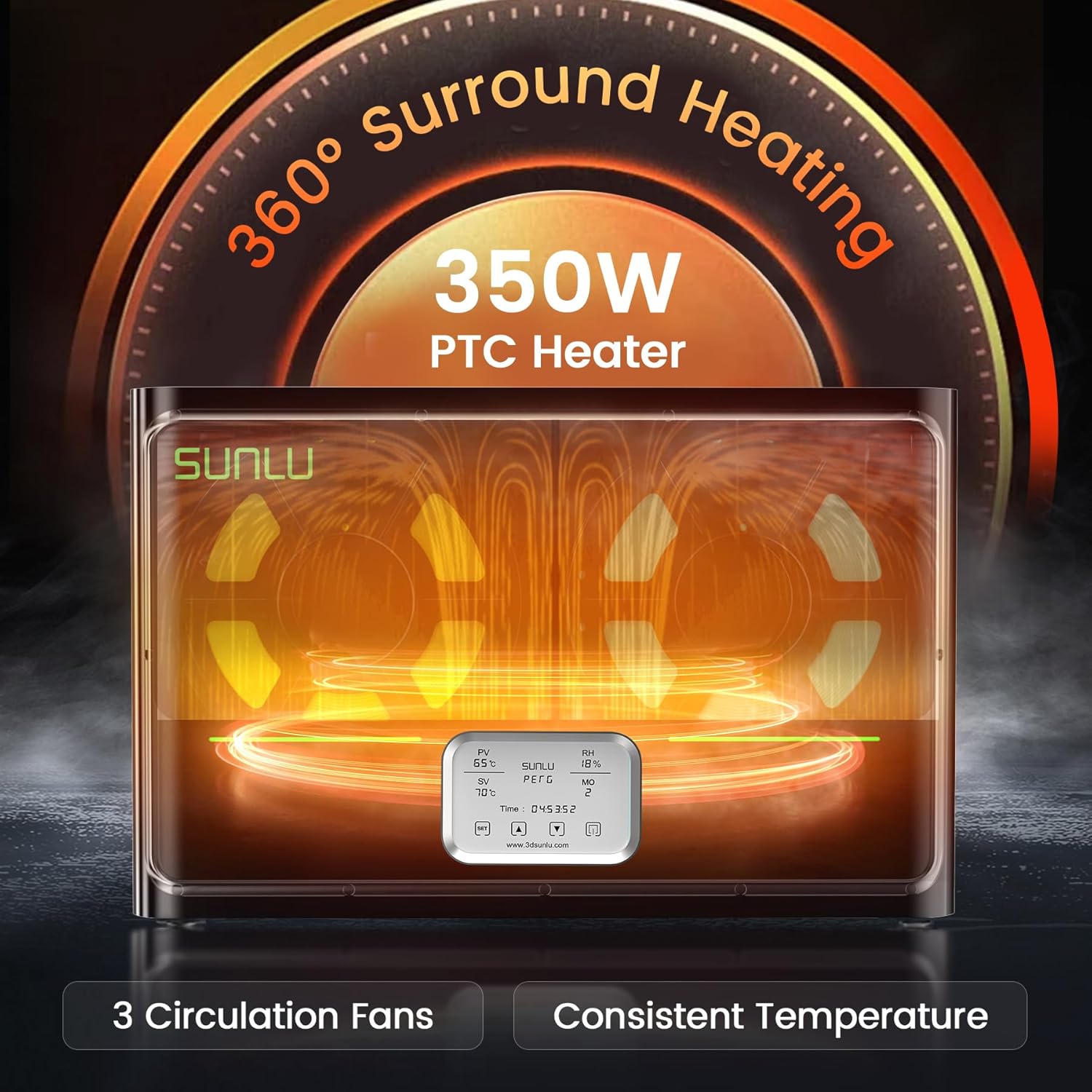
Hình 2.3: Internal heating and fan system for uniform drying.

Hình 2.4: Multiple filament exit points for flexible printer setups.
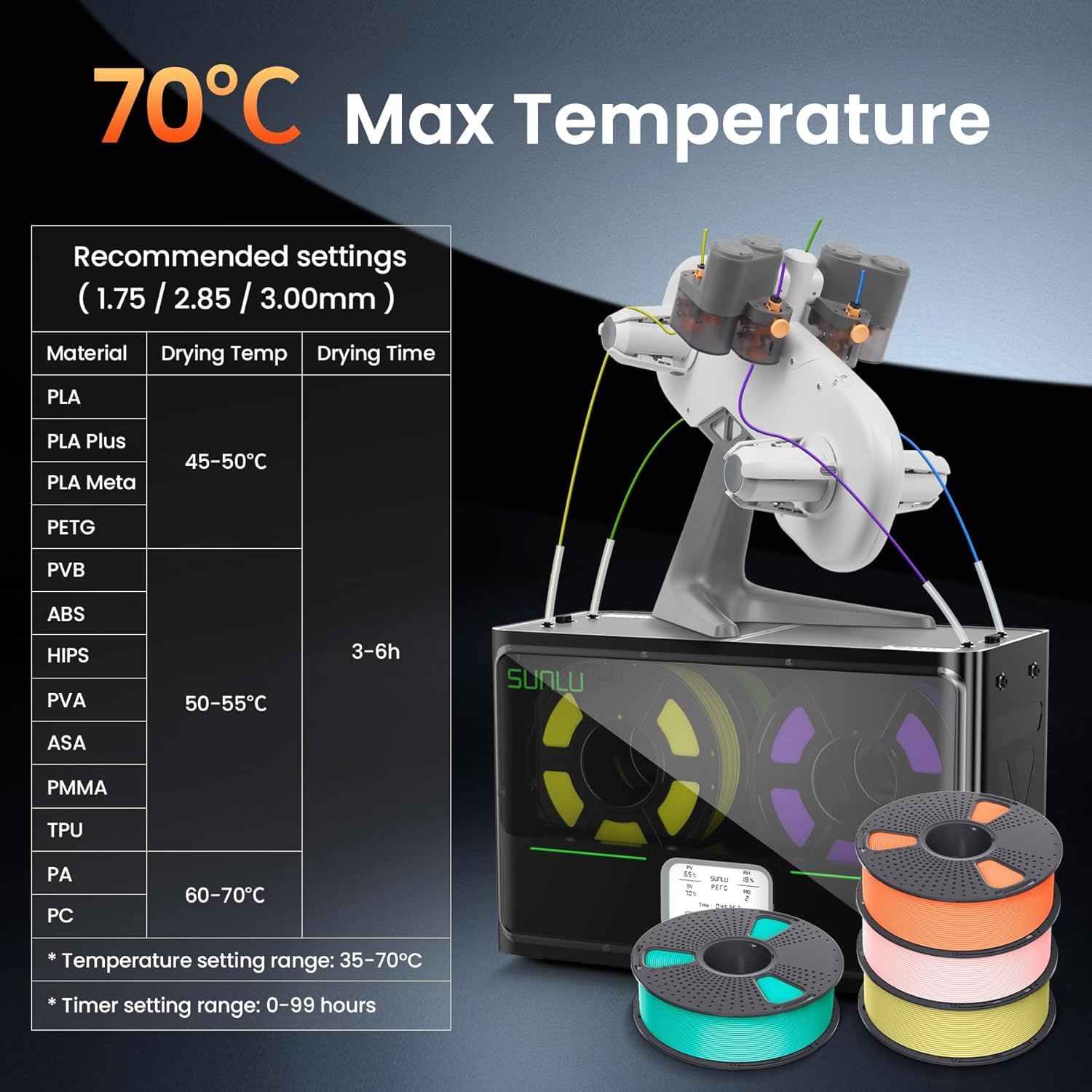
Hình 2.5: Guide for optimal temperature and time settings based on filament type.
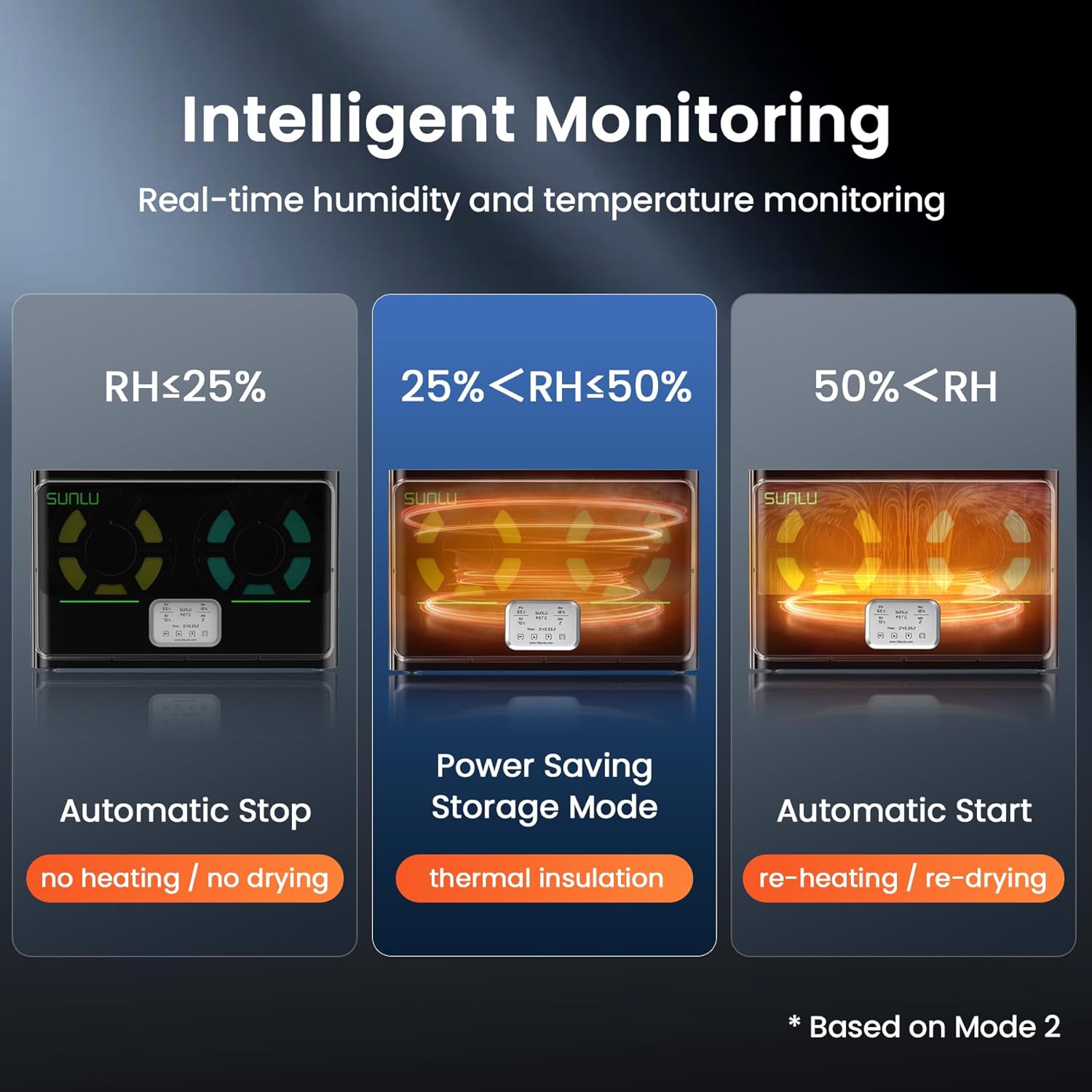
Hình 2.6: The intelligent monitoring system automatically adjusts drying based on humidity levels.

Hình 2.7: Visual comparison demonstrating improved print quality with dry filament.
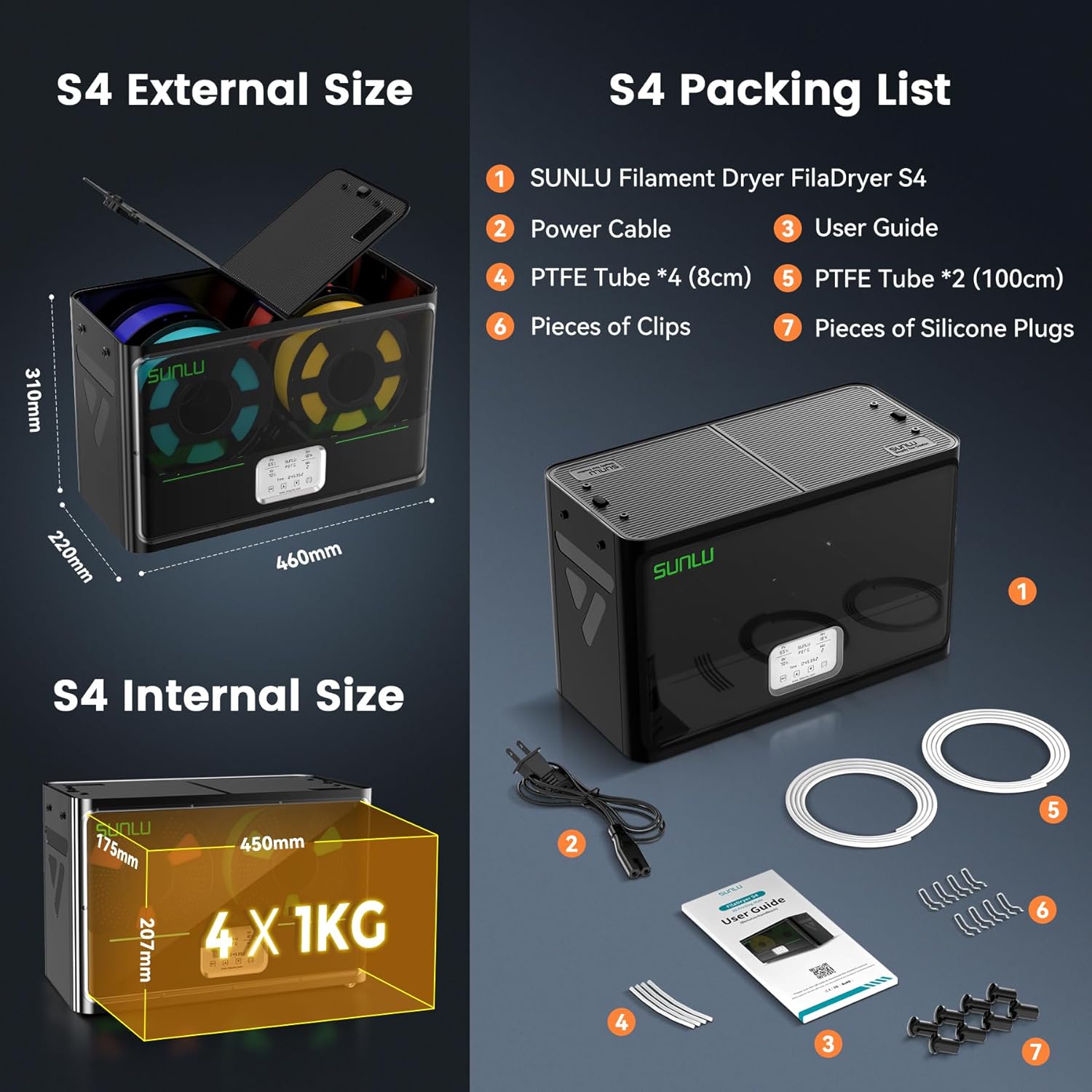
Hình 2.8: Detailed dimensions and contents of the FilaDryer S4 package.
3. Hướng dẫn cài đặt
3.1 Mở hộp
Carefully unbox your SUNLU FilaDryer S4. Ensure all components listed in the packing list (Figure 2.8) are present. The unboxing process is demonstrated in the video below.
PHIM 3.1: Unboxing the SUNLU FilaDryer S4. This video guides you through opening the package and checking its contents.
3.2 Thiết lập vật lý
- Install PTFE Tube: Insert the provided PTFE tubes into the designated filament exit holes. Push firmly to secure.
- Place Filament: Open the top cover by pulling the safety lock latch back. Place up to four 1kg filament spools inside the dryer.
- Dây tóc nạp liệu: Thread the filament through the installed PTFE tubes. You can use either the top holes or side holes depending on your printer setup.
- Đóng nắp: Đóng chặt nắp trên.
3.3 Bật nguồn
Connect the power cable to the dryer and plug it into a power outlet. Flip the main power switch to the 'ON' position. The display screen will illuminate.
4. Hướng dẫn vận hành
The FilaDryer S4 features an intuitive touch screen interface for easy operation. Refer to the screen function introduction video for a visual guide.
PHIM 4.1: Screen Function Introduction for SUNLU FilaDryer S4. This video explains the various display elements and controls.
4.1 Basic Operation (Manual Mode)
- Cài đặt nhiệt độ: Use the 'SET' button to navigate through settings. When the temperature value flashes, use the up/down arrows to adjust the desired drying temperature (35-70°C).
- Cài đặt thời gian sấy: When the time value flashes, use the up/down arrows to set the drying duration (0-99 hours).
- Bắt đầu sấy khô: The dryer will automatically begin heating once settings are confirmed.
4.2 Intelligent Drying Modes
The FilaDryer S4 offers intelligent drying modes based on real-time humidity monitoring:
- Automatic Stop (RH ≤ 25%): The dryer will stop heating and drying when the internal relative humidity drops to 25% or below.
- Power Saving Storage Mode (25% < RH < 50%): The dryer maintains thermal insulation to keep filaments dry without continuous heating.
- Automatic Start (RH ≥ 50%): If the humidity rises to 50% or above, the dryer will automatically re-heat and re-dry the filaments.
4.3 Filament Type Presets
The dryer has recommended temperature settings for various filament types. You can select the filament type on the screen, and the dryer will suggest optimal parameters (refer to Figure 2.5).
PHIM 4.2: Tutorial on operating the SUNLU FilaDryer S4, including setting parameters and modes.
5. Bảo trì
To ensure the longevity and optimal performance of your FilaDryer S4, regular maintenance is recommended:
- Nội thất sạch sẽ: Periodically wipe the interior of the dryer with a dry, soft cloth to remove any dust or filament debris.
- Check PTFE Tubes: Inspect the PTFE tubes for any wear or blockages. Replace if necessary to ensure smooth filament feeding.
- Desiccants: The S4 has two compartments for storing desiccants. Ensure desiccants are fresh and replace them as needed to maintain low humidity levels for storage.
KHAI THÁC. Xử lý sự cố
If you encounter issues with your FilaDryer S4, consider the following common problems and solutions:
- Filament Still Moist After Drying:
- Ensure correct temperature and time settings for your filament type.
- Verify that the dryer is properly sealed and there are no significant air leaks.
- Check the condition of desiccants if used for storage.
- Dryer Not Heating:
- Confirm the power cable is securely plugged in and the main switch is on.
- Check the set temperature; ensure it's above the ambient temperature.
- If an error code (e.g., ER3) appears, it might indicate a sensor issue. Contact customer support if the problem persists after checking connections.
- Filament Snagging/Breaking:
- Ensure PTFE tubes are correctly installed and not kinked.
- Verify filament is properly spooled and not tangled inside the dryer.
7. Thông số kỹ thuật
| Thuộc tính | Giá trị |
|---|---|
| Kích thước sản phẩm | 18.11 x 8.66 x 12.21 inch |
| Trọng lượng sản phẩm | 8.8 pound (4 kg) |
| Số hiệu mẫu sản phẩm | SUNLU 3D Printer Filament Dryer S4 |
| Thương hiệu | SUNLU |
| Vật liệu | Filament Dryer S4 |
| Màu sắc | Black S4 |
| Nhà sản xuất | SUNLU |
| Nước xuất xứ | Trung Quốc |
| Tiêu thụ điện năng ở chế độ bật | 350.0 watt |
| Đường kính mục | 10 Inches (for spools) |
8. DIY Possibilities
The SUNLU FilaDryer S4 offers versatility beyond just filament drying. With minor modifications, it can be adapted for other uses:
- 3kg Large Spool Capacity: The dryer can be modified to accommodate larger 3kg filament rolls.
- Shoe Dryer: The FilaDryer S4 can also function as a shoe dryer.
Watch the official videos below for demonstrations on these DIY modifications:
PHIM 8.1: DIY modification to dry 3kg large spools with the SUNLU FilaDryer S4.
PHIM 8.2: Transforming the SUNLU FilaDryer S4 into a shoe dryer.