
Giới thiệu
This manual provides instructions for the installation, operation, and maintenance of your Xtreme Smart Wi-Fi Window & Door Sensor. This device is designed to enhance home security by detecting the opening and closing of windows and doors, sending instant notifications to your smartphone.
Thông tin an toàn
- Không để thiết bị ở nơi có nhiệt độ quá cao, ánh nắng trực tiếp hoặc độ ẩm.
- Không tự ý tháo rời hoặc sửa chữa thiết bị. Việc này sẽ làm mất hiệu lực bảo hành.
- Để pin ngoài tầm với của trẻ em. Nếu nuốt phải, tìm kiếm sự chăm sóc y tế ngay lập tức.
- Vứt bỏ pin theo quy định của địa phương. Không trộn lẫn pin cũ và pin mới.
- Ensure the installation surface is clean and dry for proper adhesive attachment.
Nội dung gói
Xác minh rằng tất cả các mục đều có trong gói hàng của bạn:
- Xtreme Smart Wi-Fi Window & Door Sensor (Main Unit)
- Xtreme Smart Wi-Fi Window & Door Sensor (Magnetic Contact)
- Hướng dẫn sử dụng (tài liệu này)

Image: The main sensor unit and the smaller magnetic contact unit.
Hướng dẫn thiết lập
1. Lắp đặt pin
- Gently slide open the battery cover on the main sensor unit.
- Lắp hai pin AAA (không kèm theo) vào ngăn chứa pin, đảm bảo đúng cực (+/-).
- Đóng chặt nắp pin.
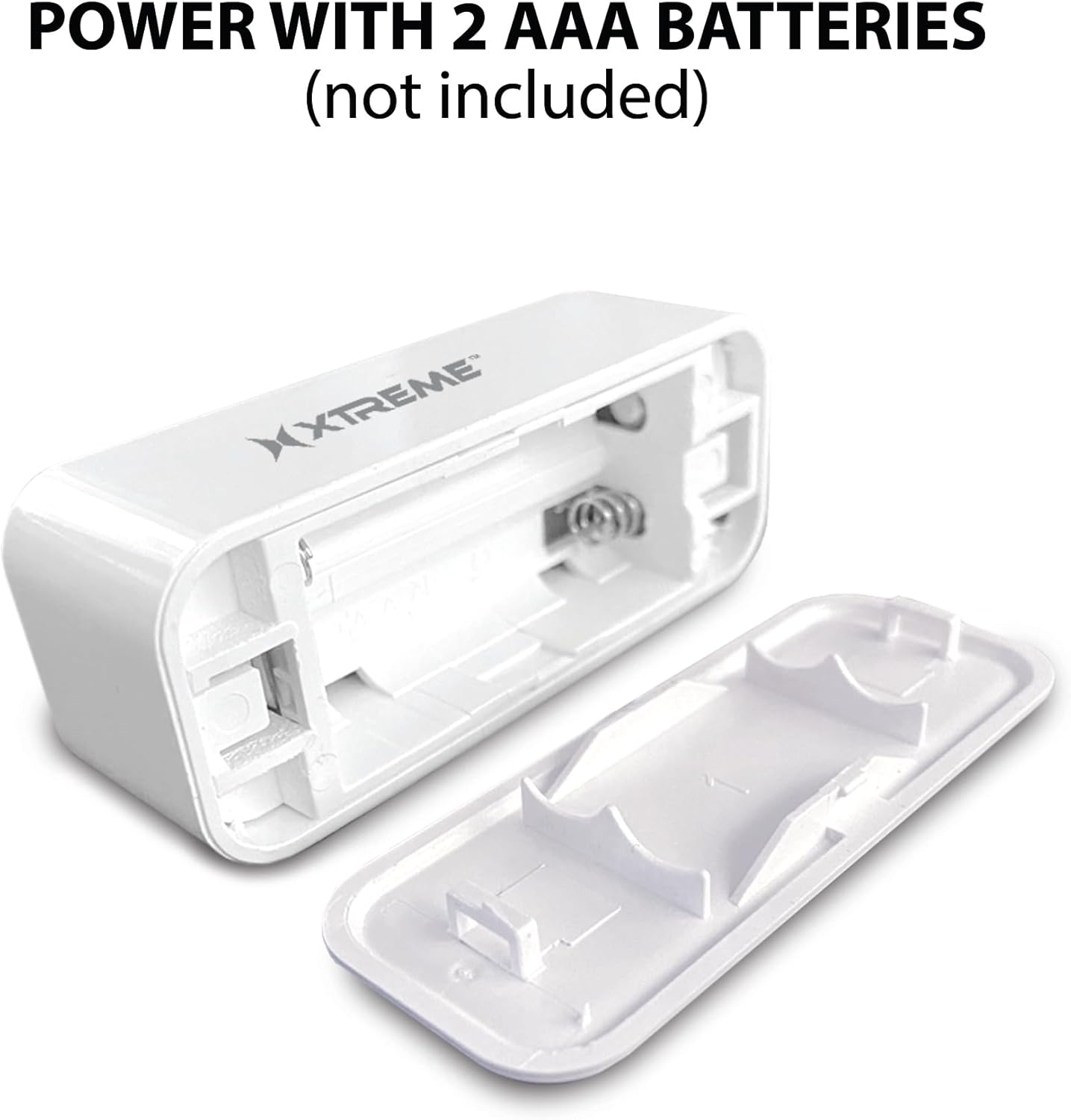
Image: The main sensor unit with its battery compartment open, showing where to insert two AAA batteries.
2. Tải ứng dụng và tạo tài khoản
- Tải xuống Xtreme Connect Home App from the Apple App Store (for iOS 11 or higher) or Google Play Store (for Android 7.0 or higher).
- Mở ứng dụng và làm theo hướng dẫn trên màn hình để tạo tài khoản mới hoặc đăng nhập nếu bạn đã có tài khoản.

Image: The product box illustrating the Xtreme Connect Home App download options for both iOS and Android devices.
3. Ghép nối thiết bị
- Ensure your smartphone is connected to a 2.4GHz Wi-Fi network. The sensor does not support 5GHz networks.
- In the Xtreme Connect Home App, tap the "+" icon to add a new device.
- Select "Sensor" or "Door/Window Sensor" from the device list.
- Follow the app's instructions to put the sensor into pairing mode (usually involves pressing and holding a button on the sensor until an indicator light flashes).
- Confirm the Wi-Fi network and enter the password in the app. The sensor will then connect to your home network.
- Once successfully paired, you can name your sensor within the app (e.g., "Front Door," "Bedroom Window").
4. Cài đặt vật lý
The sensor consists of two parts: a main unit and a smaller magnetic contact. These two parts must be installed close to each other (within 1 cm) on a door or window frame.
- Choose a clean, dry, and flat surface on your door or window frame.
- Peel off the protective backing from the adhesive on both the main unit and the magnetic contact.
- Attach the main unit to the fixed part of the door/window frame.
- Attach the magnetic contact to the moving part of the door/window (the door or window itself), aligning it with the main unit so they are no more than 1 cm apart when the door/window is closed.
- Test the installation by opening and closing the door/window. The app should register the change in status.


Image: Left: The sensor installed on a window sill with the window closed. Right: The sensor detecting an open window, with the magnetic contact separated from the main unit.
Hoạt động
Monitoring Door/Window Status
Once installed and paired, the Xtreme Smart Wi-Fi Window & Door Sensor will continuously monitor the open/closed status of your designated entry point. When the magnetic contact separates from the main unit (door/window opens), the sensor will detect this change.
Thông báo tức thời
Upon detecting an open or close event, the sensor will send an instant notification to your smartphone via the Xtreme Connect Home App. Ensure app notifications are enabled in your phone's settings to receive these alerts.
Truy cập từ xa
Bạn có thể view the current status of your sensor (open or closed) and review event history from anywhere using the Xtreme Connect Home App, provided your smartphone has an internet connection.
Smart Scenes Integration
The Xtreme Connect Home App allows you to create "Smart Scenes" to automate actions based on sensor activity. For examplê:
- "If door opens, then turn on living room lights."
- "If window opens after 10 PM, then send an alert to family members."
Explore the "Smart Scenes" section within the app to customize your home automation.
BẢO TRÌ
Thay thế pin
The sensor is powered by two AAA batteries. When the battery level is low, you may receive a notification via the Xtreme Connect Home App. To replace batteries:
- Gently slide open the battery cover on the main sensor unit.
- Tháo pin cũ ra.
- Lắp hai pin kiềm AAA mới, đảm bảo đúng cực (+/-).
- Đóng chặt nắp pin.
Note: The sensor is designed for up to four months of battery life under normal usage conditions.
Vệ sinh
Wipe the sensor with a soft, dry cloth. Do not use liquid cleaners or abrasive materials, as these can damage the device.
Xử lý sự cố
| Vấn đề | Nguyên nhân có thể | Giải pháp |
|---|---|---|
| Cảm biến không kết nối được với Wi-Fi. | Incorrect Wi-Fi password; 5GHz network used; sensor too far from router. | Ensure correct 2.4GHz Wi-Fi network and password. Move sensor closer to the router. Re-attempt pairing. |
| Không nhận được thông báo nào. | App notifications disabled; sensor offline; app not running in background. | Check phone's notification settings for the Xtreme Connect Home App. Verify sensor status in the app. Ensure app is allowed to run in the background. |
| Sensor not detecting open/close. | Sensor parts misaligned; dead batteries. | Ensure the main unit and magnetic contact are within 1 cm when closed. Replace batteries if low. |
| Tuổi thọ pin ngắn. | Frequent activations; poor quality batteries. | Use high-quality alkaline batteries. Reduce unnecessary activations if possible. |
Thông số kỹ thuật
| Tính năng | Chi tiết |
|---|---|
| Số hiệu mẫu | XHS7-2001-WHT |
| Nguồn điện | 2 x Pin AAA (không bao gồm) |
| Loại pin | Kiềm |
| Tậptage | 1.5 Vôn (DC) |
| Kết nối | 2.4GHz 802.11n Wi-Fi, Bluetooth 4.0 (optional) |
| Phương pháp kiểm soát | App (Xtreme Connect Home) |
| Hệ điều hành tương thích | Android 7.0 trở lên, iOS 11 trở lên |
| Kiểu lắp đặt | Adhesive / Wall Mount |
| Kích thước sản phẩm | 2.7 x 2.4 x 4.6 inch |
| Trọng lượng sản phẩm | 2.39 ounce |
| Màu sắc | Trắng |
| Mã số UPC | 805106232399 |
Bảo hành và Hỗ trợ
For warranty information and technical support, please refer to the documentation included with your purchase or visit the official Xtreme Digital Lifestyle Accessories website. Do not attempt to return the product to the retailer without first contacting customer support, as per manufacturer guidelines.
Nhà sản xuất: Cực độ
Thương hiệu: PHỤ KIỆN PHONG CÁCH SỐNG XTREME