
1. Giới thiệu
This manual provides essential instructions for the safe and effective operation of your Fujifilm S4500 and S4530 Compact Digital Camera. Please read this manual thoroughly before using the camera and keep it in a safe place for future reference. The Fujifilm S4500/S4530 is equipped with a 14MP CCD sensor, a 30x optical zoom Fujinon lens, and is capable of recording 720p HD movies.
2. Sản phẩm hếtview
Hãy làm quen với các bộ phận chính của máy ảnh.
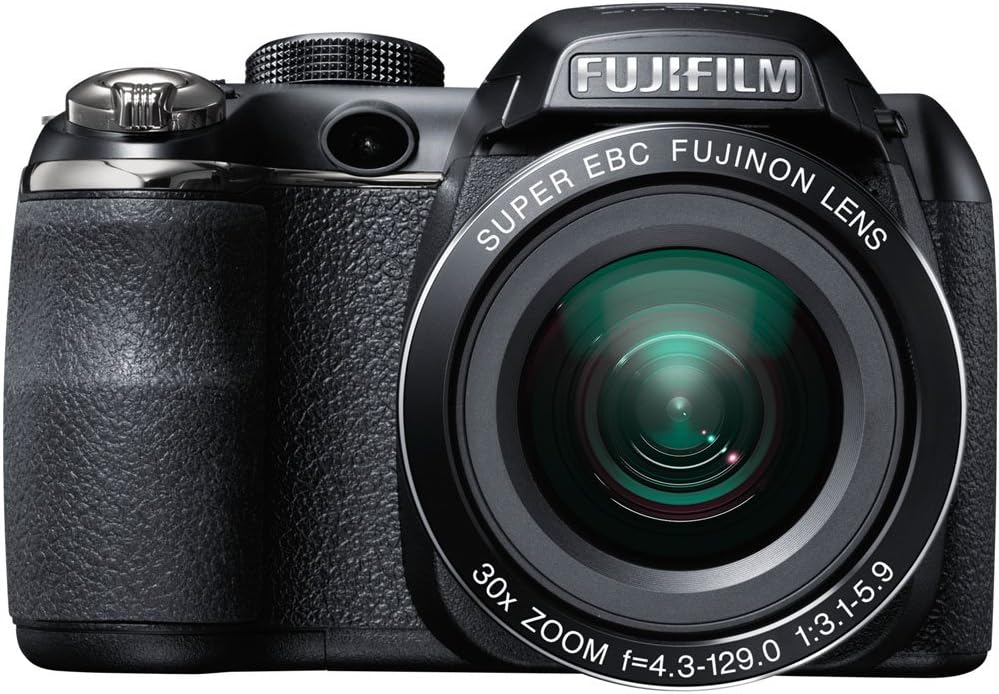
Hình 2.1: Đằng trước view of the Fujifilm S4500/S4530 camera with the built-in flash in the raised position, showcasing the Fujinon 30x optical zoom lens.

Hình 2.2: Đằng trước view of the Fujifilm S4500/S4530 camera with the built-in flash in the lowered position, highlighting the lens barrel and grip.

Hình 2.3: Bên view of the Fujifilm S4500/S4530 camera, showing the ergonomic grip and control layout.
Các thành phần chính:
- Ống kính: Fujinon 30x Optical Zoom Lens (24-720mm equivalent).
- Đèn nháy: Built-in pop-up flash.
- Màn hình LCD: 3-inch, 230,000-dot screen for viewĐiều hướng menu và giao diện.
- Viewcông cụ tìm kiếm: Điện tử Viewcông cụ tìm (EVF).
- Quay số kiểm soát: For selecting shooting modes.
- Nút chụp: Để chụp ảnh.
- Cần gạt thu phóng: Điều khiển zoom quang học và kỹ thuật số.
3. Thiết lập
3.1. Lắp pin
- Mở nắp ngăn chứa pin nằm ở phía dưới máy ảnh.
- Lắp bốn (4) pin kiềm AA, đảm bảo đúng cực (+/-) như được chỉ dẫn bên trong ngăn chứa.
- Đóng chặt nắp ngăn chứa pin.
3.2. Lắp thẻ nhớ
- Mở nắp khe cắm thẻ nhớ, thường nằm ở cạnh bên hoặc đáy máy ảnh.
- Insert an SD, SDHC, or SDXC memory card with the label facing the correct direction until it clicks into place.
- Đóng chặt nắp khe cắm thẻ nhớ.
3.3. Khởi động lần đầu và cài đặt ngày/giờ
- Nhấn nút BẬT/TẮT để bật nguồn máy ảnh.
- The first time you power on, you will be prompted to set the date and time. Use the directional buttons to navigate and the MENU / OK nút để xác nhận.
- Làm theo hướng dẫn trên màn hình để hoàn tất thiết lập ban đầu.
4. Hướng dẫn vận hành
4.1. Chụp ảnh
- Bật máy ảnh lên.
- Select a shooting mode using the mode dial (e.g., TỰ ĐỘNG for automatic settings).
- Hãy căn chỉnh khung hình bằng màn hình LCD hoặc thiết bị điện tử. viewngười tìm
- Use the zoom lever to adjust the focal length.
- Nhấn nửa nút chụp để lấy nét. Khung lấy nét sẽ chuyển sang màu xanh lá cây khi lấy nét thành công.
- Nhấn nút chụp xuống hoàn toàn để chụp ảnh.
4.2. Quay video
- Turn the mode dial to the movie recording setting (often indicated by a film camera icon).
- Đóng khung chủ thể của bạn.
- Press the dedicated movie record button (if available) or the shutter button to start recording.
- Press the button again to stop recording. The camera records in 720p HD resolution.
4.3. Phát lại
- Nhấn nút CHƠI để vào chế độ phát lại.
- Use the directional buttons to scroll through your photos and videos.
- Nhấn MENU / OK ĐẾN view options for the selected image/video.
4.4. Chế độ đèn flash
The camera offers various flash modes, including Auto and Red Eye Reduction. To change the flash mode, press the flash button (often indicated by a lightning bolt icon) and use the directional buttons to select your desired mode from the on-screen menu.
5. Bảo trì
5.1. Vệ sinh máy ảnh
- Ống kính: Dùng khăn mềm, không xơ hoặc chổi lau ống kính để nhẹ nhàng lau sạch bụi. Đối với các vết bẩn, hãy dùng dung dịch vệ sinh ống kính chuyên dụng thấm vào khăn, không đổ trực tiếp lên ống kính.
- Màn hình LCD: Lau nhẹ nhàng bằng vải mềm, khô. Tránh ấn quá mạnh.
- Thân máy ảnh: Use a soft, dry cloth to wipe away dust and fingerprints. Do not use organic solvents or strong cleaning agents.
5.2. Chăm sóc pin
- Remove batteries when the camera will not be used for an extended period to prevent leakage.
- Bảo quản pin ở nơi khô ráo, thoáng mát.
- Replace all four AA batteries at the same time with new ones for optimal performance.
5.3. Lưu trữ
When storing the camera, ensure it is turned off, and the lens cap is attached. Store in a dry, well-ventilated area away from direct sunlight, high temperatures, and humidity.
KHAI THÁC. Xử lý sự cố
| Vấn đề | Giải pháp |
|---|---|
| Máy ảnh không bật được. | Check if batteries are inserted correctly and are fully charged. Replace with new AA batteries if necessary. |
| Hình ảnh bị mờ. | Ensure the lens is clean. Press the shutter button halfway to allow the camera to focus before taking the shot. Check if the camera is in a suitable shooting mode for the lighting conditions. |
| Đèn flash không nháy. | Check the flash mode settings. Ensure the flash is raised if it is a pop-up type. The flash may not fire if the battery level is low. |
| Lỗi thẻ nhớ. | Ensure the memory card is inserted correctly. Try formatting the card (this will erase all data). If the problem persists, try a different memory card. |
| Không thể quay video. | Ensure the camera is in video recording mode. Check if there is sufficient space on the memory card. |
7. Thông số kỹ thuật
| Tính năng | Chi tiết |
|---|---|
| Tên mẫu | Fujifilm S4500 / S4530 |
| Cảm biến hình ảnh | 14 Megapixel 1/2.3-inch CCD |
| Ống kính | Fujinon 30x Optical Zoom (24-720mm equivalent) |
| Zoom kỹ thuật số | Lên đến 6.7x |
| Ổn định hình ảnh | Ổn định hình ảnh kỹ thuật số |
| Màn hình LCD | 3.0-inch, 230,000 dots |
| Quay Video | Độ phân giải 720p HD (định dạng MP4) |
| Phương tiện lưu trữ | SD / SDHC / SDXC memory cards |
| Độ nhạy ISO | Auto, 100, 200, 400, 800, 1600, 3200, 6400 (expanded to 51200) |
| Tốc độ màn trập | Từ 8 giây đến 1/2000 giây |
| Nguồn điện | 4x pin kiềm AA |
| Kết nối | HDMI, USB |
| Kích thước (xấp xỉ) | 1.2 Pounds (Item Weight) |
8. Bảo hành và Hỗ trợ
This Fujifilm S4500/S4530 camera typically comes with a 90-day limited warranty. Please refer to your purchase documentation for specific warranty terms and conditions. For technical support or service inquiries, please contact Fujifilm customer service or the retailer from whom the product was purchased.


