
Uni Pro KM 225
Hướng dẫn sử dụng ghế xô Uni Pro KM 225
Model: KM 225 (Part No. 8773)
Brand: Uni Pro
Sản phẩm trênview
The Uni Pro KM 225 Bucket Seat is designed to provide superior comfort and durability for a wide range of heavy-duty equipment. Crafted with a heavy-duty vinyl covering and ergonomic cushions, this seat is built for extended use. Its robust construction includes a corrosion-resistant, blow-molded plastic frame and a vacuum-formed waterproof vinyl with a central drain hole to prevent water accumulation. This 19-inch high-back seat is a versatile replacement for both 16-inch and 19-inch original seats and is designed to accommodate operator presence switches for enhanced safety.

Hình 1: Mặt trước view of the Uni Pro KM 225 Black Vinyl Bucket Seat, showcasing its ergonomic design and durable vinyl covering.
Cài đặt và thiết lập
This section provides general guidelines for installing your Uni Pro KM 225 Bucket Seat. Due to the universal fit design, minor modifications may be required depending on your specific equipment. It is crucial to verify mounting dimensions before purchase and installation.
Kiểm tra trước khi cài đặt:
- Xác minh khả năng tương thích: Ensure the seat's dimensions and mounting pattern are compatible with your equipment's existing seat rails or mounting points. Refer to the detailed dimension diagram below.
- Operator Presence Switch: Confirm your equipment's operator presence switch can be integrated with the KM 225 seat. The seat is designed to accommodate these switches.
- Công cụ cần thiết: Gather necessary tools such as wrenches, sockets, and potentially a drill if new mounting holes are required.
Các bước cài đặt:
- Tháo bỏ ghế cũ: Carefully unbolt and remove the existing seat from your equipment. Disconnect any wiring for operator presence switches or other sensors.
- Align New Seat: Position the Uni Pro KM 225 seat onto the mounting rails or platform. Align the mounting holes.
- Đảm bảo chỗ ngồi: Use appropriate bolts, washers, and nuts to securely fasten the new seat. Ensure all fasteners are tightened to the manufacturer's specifications. Do not overtighten.
- Kết nối dây: If applicable, connect the operator presence switch wiring to the seat. Ensure connections are secure and properly insulated.
- Chức năng kiểm tra: Before operating the equipment, test the seat's stability and the functionality of any connected safety switches.

Hình 2: Dưới cùng view of the Uni Pro KM 225 seat, illustrating the various pre-drilled mounting hole patterns for universal fit.
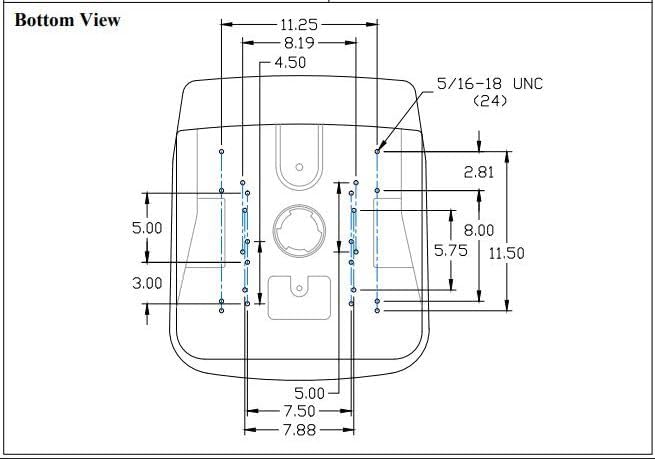
Figure 3: Detailed technical drawing providing precise mounting dimensions for the Uni Pro KM 225 seat. Users should cross-reference these measurements with their equipment's mounting points.
Hướng dẫn sử dụng
The Uni Pro KM 225 Bucket Seat is designed for comfort and functionality during operation of various equipment types. While the seat itself does not have operational controls, its design contributes significantly to the user experience.
- An ủi: The ergonomic cushions and heavy-duty vinyl covering are engineered to provide optimal operator comfort, reducing fatigue during long hours of use.
- Quản lý nước: The vacuum-formed waterproof vinyl and integrated central drain hole effectively prevent water accumulation, keeping the seating surface dry even in wet conditions.
- Sự an toàn: Ensure the operator presence switch (if connected) is functioning correctly. This safety feature prevents equipment operation when the seat is unoccupied.
Bảo trì và chăm sóc
Proper maintenance will extend the life and preserve the appearance of your Uni Pro KM 225 Bucket Seat.
- Vệ sinh: For routine cleaning, wipe the vinyl surface with a damp cloth and mild soap. Avoid harsh chemicals or abrasive cleaners, as these can damage the vinyl. Rinse thoroughly with clean water and dry with a soft cloth.
- Điều tra: Periodically inspect the seat for any signs of wear, tears in the vinyl, or damage to the frame. Check all mounting bolts for tightness and re-tighten if necessary.
- Kho: If the equipment is stored outdoors, consider covering the seat to protect it from prolonged exposure to direct sunlight and extreme weather conditions, which can degrade vinyl over time.
Xử lý sự cố
This section addresses common issues that may arise during the installation or use of your Uni Pro KM 225 Bucket Seat.
| Vấn đề | Nguyên nhân có thể | Giải pháp |
|---|---|---|
| Seat does not fit existing mounting points. | Mounting hole patterns do not align perfectly; slight variations in equipment manufacturing. |
|
| Operator presence switch not functioning after installation. | Incorrect wiring, switch not properly seated, or switch malfunction. |
|
| Water pooling on seat surface. | Drain hole is obstructed or seat is not level. |
|
Thông số kỹ thuật
| Thuộc tính | Chi tiết |
|---|---|
| Thương hiệu | Uni Pro |
| Tên mẫu | Km225 |
| Mã số sản phẩm | 8773 |
| Màu sắc | Đen |
| Vật liệu | Đĩa than |
| Chiều rộng ghế | 19 Inches (High-back design, replaces 16" and 19" seats) |
| Trọng lượng sản phẩm | 16 Bảng Anh |
| Kiểu dáng vừa vặn | Phù hợp phổ quát |
| Loại dịch vụ xe | Tractor, Mower, Gator, Skid Steer, Compact Utility Tractor, Roller, Trencher, UTV, Excavator, and more. |
| Mã số UPC | 808841087736 |

Hình 4: Mặt bênfile of the Uni Pro KM 225 seat, highlighting its high-back design.

Hình 5: Phía sau view of the Uni Pro KM 225 seat, showing the durable plastic frame.
Bảo hành và Hỗ trợ
Specific warranty terms for the Uni Pro KM 225 Bucket Seat are typically provided by the manufacturer or the retailer at the time of purchase. It is recommended to retain your proof of purchase for any warranty claims.
Để được hỗ trợ:
- Hỗ trợ sản phẩm: For technical assistance, installation queries, or troubleshooting beyond this manual, please contact Uni Pro customer support. Contact information can usually be found on the manufacturer's official webtrên trang web hoặc trên bao bì sản phẩm.
- Hỗ trợ nhà bán lẻ: For questions regarding your purchase, returns, or specific warranty details, please contact the retailer from whom you purchased the seat.
Always refer to the latest information provided by Uni Pro or your authorized dealer for the most accurate and up-to-date support resources.
Ask a question about this manual
Ask about setup, troubleshooting, compatibility, parts, safety, or missing instructions. Manuals+ will review the question and use this page’s manual context to help answer it.