
1. Giới thiệu
Thank you for choosing the AWESAFE 10.25 inch Android 13 Car Radio. This advanced multimedia system is designed to enhance your driving experience with its powerful features, including Android 13 operating system, 8GB RAM, 128GB ROM, wireless CarPlay, Android Auto, GPS navigation, Bluetooth, and 4G connectivity. This manual provides essential information for proper installation, operation, and maintenance of your new car radio. Please read it thoroughly before use.
2. Thông tin an toàn
- Khuyến nghị cài đặt chuyên nghiệp: Do hệ thống điện trên ô tô rất phức tạp, bạn nên nhờ đến sự lắp đặt chuyên nghiệp để tránh làm hỏng thiết bị hoặc xe của bạn.
- Nguồn điện: Ensure the car radio is connected to a 12V DC power supply with negative grounding. Incorrect voltage có thể gây ra thiệt hại.
- Lái xe an toàn: Không được sử dụng thiết bị theo cách làm bạn mất tập trung khi lái xe. Luôn ưu tiên an toàn giao thông.
- Nhiệt độ: Tránh để thiết bị ở nhiệt độ quá cao hoặc tiếp xúc trực tiếp với ánh nắng mặt trời trong thời gian dài.
- Độ ẩm: Keep the unit away from water and excessive moisture to prevent electrical hazards.
- Thông gió: Đảm bảo thông gió thích hợp xung quanh thiết bị để tránh quá nóng.
3. Nội dung gói hàng
Xác minh rằng tất cả các mục được liệt kê dưới đây đều có trong gói hàng của bạn:

Hình ảnh: Trênview of the AWESAFE car radio and its included accessories, such as cables, modules, and tools.
- AWESAFE 10.25 inch Car Radio Unit
- F20 EVO Base Support
- Mô-đun 4G
- Mô-đun GPS
- Cáp AUX
- Cáp nguồn
- Prying Tools
- Tua vít
- 4G SIM Card Cable
- Cáp USB
4. Khả năng tương thích
This car radio is specifically designed for:
- BMW 2 Series F45 (2018-2019)
- Only compatible with EVO System.
Trước khi muaasing, please provide a photo of your car's dashboard for compatibility confirmation if you have any doubts.
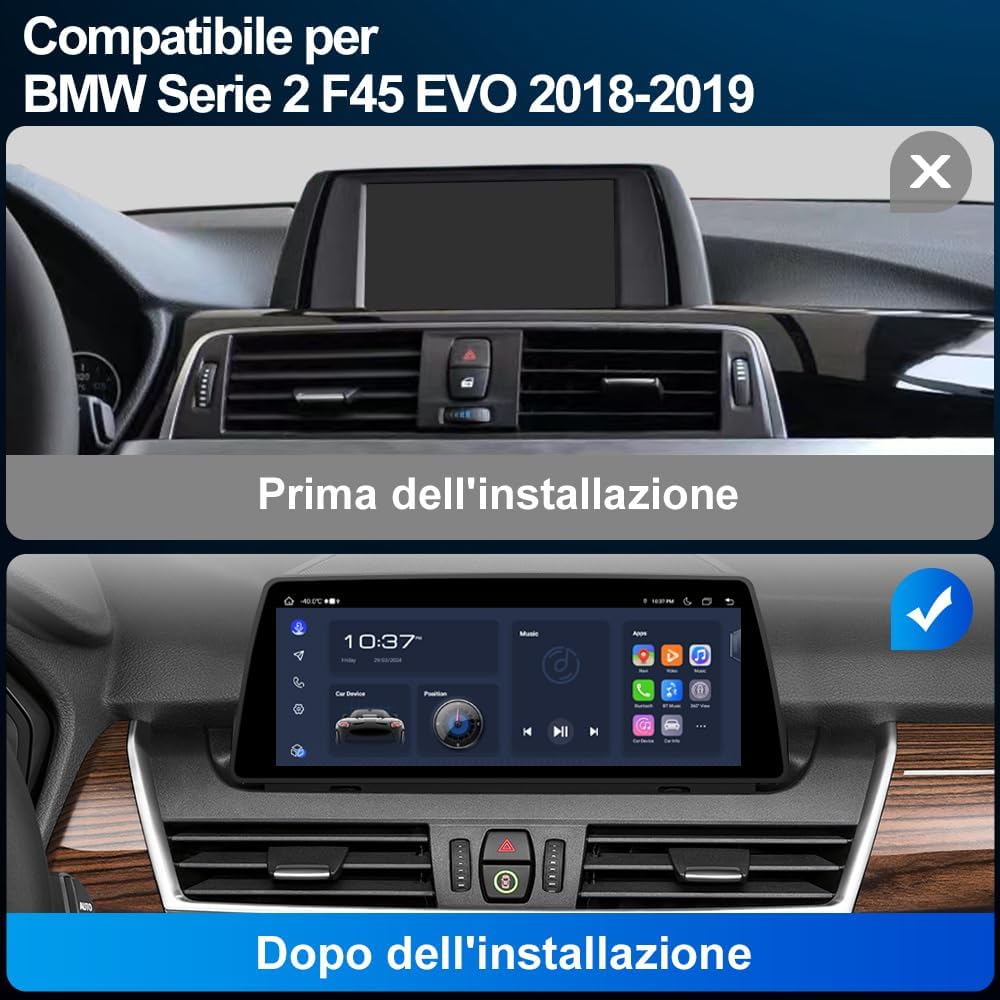
Image: A visual comparison showing the car's dashboard before and after the installation of the AWESAFE 10.25 inch car radio, highlighting the seamless integration.

Image: Details on applicable car models and years (BMW F45 EVO 2018-2019), showing the LVDS 6-pin connector, iDrive controller, and the EVO interface for system identification.

Image: Illustrates different BMW car system interfaces (CCC, CIC, NBT, EVO) to help users identify their vehicle's system for compatibility.
5. Thiết lập và Cài đặt
Installation of the AWESAFE car radio requires careful attention to detail and knowledge of car electronics. It is highly recommended to have the unit installed by a qualified professional.
Kiểm tra trước khi cài đặt:
- Confirm your vehicle is a BMW 2 Series F45 (2018-2019) with an EVO system.
- Đảm bảo ắc quy của xe đã được ngắt kết nối trước khi bắt đầu lắp đặt.
- Gather all necessary tools, including those provided in the package.
Các bước lắp đặt chung (Tham khảo ý kiến chuyên gia để được hướng dẫn chi tiết):
- Carefully remove the original car display and trim panels using the prying tools.
- Disconnect the original cables from the display unit.
- Connect the new AWESAFE car radio's power cable and other necessary cables (AUX, USB, GPS, 4G modules) according to the wiring diagram (not provided in this manual, typically included with the product or available online).
- Install the new display unit into the dashboard, ensuring all connections are secure.
- Nối lại bình ắc quy của xe và kiểm tra chức năng của thiết bị.
- Reassemble the trim panels.
6. Hướng dẫn vận hành
6.1. Android 13 System and Dual System Functionality
The car radio operates on Android 13, offering a modern and intuitive user interface. It features 8GB RAM and 128GB ROM for smooth performance and ampkho le.

Image: A visual representation of the Android 13 system highlighting its 8GB RAM and 128GB ROM specifications.
This unit supports a dual-system operation, allowing you to switch between the original BMW system interface and the new Android 13 system at any time. This ensures that all original car functions and settings are preserved.

Image: Demonstrates how the car radio maintains the original system, including the original CD player, steering wheel controls, speaker, rearview camera, and iDrive controls.
6.2. CarPlay và Android Auto
The multimedia system supports both wired and wireless CarPlay and Android Auto. This allows seamless integration with your smartphone for navigation, music, calls, and messaging.
- Kết nối không dây: Connect your smartphone via Bluetooth and Wi-Fi for a wireless CarPlay or Android Auto experience.
- Kết nối có dây: Use a USB cable to connect your smartphone for a stable wired connection.

Image: The car radio display showing the CarPlay and Android Auto interfaces, with smartphone screens below illustrating the connection.

Image: Illustrates the wireless and wired connection options for CarPlay and Android Auto, showing Bluetooth and USB cable connections.
6.3. Định vị GPS
The unit supports online GPS navigation. Once connected to Wi-Fi or a 4G SIM, you can access various navigation applications directly from the Android system. For optimal GPS signal reception, it is recommended to position the GPS module near the windshield.

Image: The car radio display showing a map for GPS navigation, with location pins and a route highlighted.
6.4. Kết nối Bluetooth
Utilize the built-in Bluetooth for hands-free calling and audio streaming. This feature enhances driving safety by allowing you to make and receive calls without holding your phone, and enjoy your favorite music wirelessly.
- Gọi Bluetooth: Pair your phone to make and receive calls directly from the car radio interface.
- Phát lại nhạc qua Bluetooth: Phát âm thanh từ điện thoại của bạn đến loa xe hơi.

Image: The car radio display showing Bluetooth call interface and music playback, with an incoming call notification on a smartphone.
6.5. 4G SIM Connectivity
The car radio includes a SIM card slot and an integrated 4G antenna, allowing for direct 4G connectivity. This enables online features, app downloads, and real-time navigation without relying on a Wi-Fi hotspot from your phone.
6.6. Chức năng chia đôi màn hình
Chức năng chia màn hình cho phép bạn chạy hai ứng dụng cùng lúc trên màn hình. Ví dụ:ample, you can have navigation on one side and music playback on the other, enhancing convenience and entertainment during your drive.

Image: The car radio display demonstrating the split-screen feature, showing a navigation map on one side and a music player on the other.
6.7. Kết nối Wi-Fi
Connect the car radio to a Wi-Fi network (e.g., from your smartphone's hotspot) to access online content, download applications from the app store, and browse the internet. This provides a larger and safer screen experience compared to using a smartphone while driving.

Image: Illustrates Wi-Fi and phone hotspot connectivity options, showing the car radio display browsing online content and apps.
6.8. Phía sauview Chức năng máy ảnh
Thiết bị hỗ trợ phía sauview camera input (camera not included). When a compatible rearview camera is connected via the Camera IN cable, the display will automatically switch to the camera view when reversing. It also supports parking assistance lines for easier maneuvering.

Image: The car radio display showing a rearview camera feed with parking assistance lines, illustrating the reversing function.
6.9. Maintaining Original Car Information Systems
The AWESAFE car radio is designed to integrate seamlessly while preserving the functionality of your original BMW car systems. This includes:
- Original System Interface: You can switch back to the original BMW interface at any time.
- Đầu đĩa CD nguyên bản: The functionality of your car's original CD player is retained.
- Điều khiển vô lăng: Original steering wheel controls remain fully functional.
- Original Speaker: The car's original speaker system is supported.
- Original iDrive Controls: The iDrive controller maintains its functionality for both original and Android systems.
- Màn hình hiển thị thông tin xe: Important vehicle information such as speed, parking brake status, seatbelt warnings, and oil level can still be accessed.

Image: The car radio display showing various car information systems, including speed, parking brake, seatbelt, general car information, and oil level.
7. Bảo trì
- Vệ sinh: Hãy dùng khăn mềm, khô để lau màn hình và bên ngoài thiết bị. Tránh sử dụng chất tẩy rửa có tính ăn mòn hoặc dung môi.
- Cập nhật phần mềm: Thường xuyên kiểm tra các bản cập nhật phần mềm để đảm bảo hiệu suất tối ưu và truy cập vào các tính năng mới. Thông thường, việc cập nhật có thể được thực hiện qua Wi-Fi.
- Kết nối cáp: Hãy đảm bảo tất cả các dây cáp được kết nối chắc chắn. Các kết nối lỏng lẻo có thể dẫn đến các sự cố không liên tục.
KHAI THÁC. Xử lý sự cố
Nếu gặp bất kỳ sự cố nào, vui lòng tham khảo các vấn đề và giải pháp thường gặp sau đây:
| Vấn đề | Nguyên nhân có thể | Giải pháp |
|---|---|---|
| Không có điện | Dây nguồn bị lỏng, cầu chì bị cháy, đấu dây sai. | Check power cable connections. Inspect vehicle fuses. Verify wiring with a professional. |
| Không có âm thanh | Volume too low, mute activated, loose audio cables, incorrect audio source. | Increase volume. Check mute settings. Ensure AUX/audio cables are connected. Select correct audio source. |
| Tín hiệu GPS yếu/mất tín hiệu | Vị trí đặt ăng-ten GPS, nhiễu môi trường. | Ensure GPS module is placed in an open area (e.g., near windshield). Avoid areas with high buildings or tunnels. |
| CarPlay/Android Auto không kết nối | Bluetooth/Wi-Fi off, incorrect phone settings, faulty USB cable. | Ensure Bluetooth and Wi-Fi are enabled on both devices. Check phone settings for CarPlay/Android Auto. Try a different USB cable for wired connection. |
| Màn hình cảm ứng không phản hồi | Software glitch, screen protector interference. | Restart the unit. Remove and reapply screen protector if applicable. |
If the problem persists after trying these solutions, please contact AWESAFE customer support for further assistance.
9. Thông số kỹ thuật
| Tính năng | Đặc điểm kỹ thuật |
|---|---|
| Thương hiệu | TUYỆT VỜI |
| Số hiệu mẫu | 0d3c4775-641c-43d1-a559-c2e5a609a7ff |
| Hệ điều hành | Android 13 |
| ĐẬP | 8GB |
| Bộ nhớ trong | 128GB |
| Kích thước màn hình | 10.25 inch |
| Công nghệ kết nối | Bluetooth, Wi-Fi, 4G SIM |
| Tính năng đặc biệt | Android Auto, Apple CarPlay, GPS Navigation, Split Screen, Rearview Hỗ trợ máy ảnh |
| Thiết bị tương thích | BMW F45 2018-2019 EVO System |
| Chế độ đầu ra âm thanh | Âm thanh nổi |
| Cấu hình kênh âm thanh vòm | 5.1 |
| Mã hóa video | H.264, H.265/HEVC, MPEG-4, v.v. |
| Phương pháp kiểm soát | Ứng dụng, Chạm |
| Định dạng | 4K |
| Mã số UPC | 759973852672 |
| Nước xuất xứ | Trung Quốc |
10. Bảo hành và Hỗ trợ
This AWESAFE car radio comes with a Bảo hành 1 năm kể từ ngày mua. Bảo hành này bao gồm các lỗi sản xuất và trục trặc trong quá trình sử dụng bình thường.
Bảo hành không bao gồm những gì:
- Damage caused by improper installation or unauthorized repairs.
- Damage caused by accidents, misuse, abuse, neglect, or external causes.
- Thiệt hại về mỹ phẩm, bao gồm nhưng không giới hạn ở vết xước, vết lõm và nhựa vỡ trên cổng.
- Damage caused by operating the product outside the permitted or intended uses described by AWESAFE.
Hỗ trợ khách hàng:
For technical support, warranty claims, or any questions regarding your AWESAFE car radio, please contact the seller or AWESAFE customer service through the platform where you purchased the product. Please have your purchase receipt and product model number ready when contacting support.