
1. Giới thiệu
Cảm ơn bạn đã muaasing the EMB Home PKL5000 Rechargeable PA Speaker. This powerful and versatile speaker system is designed to deliver high-quality audio for various events, including parties, karaoke, and public announcements. Featuring a 15-inch woofer, Bluetooth connectivity, USB/SD card playback, and a wireless microphone, the PKL5000 offers a comprehensive audio solution. Please read this manual thoroughly before operating the device to ensure proper use and to maximize its performance and longevity.
2. Hướng dẫn an toàn quan trọng
- Đọc kỹ hướng dẫn trước khi sử dụng sản phẩm.
- Giữ lại hướng dẫn này để tham khảo sau này.
- Không để loa tiếp xúc với nước, hơi ẩm hoặc nhiệt độ quá cao.
- Không được chặn bất kỳ lỗ thông gió nào.
- Chỉ sử dụng các phụ kiện/tập tin đính kèm do nhà sản xuất chỉ định.
- Hãy rút phích cắm loa khi có giông bão hoặc khi không sử dụng trong thời gian dài.
- Hãy giao việc bảo dưỡng cho nhân viên kỹ thuật có trình độ chuyên môn. Không tự ý sửa chữa thiết bị.
- Đảm bảo nguồn điện phù hợp với voltagcác yêu cầu của người nói.
- Hãy đặt loa tránh xa các nguồn nhiệt như lò sưởi, lỗ thông hơi, bếp hoặc các thiết bị khác sinh nhiệt.
3. Nội dung gói hàng
Xác minh rằng tất cả các mục đều có trong gói hàng:
- EMB Home PKL5000 PA Speaker
- Micrô không dây UHF
- Đế loa ba chân
- Điều khiển từ xa
- Bộ đổi nguồn/Cáp sạc
- Hướng dẫn sử dụng
4. Sản phẩm hếtview: Rear Control Panel
Familiarize yourself with the various controls and ports located on the rear panel of your PKL5000 speaker.

Hình ảnh: Chi tiết view of the EMB Home PKL5000 speaker's rear control panel, showing inputs, outputs, and adjustment knobs.
- Bảng điều khiển: Main interface for settings and adjustments.
- Mic in Vol: Adjusts the volume for microphone inputs.
- Mic in 6.5mm Jack: Input for wired microphones.
- Mic/Guitar 6.5mm Jack: Dual-purpose input for microphones or guitars.
- Mic/Guitar Switch: Toggles between microphone and guitar input modes.
- XLR Cable Connector: Professional audio input for balanced signals.
- DC12V Battery Input: Port for external 12V DC power source.
- Quyền lực: Công tắc nguồn chính của thiết bị.
- Nguồn điện AC: Input for the AC power cable to power and charge the speaker.
- Line in Vol: Adjusts the volume for line-level inputs.
- Tiếng vọng: Điều khiển hiệu ứng tiếng vọng cho đầu vào micro.
- Đầu vào AUX: Đầu vào phụ 3.5 mm cho các thiết bị âm thanh bên ngoài.
- Đầu vào dòng RCA: Stereo RCA inputs for external audio sources.
- Dòng ra: Audio output to connect to another speaker or audio system.
5. Hướng dẫn cài đặt
5.1 Giải nén và đặt
- Cẩn thận loại bỏ tất cả các thành phần khỏi bao bì.
- Place the speaker on a stable, flat surface. For optimal sound projection and stability, use the included tripod stand. Ensure the stand is fully extended and locked before placing the speaker.
5.2 Bật nguồn và sạc
The PKL5000 speaker can operate on AC power or its internal rechargeable battery.
- Nguồn điện AC: Connect the supplied power cable to the AC Power input on the rear panel and then to a standard wall outlet.
- Sạc: When connected to AC power, the internal battery will automatically begin charging. A full charge takes approximately 4.5 hours.
- Tuổi thọ pin: A fully charged battery provides approximately 5 hours of playback time, depending on volume and usage.

Image: The EMB Home PKL5000 speaker with indicators for a charging time of 4.5 hours and a play time of 5 hours.
6. Hướng dẫn vận hành
6.1 Hoạt động cơ bản
- Turn on the speaker using the 'Power' switch on the rear panel.
- Adjust the main volume knob to a low level before playing audio.
6.2 Kết nối Bluetooth
Để kết nối thiết bị của bạn qua Bluetooth:
- Đảm bảo loa đã được bật nguồn.
- Press the 'Mode' button on the control panel or remote until 'Bluetooth' mode is selected. The display will show 'BLUE' and a pairing indicator will flash.
- Trên thiết bị di động của bạn, bật Bluetooth và tìm kiếm các thiết bị có sẵn.
- Select 'EMB PKL5000' from the list. Once connected, the speaker will emit a confirmation tone, and the pairing indicator will stop flashing.
- Bây giờ bạn có thể phát âm thanh từ thiết bị của mình qua loa.

Image: A smartphone displaying the Bluetooth icon, indicating a wireless connection to the EMB Home PKL5000 speaker, with a range of up to 30 feet.
6.3 Phát lại qua USB/thẻ SD
To play audio from a USB drive or SD card:
- Insert a USB drive or SD card into the corresponding slot on the control panel.
- Loa sẽ tự động chuyển sang chế độ USB/SD và bắt đầu phát âm thanh tương thích. files. If not, press the 'Mode' button to select USB/SD.
- Use the playback controls (Play/Pause, Next, Previous) on the control panel or remote to manage your music.
6.4 Sử dụng micro không dây
The included UHF wireless microphone is pre-paired with the speaker.
- Insert batteries into the wireless microphone.
- Bật micrô.
- Adjust the 'Mic in Vol' knob on the speaker's control panel to control the microphone's volume.
- Use the 'Echo' knob to add an echo effect to the microphone's sound.
6.5 Chế độ Âm thanh nổi không dây thực sự (TWS)
To connect two PKL5000 speakers for a stereo sound experience:
- Ensure both PKL5000 speakers are powered on and in Bluetooth mode.
- On one speaker (this will be your primary speaker), press and hold the 'TWS' button (or a similar pairing button, refer to the speaker's display for 'BT Mode ON' confirmation).
- Loa chính sẽ tìm kiếm loa phụ. Sau khi kết nối, cả hai loa sẽ phát ra âm báo xác nhận.
- Bây giờ, hãy kết nối thiết bị di động của bạn với loa chính qua Bluetooth như mô tả trong mục 6.2. Âm thanh sẽ phát ở chế độ âm thanh nổi qua cả hai loa.

Image: Two EMB Home PKL5000 speakers positioned apart, illustrating their ability to wirelessly connect up to 30 feet for a stereo sound experience.
6.6 EQ Modes and Party Lights
The PKL5000 features multiple EQ modes to optimize sound for different genres and integrated party lights.
- Chế độ EQ: Use the 'EQ' button on the control panel or remote to cycle through preset equalization settings (e.g., Pop, Rock, Jazz, Classic, Flat).
- Đèn tiệc: The speaker features translucent cabinet lighting and 360-degree motion lights. These lights automatically activate when the speaker is powered on. Use the dedicated 'Light' button (if available) or refer to the remote control for light mode adjustments. Note that the LED light mode may reset to flash-color mode upon power cycling.

Image: The EMB Home PKL5000 speaker highlighting its 360-degree surround cabinet party lights, designed to enhance the party atmosphere.

Image: The EMB Home PKL5000 speaker showcasing its dynamic 360-degree motion lights, creating a vibrant visual effect.
7. Bảo trì
7.1 Vệ sinh
- Always unplug the speaker from the power source before cleaning.
- Hãy dùng một miếng vải mềm, khô để lau sạch các bề mặt bên ngoài của loa.
- Không sử dụng chất tẩy rửa có tính mài mòn, sáp hoặc dung môi vì chúng có thể làm hỏng lớp hoàn thiện.
- Keep the speaker grille free of dust and debris for optimal sound quality.
7.2 Lưu trữ
- Bảo quản loa ở nơi khô ráo, thoáng mát, tránh ánh nắng trực tiếp và nhiệt độ cao.
- If storing for an extended period, ensure the battery is partially charged (around 50%) to prolong its lifespan. Recharge the battery every few months to prevent deep discharge.
KHAI THÁC. Xử lý sự cố
| Vấn đề | Nguyên nhân có thể | Giải pháp |
|---|---|---|
| Không có điện | Power cable not connected; Battery drained; Power switch off | Ensure power cable is securely connected and plugged in. Charge the battery. Turn the power switch ON. |
| Không có âm thanh | Âm lượng quá nhỏ; Chế độ nhập liệu không chính xác; Thiết bị chưa được kết nối | Increase master volume and input volume. Select the correct input mode (Bluetooth, USB, AUX). Ensure your device is properly connected. |
| Bluetooth không ghép nối | Loa không ở chế độ ghép nối; Thiết bị quá xa; Nhiễu | Ensure speaker is in Bluetooth pairing mode. Move device closer to speaker. Turn off other Bluetooth devices. |
| Micrô không hoạt động | Microphone off; Batteries low/dead; Mic volume low | Turn on the microphone. Replace batteries. Increase 'Mic in Vol' knob. |
| Chế độ TWS không kết nối | Incorrect TWS pairing procedure; Speakers too far apart | Ensure both speakers are in Bluetooth mode. Follow TWS pairing steps carefully (Section 6.5). Keep speakers within 30 feet. |
9. Thông số kỹ thuật
| Tính năng | Chi tiết |
|---|---|
| Người mẫu | PKL5000 |
| Công suất đầu ra | 5000W (Cao điểm) |
| Kích thước loa trầm | 15-inch Steel Frame |
| Tài xế | 1-inch Titanium Diaphragm |
| Kết nối | Bluetooth, USB, SD Card, AUX (3.5mm), RCA, XLR |
| Micro không dây | UHF |
| Nguồn điện | AC Power, Rechargeable Battery |
| Thời gian sạc | Xấp xỉ 4.5 giờ |
| Thời gian chơi | Approx. 5 hours (battery) |
| Kích thước (Xấp xỉ) | 72.7cm (Width) x 439cm (Height) x 47.3cm (Depth) - Note: Height value seems unusually large, please verify actual product dimensions. |
| Kiểu lắp đặt | Pole Mount (with included tripod stand) |
| Mã số UPC | 783501154877 |
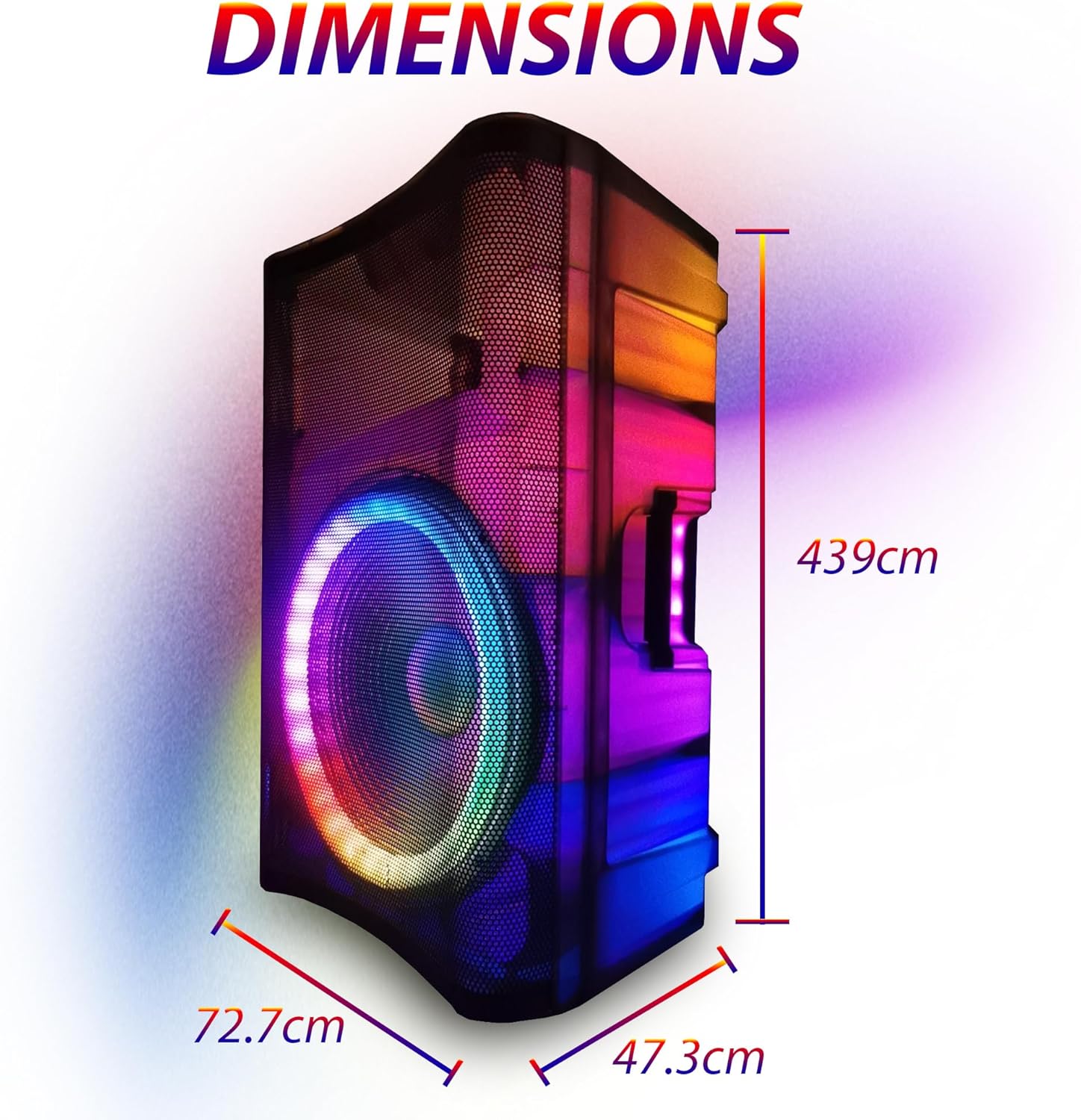
Image: Diagram showing the approximate dimensions of the EMB Home PKL5000 speaker: 72.7cm width, 439cm height, and 47.3cm depth.
10. Bảo hành và Hỗ trợ
EMB products are designed for reliability and performance. For warranty information, technical support, or service inquiries, please refer to the warranty card included with your product or contact EMB customer support through their official website or the retailer where the product was purchased. Please have your model number (PKL5000) and proof of purchase ready when contacting support.