
1. Giới thiệu
The PEAKMETER PM2016S is a compact and intelligent digital clamp meter designed for accurate electrical measurements. This instrument features a liquid crystal display with a maximum count value of 5999 and a backlight function for improved visibility in various environments. It offers a range of measurement functions with automatic range selection, making it suitable for both beginners and experienced users. The PM2016S can measure AC and DC voltage, AC current, resistance, frequency, and also includes continuity testing, Non-Contact Voltage (NCV) detection, and V/Ω/A auto-scan capabilities. Its portable design ensures ease of use and convenience.
2. Thông tin an toàn
WARNING: To avoid electric shock or personal injury, read and understand all instructions and safety information before using this instrument.
- Luôn đảm bảo thiết bị hoạt động tốt trước khi sử dụng.
- Không áp dụng nhiều hơn mức định mứctage, as marked on the instrument, between the terminals or between any terminal and earth ground.
- Hãy cẩn thận khi làm việc với voltagtrên 30V AC RMS, 42V đỉnh hoặc 60V DC. Các vol nàytagcó thể gây ra nguy cơ điện giật.
- Do not use the instrument if it appears damaged or if the insulation is compromised.
- Ensure the test leads are in good condition, without any cracks or breaks in the insulation.
- Luôn ngắt kết nối dây thử ra khỏi mạch trước khi thay đổi chức năng.
- Thay pin ngay khi có dấu hiệu pin yếu để đảm bảo kết quả đo chính xác.
- Tuân thủ các quy tắc an toàn của địa phương và quốc gia.
This instrument complies with EN61010-1, EN61010-2-033, EN61326, CAT. III 600V safety ratings.
3. Tính năng sản phẩm
- High Quality Jaw Head: Durable and precise clamp mechanism for current measurement.
- Clear LCD Display and Backlight: Easy-to-read 6000-count display with backlight for visibility in various lighting conditions.
- Hoạt động dễ dàng: Simple, intuitive controls, often requiring just one click for common functions.
- Tự động đo khoảng cách: Automatically selects the appropriate measurement range, simplifying operation.
- Giữ dữ liệu: Freezes the displayed reading for convenient recording.
- Không tiếp xúc Voltage (NCV) Phát hiện: Phát hiện an toàn AC voltage không tiếp xúc trực tiếp.
- V/Ω/A Auto Scan: Automatically identifies and measures voltage, resistance, or current.
- Kiểm tra tính liên tục: Checks for electrical continuity with an audible buzzer.
- Đo tần số: Measures frequency via clamp hoặc tậptage đầu vào.
- Nhỏ gọn và nhẹ: Handheld design for portability and ease of use.
- Tự động tắt: Automatically shuts down after 10 minutes of inactivity to conserve battery life.
4. Nội dung gói hàng

Gói hàng thường bao gồm các mục sau:
- Hộp màu (Bao bì)
- PEAKMETER PM2016S Digital Clamp Mét
- Dây dẫn thử nghiệm (Đỏ và Đen)
- AAA Batteries (2x 1.5V)
- Hướng dẫn sử dụng
Description: This image displays the complete contents of the PEAKMETER PM2016S Digital Clamp Multimeter package, including the device itself, test leads, batteries, and the user manual, all presented within its retail packaging.
5. Thiết lập
5.1 Lắp đặt pin
The PM2016S requires two 1.5V AAA batteries. To install or replace batteries:
- Đảm bảo đồng hồ đo đã tắt.
- Xác định vị trí nắp ngăn chứa pin ở mặt sau của máy đo.
- Sử dụng tuốc nơ vít để mở ngăn chứa pin.
- Insert the two AAA batteries, observing the correct polarity (+ and -).
- Lắp lại nắp ngăn chứa pin và cố định nó bằng vít.
5.2 Kết nối dây dẫn thử nghiệm
Đối với voltage, resistance, frequency (voltage), and continuity measurements, connect the test leads:
- Cắm dây thử màu đen vào giắc cắm đầu vào "COM" (chung).
- Insert the red test lead into the "VΩ" input jack.
6. Hướng dẫn vận hành
The PM2016S features an auto-ranging function, simplifying most measurements. Press the red power button to turn the meter on or off. The meter will typically start in auto-scan mode (V/Ω/A Auto Scan).
6.1 Âm lượng AC/DCtage Đo lường
- Kết nối các dây dẫn thử nghiệm như mô tả trong Phần 5.2.
- Turn on the meter. It will automatically detect AC or DC voltage.
- Chạm đầu dò màu đỏ và đen vào các điểm trong mạch mà bạn muốn đo điện áp.tage.
- Đọc tậptaggiá trị e trên màn hình LCD.
Description: This video demonstrates the unboxing of the PEAKMETER PM2016S and its accessories, followed by a practical demonstration of measuring AC voltage using the test leads. The user connects the leads to a power outlet and the meter displays the voltage đang đọc.
6.2 Đo dòng điện xoay chiều (Clamp Hàm số)
- Ensure the meter is on.
- Nhấn nút clamp cò súng để mở hàm.
- Enclose a single conductor (not a bundle of wires) within the jaws. Ensure the jaws are fully closed.
- The meter will display the AC current reading.
Description: This video demonstrates the AC current measurement function of the PEAKMETER PM2016S. The user clamps the meter around a power cable connected to an appliance (kettle), and the meter displays the current draw.
6.3 Đo tần số
The PM2016S can measure frequency in two ways:
- Via Test Leads (Voltage Frequency): Trong voltage measurement mode, the meter can display frequency. Press the "Hz/NCV" button to toggle to frequency display.
- Via Clamp (Current Frequency): Khi đo dòng điện xoay chiều bằng clamp, the meter can also display the frequency of the current. Press the "Hz/NCV" button to toggle to frequency display.

Description: This image shows the clear LCD display of the PM2016S, highlighting its backlight feature and the various measurement indicators, including frequency (Hz).
6.4 tập không tiếp xúctage (NCV) Phát hiện
- Press the "Hz/NCV" button to activate NCV mode. The display will show "NCV".
- Move the top end of the meter near a live AC voltagnguồn e.
- The meter will beep and the NCV indicator will light up, with the frequency of beeps and light increasing khi nó tiến gần đến thể tíchtagnguồn e.
Description: This video demonstrates the NCV (Non-Contact Voltage) function of the PEAKMETER PM2016S. The user activates NCV mode and brings the meter near a power outlet, showing the audible and visual alerts when voltage được phát hiện.
6.5 Kiểm tra liên tục
- Kết nối các dây dẫn thử nghiệm như mô tả trong Phần 5.2.
- The meter will automatically enter continuity mode if resistance is low.
- Chạm các đầu dò thử nghiệm vào hai điểm bạn muốn kiểm tra tính liên tục.
- If there is continuity (resistance less than 30Ω), the buzzer will sound.
6.6 Giữ dữ liệu và đèn nền
- Giữ dữ liệu: Press the "HOLD" button (often combined with the backlight button) to freeze the current reading on the display. Press again to release.
- Đèn nền: Press and hold the "HOLD" button (or a dedicated backlight button if present) to turn the backlight on or off.

Description: This image highlights the user-friendly design of the PM2016S, showing the main power button and other function buttons, emphasizing its easy operation.
7. Bảo trì
7.1 Vệ sinh
Lau sạch vỏ máy bằng quảng cáoamp vải và chất tẩy rửa nhẹ. Không sử dụng chất mài mòn hoặc dung môi. Giữ cho các đầu nối đầu vào không bị bẩn và ẩm ướt.
7.2 Thay thế pin
When the low battery indicator appears on the display, replace the batteries as described in Section 5.1. Remove batteries if the meter is not used for an extended period to prevent leakage.
KHAI THÁC. Xử lý sự cố
- Không hiển thị/Đồng hồ không bật: Kiểm tra việc lắp đặt pin và đảm bảo pin không bị cạn. Thay thế nếu cần thiết.
- Đọc không chính xác: Ensure test leads are properly connected. Check for damaged leads. Verify the correct measurement function is selected (though auto-ranging minimizes this). Ensure the clamp jaws are fully closed for current measurements.
- "OL" hoặc Chỉ báo quá tải: The measured value exceeds the meter's range. Select a higher range if available, or ensure the input is within the meter's specifications.
- Không phát hiện NCV: Ensure NCV mode is active. The NCV sensor is typically at the top of the clamp head; ensure it is close to the AC source.
9. Thông số kỹ thuật
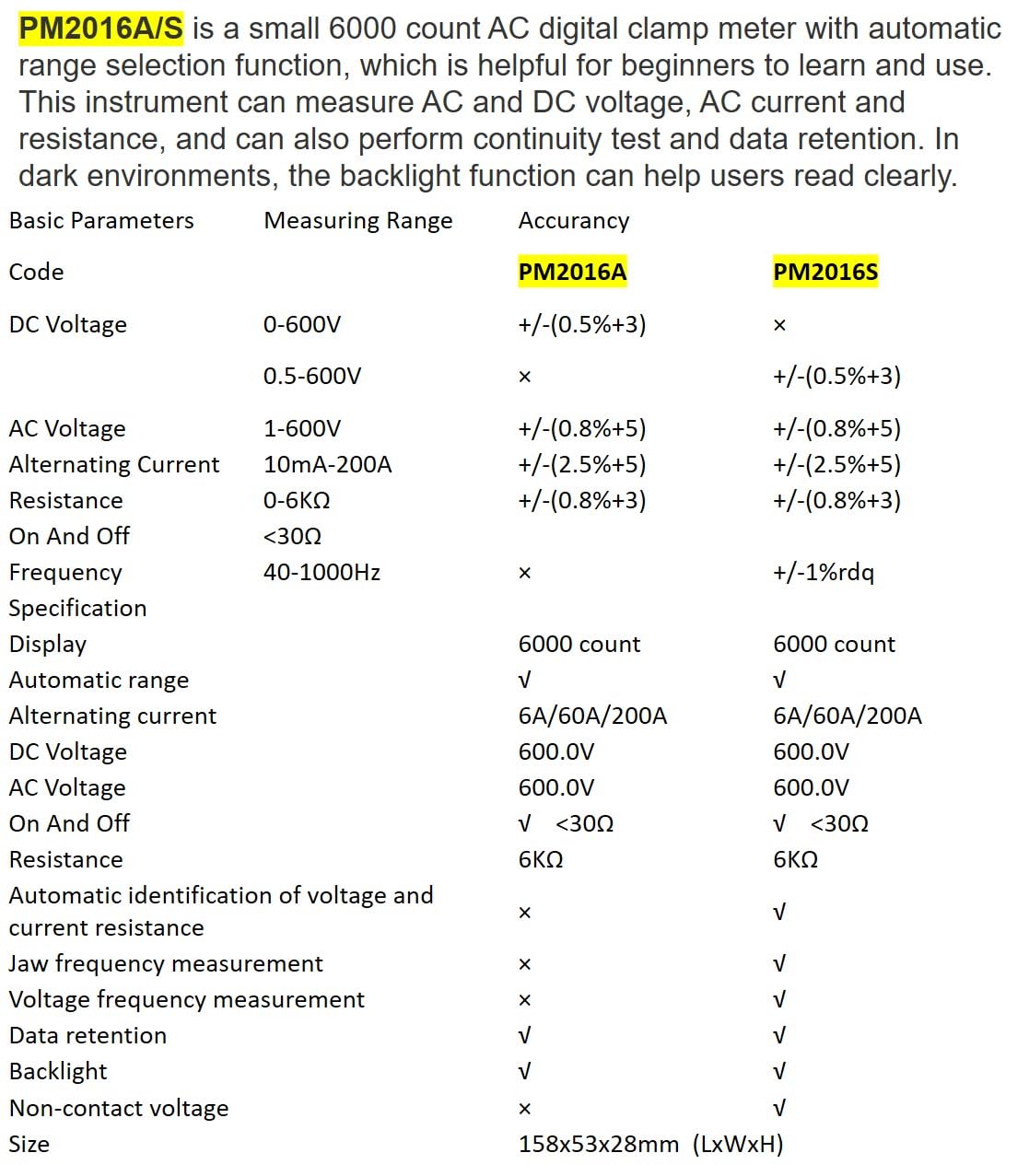
Description: This image presents a comprehensive table detailing the basic parameters, measuring ranges, and accuracy for both the PM2016A and PM2016S models, including features like display count, auto-ranging, and NCV.
| Tham số | Range (PM2016S) | Accuracy (PM2016S) |
|---|---|---|
| Tập DCtage | 0.5~600V | ±(0.5%+3) |
| điện áp xoay chiềutage | 1.0~600V | ±(0.8%+5) |
| Dòng điện xoay chiều | 6A/60A/200A | ±(2.5%+8) |
| Sức chống cự | 0 ~ 6kΩ | ±(0.8%+3) |
| Tính thường xuyên | 60Hz~1000Hz | ±(1.0%+5) |
| Trưng bày | 6000 lần đếm | |
| Phạm vi tự động | Đúng | |
| Tính liên tục | <30Ω | |
| V/Ω/A Auto Scan | Đúng | |
| Frequency (Clamp) | Đúng | |
| Frequency (Voltage) | Đúng | |
| Giữ dữ liệu | Đúng | |
| Đèn nền | Đúng | |
| NCV | Đúng | |
| Nguồn điện | 2*1.5V AAA Batteries | |
| Trọng lượng tịnh | 122.4g (không có pin) | |
| Kích cỡ | 158mm*55mm*29mm | |
| Kích thước hàm | Ø20mm | |
| Xếp hạng an toàn | EN61010-1, EN61010-2-033, EN61326, CAT. III 600V | |

Description: This image provides a visual representation of the physical dimensions of the PEAKMETER PM2016S, including its length, width, and jaw opening size, along with its weight.
10. Bảo hành và Hỗ trợ
The PEAKMETER PM2016S Digital Clamp Multimeter comes with a Bảo hành 1 năm kể từ ngày mua. Bảo hành này bao gồm các lỗi về vật liệu và tay nghề trong quá trình sử dụng bình thường.
For technical support, warranty claims, or service inquiries, please contact your retailer or the manufacturer directly. Keep your purchase receipt as proof of purchase for warranty purposes.