Giới thiệu
This manual provides instructions for the Generic replacement remote control designed for various Bauhn Smart UHD LED HDTV Android TV models. This remote functions as an infrared (IR) replacement and does not require complex pairing. For optimal compatibility, ensure your original remote control visually matches the replacement remote shown in this manual.
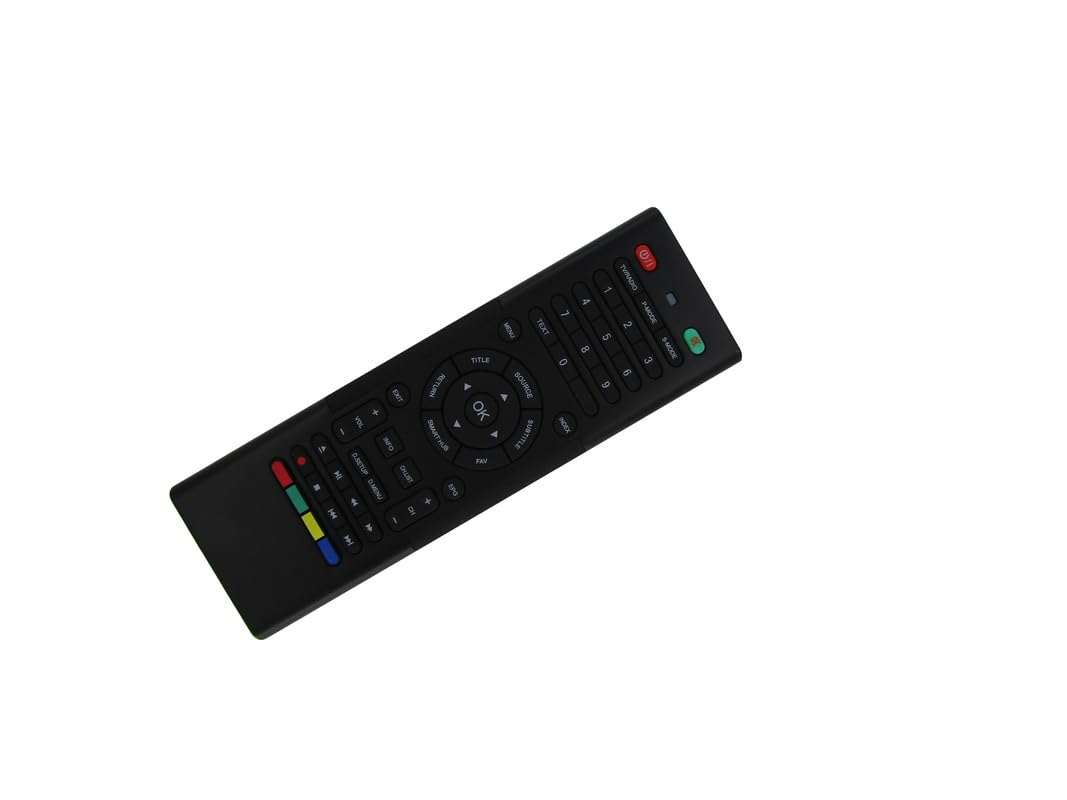
Image: The Generic replacement remote control, displaying both its primary button-side and the secondary QWERTY keyboard-side.
Cài đặt
1. Lắp đặt pin
- Xác định vị trí ngăn chứa pin ở mặt sau của điều khiển từ xa.
- Trượt mở nắp pin.
- Lắp hai (2) pin AAA, đảm bảo đúng cực (+/-) như được chỉ dẫn bên trong ngăn chứa.
- Đóng chặt nắp pin.

Hình ảnh: Phía sau view of the remote control with the battery cover detached, revealing the empty battery compartment for AAA batteries.
2. Sử dụng ban đầu
This remote control is an infrared (IR) replacement and typically does not require any programming or pairing. Once batteries are installed, point the remote directly at your Bauhn TV and begin operation. Ensure there are no obstructions between the remote and the TV's IR receiver.
Hướng dẫn sử dụng
The remote features a dual-sided design: a standard TV remote layout on one side and a QWERTY keyboard on the other for easier text input.
Front Side: Standard TV Controls
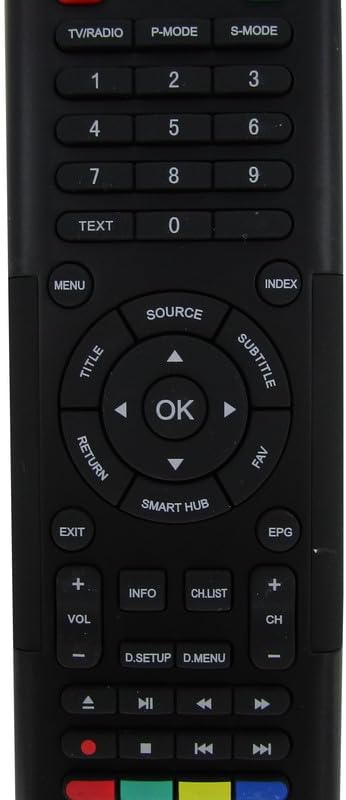
Hình ảnh: Chi tiết view of the front face of the remote control, highlighting the power, channel, volume, navigation, and media control buttons.
- Nút nguồn: Bật hoặc tắt TV.
- TRUYỀN HÌNH / RADIO: Chuyển đổi giữa chế độ TV và Radio.
- P-MODE / S-MODE: Picture Mode and Sound Mode selection.
- Các nút số (0-9): Lựa chọn kênh trực tiếp.
- CHỮ: Truy cập dịch vụ teletext.
- THỰC ĐƠN: Mở menu chính của TV.
- NGUỒN: Chọn nguồn đầu vào (HDMI, AV, v.v.).
- Navigation Pad (Up/Down/Left/Right) & OK: Điều hướng menu và xác nhận lựa chọn.
- TITLE / SUBTITLE: Accesses title or subtitle options.
- TRỞ LẠI / RA: Trở về màn hình trước đó hoặc thoát khỏi menu.
- TRUNG TÂM THÔNG MINH: Accesses the TV's smart features/apps.
- EPG: Hướng dẫn Chương trình Điện tử.
- VÒNG +/-: Điều chỉnh âm lượng.
- CH +/-: Thay đổi kênh.
- THÔNG TIN: Hiển thị thông tin chương trình.
- CH.DANH SÁCH: Hiển thị danh sách kênh.
- Các nút điều khiển đa phương tiện (Phát, Tạm dừng, Dừng, Tua lại, Tua nhanh): Kiểm soát phát lại phương tiện.
- Các nút màu (Đỏ, Xanh lục, Vàng, Xanh lam): Các chức năng có thể khác nhau tùy thuộc vào menu hoặc ứng dụng trên TV.
Rear Side: QWERTY Keyboard
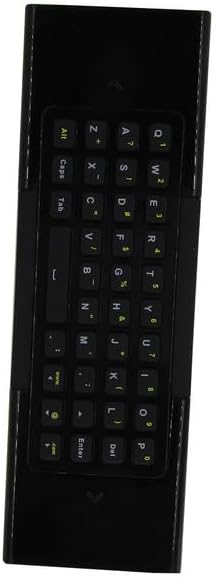
Hình ảnh: Chi tiết view of the reverse side of the remote control, featuring a full QWERTY keyboard for text input.
The QWERTY keyboard on the back of the remote allows for convenient text entry in smart TV applications, web browsers, and search functions. Simply flip the remote to use the keyboard. The remote may automatically detect which side is facing up and activate the corresponding input mode.
BẢO TRÌ
Thay thế pin
Thay pin khi điều khiển từ xa phản hồi chậm hoặc ngừng hoạt động. Luôn thay cả hai pin AAA cùng lúc bằng pin mới. Không dùng lẫn pin cũ và pin mới, hoặc dùng chung các loại pin khác nhau.
Vệ sinh
Để vệ sinh điều khiển từ xa, hãy sử dụng một miếng vải mềm, khô. Đối với những vết bẩn cứng đầu, hãy chà nhẹ.ampLàm ướt khăn bằng nước. Tránh sử dụng hóa chất mạnh, chất tẩy rửa có tính mài mòn hoặc độ ẩm quá mức, vì chúng có thể làm hỏng bề mặt hoặc các bộ phận bên trong của điều khiển từ xa.
Xử lý sự cố
- Điều khiển từ xa không phản hồi:
- Kiểm tra xem pin đã được lắp đúng cực chưa.
- Thay thế pin cũ bằng pin AAA mới.
- Ensure there is a clear line of sight between the remote's IR emitter and the TV's IR receiver. Remove any obstructions.
- Hãy đảm bảo rằng điều khiển từ xa đang hướng thẳng vào TV.
- Một số chức năng không hoạt động:
- This is a replacement remote. While designed for broad compatibility, it may not replicate every single function of your original remote, especially for highly specific or proprietary features.
- Ensure your TV model is among those listed as compatible. If your specific model is not listed, full functionality cannot be guaranteed.
- Làm việc từ xa không liên tục:
- Điều này có thể cho thấy pin yếu. Hãy thay pin mới.
- Kiểm tra xem có nguồn sáng mạnh nào (như ánh nắng trực tiếp hoặc đèn huỳnh quang sáng) có thể gây nhiễu tín hiệu hồng ngoại hay không.
Thông số kỹ thuật
| Thương hiệu | Chung chung |
| Nhà sản xuất | Thử dễ dàng |
| Thiết bị tương thích | Television (Bauhn Smart UHD LED HDTV Android TV models) |
| Số lượng thiết bị được hỗ trợ tối đa | 1 |
| Pin cần thiết | 2 pin AAA |
| Tính năng đặc biệt | Ergonomic, Replacement, QWERTY Keyboard |
| Màu sắc | Đen |
| ASIN | B0D7MFQJMX |


