
Giới thiệu
This manual provides comprehensive instructions for the setup, operation, maintenance, and troubleshooting of your QRD Spark N5 Wireless Controller. Please read this manual carefully before using the product to ensure optimal performance and longevity.
Sản phẩm trênview
The QRD Spark N5 Wireless Controller is designed for a versatile gaming experience across multiple platforms. It features advanced Hall Effect technology for precise control, customizable macro functions, and immersive vibration feedback.

Hình 1: Đằng trước view of the QRD Spark N5 Wireless Controller, showcasing its ergonomic design and illuminated buttons.
Các tính năng chính:
- Hall Effect Joysticks & Analog Triggers: Provides drift-free and highly accurate control with less than 0.1mm accuracy.
- Bàn di chuột đa chức năng: Supports touch control for PS4 and acts as a mouse on other compatible platforms.
- 6-Axis Gyroscope & Motion Sensor: Integrated for immersive gaming experiences and precise motion control.
- Động cơ rung kép: Adjustable vibration levels (0%, 30%, 70%, 100%) for realistic feedback.
- Macro Back Paddles (N1 & N2): Customizable for assigning complex shortcuts and executing multiple actions.
- Chức năng Turbo: Adjustable turbo speed with auto and manual modes for various buttons.
- 3.5mm Audio Port, Speaker & Mic: Enables audio output and communication during gameplay.
- Wired & Wireless Compatibility: Supports Bluetooth 5.3 for wireless connection and USB-C for wired connection (D-input default, X-input available).
Thiết lập và kết nối
Sạc bộ điều khiển:
Before first use, fully charge the controller using the provided USB-C cable. Connect the USB-C end to the controller and the USB-A end to a compatible power source (e.g., console, PC, USB wall adapter).
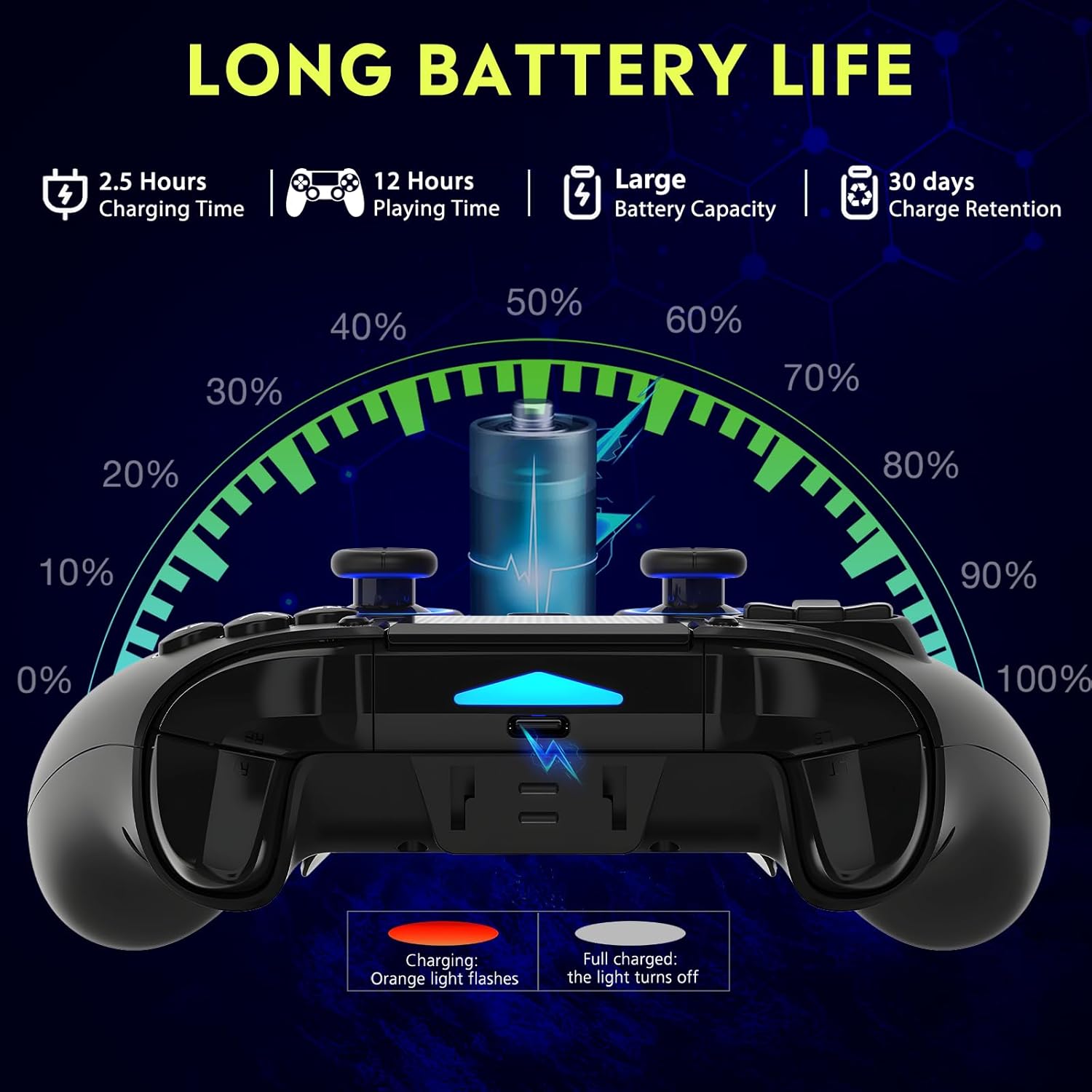
Hình 2: Battery life illustration. The orange light flashes during charging and turns off when fully charged. A full charge takes approximately 2.5 hours and provides up to 12 hours of playing time.
Kết nối không dây (Bluetooth 5.3):
The controller supports wireless connection via Bluetooth 5.3 for PS4, PS3, PS2, Steam Deck, PC (Windows/macOS), iOS, and Android TV Box/phones. For PS5 compatibility, a separate QRD Wireless Converter is required.

Hình 3: Khả năng tương thích hơnview showing the controller connecting to Windows, PS4, Steam, Mobile, PS3.
- Đảm bảo bộ điều khiển đã được sạc.
- Turn on the controller by pressing the "Q" (Home) button.
- On your device, navigate to Bluetooth settings.
- Select "Spark N5" or similar from the list of available devices to pair.
- Sau khi ghép nối, các đèn báo trên bộ điều khiển sẽ ổn định.
Ghi chú: For PS5 games, an additional QRD Wireless Converter is necessary. This converter allows the Spark N5 controller to function with PS5 titles, expanding your gaming options.
PHIM 1: This video demonstrates the QRD Spark N5 Wireless Controller's compatibility with various game devices, including setup and initial connection steps.
Kết nối có dây (USB-C):
Connect the controller directly to your PC or console using the provided USB-C cable. The controller will operate in D-input mode by default. X-input mode is available for PC connections only.
Hướng dẫn sử dụng
Điều khiển cơ bản:
The controller features standard gamepad buttons, joysticks, and triggers. Familiarize yourself with the layout for optimal gameplay.

Hình 4: The multi-function touchpad on the controller, which can be used for navigation and specific game interactions.
Cần điều khiển và cò Hall Effect:
The Hall Effect technology ensures precise, drift-free input for both joysticks and triggers. This provides enhanced accuracy and responsiveness in games.

Hình 5: Đã nổ tung view of the Hall Effect Joystick, illustrating its magnetic sensing mechanism for drift-free operation.

Hình 6: Illustration of the Hall Sensing Analog Triggers, highlighting their sub-millimeter accuracy for precise control.
Macro Back Paddles (N1 & N2):
The N1 and N2 back paddles can be programmed to execute complex actions or button combinations with a single press. This feature is useful for competitive gaming or simplifying repetitive tasks.

Hình 7: Ở phía sau view of the controller showing the N1 and N2 macro back paddles, which can be assigned to perform complex combos.
Refer to the controller's quick start guide or the official QRD website for detailed instructions on programming macro functions.
Chức năng Turbo:
The Turbo function allows for rapid, continuous input of a button press. You can set three different turbo speeds for most buttons (excluding macro paddles) and choose between auto and manual turbo modes.
Consult the quick start guide for specific button combinations to activate and adjust turbo settings.
Độ rung có thể điều chỉnh:
The dual vibration motors provide haptic feedback. You can adjust the intensity to your preference: 0% (off), 30%, 70% (default), or 100%.

Hình 8: Visual representation of the dual vibration shock feature and its adjustable intensity levels.
Instructions for adjusting vibration intensity are typically found in the quick start guide or by holding specific button combinations.
6-Axis Gyroscope & Motion Sensor:
The integrated 6-axis gyroscope and motion sensor enable precise motion control in supported games, enhancing immersion and aiming accuracy.

Hình 9: Depiction of the 6-axis gyroscope and motion control, showing how controller movements translate into in-game actions.
Các tính năng âm thanh:
The controller includes a 3.5mm audio port for headphones, a built-in speaker, and a microphone. This allows for in-game audio, voice chat, and immersive sound effects.
PHIM 2: This video demonstrates the smartphone connection and gaming experience with the QRD Spark N5 Wireless Controller, including audio functionality.
BẢO TRÌ
- Vệ sinh: Sử dụng khăn mềm, khô để lau bộ điều khiển. Đối với vết bẩn cứng đầu, hãy dùng khăn hơi ẩm.amp Có thể dùng vải, nhưng phải đảm bảo không có hơi ẩm lọt vào các lỗ hoặc khe hở.
- Kho: Bảo quản bộ điều khiển ở nơi khô ráo, thoáng mát, tránh ánh nắng trực tiếp và nhiệt độ cao.
- Chăm sóc pin: Để kéo dài tuổi thọ pin, tránh xả hết pin bộ điều khiển thường xuyên. Hãy sạc pin thường xuyên, ngay cả khi không sử dụng liên tục.
- Tránh tác động: Không được làm rơi hoặc để bộ điều khiển chịu tác động mạnh, vì điều này có thể làm hỏng các bộ phận bên trong.
Xử lý sự cố
| Vấn đề | Nguyên nhân có thể | Giải pháp |
|---|---|---|
| Bộ điều khiển không bật. | Pin yếu hoặc không sạc được. | Sạc bộ điều khiển bằng cáp USB-C được cung cấp kèm theo. |
| Không thể kết nối không dây. | Bluetooth chưa được bật trên thiết bị; bộ điều khiển không ở chế độ ghép nối; có nhiễu sóng. | Ensure Bluetooth is on. Press and hold the "Q" button to enter pairing mode. Move closer to the device. Restart both controller and device. |
| Độ trễ đầu vào hoặc nút bấm không phản hồi. | Low battery; wireless interference; outdated firmware. | Charge the controller. Reduce wireless interference. Check QRD website for firmware updates. Try wired connection. |
| Cần điều khiển hoặc cò súng bị trôi. | Calibration issue; rare hardware defect. | The Hall Effect technology minimizes drift. If persistent, try recalibrating (refer to quick start guide) or contact customer support. |
| Không có phản hồi rung. | Vibration setting is off (0%); game does not support vibration. | Adjust vibration intensity to 30%, 70%, or 100%. Ensure the game supports vibration. |
Thông số kỹ thuật
- Người mẫu: Spark N5
- Kết nối: Bluetooth 5.3 (Không dây), USB-C (Có dây)
- Khả năng tương thích: PS4, PS4 Slim, PS4 Pro, PS3, PS2, Steam Deck, PC (Windows, macOS), iOS, Android TV Box, Phone. (PS5 via separate converter)
- Cần điều khiển/Cò súng: Hiệu ứng Hall
- Cảm biến chuyển động: Con quay hồi chuyển 6 trục
- Rung động: Dual Motors, Adjustable (0%, 30%, 70%, 100%)
- Âm thanh: 3.5mm Audio Port, Built-in Speaker, Microphone
- Tính năng đặc biệt: Multi-function Touchpad, Macro Back Paddles (N1, N2), Turbo Function
- Ắc quy: 1 pin Lithium Polymer (đi kèm)
- Thời gian sạc: Khoảng 2.5 giờ
- Thời gian chơi: Lên đến 12 giờ
- Kích thước: 6.38 x 4.06 x 2.56 inch
- Cân nặng: 13.7 ounce
Bảo hành và Hỗ trợ
QRD products are designed for durability and performance. For warranty information and technical support, please refer to the official QRD webtrang web hoặc liên hệ trực tiếp với bộ phận chăm sóc khách hàng của họ.
- Chính thức Webđịa điểm: QRD Store on Amazon
- Dịch vụ khách hàng: Contact information may be available on the product packaging or the official webđịa điểm.
Vui lòng giữ lại bằng chứng mua hàng để yêu cầu bảo hành.