
1. Giới thiệu
This manual provides detailed instructions for the safe and effective operation of your WLLKIY ET31C/ET32C Automotive Signal Generator Multimeter. This device combines the functions of a signal generator and a multimeter, designed for automotive diagnostics and testing. It can simulate various automotive sensor signals, test ignition coils, and perform standard multimeter measurements.

Figure 1: WLLKIY ET31C/ET32C Automotive Signal Generator Multimeter and included accessories.
2. Thông tin an toàn
Vui lòng đọc và hiểu tất cả các cảnh báo an toàn và hướng dẫn vận hành trước khi sử dụng thiết bị này. Việc không tuân thủ các hướng dẫn này có thể dẫn đến điện giật, hỏa hoạn hoặc thương tích nghiêm trọng.
- Always wear appropriate personal protective equipment, such as safety glasses, when working on vehicles.
- Không sử dụng thiết bị nếu thiết bị có vẻ bị hư hỏng hoặc dây dẫn thử nghiệm bị lỗi.
- Hãy đảm bảo thiết bị đã tắt nguồn trước khi kết nối hoặc ngắt kết nối các dây dẫn thử nghiệm.
- Tránh tiếp xúc với mạch điện đang hoạt động.
- Do not exceed the maximum input ratings specified in the specifications section.
- Tránh để thiết bị tiếp xúc với hơi ẩm và nhiệt độ quá cao hoặc quá thấp.
3. Nội dung gói hàng
Xác minh rằng tất cả các mục được liệt kê dưới đây đều có trong gói hàng của bạn:
- 1 x Signal Generator Multimeter (ET31C or ET32C model)
- 1 x Cặp dây thử
- 1 x Pair of Alligator Clip Wires
- 1 x USB Type-C Cable (for ET32C charging, or data for both)
- 1 x Hướng dẫn sử dụng tiếng Anh
Note: For ET31C, 3x 1.5V AAA batteries are required and are not included. The ET32C model includes a built-in 4.2V lithium battery.
4. Thiết lập
4.1 Khởi động thiết bị
- For ET31C: Open the battery compartment on the back of the device. Insert 3x 1.5V AAA batteries, ensuring correct polarity. Close the compartment.
- For ET32C: The device has a built-in rechargeable battery. If the battery is low, connect the included USB Type-C cable to the device and a suitable USB power source (e.g., computer USB port, USB wall adapter).
- Nhấn và giữ nút nguồn (thường có biểu tượng nguồn) để bật thiết bị.
4.2 Kết nối dây dẫn thử nghiệm
Connect the test leads or alligator clip wires to the appropriate input jacks on the bottom of the device.
- Giắc cắm COM: Common (negative) input for all measurements and signal output.
- Giắc cắm VΩHz: Đầu vào tích cực cho khối lượngtage, đo điện trở, tần số, điện dung, diode và tính liên tục.
- Giắc cắm đầu ra: Positive output for signal generation.
5. Hướng dẫn vận hành
5.1 Chuyển đổi giữa các chế độ
The device operates in two primary modes: Signal Generator and Multimeter. Use the CÁCH THỨC button to switch between these functions. The current mode will be displayed on the 2.8-inch screen.
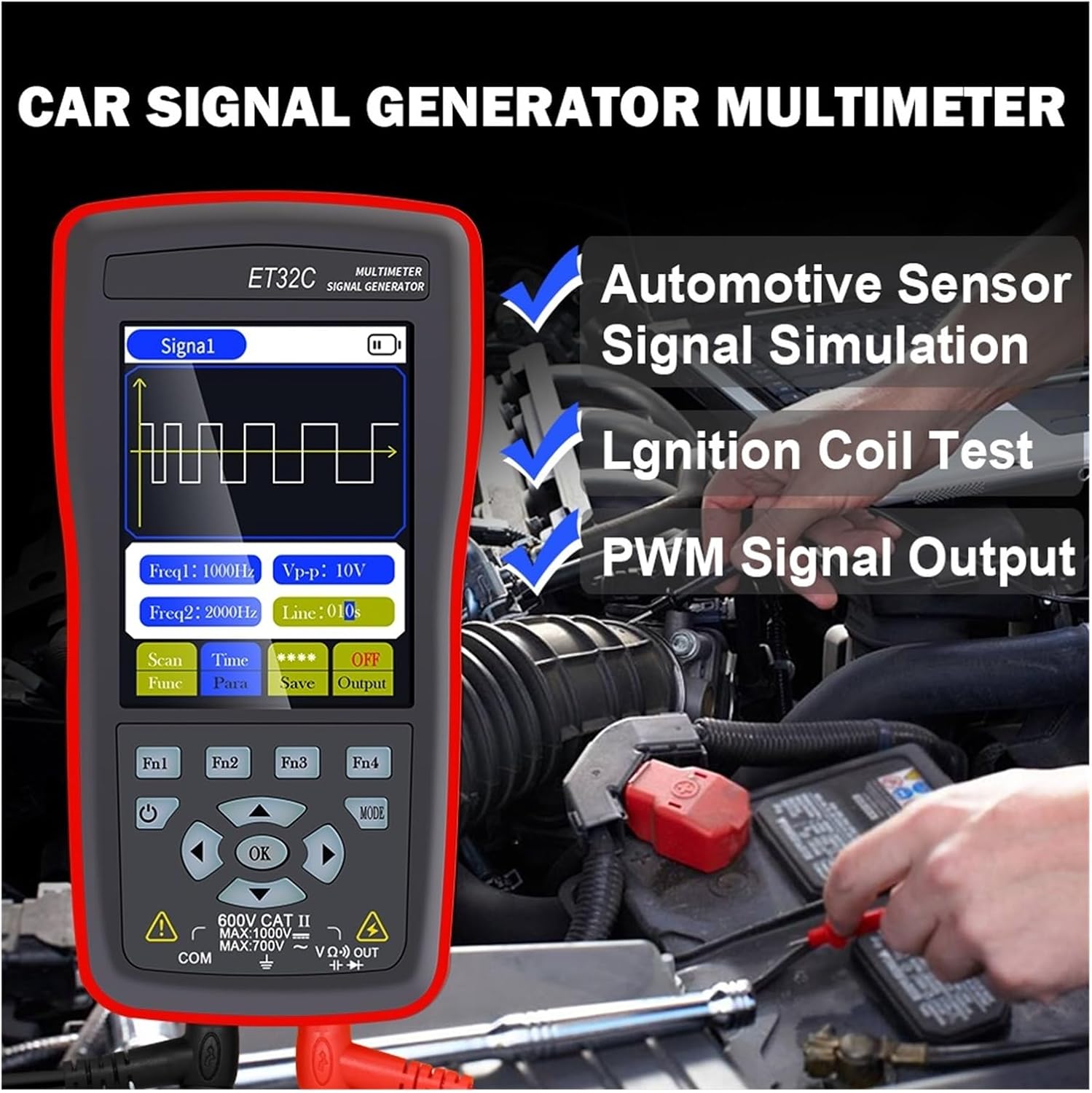
Figure 2: The device in use for automotive sensor signal simulation and ignition coil testing.
5.2 Chức năng của máy phát tín hiệu
This mode allows you to generate various electrical signals for testing automotive components.
- Signal Types: Sine wave, Square wave, Combined wave (e.g., 58+2, 10+1 missing teeth), Scan wave, and DC wave.
- Dải tần số: 1Hz to 9999Hz (adjustable in 1Hz steps).
- Đầu ra Voltage (Đỉnh tới đỉnh): -12V to +12V (adjustable in 1V steps).
- Duty Cycle (for Square Wave): 1% đến 99%.
- Scan Wave: Simulates crankshaft/camshaft signal changes from low to high speed (scan time 1s to 999s).
- Combined Wave: Allows setting of missing teeth signals (e.g., 58+2, 10+1). Maximum combined wave combinations: 99+99.
- Lưu trữ dạng sóng: The instrument supports storing up to 50 sets of waveform parameters.

Figure 3: Display illustrating combined wave signal generation with missing teeth settings.

Figure 4: The device's waveform storage feature, allowing up to 50 sets of parameters to be saved.
5.2.1 Automotive Signal Simulation
The signal generator can simulate Hall-type and magneto-electric crankshaft and camshaft signals. This is useful for diagnosing engine management systems without needing to run the engine.
- Supports simulation for both gasoline and diesel vehicles.
- Simulate various sensor outputs to test ECU responses.

Figure 5: The device functioning as a vehicle maintenance signal source, simulating sensor outputs.
5.2.2 Ignition Coil Control
The device can control ignition coils, solenoid valves, and relays to test their functionality.
- Coil control power: Less than 30V/1A.
- Connect the output to the component to be tested and observe its operation.

Figure 6: Screen showing the ignition coil test function, used to verify normal operation of coils, solenoid valves, and relays.
5.3 Chức năng của đồng hồ vạn năng
In multimeter mode, the device performs standard electrical measurements.
- Tập DCtage: Max 1000V.
- điện áp xoay chiềutage: Max 750V.
- Sức chống cự: Max 40MΩ.
- Điện dung: Max 100uF.
- Tính thường xuyên: Max 50KHz.
- Chu kỳ hoạt động: 0.1% đến 99.9%.
- Kiểm tra Diode: 0V đến 1.5V.
- Kiểm tra tính liên tục: Resistance value for continuity detection: Max 30Ω.
- Trưng bày: 4000 counts, updates 3 times per second.

Figure 7: The device's multimeter display showing a measurement, alongside details of the 2.8-inch screen with 320x480 resolution.
6. Thông số kỹ thuật
6.1 Thông số kỹ thuật chung
- Trưng bày: 2.8-inch, 320 * 480 resolution
- Màn hình cảm ứng: Không được hỗ trợ
- Giao diện USB: USB loại C
- Battery (ET31C): Sử dụng 3 pin AAA 1.5V (không kèm theo)
- Battery (ET32C): Pin lithium 4.2V tích hợp
- Nhiệt độ lưu trữ: -20°C đến 60°C (-4°F đến 140°F)
- Nhiệt độ hoạt động: 0°C đến 50°C (32°F đến 122°F)
- Độ ẩm: <85% RH (không ngưng tụ)
- Kích thước sản phẩm (LxWxH): 134mm * 69mm * 25mm
- Trọng lượng sản phẩm: 125 g (excluding accessories)
6.2 Thông số máy phát tín hiệu
- Sine Wave/Square Wave Frequency Range: 1Hz ~ 9999Hz
- Sine Wave/Square Wave Frequency Step: 1Hz
- Sine Wave/Square Wave Peak Range: -12V ~ + 12V
- Sine Wave/Square Wave Peak Step: 1V
- Scan Wave Scan Time Range: 1 giây ~ 999 giây
- Maximum Combined Wave Combinations: 99+99
- Đầu ra Voltage Phạm vi: -12V ~ + 12V
- Đầu ra Voltage Bước: 1V
- Coil Control Power: Less than 30V/1A
- Lưu trữ dạng sóng: 50 bộ
- Duty Setting (for Square Wave only): 1% ~ 99%
6.3 Thông số của đồng hồ vạn năng
- Khối lượng đầu vào DC tối đatage: 1000V
- Âm lượng đầu vào AC tối đatage: 750V
- Maximum Measured Resistance: 40MΩ
- Maximum Measured Capacitance: 100uF
- Maximum Frequency Measurement: 50 KHz
- Duty Cycle Measurement Range: 0.1% ~ 99.9%
- Diode Measurement Range: 0V ~ 1.5V
- Maximum Resistance for Continuity Detection: 30Ω
- Số lượng hiển thị: 4000 lần đếm
- Tốc độ cập nhật: 3 lần mỗi giây
7. Bảo trì
- Vệ sinh: Lau máy bằng khăn mềm, damp vải. Không sử dụng chất tẩy rửa có tính mài mòn hoặc dung môi.
- Kho: Store the device in a cool, dry place away from direct sunlight and extreme temperatures. If storing for extended periods, remove AAA batteries from the ET31C model.
- Battery Care (ET32C): For optimal battery life, avoid fully discharging the battery frequently. Charge the device regularly if not in use for long periods.
- Khách hàng tiềm năng thử nghiệm: Kiểm tra dây dẫn thử nghiệm xem có hư hỏng gì không (vết cắt, vết nứt) trước mỗi lần sử dụng. Thay thế dây dẫn bị hư hỏng ngay lập tức.
KHAI THÁC. Xử lý sự cố
| Vấn đề | Nguyên nhân có thể | Giải pháp |
|---|---|---|
| Thiết bị không bật nguồn. |
|
|
| Incorrect readings in Multimeter mode. |
|
|
| No signal output from Signal Generator. |
|
|
9. Bảo hành và Hỗ trợ
For warranty information and technical support, please refer to the documentation provided with your purchase or contact WLLKIY customer service directly. Contact details can typically be found on the manufacturer's official webtrên trang web hoặc trên bao bì sản phẩm.