
AUTOWIKI NF201A101-1A+2A+3A+2
Hướng dẫn lắp đặt và sử dụng cản trước AUTOWIKI cho xe Ford F-250/F-350 Super Duty đời 2017-2025
Model: NF201A101-1A+2A+3A+2
Sản phẩm trênview
The AUTOWIKI Front Bumper is designed for 2017-2025 Ford F-250/F-350 Super Duty trucks. It features a robust design and is constructed from Q235A steel for enhanced strength and stiffness. This bumper is a direct bolt-on replacement for the stock bumper, requiring no cutting or drilling for installation. It includes provisions for D-rings, a winch plate, and light mounting options, offering both protection and utility.
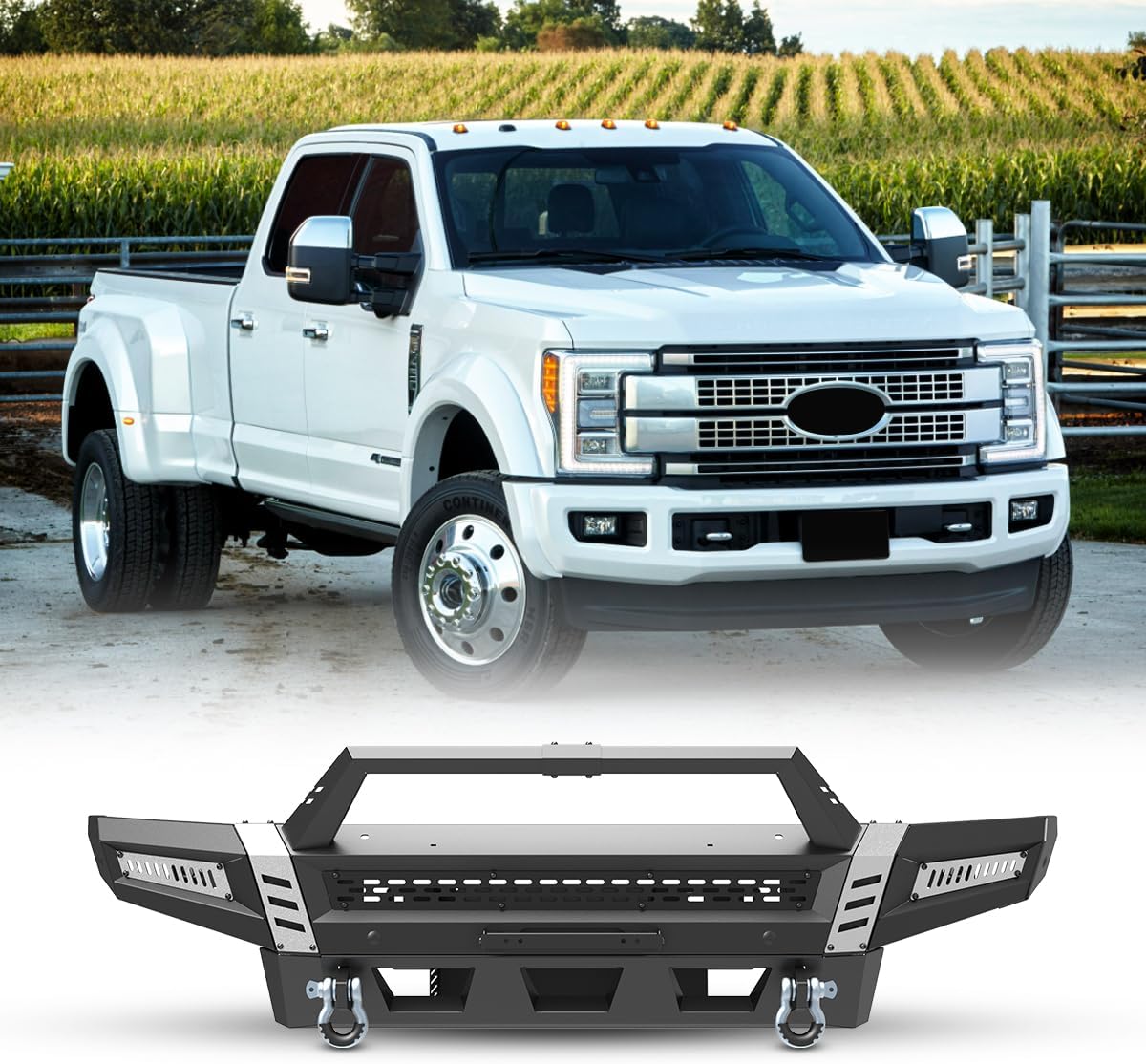
Image: The AUTOWIKI Front Bumper shown with a compatible Ford Super Duty truck, highlighting its robust design.
Các tính năng chính
- Khả năng tương thích: Specifically designed for 2017-2025 Ford F-250/F-350 Super Duty models.
- Kết cấu bền bỉ: Made from Q235A steel (A3 steel) with a textured black powder coat finish and premium E-coating for long-lasting durability and corrosion resistance.
- Cài đặt dễ dàng: Direct bolt-on replacement using factory mounting points; no cutting, drilling, or modification required.
- Tính năng tích hợp: Includes high-strength D-ring fixtures, a winch plate, and provisions for 2x4" pod lights (Combo A includes 2x4" pod lights).
- Tùy chọn tùy chỉnh: Features removable and paintable decorative frames, reserving space for pod lights, allowing for DIY customization.
- Khả năng tương thích cảm biến: Pre-reserved park distance sensor mounting holes and retains Auxiliary Heater Wiring Harness hole.
- Bull Bar: Includes a Type A Bull Bar for added front-end protection.

Hình ảnh: Chi tiết view of the bumper's front features, including sensor locations and decorative elements.

Hình ảnh: Mặt dưới view illustrating mounting points for a light bar, pod lights, and the winch plate.
Thiết lập và cài đặt
The AUTOWIKI Front Bumper is designed for straightforward, bolt-on installation. It directly replaces the original stock bumper and utilizes existing factory mounting points. No cutting, drilling, or modifications to the vehicle are typically required. Basic hand tools are sufficient for the installation process.
Các bước cài đặt:
- Sự chuẩn bị: Ensure the vehicle is parked on a level surface and the engine is off. Gather all necessary tools and components as listed in the package contents.
- Remove Stock Bumper: Carefully remove the existing front bumper according to your vehicle's service manual. Disconnect any wiring for lights or sensors.
- Install Bumper Brackets: Attach any necessary mounting brackets to the vehicle frame. The AUTOWIKI bumper is designed to align with original car holes.
- Mount the Bumper: With assistance, carefully lift and position the new AUTOWIKI front bumper onto the vehicle's frame. Align the mounting holes.
- Cố định cản xe: Insert and hand-tighten all bolts and nuts to secure the bumper to the frame. Once all fasteners are in place, tighten them to the manufacturer's specified torque settings.
- Cài đặt phụ kiện: If applicable, install the bull bar, D-rings, and any lighting components (e.g., 2x4" pod lights) into their designated positions on the bumper.
- Kết nối dây: Reconnect any wiring for sensors or lights. Ensure all connections are secure and properly routed to avoid pinching or damage.
- Kiểm tra cuối cùng: Verify that all bolts are tightened, the bumper is securely mounted, and all lights and sensors are functioning correctly.
The package includes all installation tools and detailed instructions to guide you through the process.

Image: Visual confirmation of bumper fitment for 2017-2022 F250 Super Duty 2WD & 4WD models.
Operating and Functionality
Once installed, the AUTOWIKI Front Bumper enhances your vehicle's front-end protection and utility. Its design accommodates various accessories and maintains essential vehicle functions.
- Nhẫn chữ D: The integrated D-ring mounts provide secure attachment points for recovery operations. Ensure D-rings are properly secured before use.
- Tấm tời: The bumper includes a pre-installed winch plate, ready for mounting a compatible winch. It also features a reserved winch cable guide hole and winch clutch switch operating hole.
- Tùy chọn chiếu sáng: The side wings have two decorative frames each, suitable for installing 3" or 4" pod lights or fog lights. The Combo A package includes 2x4" pod lights.
- Cảm biến đỗ xe: The bumper retains pre-reserved park distance sensor mounting holes, allowing for the continued functionality of your vehicle's parking sensors.
- Kiểm soát hành trình thích ứng (ACC): If your vehicle is equipped with ACC, the sensor module must be relocated. An ACC relocation bracket is included in the package to maintain this functionality.

Image: Guide for relocating the Adaptive Cruise Control sensor to ensure proper function with the new bumper.
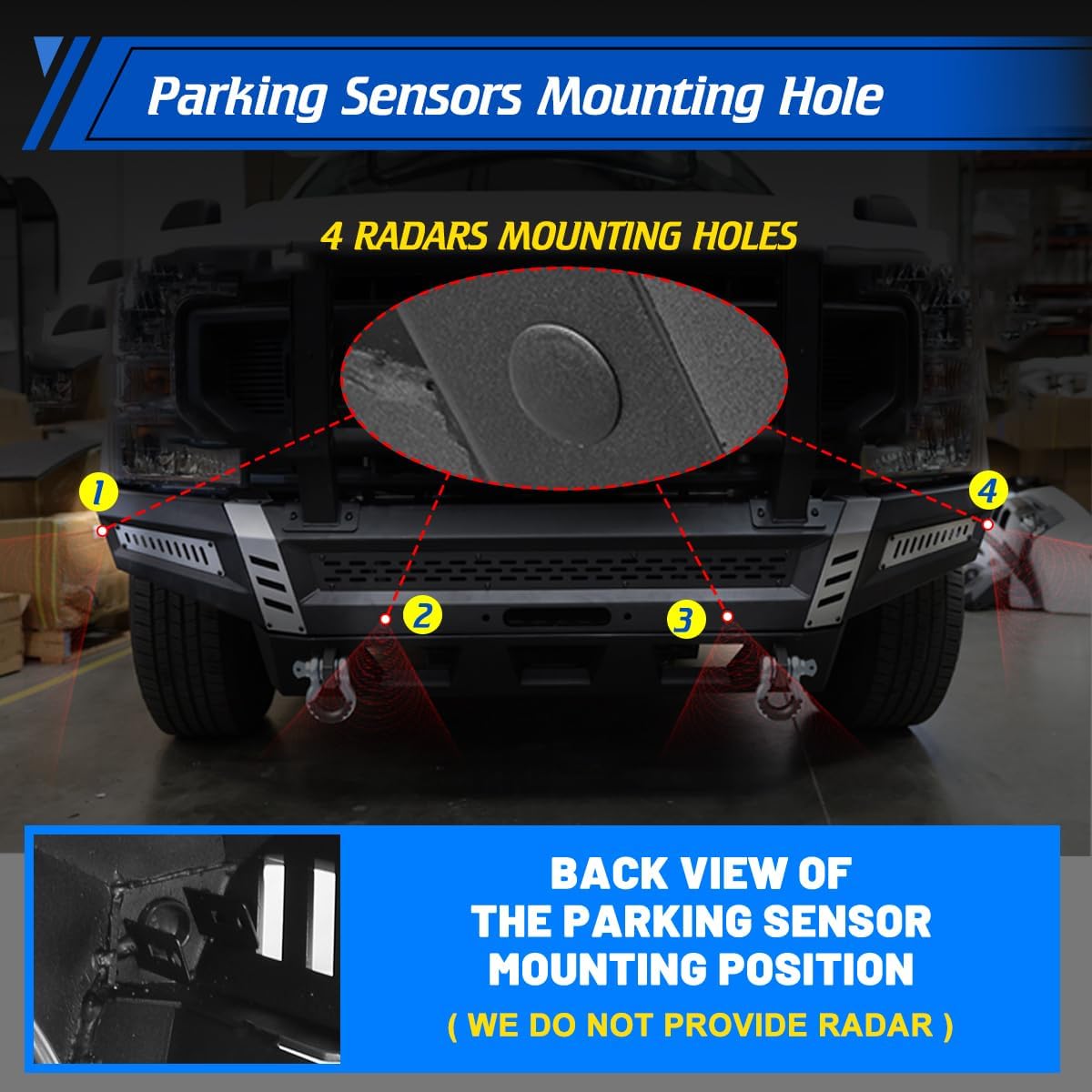
Image: Location of the four radar mounting holes for parking sensors on the bumper.
BẢO TRÌ
Regular maintenance will help preserve the appearance and functionality of your AUTOWIKI Front Bumper.
- Vệ sinh: Wash the bumper regularly with mild soap and water. Avoid abrasive cleaners or harsh chemicals that could damage the powder coat finish.
- Điều tra: Periodically inspect all bolts and mounting hardware for tightness. Re-tighten as necessary to prevent loosening due to vibrations or off-road use.
- Kiểm tra hư hỏng: Inspect the bumper for any signs of damage, such as scratches, dents, or rust. Touch up any deep scratches in the powder coat to prevent rust formation.
- D-Rings and Winch: Ensure D-rings are free of debris and corrosion. If a winch is installed, follow the winch manufacturer's maintenance guidelines.
Xử lý sự cố
Phần này đề cập đến các vấn đề thường gặp có thể phát sinh trong hoặc sau quá trình cài đặt.
- Bumper Not Fitting Correctly:
- Verify that the bumper is the correct model for your vehicle (2017-2025 Ford F-250/F-350 Super Duty).
- Ensure all factory mounting points are clear of obstructions and debris.
- Loosen all bolts, adjust the bumper for proper alignment, and then re-tighten.
- Loose or Rattling Components:
- Check all mounting bolts for the bumper, bull bar, and side wings. Tighten any loose fasteners.
- Ensure D-rings are securely fastened and not rattling against the bumper.
- Sự cố cảm biến:
- Confirm that parking sensors are correctly installed in their designated holes and their wiring is properly connected.
- If equipped with Adaptive Cruise Control, ensure the ACC relocation bracket is installed correctly and the sensor is properly positioned.
- Lỗi đèn:
- Check all wiring connections for the pod lights or fog lights.
- Ensure lights are properly seated and secured in their mounting brackets.
Thông số kỹ thuật
| Thương hiệu | AUTOWIKI |
| Số hiệu mẫu | NF201A101-1A+2A+3A+2 |
| Vị trí phần tự động | Đằng trước |
| Vật liệu | Q235A Steel (Alloy Steel) |
| Màu sắc | Textured Black (Combo A) |
| Trọng lượng sản phẩm | 153 Bảng Anh |
| Kích thước sản phẩm | 36.22"D x 84.06"W x 30.91"H |
| Loại dịch vụ xe | 2017-2025 Ford F-250/ F-350 Super Duty |
| Hoàn thiện bên ngoài | Thép hợp kim |
Bảo hành và Hỗ trợ
This AUTOWIKI Front Bumper comes with a Bảo hành 12 tháng của nhà sản xuất kể từ ngày mua.
For any questions, concerns, or issues regarding your product, please contact AUTOWIKI customer support. They aim to provide a friendly reply within 24 hours.
You can find more information and contact details on the official AUTOWIKI store page: AUTOWIKI Store.
Ask a question about this manual
Ask about setup, troubleshooting, compatibility, parts, safety, or missing instructions. Manuals+ will review the question and use this page’s manual context to help answer it.