
1. Giới thiệu
This document provides comprehensive instructions for the installation, operation, and maintenance of the WLLKIY 3000W Hybrid Solar Inverter, Model SM-3200H. This multi-functional inverter/charger combines the functions of an inverter, MPPT solar charger, and battery charger to provide uninterruptible power support. It features a comprehensive LCD display for user-configurable operations such as battery charging current, AC/solar charger priority, and acceptable input voltage.
Các tính năng chính:
- Pure sine wave output inverter.
- Đầu vào có thể lựa chọn voltagDòng sản phẩm e dành cho thiết bị gia dụng hoặc máy tính cá nhân.
- Adjustable battery charging current via LCD display.
- Configurable battery charging priority mode.
- LCD display for monitoring and settings.
- Optional dust filter.
- Compatible with utility grid and generator inputs.
- Maximizes PV power utilization with automatic restart function upon PV restoration.
- Overload, high temperature, and inverter output short circuit protection.
- Chức năng khởi động nguội.
- Supports lithium batteries.
- Optional WIFI monitoring and setting capabilities.
2. Hướng dẫn an toàn
Vui lòng đọc kỹ tất cả hướng dẫn và cảnh báo trong sách hướng dẫn này trước khi lắp đặt và vận hành. Việc không tuân theo các hướng dẫn này có thể dẫn đến điện giật, hỏa hoạn hoặc thương tích nghiêm trọng. Hãy giữ lại sách hướng dẫn này để tham khảo trong tương lai.
- Việc lắp đặt phải được thực hiện bởi nhân viên có trình độ.
- Đảm bảo nối đất thích hợp cho biến tần.
- Do not expose the inverter to rain, snow, or liquids of any type.
- Không tháo rời thiết bị. Không có bộ phận nào bên trong mà người dùng có thể tự sửa chữa.
- Ngắt kết nối tất cả các nguồn điện (điện mặt trời, ắc quy, điện xoay chiều) trước khi thực hiện bất kỳ công việc bảo trì hoặc đấu dây nào.
- Đảm bảo thông gió đầy đủ xung quanh bộ biến tần để tránh quá nhiệt.
3. Sản phẩm hếtview
The WLLKIY SM-3200H is a compact and efficient hybrid solar inverter designed for various power applications. It integrates an inverter, solar charger, and battery charger into a single unit.

Hình 3.1: Mặt trước view of the SM-3200H Hybrid Solar Inverter, highlighting its display and main features.
The inverter features a clear LCD display for monitoring system status and configuring operational parameters. The rear panel provides all necessary connection terminals for PV input, battery, AC input, and AC output.

Hình 3.2: Phía sau view of the SM-3200H, illustrating connection points for AC, battery, and PV.

Hình 3.3: Chi tiết mặt sau view of the SM-3200H, showing the input breaker and cooling vents.
4. Thiết lập
Proper installation is crucial for the safe and efficient operation of your hybrid solar inverter. Ensure all local electrical codes are followed.
4.1 Tháo dỡ và kiểm tra
Upon receiving the inverter, carefully unpack it and inspect for any shipping damage. Report any damage to your dealer immediately. Ensure all accessories are present.
4.2 Gắn thiết bị
Mount the inverter on a vertical surface in a clean, dry, and well-ventilated area. Ensure there is sufficient clearance around the unit for proper airflow. Avoid direct sunlight and heat sources.
4.3 Kết nối dây
All wiring must be performed with power disconnected from all sources. Use appropriate gauge wiring for all connections.
- Kết nối pin: Connect the battery bank to the BATTERY terminals. Ensure correct polarity (+ to + and - to -).
- Kết nối mảng PV: Connect the solar panel array to the PV IN terminals. Observe correct polarity and ensure the PV input voltage không vượt quá 450VDC.
- Kết nối đầu vào AC: Connect the utility grid or generator AC source to the AC IN terminals.
- Kết nối đầu ra AC: Connect your loads (home appliances, computers) to the AC OUT terminals.
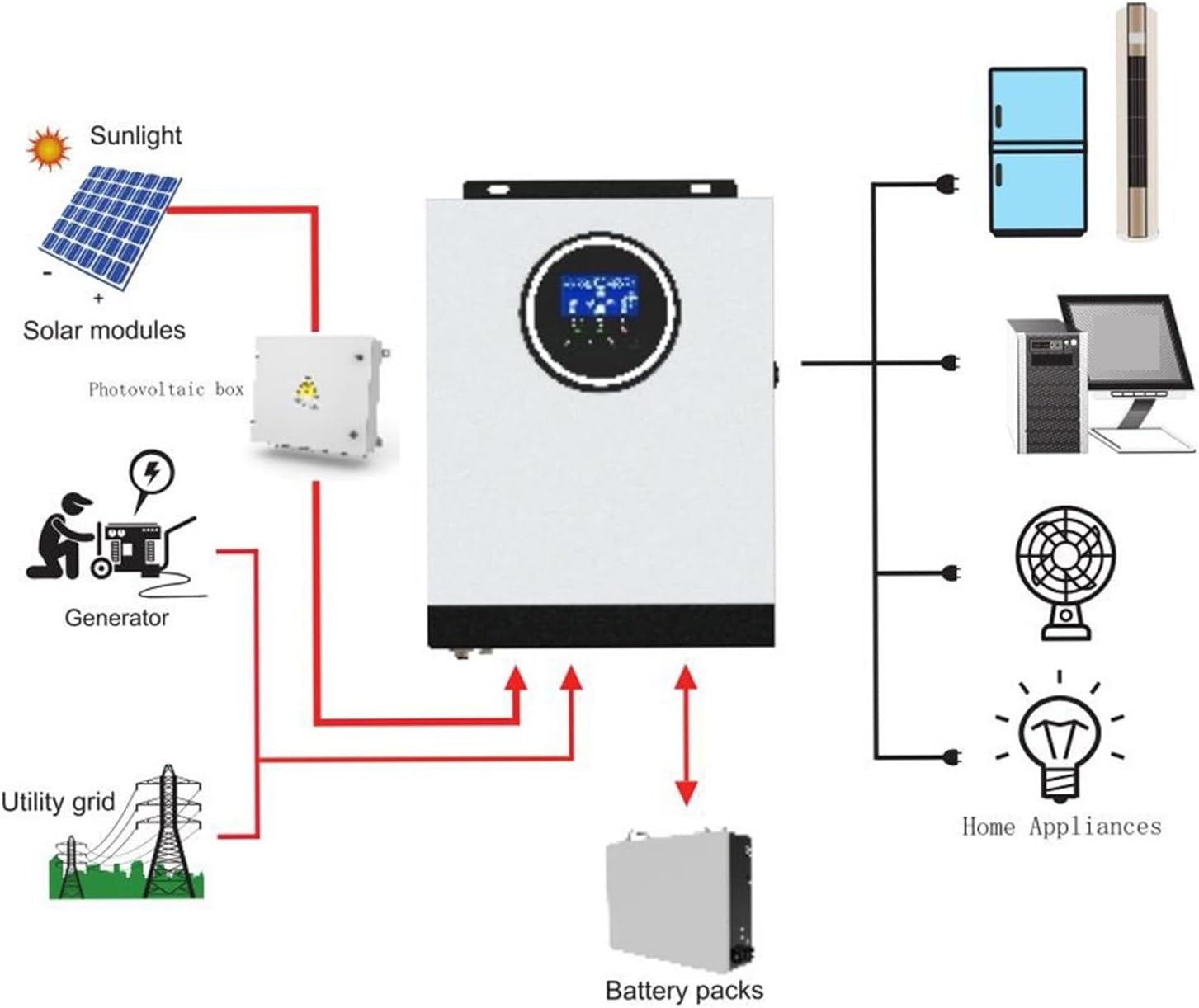
Figure 4.1: Typical system connection diagram for the SM-3200H Hybrid Solar Inverter.
5. Hướng dẫn vận hành
Once all connections are securely made, you can begin operating the inverter.
5.1 Bật / Tắt nguồn
- Để bật nguồn: Ensure the input breaker is in the 'ON' position. The inverter will perform a self-test and the LCD display will illuminate.
- Để Tắt Nguồn: Disconnect all AC loads. Turn off the input breaker. Disconnect the PV input and then the battery input.
5.2 Màn hình LCD và Cài đặt
The LCD display provides real-time system information and allows for configuration of various parameters. Use the buttons adjacent to the display to navigate menus and adjust settings.
- Giám sát: View khối lượng đầu vào/đầu ratage, frequency, battery status, charging current, and load percentage.
- Cài đặt tham số: Adjust settings such as battery charging current, AC input voltage range (170-280VAC for PC or 90-280VAC for appliances), and charger source priority (Solar first, Utility first, SBU priority).
6. Bảo trì
Bảo trì thường xuyên sẽ đảm bảo độ bền và hiệu suất tối ưu cho bộ biến tần của bạn.
- Vệ sinh: Periodically clean the exterior of the inverter with a dry cloth. Ensure ventilation openings are free from dust and debris. If an optional dust filter is installed, clean or replace it as recommended.
- Kết nối: Kiểm tra tất cả các mối nối điện hàng năm để đảm bảo độ chắc chắn và không bị ăn mòn.
- Kiểm tra pin: Regularly inspect battery terminals for corrosion and ensure battery voltage nằm trong giới hạn chấp nhận được.
- Môi trường: Đảm bảo môi trường lắp đặt nằm trong phạm vi nhiệt độ và độ ẩm quy định.
KHAI THÁC. Xử lý sự cố
Phần này cung cấp giải pháp cho những vấn đề thường gặp mà bạn có thể gặp phải.
| Vấn đề | Nguyên nhân có thể | Giải pháp |
|---|---|---|
| Biến tần không bật nguồn | Không có kết nối pin; Dung lượng pintage too low; Input breaker off | Kiểm tra kết nối pin và âm lượngtage; Ensure input breaker is ON. |
| Không có đầu ra AC | Overload; Short circuit; Inverter fault | Giảm tải; Kiểm tra xem có hiện tượng đoản mạch trong hệ thống dây điện không; Khởi động lại biến tần. |
| Pin không sạc được | PV input too low/disconnected; AC input not present; Charger settings incorrect | Check PV connections and sunlight; Verify AC input; Adjust charger settings via LCD. |
| Cảnh báo quá tải | Tải kết nối vượt quá công suất biến tần | Giảm tổng tải kết nối với biến tần. |
Nếu sự cố vẫn tiếp diễn sau khi đã thử các giải pháp này, vui lòng liên hệ với bộ phận hỗ trợ khách hàng.
8. Thông số kỹ thuật
| Tham số | Giá trị |
|---|---|
| Người mẫu | SM-3200H |
| Công suất định mức | 3000W |
| Đầu vào AC Voltage | 230 V xoay chiều |
| Vol có thể lựa chọntage Range (PC) | 170-280 VAC |
| Vol có thể lựa chọntage Range (Appliances) | 90-280 VAC |
| Dải tần số | 50 Hz / 60 Hz (Cảm biến tự động) |
| điện áp xoay chiềutage Quy định (Chế độ pin) | 230 VAC ± 5% |
| Công suất tăng đột biến | 6400VA |
| Transfer Time (PC) | 10 mili giây |
| Thời gian chuyển đổi (Thiết bị gia dụng) | 20 mili giây |
| Dạng sóng | Sóng sin tinh khiết |
| Pin Voltage | 24Vdc |
| Phí nổi Voltage | 27 vôn |
| MPPT Solar Charger Current | 80 Một |
| tối đa. Mảng PV Mở Mạch Voltage | 450Vdc |
| Trọng lượng sản phẩm | 10 gam |
9. Bảo hành và Hỗ trợ
This product comes with a standard manufacturer's warranty. Please refer to the warranty card included with your purchase for specific terms and conditions. For technical support, troubleshooting assistance, or warranty claims, please contact your dealer or the manufacturer directly.
Giữ lại biên lai mua hàng để làm bằng chứng mua hàng cho mục đích bảo hành.