
BINNUNE BW01
Hướng dẫn sử dụng tai nghe chơi game không dây BINNUNE
Mẫu: BW01
Thương hiệu: BINNUNE
Giới thiệu
Thank you for choosing the BINNUNE Wireless Gaming Headset. This manual provides detailed instructions on how to set up, operate, and maintain your headset to ensure optimal performance and a superior gaming experience. Please read this manual thoroughly before using the product.
Có gì trong hộp
Upon unboxing your BINNUNE Wireless Gaming Headset, please verify that all the following components are included:
- BINNUNE Wireless Gaming Headset (Blue)
- Cổng USB 2.4 GHz
- Cáp âm thanh 3.5mm
- Cáp sạc USB
- Hướng dẫn sử dụng (tài liệu này)

Image: The BINNUNE Wireless Gaming Headset in blue, accompanied by its 2.4GHz USB dongle and a 3.5mm audio jack. These are the primary components included in the product package.
Sản phẩm trênview
Familiarize yourself with the key features and components of your BINNUNE Wireless Gaming Headset:
- Băng đô có thể điều chỉnh: Để có cảm giác thoải mái khi đeo.
- Tai nghe chống ồn mềm mại: Large-size memory foam earmuffs (110mm diameter, 45mm thickness) made of breathable PU leather and mesh material for extended comfort.
- Trình điều khiển 50mm: High-performance 50mm driver units for clear and rich stereo sound.
- Unidirectional Noise-Canceling Microphone: A 120° adjustable boom mic designed to filter out background noise for clear communication.
- On-Headset Controls: Buttons for power, volume adjustment, and microphone mute.

Hình ảnh: Một chi tiết view of the BINNUNE Wireless Gaming Headset's unidirectional boom microphone, highlighting its flexible design and noise-canceling capabilities.

Image: An exploded diagram illustrating the internal components of the 50mm audio drivers within the BINNUNE headset, emphasizing their design for rich, full-range sound.
Cài đặt
Sạc tai nghe
Before first use, fully charge the headset. A full charge takes approximately 3 hours. A 10-minute quick charge can provide up to 3 hours of battery life. The headset offers up to 80 hours of continuous use in 2.4GHz mode and up to 120 hours in Bluetooth mode.
- Kết nối cáp sạc USB với cổng sạc của tai nghe.
- Kết nối đầu còn lại của cáp USB vào nguồn điện USB tương thích (ví dụ: cổng USB của máy tính, bộ chuyển đổi USB gắn tường).
- The LED indicator on the headset will show charging status (refer to the headset's LED guide for specific indications).

Image: The BINNUNE Wireless Gaming Headset displayed alongside a visual representation of its impressive 120-hour battery life, indicating extended usage time.
Tùy chọn kết nối
Your BINNUNE headset supports three connection modes:
- Kết nối không dây 2.4GHz (USB Dongle): Provides ultra-low latency (15ms) for gaming. Ideal for PS5, PS4, PC, and Mac.
- Bluetooth 5.3: For wireless connection to mobile phones, tablets, PC, and Mac.
- Kết nối có dây 3.5 mm: Universal compatibility with any device featuring a 3.5mm audio jack.
2.4GHz Wireless Connection (for PS5, PS4, PC, Mac)
- Cắm thiết bị thu phát USB 2.4GHz vào cổng USB trống trên PS5, PS4, PC hoặc Mac của bạn.
- Bật tai nghe. Tai nghe sẽ tự động cố gắng kết nối với thiết bị thu phát tín hiệu.
- Once connected, the LED indicator on the headset will confirm the connection (refer to LED guide).
- On your device, ensure the BINNUNE headset is selected as the audio output and input device.
Bluetooth 5.3 Connection (for PC, Mac, Mobile Phone, Tablet)
- Ensure the headset is powered on and in Bluetooth pairing mode (usually indicated by a blinking LED). If not, double-press the power button to switch to Bluetooth mode.
- On your device (PC, Mac, mobile phone, tablet), go to Bluetooth settings and search for available devices.
- Select "BINNUNE BW01" (or similar) from the list of found devices to pair.
- Once paired, the LED indicator will show a solid light (refer to LED guide).
3.5mm Wired Connection (for All Platforms)
- Kết nối một đầu của cáp âm thanh 3.5mm với cổng 3.5mm trên tai nghe.
- Connect the other end of the 3.5mm audio cable to the 3.5mm audio jack on your device (e.g., PS4/PS5 controller, PC, mobile phone).
- The headset will function in passive wired mode. Note that some headset features (like LED lighting or specific controls) may be limited in wired mode.
Note: The BINNUNE Wireless Gaming Headset is not compatible with Xbox consoles.
Khả năng tương thích kết thúcview
The following table provides a quick reference for device compatibility across different connection modes:

Image: A visual compatibility chart detailing which devices (PC, PS4/PS5 Console, PS4/PS5 Controller, Switch, Cell Phone, Tablet) support sound, microphone, and microphone mute functions across 2.4GHz Wireless (USB Dongle), Bluetooth 5.3, and 3.5mm Wired connection modes.
Hướng dẫn sử dụng
Bật/Tắt nguồn
- Bật nguồn: Nhấn và giữ nút Nguồn trong khoảng 3 giây cho đến khi đèn LED sáng lên.
- Tắt nguồn: Nhấn và giữ nút Nguồn trong khoảng 3 giây cho đến khi đèn LED tắt.
Switching Between 2.4GHz and Bluetooth Modes
The headset supports simultaneous wireless operation, allowing quick toggling between 2.4GHz and Bluetooth modes.
- Để chuyển đổi chế độ: Double-press the Power button. The headset will switch between 2.4GHz wireless mode and Bluetooth mode.
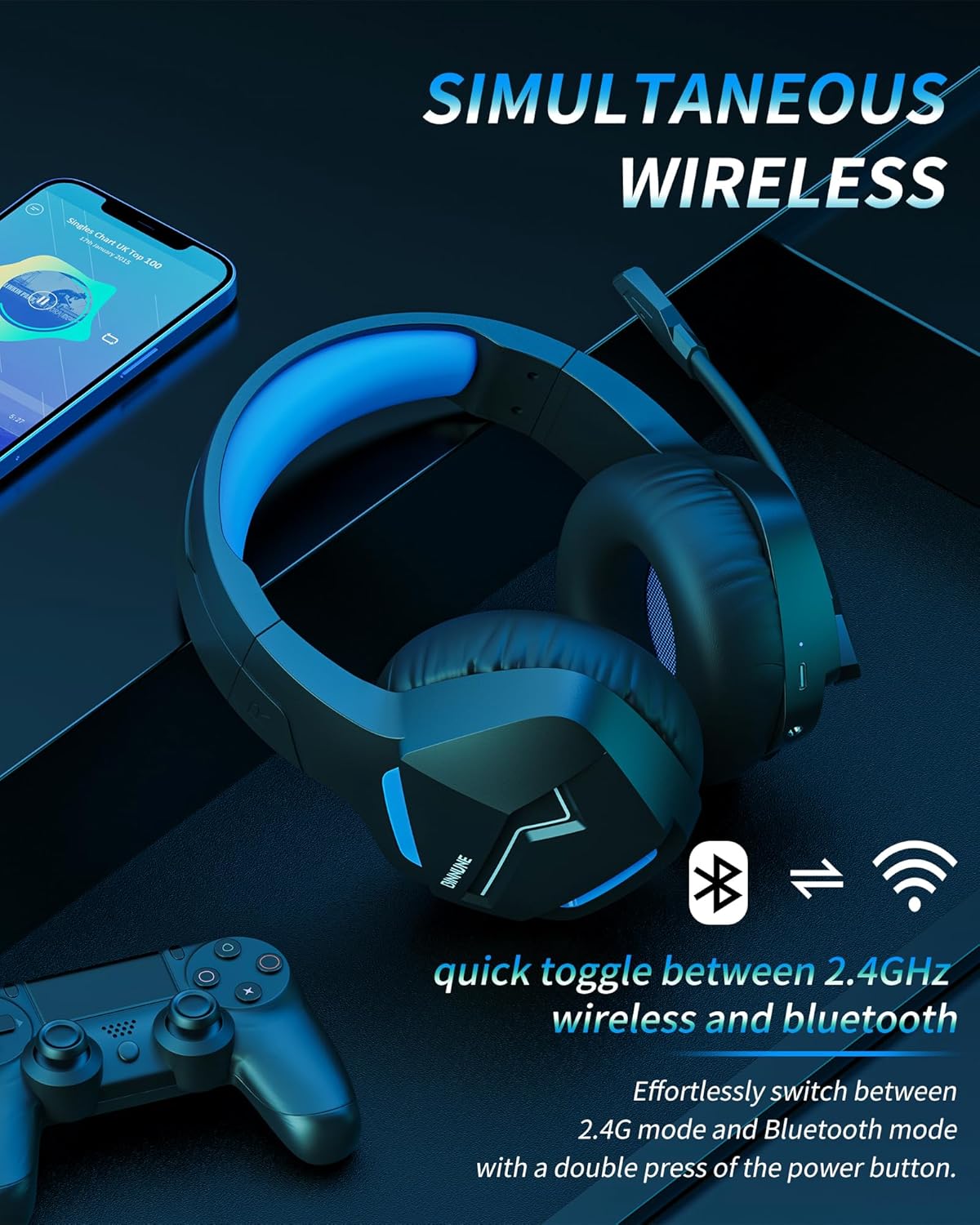
Image: The BINNUNE Wireless Gaming Headset shown with icons representing both 2.4GHz wireless and Bluetooth connectivity, indicating its ability to switch between these modes for versatile use.
Kiểm soát âm lượng
- Tăng khối lượng: Nhấn nút Tăng âm lượng (+).
- Giảm âm lượng: Nhấn nút Giảm âm lượng (-).
Điều khiển micrô
- Tắt tiếng / Bật tiếng Micrô: Press the Microphone Mute button. A red LED on the microphone tip usually indicates it is muted.
- Điều chỉnh vị trí micrô: The 120° adjustable memory line microphone can be freely shaped and adjusted to your ideal angle.
Hiệu suất chơi game
The headset is designed for an immersive gaming experience with features like:
- Accurate Sound Positioning: The 50mm drivers provide clear and rich stereo sound, allowing you to accurately pinpoint in-game sounds like footsteps and environmental details.
- Độ trễ thấp: The 2.4GHz wireless technology ensures an ultra-low latency of 15ms, providing synchronized audio and video for competitive gaming.
Image: A gamer immersed in a game, wearing the BINNUNE headset, highlighting the benefits of low latency and stable wireless connection for an enhanced gaming experience.
BẢO TRÌ
Proper maintenance ensures the longevity and performance of your BINNUNE Wireless Gaming Headset.
- Vệ sinh:
- Use a soft, dry, lint-free cloth to clean the headset's surfaces.
- Đối với chụp tai, hãy lau nhẹ nhàng bằng khăn ẩm.amp vải và để khô hoàn toàn trước khi sử dụng.
- Không sử dụng hóa chất mạnh, dung môi tẩy rửa hoặc chất tẩy rửa mạnh.
- Kho:
- Bảo quản tai nghe ở nơi khô ráo, thoáng mát, tránh ánh nắng trực tiếp và nhiệt độ cao.
- Tránh đặt vật nặng lên tai nghe.
- Chăm sóc pin:
- Tránh xả hết pin thường xuyên.
- If storing for a long period, charge the headset to about 50% every few months to preserve battery health.
Xử lý sự cố
If you encounter issues with your BINNUNE Wireless Gaming Headset, please refer to the following common solutions:
| Vấn đề | Nguyên nhân có thể | Giải pháp |
|---|---|---|
| Không có âm thanh / Âm lượng thấp |
|
|
| Micrô không hoạt động |
|
|
| Connection Issues (Intermittent/No Connection) |
|
|
| Headset Not Compatible with Xbox |
|
|
Thông số kỹ thuật
Detailed technical specifications for the BINNUNE Wireless Gaming Headset (Model: BW01):
| Tính năng | Chi tiết |
|---|---|
| Tên mẫu | BW01 |
| Công nghệ kết nối | Wireless (2.4GHz USB Dongle, Bluetooth 5.3), Wired (3.5mm Jack) |
| Công nghệ truyền thông không dây | Bluetooth 5.3 |
| Phạm vi Bluetooth | Lên đến 10 mét (33 feet) |
| Độ trễ âm thanh (2.4GHz) | 15ms (Ultra Stable 2.4GHz Wireless Connection) |
| Loại trình điều khiển âm thanh | Trình điều khiển động |
| Kích thước trình điều khiển âm thanh | 50 milimét |
| Đáp ứng tần số | 20 Hz - 20,000 Hz |
| Độ nhạy | 96 dB |
| Micrô | Unidirectional Noise-Canceling Mic (120° adjustable) |
| Tuổi thọ pin | Up to 80 hours (2.4GHz mode), Up to 120 hours (Bluetooth mode) |
| Thời gian sạc | Xấp xỉ. 3 giờ để sạc đầy |
| Hình dạng ống nghe | Oval (110mm diameter, 45mm thickness memory foam) |
| Vật liệu | Plastic (headset), PU leather and mesh (earmuffs) |
| Trọng lượng sản phẩm | 10.7 Ounce (khoảng 303 gram) |
| Kích thước sản phẩm | 8.27 x 7.48 x 4.33 inch |
| Thiết bị tương thích | Gaming Consoles (PS4, PS5), Laptops, PC, Mac, Mobile Phones, Tablets |
| Loại điều khiển | Nút điều khiển |
| Các thành phần bao gồm | User Manual, 2.4GHz USB Dongle, 3.5mm Audio Cable, USB Charging Cable |
Thông tin bảo hành
BINNUNE products are manufactured with high-quality standards. While specific warranty details are not provided in this manual, BINNUNE typically offers a limited warranty against defects in materials and workmanship. For detailed warranty terms, conditions, and registration, please refer to the official BINNUNE webtrang web hoặc liên hệ với bộ phận hỗ trợ khách hàng.
Hỗ trợ khách hàng
For further assistance, technical support, or inquiries regarding your BINNUNE Wireless Gaming Headset, please contact BINNUNE customer support through the following channels:
- Official BINNUNE Webđịa điểm: Visit the official BINNUNE webtrang web dành cho các câu hỏi thường gặp, tài nguyên hỗ trợ và biểu mẫu liên hệ.
- Cửa hàng Amazon: Bạn cũng có thể ghé thăm BINNUNE Store on Amazon Để biết thông tin sản phẩm và các tùy chọn liên hệ người bán.
Please have your product model (BW01) and purchase details ready when contacting support.
Ask a question about this manual
Ask about setup, troubleshooting, compatibility, parts, safety, or missing instructions. Manuals+ will review the question and use this page’s manual context to help answer it.