
1. Thông tin an toàn
Vui lòng đọc kỹ tất cả hướng dẫn trước khi lắp đặt và vận hành. Việc không tuân thủ các hướng dẫn này có thể dẫn đến hư hỏng sản phẩm, xe cộ hoặc thương tích cá nhân. Hãy giữ lại sách hướng dẫn này để tham khảo trong tương lai.
- Ensure the vehicle's ignition is off and the negative battery terminal is disconnected before installation to prevent electrical shorts.
- Tham khảo ý kiến chuyên gia về việc lắp đặt nếu bạn không chắc chắn về bất kỳ bước nào.
- Không được sử dụng thiết bị theo cách làm bạn mất tập trung khi lái xe. Luôn ưu tiên an toàn giao thông.
- Tránh để thiết bị tiếp xúc với nhiệt độ quá cao, ánh nắng trực tiếp hoặc hơi ẩm.
- Chỉ sử dụng cáp nguồn và phụ kiện được chỉ định.
2. Nội dung gói hàng
Xác minh rằng tất cả các mục đều có trong gói trước khi tiến hành cài đặt.

Image: Components included in the UNITOPSCI A3612A3 package, including the main unit, wiring harnesses, and accessories.
- UNITOPSCI A3612A3 Car Stereo Unit
- Power Cable & Speaker Cable Harnesses
- Điều khiển từ xa trên vô lăng
- Micrô
- Camera sau 12 đèn LED
- Ăng-ten
- Hướng dẫn sử dụng (tài liệu này)
- Giá đỡ lắp
3. Cài đặt
Proper installation is crucial for optimal performance. Refer to the wiring diagram and consult a professional if needed.
3.1 Sơ đồ đấu dây

Image: Detailed wiring connections for the car stereo unit.
Connect the power and speaker cables according to the diagram. Ensure all connections are secure to prevent malfunctions.
- Đỏ (ACC): Connect to ignition switch +12V.
- Yellow (BATTERY+): Connect to constant +12V.
- Đen (GND): Connect to vehicle ground.
- Blue (ANT): Connect to antenna power.
- Orange (ILLUMINATION): Connect to vehicle illumination wire.
- Pink (REVERSE): Connect to reverse light signal for backup camera activation.
- Brown (KEY): Connect to steering wheel control wire.
- Speaker wires (White, Gray, Green, Purple) should be connected to corresponding vehicle speakers (Front Left, Front Right, Rear Left, Rear Right).
3.2 Gắn thiết bị
Use the provided mounting brackets to secure the double din unit into your vehicle's dashboard opening. Ensure a snug fit to prevent vibrations.
3.3 Lắp đặt camera dự phòng
Mount the backup camera at the rear of your vehicle. Connect its video output to the 'CAM IN' input on the stereo and its power to the reverse light circuit.
4. Thiết lập
4.1 Bật nguồn ban đầu
After installation, reconnect the vehicle battery. Turn on the ignition. The unit should power on and display the main interface.
4.2 Thiết lập cơ bản
Navigate to the 'Settings' menu to configure basic parameters such as language, time, and date.
4.3 Display Backlight Adjustment
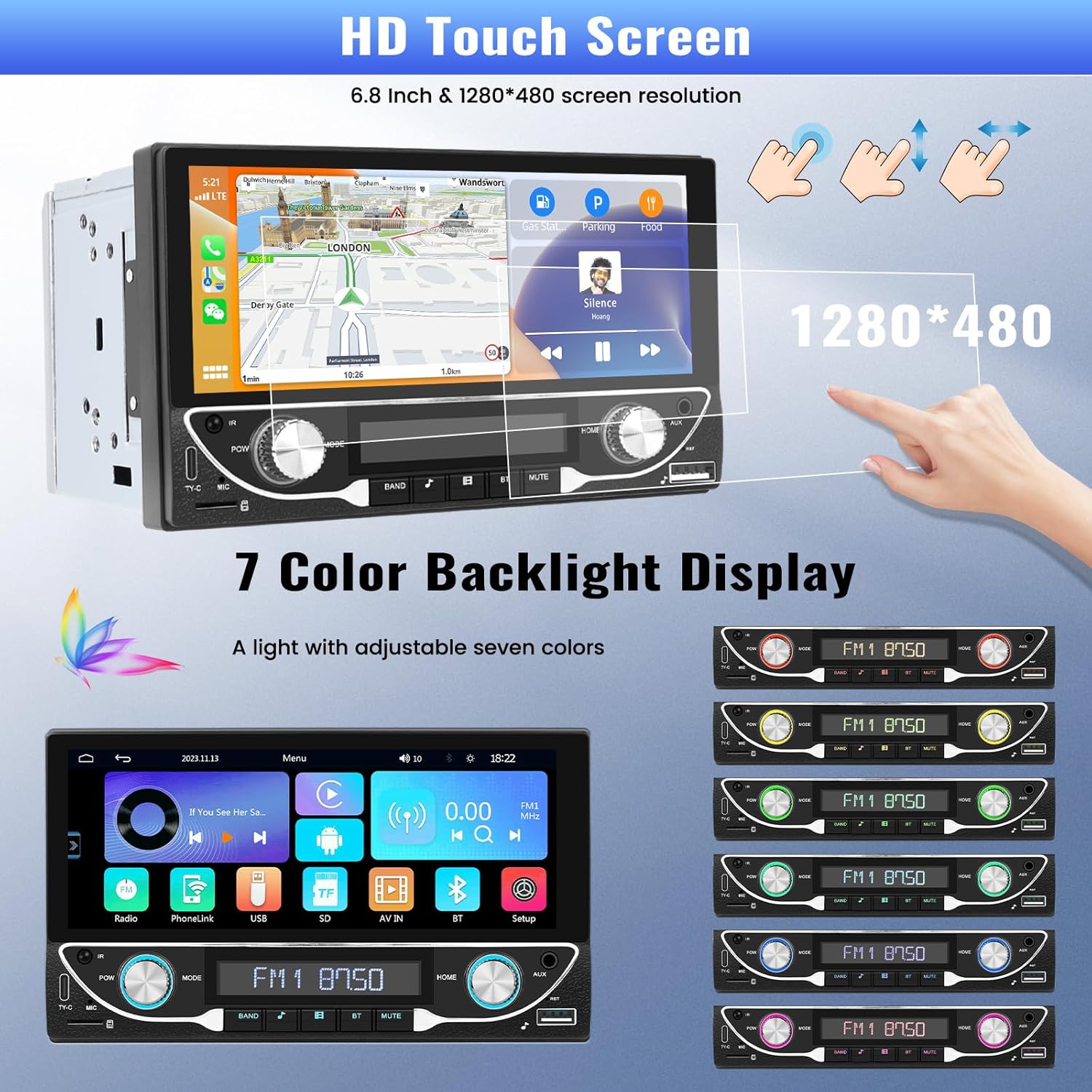
Image: The HD touchscreen and customizable 7-color backlight display options.
Access the display settings to adjust brightness and select from 7 available backlight colors for the physical buttons.
5. Hướng dẫn vận hành
5.1 Apple CarPlay & Android Auto không dây
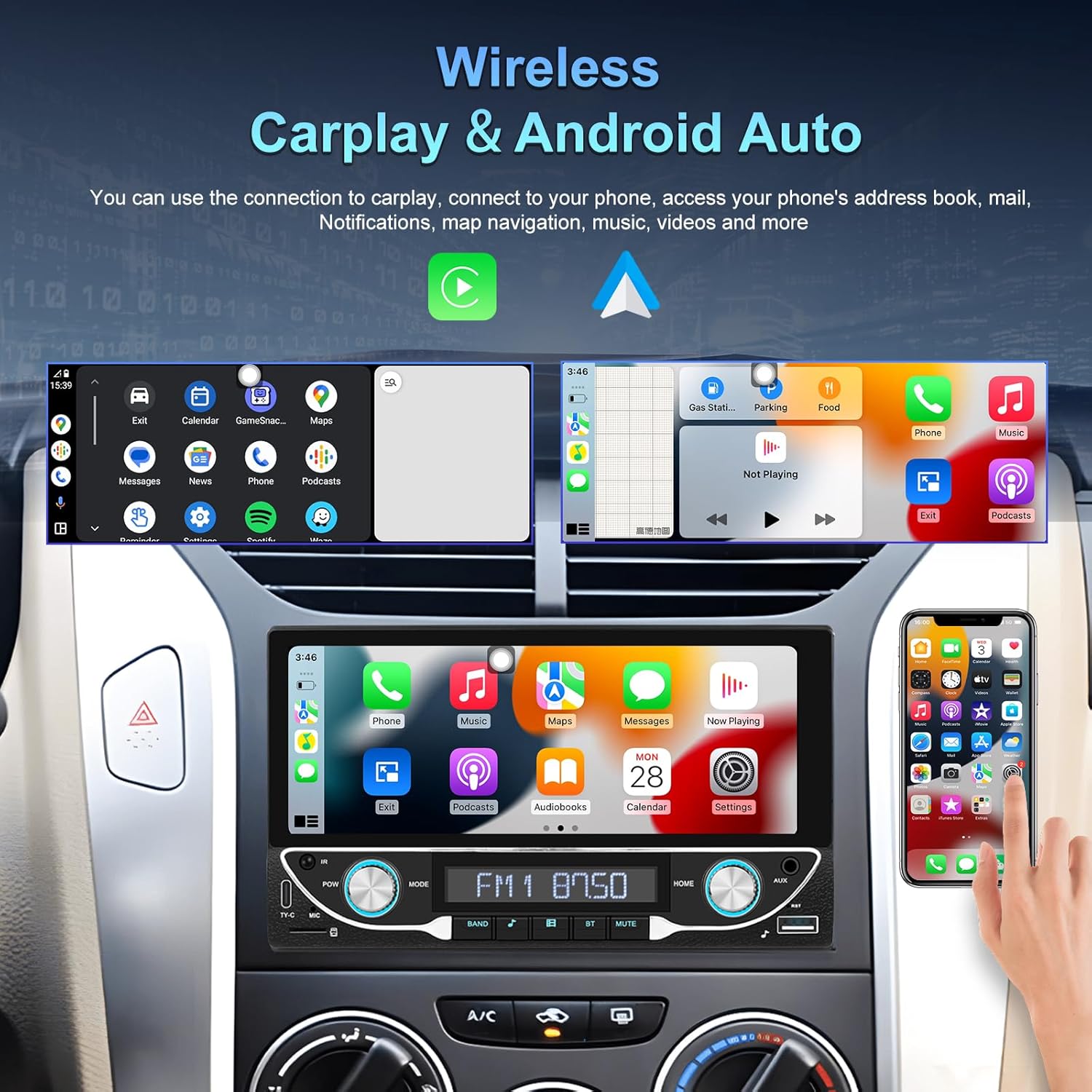
Image: The car stereo displaying both Apple CarPlay and Android Auto interfaces.
Connect your smartphone wirelessly to access Apple CarPlay or Android Auto. This allows for navigation, music, calls, and messages directly from the car stereo display.
- Đảm bảo Bluetooth và Wi-Fi được bật trên điện thoại thông minh của bạn.
- Trên hệ thống âm thanh trên xe, chọn biểu tượng CarPlay hoặc Android Auto.
- Hãy làm theo hướng dẫn trên màn hình để ghép nối thiết bị của bạn.
5.2 Kết nối Bluetooth 5.1
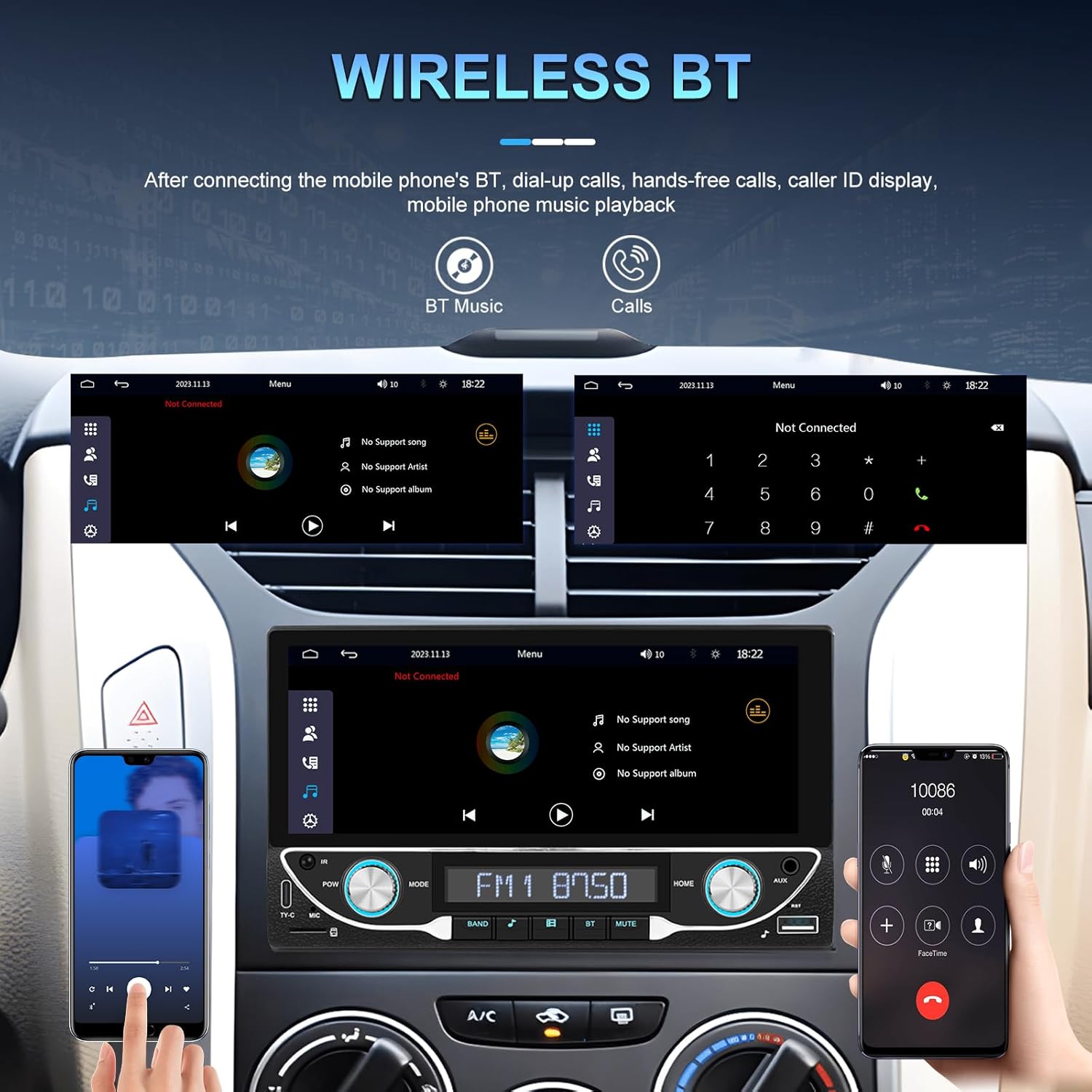
Hình ảnh: Giao diện Bluetooth để gọi điện thoại rảnh tay và phát nhạc trực tuyến.
Pair your phone via Bluetooth for hands-free calling and wireless audio streaming.
- Go to the 'Bluetooth' menu on the stereo.
- Bật Bluetooth trên điện thoại của bạn và tìm kiếm các thiết bị khả dụng.
- Select 'UNITOPSCI A3612A3' (or similar name) from your phone's list and confirm pairing.
- Use the built-in microphone for calls and stream music from your phone.
Hoạt động của đài phát thanh FM 5.3

Image: FM radio interface with frequency display and sound quality DSP/EQ settings.
Select the 'FM' icon to access the radio tuner. Use the on-screen controls or physical buttons to scan for stations, save presets, and adjust frequency.
5.4 Audio & Video Playback (USB/TF/AUX/Type-C)

Image: Available input options for audio and video playback: USB, TF Card, Type-C, and AUX-in.
The unit supports various media inputs for audio and video playback:
- Đầu vào USB: Connect a USB drive with media files.
- Khe cắm thẻ TF: Insert a TF (MicroSD) card with media files.
- Đầu vào AUXKết nối các thiết bị âm thanh ngoài bằng cáp âm thanh 3.5mm.
- Cổng Type-C: For charging compatible devices and potentially data transfer.
Select the corresponding input source from the main menu to access your media.
5.5 Điều khiển vô lăng

Image: Steering wheel control setup interface on the car stereo.
If your vehicle supports steering wheel controls, connect the 'KEY' wire during installation. Access the 'Steering Wheel Control' settings to program the buttons for functions like volume, track change, and mode selection.
5.6 Phía sau View Camera / HD Reversing Video
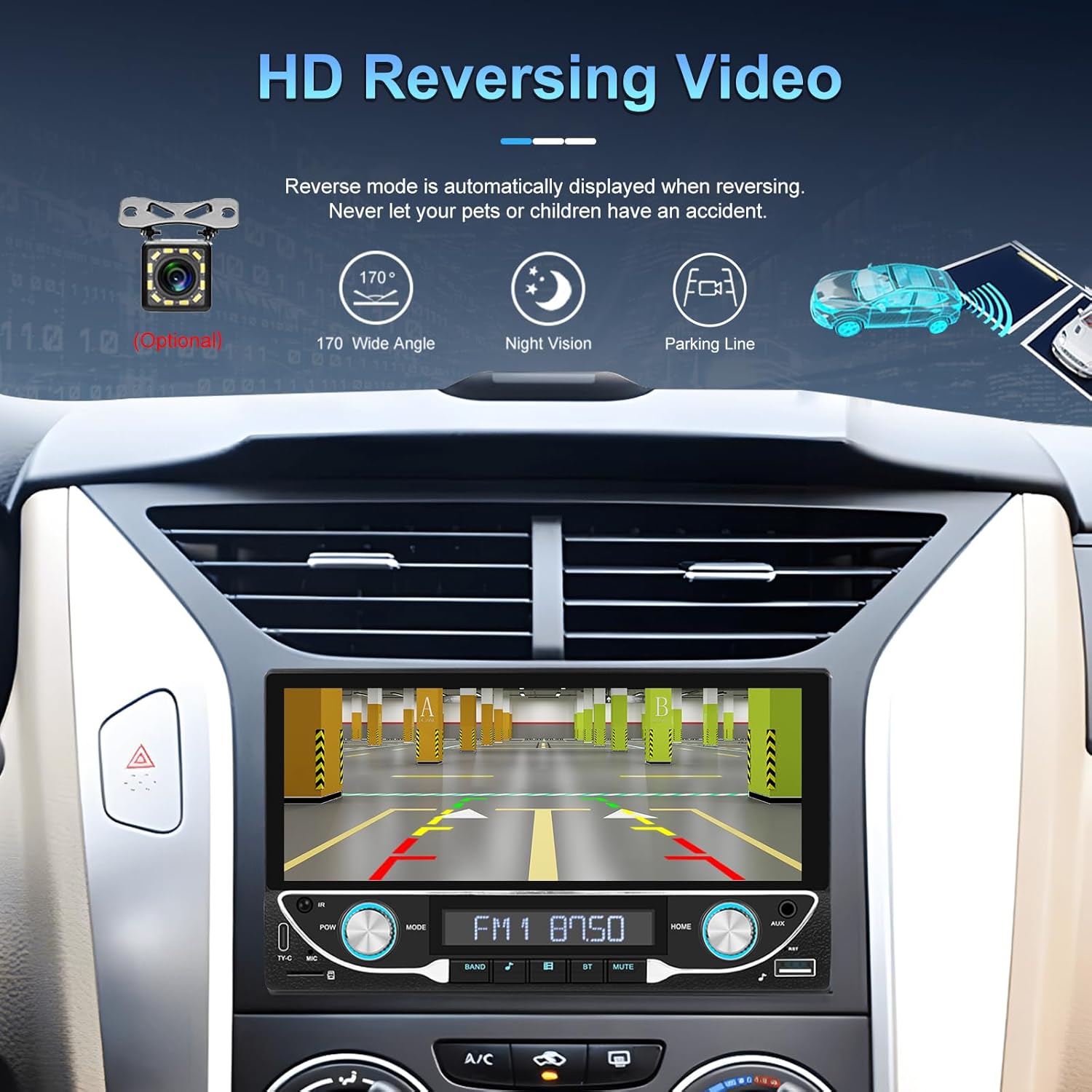
Image: High-definition reversing video display with parking guidelines.
When the vehicle is shifted into reverse, the stereo automatically displays the rear view camera feed. The included camera offers a 170-degree wide angle and night vision capabilities, along with parking lines for assistance.
5.7 DVR Function Support
The unit supports an optional DVR (Digital Video Recorder) function. Connect a compatible USB DVR camera to the dedicated USB input on the rear of the car radio to record driving footage.
5.8 Chức năng Mirror Link
Use the Mirror Link function to display your smartphone's screen directly on the car stereo. This feature is compatible with both Android and iOS devices, allowing you to view apps and content from your phone on the larger display.
5.9 Điều khiển bằng giọng nói & Định vị GPS
When connected via Apple CarPlay or Android Auto, you can utilize voice commands (e.g., Siri, Google Assistant) for navigation, making calls, sending messages, and controlling music, enhancing driving safety and convenience.
5.10 Sound Quality (DSP & EQ)
The built-in Digital Sound Processor (DSP) and Equalizer (EQ) allow for precise audio customization. Access the 'EQ Setup' menu to adjust bass, treble, and other frequency bands to match your audio preferences. Pre-set EQ modes (e.g., Jazz, Rock, Pop) are also available.
6. Bảo trì
Để đảm bảo tuổi thọ và hiệu suất tối ưu của dàn âm thanh xe hơi, hãy tuân theo các hướng dẫn bảo dưỡng sau:
- Vệ sinh màn hình: Use a soft, lint-free cloth to gently wipe the touchscreen. Avoid abrasive cleaners or solvents that could damage the display.
- Vệ sinh chung: Keep the unit free from dust and debris. Use a soft brush or compressed air for hard-to-reach areas.
- Cập nhật phần mềmKiểm tra định kỳ thông tin từ nhà sản xuất. webtrang web cung cấp mọi bản cập nhật chương trình cơ sở có sẵn để cải thiện hiệu suất và thêm tính năng mới.
- Tránh chất lỏng: Do not spill liquids on the unit. If accidental spillage occurs, power off the unit immediately and allow it to dry completely before use.
KHAI THÁC. Xử lý sự cố
If you encounter issues with your UNITOPSCI A3612A3 car stereo, refer to the following common problems and solutions:
| Vấn đề | Nguyên nhân có thể | Giải pháp |
|---|---|---|
| Không có điện | Đấu dây sai; Cầu chì bị cháy; Kết nối lỏng lẻo. | Check power cable connections (ACC, BATTERY+, GND). Verify vehicle fuse and unit's fuse. Ensure all wires are securely connected. |
| Không có âm thanh | Dây loa bị ngắt kết nối; Âm lượng quá nhỏ; Chức năng tắt tiếng đang hoạt động; Nguồn âm thanh không chính xác. | Check speaker wire connections. Increase volume. Deactivate mute. Select correct audio source (FM, USB, BT, etc.). |
| Bluetooth không kết nối | Bluetooth đã tắt trên điện thoại/hệ thống âm thanh; Thiết bị không ở chế độ ghép nối; Có nhiễu sóng. | Ensure Bluetooth is enabled on both devices. Put stereo in pairing mode. Delete previous pairings and try again. Move closer to the unit. |
| CarPlay/Android Auto không hoạt động | Wi-Fi/Bluetooth off; Phone not compatible; App issues. | Ensure Wi-Fi and Bluetooth are active on your phone. Restart phone and stereo. Check phone's settings for CarPlay/Android Auto permissions. |
| Camera sau không hiển thị | Máy quay không được cấp nguồn; Dây cáp video bị lỏng; Dây kích hoạt đảo chiều không được kết nối. | Check camera power connection. Ensure video cable is securely connected to 'CAM IN'. Verify Pink (REVERSE) wire connection. |
| Màn hình cảm ứng không phản hồi | Hệ thống bị treo; Màn hình bị bẩn. | Restart the unit (if possible, by briefly disconnecting power). Clean the screen. |
If the problem persists after trying these solutions, please contact UNITOPSCI customer support for further assistance.
8. Thông số kỹ thuật
Key technical specifications for the UNITOPSCI A3612A3 car stereo:
- Số hiệu mẫu: A3612A3
- Kích thước hiển thị: 6.86 inch
- Độ phân giải màn hình: 1280 x 480 pixel
- Đầu ra Wattage: 180 Watts (4 channels)
- Phiên bản Bluetooth: 5.1
- Các dịch vụ Internet được hỗ trợ: Maps (via CarPlay/Android Auto)
- Loại đầu ra âm thanh: Nội bộ
- Định dạng phương tiện được hỗ trợ: AVI, WAV, WMA
- Đầu vào: USB, TF Card, AUX, Type-C
- Đặc trưng: Wireless Apple CarPlay, Wireless Android Auto, FM Radio, Mirror Link, DSP, EQ, Steering Wheel Control, Backup Camera Input, DVR Function Support, 7-Color Backlight.
Image: Front, rear, and side dimensions of the UNITOPSCI A3612A3 car stereo.
Kích thước (Xấp xỉ):
- Front Panel: 17.8cm (7.0in) width x 10.3cm (4.0in) height
- Chassis: 17.8cm (7.0in) width x 10.0cm (3.9in) height x 11cm (4.3in) depth
9. Bảo hành và Hỗ trợ
UNITOPSCI products are designed for reliability and performance. For warranty information and technical support, please refer to the warranty card included in your package or visit the official UNITOPSCI webđịa điểm.
When contacting support, please have your product model number (A3612A3) and purchase details ready.