
1. Giới thiệu
The Flysky Noble NB4+ 2.4GHz 8CH radio transmitter offers advanced flexibility and functionality for remote control applications. This updated model features enhancements in appearance, structure, hardware, and software compared to the previous Noble NB4. It is designed for precise control of RC cars and boats.
The NB4+ supports the entire series of FlySky i-BUS2 devices, as well as compatible devices from Hobbywing (XeRun Axe R2 Esc) and Power HD (GTS-3, GTS-5, GTS-6, GTS-7). Remote parameter adjustment is supported directly from the transmitter, allowing for multiple parameter adjustments to suit various usage demands. The 2CH (Ultra-fast) Mode provides ultra-low latency for critical control responses.
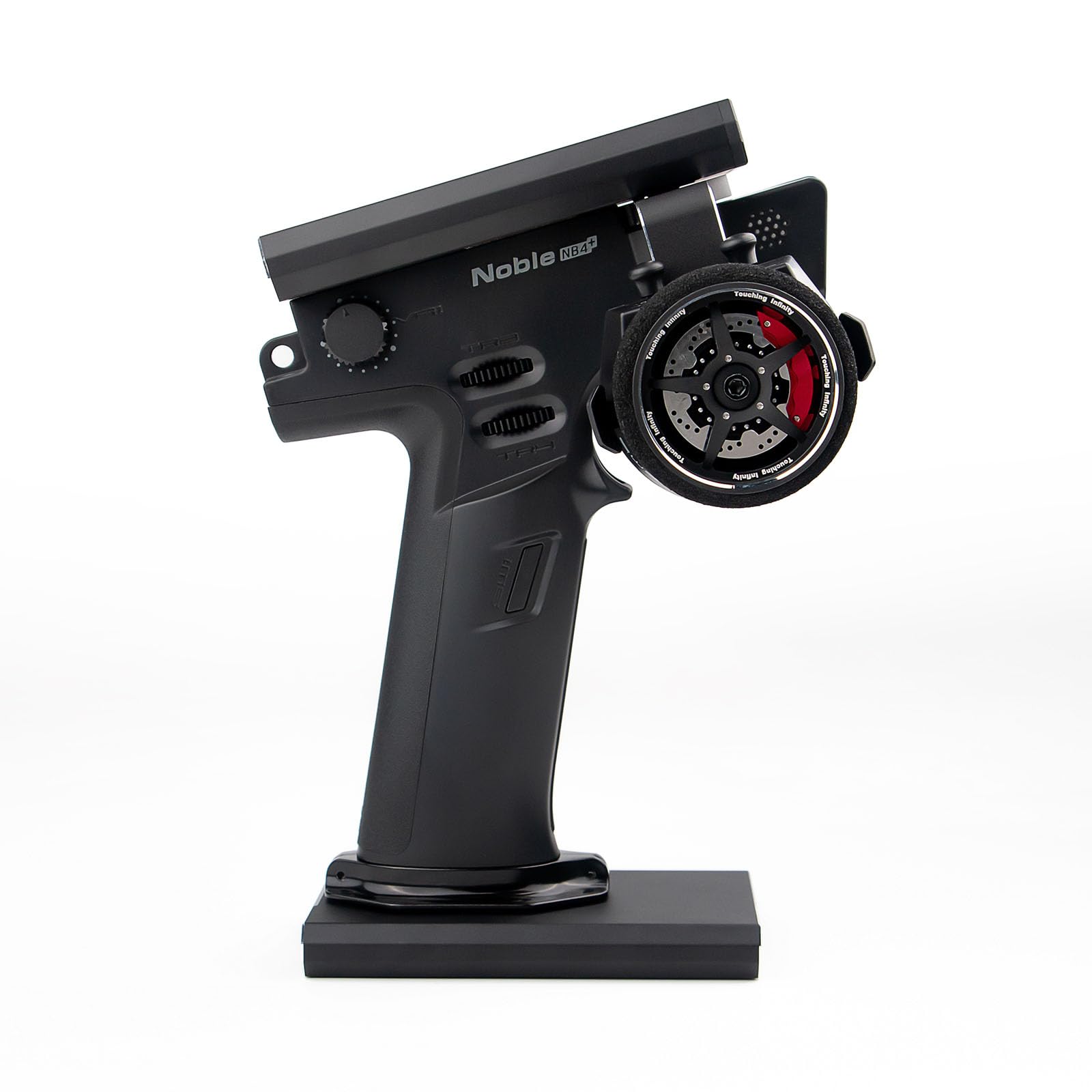
Figure 1: Flysky Noble NB4+ Remote Controller with charging base.
2. Có gì trong hộp
Upon unboxing your Flysky Noble NB4+ Remote Controller, please verify that all the following components are included:
- 1x Flysky Noble NB4+ Remote Controller
- 1x Flysky FGr4S Receiver
- 1 cáp sạc (USB Type-C)
- 1x Spare Grip Cover
- 1x English Manual (this document)

Figure 2: All components included in the Flysky Noble NB4+ package.
3. Sản phẩm hếtview
3.1. Các thành phần của bộ phát

Hình 3: Mặt trước và mặt bên view of the Noble NB4+ transmitter with labeled components including the screen, steering wheel, VR1, TR1, TR2, TR3, TR4, SW1, SW2, Transmitter LED, Transmitter Power Button, Speaker, and Battery compartment.

Figure 4: Rear and base view of the Noble NB4+ transmitter with labeled components including the Throttle Trigger Structure Travel Adjustment Hole, Steering Wheel Tension Adjustment Hole, Throttle Trigger Tension Adjustment Hole, Throttle Trigger Size Adjustment Hole, Handle, 18650 Battery Cover, Base Power Port (Type-C input, Firmware Update, Charging Jack, Simulator Port, Trainer Interface, Head Track Interface), Base Power Button, and USB 5V 2A Port.
3.2. FGr4S Receiver Components

Figure 5: Diagram of the FGr4S Receiver showing the Antenna LED, BIND button, I-BUS port, and CH1-CH4 ports. It also illustrates proper vertical antenna mounting for optimal signal strength.
3.3. Các tính năng chính
- High-Brightness IPS Touch Screen: The 3.5-inch 320*480 resolution IPS display is designed for outdoor use, offering high brightness and clear visibility even under strong sunlight.
- Giao diện người dùng có thể tùy chỉnh: A new colorful UI design allows for customizable themes and wallpaper changes, enabling users to personalize their display.
- Customizable Channel Names: The function to customize channel names has been added, providing a more intuitive display and real-time understanding of each channel's function.
- Quick Release Battery Design: The controller features a “Quick Release” internal battery design, equipped with a standard large-capacity, high-quality 18650 battery. With a charging base, it can achieve over ten hours of endurance.
- Giao diện USB Type-C: The optimized USB Type-C interface offers stable connection and versatility. It supports coach mode for interactive teaching and head tracking functionality for immersive experiences.

Figure 6: The 3.5-inch IPS high-brightness outdoor display of the Noble NB4+ is visible even in strong sunlight.

Figure 7: The new colorful UI design allows for customizable themes and wallpapers.

Figure 8: The customizable channel names function on the Noble NB4+ display.

Figure 9: The Noble NB4+ features a quick-release internal battery design for extended use.

Figure 10: The USB Type-C interface on the Noble NB4+ supports trainer mode and head tracking functionality.
Video 1: Một kết thúcview of the Flysky Noble NB4+ 8CH Radio Transmitter, highlighting its features and design.
4. Thiết lập
4.1. Lắp đặt và sạc pin
- Locate the 18650 Battery Cover on the handle of the transmitter (refer to Figure 4).
- Remove the cover and insert the provided 18650 Lithium-Ion Polymer battery, ensuring correct polarity.
- Thay nắp pin.
- Connect the charging cable to the USB Type-C port on the base of the transmitter (refer to Figure 4) and to a suitable USB power source. The transmitter can achieve over ten hours of operation on a full charge.
4.2. Cài đặt đầu thu
Mount the FGr4S receiver in your RC model. To ensure a strong signal, mount the receiver with its antenna vertical (refer to Figure 5).
4.3. Transmitter and Receiver Pairing (Binding)
The Noble NB4+ transmitter and FGr4S receiver are typically pre-bound. If re-binding is necessary, follow the instructions in the on-screen menu or consult the detailed pairing table below for compatibility with other receivers.

Figure 11: Compatibility table for AFHDS3 transmitters and receivers. A checkmark indicates compatibility. Products marked in red are no longer in production.
5. Hướng dẫn vận hành
5.1. Bật/Tắt nguồn
Press and hold the Transmitter Power Button (refer to Figure 3) to power the unit on or off.
5.2. Sử dụng giao diện màn hình cảm ứng
The 3.5-inch IPS touch screen allows for intuitive navigation through menus and settings. Tap icons and options to select them. Swipe gestures may be used for navigation in certain menus.
5.3. Cấu hình kênh
Access the channel settings through the UI to customize channel names and assign functions. The 2CH (Ultra-fast) Mode provides minimal latency for competitive use.
5.4. Trainer Mode and Head Tracking
Connect compatible devices via the USB Type-C port to utilize trainer mode for teaching or head tracking for an immersive control experience. Refer to the on-screen menus for specific setup procedures for these functions.
6. Bảo trì
- Vệ sinh: Use a soft, dry cloth to clean the transmitter and receiver. Avoid using harsh chemicals or solvents.
- Chăm sóc pin: Store the battery in a cool, dry place when not in use. Do not expose to extreme temperatures. Charge the battery regularly to maintain its lifespan.
- Kho: When storing the unit for extended periods, ensure the battery is partially charged (around 50%) and store in a safe, dry environment.
KHAI THÁC. Xử lý sự cố
7.1. Loss of Control / Signal Interference
- Always keep your RC model in sight and within 300m of the transmitter.
- Ensure there are no other 2.4GHz radio signals or strong electromagnetic interference sources nearby, as these can block the RF signal and lead to loss of control.
- Never grip the transmitter antenna during operation, as this significantly degrades signal quality and strength.
- Verify the receiver antenna is mounted vertically and unobstructed (refer to Figure 5).
7.2. Sự cố hiển thị
- If the screen is unresponsive, try restarting the transmitter.
- Ensure the battery is adequately charged if the screen is dim or not turning on.
7.3. Các vấn đề về nguồn điện
- If the transmitter does not power on, check the battery installation and ensure it is charged.
- If charging is not occurring, verify the USB Type-C cable and power source are functioning correctly.
8. Thông số kỹ thuật
| Thuộc tính | Giá trị |
|---|---|
| Tên thương hiệu | Bay trên bầu trời |
| Tên mẫu | Flysky Noble NB4+ |
| Tên loại mặt hàng | Flysky Noble NB4+ Remote Controller with FGr4S Receiver |
| Số hiệu sản phẩm của nhà sản xuất | Cao quý NB4+ |
| Số lượng mặt hàng | 1 |
| Nguồn điện | Pin chạy bằng |
| Mô tả pin | Lithium-Ion Polymer (18650) |
| Chế độ hoạt động | Siêu nhanh |
| Màu sắc | Đen |
| Loại vật liệu | Kim loại, Nhựa |
| Kích thước vật phẩm (LxWxH) | 5.17 x 4.56 x 7.5 inch |
| Độ tuổi Mô tả | Người lớn |
9. Thông tin an toàn
- To avoid 2.4GHz radio signal interference, always keep your model in sight and within 300m. Ensure there are no other signals around that may block the RF signal and lead to loss of control.
- Never grip the transmitter antenna during operation. This significantly degrades signal quality and strength and may cause loss of control.
- Sản phẩm này dành cho người lớn sử dụng.
10. Bảo hành và Hỗ trợ
For warranty information, technical support, or service inquiries, please contact Flysky customer support directly. Refer to the official Flysky website or the packaging for contact details.