
1. Giới thiệu
Thank you for choosing the RIGOL DS1102Z-E Digital Oscilloscope. This manual provides essential information for the safe and efficient use of your device. Please read it thoroughly before operation and keep it for future reference.
The DS1102Z-E is a high-performance digital oscilloscope designed for various applications including research and development, education, maintenance, and industrial testing. It features a 100 MHz bandwidth, 1 GSa/s sample rate, and a 24 Mpts memory depth, enabling precise analysis of complex waveforms.
2. Sản phẩm hếtview
The RIGOL DS1102Z-E is a versatile measurement instrument integrating a frequency counter and supporting protocol decoding for RS232/UART, I2C, and SPI. It also includes FFT analysis and automatic measurement functions to enhance testing efficiency.
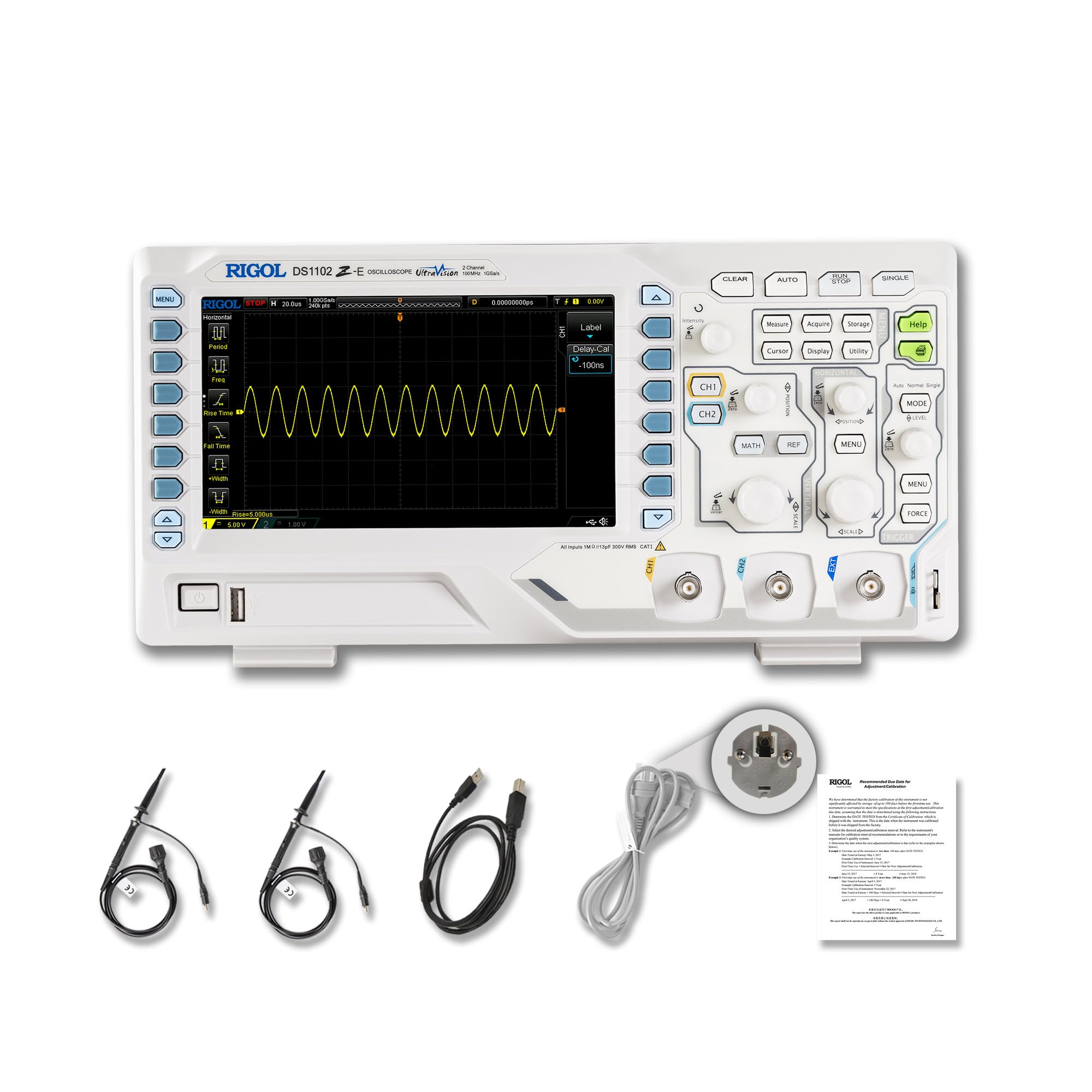
Hình 2.1: Mặt trước view of the RIGOL DS1102Z-E Digital Oscilloscope.
2.1 Các tính năng chính
- 100 MHz Bandwidth, 1 GSa/s Sample Tỷ lệ: Captures signals with high precision.
- 24 Mpts Memory Depth: Allows for extended signal capture and detailed waveform analysis.
- Multi-function Measurement Device: Includes frequency counter, protocol decoding (RS232/UART, I2C, SPI), FFT analysis, and automatic measurement functions.
- Waveform Recording and Playback: Records signal variations and replays them for fault identification.
- Màn hình độ nét cao: 7-inch TFT screen with 256-level grayscale, offering a phosphor-like display effect for clear waveform details.
- Remote Control & Secondary Development Support: Equipped with USB and LAN ports for PC remote control, compatible with SCPI commands, LabVIEW, Visual Basic, and Visual C++.
2.2 Có gì trong hộp

Figure 2.2: Contents included with the DS1102Z-E Oscilloscope.
- 1x Main Unit (DS1102Z-E Digital Oscilloscope)
- 2x Passive Probes (150MHz)
- 1x Power Cable (EU plug)
- 1x USB A-B Cable
- 1x Thẻ bảo hành
- 1x Calibration Certificate
- 1x Declaration of Conformity
3. Thiết lập
Follow these steps to set up your RIGOL DS1102Z-E oscilloscope:
- Tháo hộp: Carefully remove all components from the packaging. Inspect the device for any signs of damage.
- Kết nối nguồn điện: Connect the provided power cable to the oscilloscope's power input and then to a suitable AC power outlet.
- Kết nối thăm dò: Connect the passive probes to the BNC input connectors (CH1, CH2) on the front panel. Ensure a secure connection.
- Tiếp đất: Always ensure the oscilloscope is properly grounded through the power cable.
- Kết nối USB/LAN (Tùy chọn): If you plan to use remote control or secondary development, connect the USB cable to a PC or the LAN cable to your network.

Hình 3.1: Hếtview of the oscilloscope's physical dimensions and ports.
4. Hướng dẫn vận hành
This section covers the basic operation of your oscilloscope.
4.1 Bật / Tắt nguồn
- Bật nguồn: Press the power button located on the front panel. The device will perform a self-test and display the main interface.
- Tắt nguồn: Nhấn và giữ nút nguồn cho đến khi thiết bị tắt.
4.2 Hiển thị dạng sóng cơ bản
After powering on, connect a signal to one of the input channels (e.g., CH1). Adjust the vertical scale (Volts/Div) and horizontal scale (Time/Div) knobs to display the waveform clearly. Use the TỰ ĐỘNG button for automatic setup of the waveform display.

Hình 4.1: Ví dụample of a waveform displayed on the oscilloscope screen.
4.3 chức năng nâng cao
- Chức năng đo lường: Nhấn nút ĐO LƯỜNG button to access automatic measurements like frequency, period, peak-to-peak voltage, v.v.
- Hệ thống kích hoạt: Use the trigger controls to stabilize repetitive waveforms. Adjust the trigger level and mode (Edge, Pulse, Video, Slope, etc.) as needed.
- Ghi lại dạng sóng: The oscilloscope allows recording and replaying waveforms. Access this feature through the menu to capture transient events.
- Giải mã giao thức: For serial bus analysis (RS232/UART, I2C, SPI), configure the decoding settings via the menu.
- Phân tích FFT: Perform Fast Fourier Transform (FFT) to analyze the frequency components of your signal.

Figure 4.2: Complex waveform analysis with measurement data.

Figure 4.3: Multiple waveforms displayed simultaneously for comparison.
5. Bảo trì
Bảo trì đúng cách sẽ đảm bảo độ bền và độ chính xác của máy hiện sóng.
- Vệ sinh: Sử dụng khăn mềm, khô để lau sạch bên ngoài máy hiện sóng. Đối với những vết bẩn cứng đầu, hãy dùng khăn hơi ẩm.amp Có thể dùng khăn mềm thấm dung môi và chất tẩy rửa nhẹ. Tránh sử dụng chất tẩy rửa có tính ăn mòn hoặc dung môi.
- Chăm sóc màn hình: Clean the display screen with a soft, lint-free cloth. Do not use excessive force or harsh chemicals.
- Kho: When not in use, store the oscilloscope in a clean, dry environment, away from direct sunlight, extreme temperatures, and excessive dust.
- Chăm sóc đầu dò: Handle probes carefully. Avoid bending or stressing the probe tips. Store them properly to prevent damage.
- Sự định cỡ: For optimal performance, periodic calibration by qualified personnel is recommended. Refer to the official RIGOL website for calibration services.
KHAI THÁC. Xử lý sự cố
Phần này cung cấp giải pháp cho những vấn đề thường gặp mà bạn có thể gặp phải.
| Vấn đề | Nguyên nhân có thể | Giải pháp |
|---|---|---|
| No power when turned on. | Power cable not connected, power outlet faulty, or power button issue. | Check power cable connection. Test the power outlet. Ensure the power button is fully pressed. |
| Không hiển thị dạng sóng. | No signal input, probe not connected correctly, vertical/horizontal scale incorrect, or trigger not set. | Verify signal source. Check probe connections. Adjust Volts/Div and Time/Div. Press TỰ ĐỘNG or adjust trigger settings. |
| Waveform is unstable. | Cài đặt kích hoạt không chính xác. | Adjust trigger level, mode, and source to stabilize the waveform. |
| Điều khiển từ xa không hoạt động. | USB/LAN cable issue, incorrect network settings, or software driver not installed. | Check cable connections. Verify network configuration. Install necessary drivers and software (e.g., UltraScope). |
If the problem persists, please contact RIGOL technical support.
7. Thông số kỹ thuật
Detailed technical specifications for the RIGOL DS1102Z-E Digital Oscilloscope.

Hình 7.1: Hình ảnh minh họa các thông số kỹ thuật chính.
| Tính năng | Đặc điểm kỹ thuật |
|---|---|
| Thương hiệu | Rigol |
| Người mẫu | DS1102Z-E |
| Băng thông | 100MHz |
| Kênh | 2 Channels + EXT |
| Samptỷ lệ le | 1 GSa/giây |
| Độ sâu bộ nhớ | 24 Mpts |
| Tốc độ thu dạng sóng | 30,000 wfms/giây |
| Độ phân giải dọc | 8 bit |
| Độ nhạy tối thiểu | 1 mV/phần |
| Minimum Time Base | 2 ns/div |
| Hỗ trợ giải mã | RS232/UART, I2C, SPI |
| Phân tích FFT | Tiêu chuẩn |
| Trưng bày | 7-inch TFT (800x480) |
| Kết nối | Máy chủ USB, Thiết bị USB, Mạng LAN |
| Nguồn điện | Bộ đổi nguồn AC |
| Màu sắc | Xám / trắng |
| Trọng lượng sản phẩm | 2.9 Kilôgam |
| Kích thước (D x R x C) | 31.31 x 16.08 x 12.24 cm |
| Tiêu chuẩn tuân thủ | CE, RoHS |
| Số hiệu sản phẩm của nhà sản xuất | DS1102Z-E |
| Nước xuất xứ | Trung Quốc |
8. Bảo hành và Hỗ trợ
RIGOL is committed to providing high-quality products and excellent customer service.
- Bảo hành: The RIGOL DS1102Z-E Digital Oscilloscope comes with a Bảo hành 3 năm kể từ ngày mua. Bảo hành này bao gồm các lỗi về vật liệu và tay nghề trong quá trình sử dụng bình thường.
- Hỗ trợ kỹ thuật: RIGOL offers Hỗ trợ kỹ thuật 24/7 to assist you with any questions or issues you may encounter. Please refer to the official RIGOL webTrang web này cung cấp thông tin liên hệ và các nguồn hỗ trợ.
- Tài nguyên trực tuyến: Visit the official RIGOL website for product documentation, software updates (e.g., UltraScope), and additional support materials.

Figure 8.1: RIGOL oscilloscopes support multiple languages for user convenience.