
1. Giới thiệu
This manual provides detailed instructions for the installation, operation, and maintenance of the QOLTEC 50900 Three Phase Electronic Energy Consumption Meter. This device is designed for measuring active energy consumption in three-phase, four-wire AC circuits. Please read this manual thoroughly before installation and use to ensure proper function and safety.
2. Thông tin an toàn
CẢNH BÁO: Installation and maintenance of this device must be performed by qualified personnel only. Failure to follow these instructions can result in electric shock, fire, or serious injury.
- Luôn ngắt nguồn điện trước khi lắp đặt hoặc bảo dưỡng đồng hồ đo điện.
- Hãy đảm bảo tất cả các kết nối dây điện đều chắc chắn và chính xác theo sơ đồ đấu dây.
- Do not operate the meter in environments exceeding its specified operating conditions.
- Do not open or modify the meter casing. Không có bộ phận nào bên trong mà người dùng có thể tự sửa chữa.
- Protect the meter from moisture, dust, and direct sunlight.
3. Sản phẩm hếtview
The QOLTEC 50900 is a compact, DIN rail mountable electronic energy meter designed for accurate measurement of three-phase energy consumption. It features an LCD display for clear readings and a pulse output for remote monitoring.

Figure 3.1: QOLTEC 50900 Energy Meter showing dimensions (75mm x 92mm x 76mm) and key features like Three Phase Type, 230V Rated Voltage, 1.0 Precision Class, and LCD Display.
Các tính năng chính:
- Three-phase, four-wire measurement
- LCD digital display for energy consumption (kWh)
- DIN rail mounting (4P width)
- High accuracy (Class 1.0)
- Pulse output (400imp/kWh)
- Hoạt động voltage: 3x230/400V
4. Thông số kỹ thuật
| Tham số | Giá trị |
|---|---|
| Người mẫu | 50900 |
| Xếp hạng Voltage | 3x230/400V AC |
| Dòng điện định mức | 3x10(100)A |
| Tính thường xuyên | 50Hz |
| Lớp độ chính xác | 1.0 |
| Trưng bày | Màn hình tinh thể lỏng |
| Đầu ra xung | 400imp / kWh |
| Cài đặt | DIN Rail (4P) |
| Kích thước (Rộng x Cao x Sâu) | 75 x 92 x 76mm |
| Cân nặng | 100 gam |
| Vật liệu | Acrylic |
5. Thiết lập và Cài đặt
The QOLTEC 50900 meter is designed for standard 35mm DIN rail mounting. Ensure the installation location is dry, well-ventilated, and free from excessive vibration or electromagnetic interference.
5.1 Lắp đặt
- Locate a suitable 35mm DIN rail within your electrical panel.
- Align the meter's DIN rail clip with the rail.
- Press the meter firmly onto the rail until it clicks into place.

Figure 5.1: The QOLTEC 50900 meter securely mounted on a DIN rail, showing its compact form factor.
5.2 Kết nối dây
QUAN TRỌNG: All wiring must comply with local electrical codes and regulations. Ensure power is OFF before making any connections.
- Identify the input (IN) and output (OUT) terminals on the meter.
- Connect the incoming three-phase lines (L1, L2, L3) and Neutral (N) to the corresponding IN terminals (typically 5, 6, 7, 8).
- Connect the outgoing three-phase lines (L1, L2, L3) and Neutral (N) to the corresponding OUT terminals (typically 1, 2, 3, 4).
- Đảm bảo tất cả các kết nối đều chặt chẽ và an toàn để tránh tình trạng tiếp xúc lỏng lẻo và quá nhiệt.

Hình 5.2: Mặt bên view of the meter showing the wiring diagram for input (IN) and output (OUT) connections for L1, L2, L3, and Neutral.

Hình 5.3: Mặt trước view of the meter with its LCD display and a separate view of the terminal block for wiring connections.
6. Hướng dẫn vận hành
Once properly installed and powered, the QOLTEC 50900 meter will automatically begin measuring energy consumption.
Màn hình LCD 6.1
The LCD displays the total active energy consumption in kilowatt-hours (kWh). The display is continuous and does not require any button presses for basic reading.
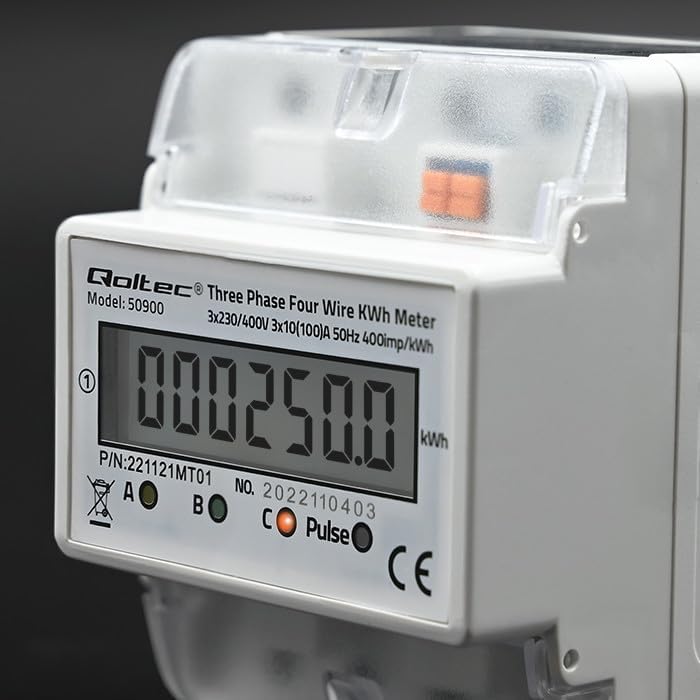
Hình 6.1: Cận cảnh view of the LCD display showing an example energy reading in kWh.
6.2 Đầu ra xung
The meter features a pulse output (400imp/kWh) which can be used to connect to external monitoring systems for remote data collection. Refer to the external system's documentation for connection details.
7. Bảo trì
The QOLTEC 50900 energy meter is designed for maintenance-free operation under normal conditions.
- Vệ sinh: Use a soft, dry cloth to clean the meter's exterior. Do not use abrasive cleaners, solvents, or liquids that could enter the casing.
- Điều tra: Periodically inspect the wiring connections for any signs of loosening or damage. Ensure the meter is free from dust accumulation.
- Điều kiện môi trường: Đảm bảo môi trường hoạt động luôn nằm trong phạm vi nhiệt độ và độ ẩm quy định để kéo dài tuổi thọ của thiết bị đo.
KHAI THÁC. Xử lý sự cố
If you encounter issues with your QOLTEC 50900 meter, refer to the following common problems and solutions:
| Vấn đề | Nguyên nhân có thể | Giải pháp |
|---|---|---|
| Màn hình không hiển thị/Đồng hồ không bật nguồn | No power supply; Incorrect wiring; Blown fuse in circuit | Check power supply to the meter. Verify wiring connections. Check circuit breaker/fuse. |
| Incorrect energy reading | Incorrect wiring; Faulty meter | Verify wiring connections against the diagram. If wiring is correct, contact support. |
| Pulse output not working | Incorrect connection to external system; Faulty meter | Check pulse output wiring to the external system. Consult external system's manual. If issue persists, contact support. |
If the problem persists after attempting these solutions, please contact Qoltec customer support.
9. Bảo hành và Hỗ trợ
Qoltec products are manufactured to high-quality standards. For warranty information and technical support, please refer to the warranty card included with your product or visit the official Qoltec webtrang web. Giữ lại biên lai mua hàng làm bằng chứng mua hàng.