
Giới thiệu
This manual provides essential instructions for the proper setup, operation, and maintenance of your 3nStar PTA0157-432 All-in-One POS System. Please read this manual thoroughly before using the device to ensure optimal performance and longevity.
Thông tin an toàn
Observe the following safety precautions to prevent damage to the device or injury to yourself and others:
- Không để thiết bị tiếp xúc với nước hoặc độ ẩm quá mức.
- Tránh đặt thiết bị gần nguồn nhiệt hoặc dưới ánh nắng trực tiếp.
- Chỉ sử dụng bộ chuyển đổi nguồn AC được cung cấp kèm theo.
- Không tự ý mở hoặc sửa chữa thiết bị. Vui lòng liên hệ nhân viên có trình độ để được bảo dưỡng.
- Đảm bảo thông gió thích hợp xung quanh thiết bị trong quá trình vận hành.
Nội dung gói
Xác minh rằng tất cả các mục đều có trong gói hàng:
- 3nStar PTA0157-432 All-in-One POS System
- Bộ đổi nguồn AC
- Hướng dẫn sử dụng (tài liệu này)
Sản phẩm trênview
The 3nStar PTA0157-432 is a 15.6-inch All-in-One Point of Sale system designed for various business environments. It features a 10-point capacitive touchscreen, runs on Android 11, and is powered by a Quad-Core processor with 4GB RAM and 32GB storage. Integrated Wi-Fi and Bluetooth connectivity are also included.

Hình 1: Mặt trước view of the 3nStar PTA0157-432 All-in-One POS System, showcasing the 15.6-inch display and integrated stand.

Figure 2: A user interacting with the 10-point capacitive touchscreen of the POS system, demonstrating its touch responsiveness.

Hình 3: Phía sau view of the 3nStar POS System, showing the ventilation slots and the sturdy integrated stand.
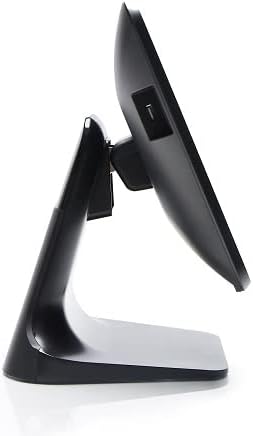
Hình 4: Mặt bênfile of the 3nStar POS System, highlighting its slim design and adjustable screen angle.
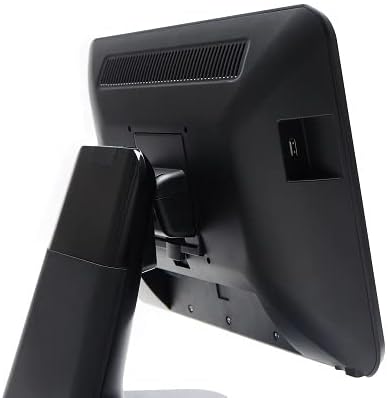
Hình 5: Mặt sau view of the 3nStar POS System, illustrating the location of various connectivity ports for peripherals.
Cài đặt
- Giải nén hệ thống: Carefully remove the POS system and all accessories from the packaging.
- Position the System: Place the POS system on a stable, flat surface, ensuring adequate ventilation around the device.
- Kết nối nguồn: Connect the AC adapter to the power input port on the back of the POS system, then plug the adapter into a standard electrical outlet.
- Bật nguồn ban đầu: Press the power button, usually located on the side or back of the display. The system will boot up to the Android 11 operating system.
- Cấu hình ban đầu: Follow the on-screen prompts to complete the initial Android setup, including language selection, Wi-Fi connection, and Google account setup (optional).
- Kết nối thiết bị ngoại vi: Connect any necessary peripherals such as barcode scanners, receipt printers, or cash drawers to the available USB or other designated ports. Refer to the peripheral's manual for specific connection instructions.
Hướng dẫn sử dụng
The 3nStar PTA0157-432 operates on Android 11, providing a familiar and intuitive user experience.
Điều hướng cơ bản
- Màn hình cảm ứng: Use your fingers to tap, swipe, pinch, and zoom on the 15.6-inch capacitive display.
- Màn hình chính: Access your installed applications and widgets from the main home screen.
- Ngăn kéo ứng dụng: Swipe up from the bottom of the screen or tap the app drawer icon to view tất cả các ứng dụng đã cài đặt.
- Thông báo: Vuốt xuống từ đầu màn hình để truy cập thông báo và cài đặt nhanh.
Kết nối với Wi-Fi
- Đi đến Cài đặt > Mạng & internet > Wi-Fi.
- Chuyển đổi Wi-Fi On.
- Chọn mạng mong muốn từ danh sách và nhập mật khẩu nếu được yêu cầu.
Kết nối thiết bị Bluetooth
- Đi đến Cài đặt > Thiết bị được kết nối > Tùy chọn kết nối > Bluetooth.
- Chuyển đổi Bluetooth On.
- Đảm bảo thiết bị Bluetooth của bạn đang ở chế độ ghép nối.
- Select the device from the list to pair.
Using POS Software
The system is designed to run various Android-compatible Point of Sale applications. Install your preferred POS software from the Google Play Store or other trusted sources. Refer to your specific POS software's documentation for detailed usage instructions.
BẢO TRÌ
Vệ sinh thiết bị
- Màn hình: Sử dụng một miếng vải mềm, không xơ vải lau nhẹampened with water or a screen cleaner specifically designed for electronic displays. Do not spray cleaner directly onto the screen.
- Thân hình: Wipe the exterior surfaces with a soft, dry cloth. Avoid abrasive cleaners or solvents.
- Thông gió: Ensure ventilation slots are free from dust and debris to prevent overheating. Use compressed air if necessary.
Cập nhật phần mềm
Regularly check for and install system updates for Android 11 to ensure optimal performance, security, and compatibility. Go to Cài đặt > Hệ thống > Cập nhật hệ thống.
Quản lý lưu trữ
Monitor the 32GB internal storage to ensure sufficient space for applications and data. Delete unnecessary files or uninstall unused applications to free up space. Go to Cài đặt > Kho.
Xử lý sự cố
| Vấn đề | Nguyên nhân có thể | Giải pháp |
|---|---|---|
| Thiết bị không bật nguồn. | Power cable not connected properly; AC adapter malfunction. | Ensure the AC adapter is securely connected to the device and a working power outlet. Test the outlet with another device. |
| Màn hình cảm ứng không phản hồi. | Software glitch; screen dirty; physical damage. | Restart the device. Clean the screen with a soft cloth. If the issue persists, contact support. |
| Sự cố kết nối Wi-Fi. | Mật khẩu không chính xác; ngoài vùng phủ sóng; sự cố bộ định tuyến. | Verify Wi-Fi password. Ensure the device is within range of the router. Restart the router and the POS system. |
| Peripheral (e.g., printer) not detected. | Incorrect connection; driver issue; peripheral not powered on. | Check physical connections. Ensure the peripheral is powered on. Install necessary drivers or apps for the peripheral. Restart the POS system. |
Thông số kỹ thuật
| Tính năng | Chi tiết |
|---|---|
| Số hiệu mẫu | PTA0157-432 |
| Hệ điều hành | Android 11 |
| Kích thước màn hình | 15.6 inch |
| Độ phân giải màn hình | 1920 x 1080 điểm ảnh |
| Màn hình cảm ứng | 10-point Capacitive |
| Bộ xử lý | Quad-Core (Rockchip 3568, 2 GHz) |
| ĐẬP | 4GB LPDDR4 |
| Kho | 32GB SSD (Flash Memory) |
| Đồ họa | Đồ họa tích hợp |
| Kết nối | Wi-Fi, Bluetooth |
| Kích thước sản phẩm (DxRxC) | 10 x 13 x 16 inch |
| Trọng lượng sản phẩm | 11 pound |
| Màu sắc | Đen |
Bảo hành và Hỗ trợ
For warranty information, technical support, or service inquiries, please refer to the official 3nStar webTruy cập trang web hoặc liên hệ với đại lý ủy quyền của bạn. Giữ lại hóa đơn mua hàng làm bằng chứng mua hàng cho các yêu cầu bảo hành.
Online resources and frequently asked questions may be available on the manufacturer's support page: Hỗ trợ 3nStar