
VCHICS DPS305U 30V 5A
VCHICS DPS305U DC Power Supply User Manual
Model: DPS305U (30V 5A)
1. Giới thiệu
Cảm ơn bạn đã muaasing the VCHICS DPS305U Variable DC Regulated Power Supply. This device is designed for laboratory, electronic repair, DIY projects, communication equipment maintenance, product lines, scientific research, and educational units. It offers high precision, low noise, and multiple safety features to ensure reliable and safe operation. Please read this manual thoroughly before use to ensure proper operation and to maximize the lifespan of your power supply.
2. Biện pháp phòng ngừa an toàn
To prevent electric shock, fire, or damage to the device, please observe the following safety guidelines:
- Luôn luôn kết nối nguồn điện với ổ cắm có nối đất.
- Không vận hành thiết bị trong điều kiện ẩm ướt hoặc damp điều kiện.
- Ensure proper ventilation. Do not block the cooling fan or vents.
- Không mở casing. Không có bộ phận nào bên trong có thể tự bảo dưỡng. Vui lòng liên hệ với nhân viên có trình độ để được bảo dưỡng.
- Before connecting or disconnecting loads, ensure the power supply is turned off.
- Avoid short-circuiting the output terminals for extended periods, although the device has short-circuit protection.
- Xác minh khối lượng đầu vàotage switch (115V/230V) on the back matches your local power supply before connecting.
3. Nội dung gói hàng
Khi mở gói hàng, vui lòng kiểm tra xem tất cả các mặt hàng được liệt kê bên dưới có đầy đủ và trong tình trạng tốt hay không:
- 1 x VCHICS DPS305U DC Power Supply Host
- 1 x Output Power Cord (Alligator clips)
- 1 x Dây nguồn đầu vào
- 1 x Hướng dẫn sử dụng
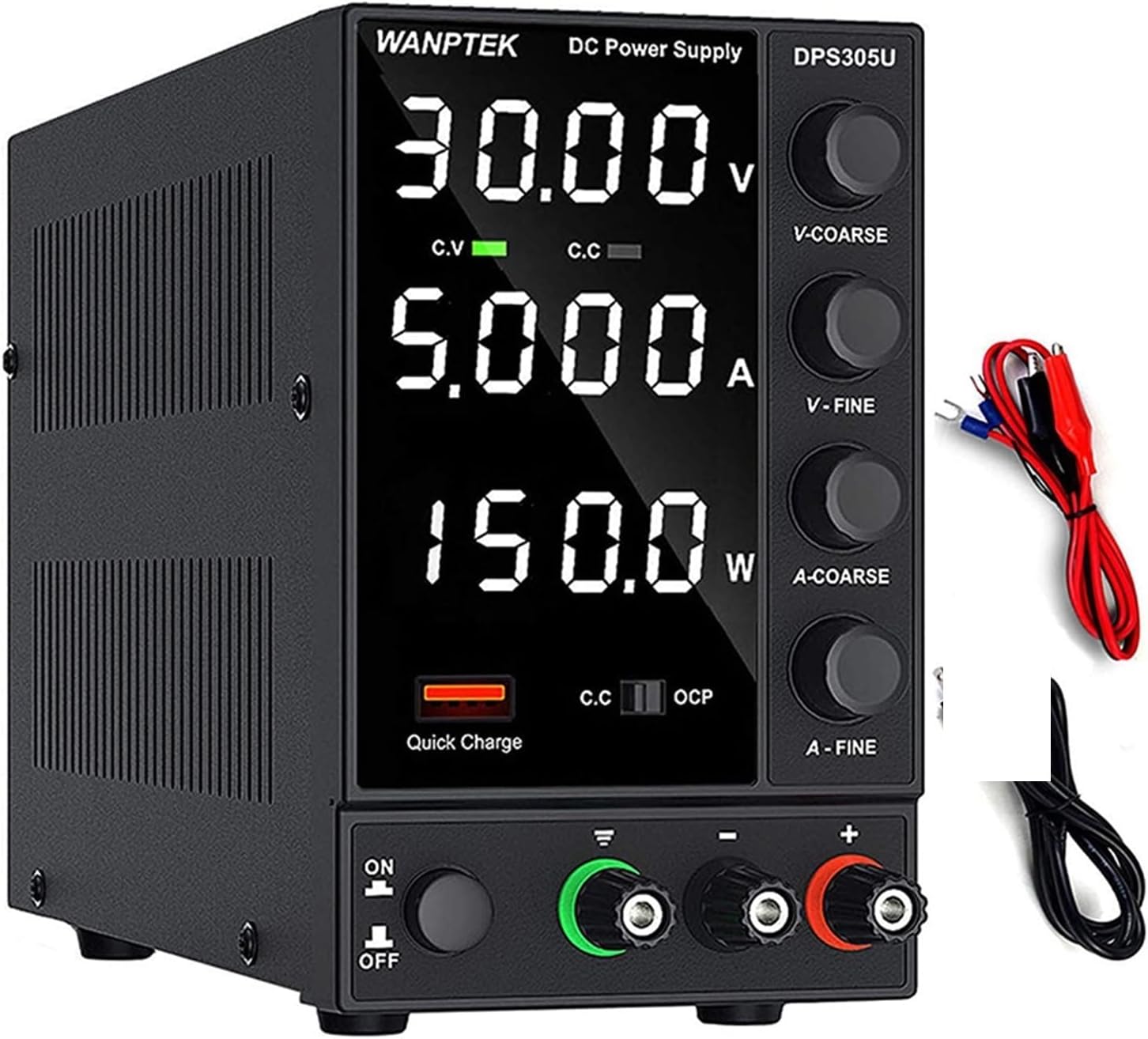
Image: The VCHICS DPS305U DC Power Supply unit shown with its included output power cords (red and black with alligator clips) and input power cord.
4. Tính năng sản phẩm
- Tính toán công suất tự động: Unlike other DC power supplies, the WANPTEK DPS305U automatically calculates the power value. It simultaneously displays voltage, current, and power values with a precision of 0.01V, 0.001A, and 0.001W.
- 5V / 3.6A USB Interface: Equipped with a high-speed charging protocol identification chip, this variable power supply supports USB fast charging. It provides a 5V / 3.6A output, allowing for quick charging of mobile phones and other devices, or for powering devices under repair.
- Short Circuit Alarm: Designed to enhance safety and extend the lifespan of the DC power supply. When a short circuit occurs, the adjustable DC power supply unit stops output and emits an alarm. The bench power supply includes safety protections such as over-voltage, over-current, over-temperature, and overload protection.
- Ứng dụng rộng rãi: This adjustable power supply features an electrically controlled fan and an excellent heat sink for efficient heat dissipation. It is particularly suitable for laboratories, electronic repair DIY, communication equipment maintenance, product lines, scientific research, and educational units.
- Độ chính xác cao: The power supply boasts a high resolution of 0.01V and 0.001A, ensuring accurate and stable output.

Hình ảnh: Cận cảnh view highlighting the Short Circuit Alarm indicator and the USB Quick-Charge Interface on the front panel of the power supply.

Hình ảnh: Một nội bộ view of the power supply, illustrating the cooling fan and heat sink components responsible for intelligent temperature control and heat dissipation.

Image: The power supply unit displayed alongside a digital multimeter, demonstrating its high precision output readings for voltage và hiện tại.
5. Sản phẩm hếtview và các thành phần
Familiarize yourself with the various parts and controls of your VCHICS DC Power Supply:

Image: A detailed diagram of the power supply, clearly labeling its front panel controls and rear panel connections.
- Màn hình hiển thị: Hiển thị tậptagCác chỉ số đo điện áp (V), dòng điện (A) và công suất (W).
- Phim bảo vệ: A film on the display screen to prevent scratches during transport. Remove it for clearer viewđang.
- Tậptage Coarse Knob (V-COARSE): Điều chỉnh voltage với mức tăng lớn hơn.
- Tậptage Fine Knob (V-FINE): Điều chỉnh voltage theo những bước nhỏ hơn, chính xác hơn.
- Current Coarse Knob (A-COARSE): Adjusts current limit in larger increments.
- Current Fine Knob (A-FINE): Adjusts current limit in smaller, precise increments.
- USB Quick Charging Interface: Ngõ ra 5V/3.6A dùng để sạc thiết bị.
- Short Circuit Alarm Indicator: Lights up and unit alarms when a short circuit is detected.
- Công tắc Bật / Tắt nguồn: Bật hoặc tắt thiết bị.
- GND Terminal: Đầu cuối mặt đất.
- Cực dương (+): Red output terminal for positive connection.
- Cực âm (-): Black output terminal for negative connection.
- Quạt làm mát: Tự động kích hoạt để tản nhiệt.
- 230V/115V±10% Switch: Tậptage selection switch for input power. Ensure this matches your local voltage.
- Đầu vào nguồn AC: Connects the input power cord.
- Hộp cầu chì: Có chứa cầu chì bảo vệ.
6. Thiết lập
- Tháo hộp: Cẩn thận lấy bộ nguồn ra khỏi bao bì.
- Tậptage Lựa chọn: Locate the 230V/115V switch on the rear panel. Ensure it is set to the correct voltage for your region (e.g., 115V for North America, 230V for Europe/Asia). Tập không đúngtagLựa chọn này có thể làm hỏng thiết bị.
- Kết nối nguồn điện: Connect the provided input power cord to the AC Power Input on the rear of the unit and then to a grounded wall outlet.
- Kết nối đầu ra:
- Connect the red output power cord (alligator clip) to the Positive Terminal (+).
- Connect the black output power cord (alligator clip) to the Negative Terminal (-).
- If grounding is required for your application, connect a separate ground wire to the GND terminal.
- Kiểm tra ban đầu: Before connecting any load, ensure all knobs (V-COARSE, V-FINE, A-COARSE, A-FINE) are turned fully counter-clockwise to their minimum settings.
7. Hướng dẫn vận hành
7.1 Hoạt động cơ bản
- Bật nguồn: Flip the Power On/Off switch to the "ON" position. The display will light up.
- Điều chỉnh âm lượngtage (Vol không đổitage Mode - CV):
- Turn the V-COARSE knob clockwise to set the approximate desired voltage.
- Use the V-FINE knob to precisely adjust the voltage to the exact desired value.
- The "C.V" indicator on the display will light up when the unit is operating in Constant Voltagchế độ e.
- Adjusting Current Limit (Constant Current Mode - CC):
- To set the current limit, first short-circuit the output terminals (connect the red and black alligator clips together). The "C.C" indicator will light up.
- Turn the A-COARSE knob clockwise to set the approximate desired current limit.
- Use the A-FINE knob to precisely adjust the current limit.
- Remove the short circuit from the output terminals. The unit will return to Constant Voltage mode if no load is connected or if the load draws less current than the set limit.
- The "C.C" indicator will light up when the unit is operating in Constant Current mode (i.e., the load is drawing the maximum set current).
- Tải kết nối: Sau khi thiết lập âm lượng mong muốntage and current limits, connect your device or circuit to the output terminals. Ensure correct polarity.
- Giám sát: Observe the display for real-time voltagCác chỉ số về điện áp, dòng điện và công suất.
7.2 Giao diện sạc nhanh USB
The 5V/3.6A USB port on the front panel can be used to quickly charge compatible devices. Simply connect your device's USB cable to this port. This output is independent of the main DC output settings.
8. Bảo trì
- Vệ sinh: Disconnect the power supply from the main power outlet before cleaning. Use a soft, dry cloth to wipe the exterior. Do not use abrasive cleaners or solvents.
- Thông gió: Ensure the cooling fan and vents are free from dust and obstructions. Periodically check for dust buildup and gently clean with compressed air if necessary.
- Kho: Khi không sử dụng trong thời gian dài, hãy bảo quản nguồn điện ở nơi khô ráo, thoáng mát, tránh ánh nắng trực tiếp và nhiệt độ cao.
- Thay thế cầu chì: If the unit does not power on, check the fuse located in the fuse box on the rear panel. Replace it only with a fuse of the same type and rating. Refer to the specifications for fuse details.
KHAI THÁC. Xử lý sự cố
| Vấn đề | Nguyên nhân có thể | Giải pháp |
|---|---|---|
| Thiết bị không bật nguồn. | No power from outlet; Power cord not connected; Blown fuse; Power switch off. | Check outlet with another device; Ensure power cord is securely connected; Replace fuse (refer to Maintenance); Flip power switch to ON. |
| Không có vol đầu ratage / hiện tại. | Các cực đầu ra không được kết nối; Âm lượngtage/Current knobs set to minimum; Overload/Short circuit protection activated. | Ensure load is properly connected; Adjust voltage/current knobs clockwise; Check for short circuit in load, reduce load, or increase current limit. |
| Short Circuit Alarm activates. | Short circuit in the connected load or output cables. | Immediately disconnect the load. Identify and resolve the short circuit in your circuit/cables. Reconnect after resolving. |
| Màn hình bị mờ hoặc không rõ nét. | Protective film still on the display. | Carefully peel off the protective film from the display screen. |
| Thiết bị bị quá nóng. | Blocked ventilation; Overload. | Ensure cooling fan and vents are clear; Reduce load or operating time. |
10. Thông số kỹ thuật
| Tính năng | Chi tiết |
|---|---|
| Người mẫu | DPS305U |
| Thương hiệu | VCHICS |
| Đầu ra Voltage | 0-30V (Có thể điều chỉnh) |
| Dòng điện đầu ra | 0-5A (Có thể điều chỉnh) |
| Công suất đầu ra | 150W (Tối đa) |
| Tậptage Độ chính xác hiển thị | 0.01V |
| Độ chính xác hiển thị hiện tại | 0.001A |
| Power Display Accuracy | 0.001W |
| Đầu ra USB | 5V / 3.6A |
| Phương pháp làm mát | Air Cooling (Intelligent Fan) |
| Trọng lượng sản phẩm | Xấp xỉ 2 kg (4.4 lbs) |
| Đầu vào Voltage Chuyển đổi | 115V/230V ±10% (selectable) |

Image: A visual comparison illustrating the compact and lightweight design of the switching power supply (DPS3010U model shown) compared to a traditional linear power supply, highlighting its space-saving benefits.
11. Bảo hành và Hỗ trợ
VCHICS products are manufactured to high quality standards. This product comes with a standard manufacturer's warranty against defects in materials and workmanship. For specific warranty terms and conditions, please refer to the warranty card included in your package or contact your point of purchase.
For technical support, troubleshooting assistance, or warranty claims, please contact VCHICS customer service through the retailer where you purchased the product.
Ask a question about this manual
Ask about setup, troubleshooting, compatibility, parts, safety, or missing instructions. Manuals+ will review the question and use this page’s manual context to help answer it.