
Giới thiệu
This manual provides detailed instructions for the installation, operation, and maintenance of the IXITAB STC-3008, STC-3018, and STC-3028 series of digital temperature and humidity controllers. These devices are designed for precise control in various applications, including aquariums, terrariums, incubators, and industrial temperature/humidity control systems.
Các biến thể sản phẩm
- STC-3008: Dual Digital Temperature Controller with two temperature probes.
- STC-3018: Dual Digital Temperature Controller with two temperature probes.
- STC-3028: Digital Temperature and Humidity Controller with one combined temperature and humidity sensor.
Các tính năng chính
- Dual display for simultaneous monitoring of two temperatures or temperature and humidity.
- Two independent relay outputs for controlling heating/cooling or humidification/dehumidification devices.
- Wide range of power supply options (AC 110V/220V, DC 12V/24V) depending on the model.
- High precision sensors for accurate readings.
- User-friendly interface for setting parameters.
Biện pháp phòng ngừa an toàn
To ensure safe operation and prevent damage to the device, please observe the following precautions:
- Luôn ngắt nguồn điện trước khi thực hiện bất kỳ công việc đấu dây hoặc bảo trì nào.
- Đảm bảo rằng nguồn cung cấp điệntage matches the requirements of your specific controller model.
- Strictly distinguish the interface of the relay, sensor, and power connections to avoid short circuits or damage.
- Đảm bảo tất cả các kết nối dây được an toàn và cách điện đúng cách.
- Keep the sensor and power wires separate and maintain a proper distance to prevent interference.
- Không để thiết bị tiếp xúc với nước hoặc độ ẩm quá mức.
 Hình ảnh: Trên cùng view of the STC-3018 controller showing the display, buttons, and a label with wiring instructions and safety notes. The label indicates power supply options (110-220VAC, 12V, 24V) and relay outputs (10A/220VAC). A temperature probe is connected to the device.
Sản phẩm trênview
Thành phần
- Main Controller Unit (with digital displays and control buttons)
- Temperature Sensor (for STC-3008/3018 models)
- Temperature and Humidity Sensor (for STC-3028 model)
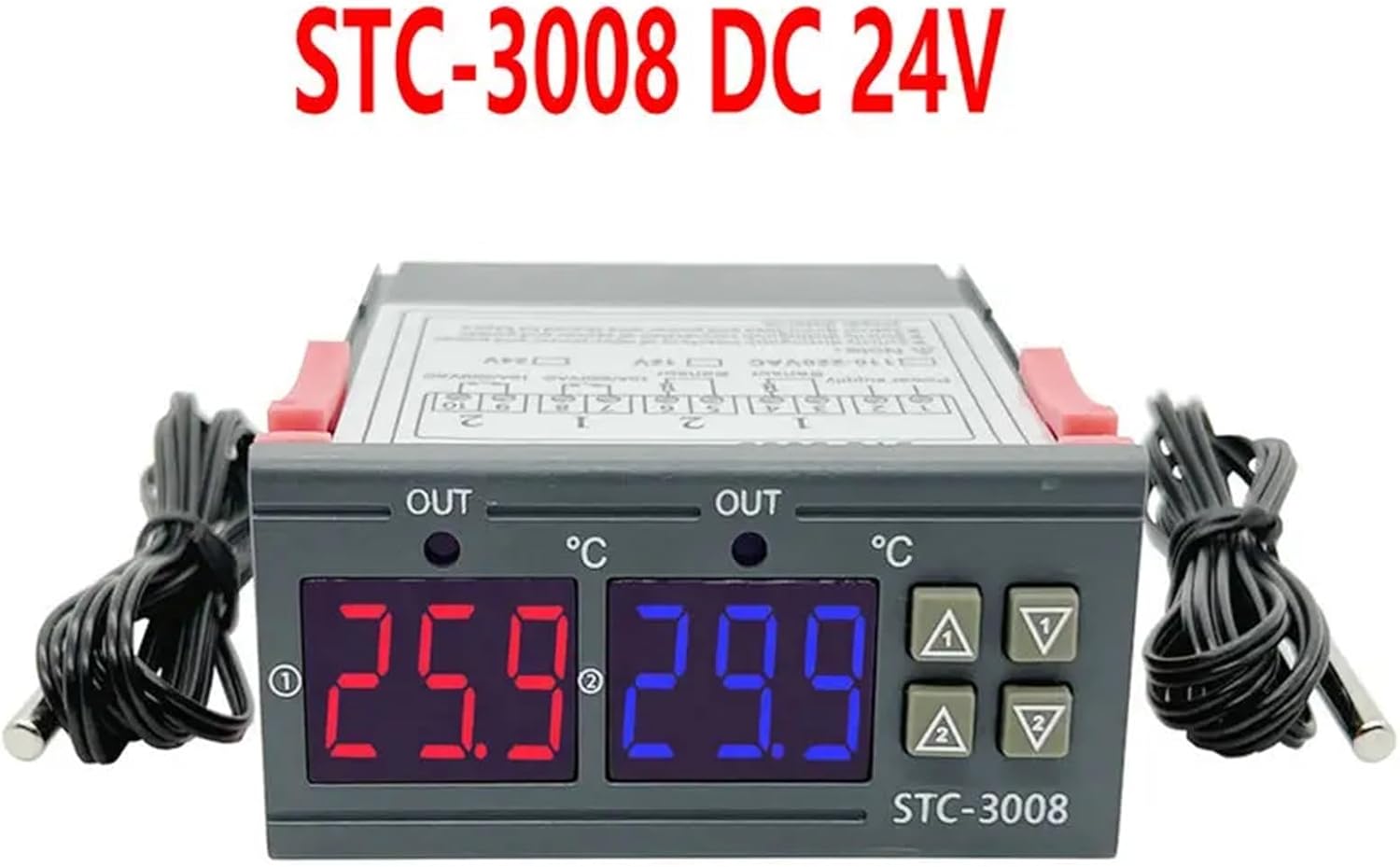 Hình ảnh: Mặt trước view of the STC-3008 DC 24V model, featuring two digital displays (red and blue) showing temperature readings, and two connected temperature probes. The model name "STC-3008" is visible on the front panel.
 Image: A collage showing three different models: STC-3018 (top left), STC-3008 (top right and bottom left), and STC-3028 (bottom right). Each model is shown with its respective sensor, highlighting the visual differences and sensor types (temperature probe for 3008/3018, combined temperature/humidity sensor for 3028).
 Hình ảnh: Cận cảnh view of the STC-3028 model, showcasing its dual digital display for temperature and humidity, along with the connected combined temperature and humidity sensor.
Thông số kỹ thuật
| Tham số | Giá trị |
|---|---|
| Người mẫu | STC-3008, STC-3018, STC-3028 |
| Nguồn điện | AC 110V/220V, DC 12V/24V (model dependent) |
| Phạm vi đo nhiệt độ | -50°C đến 110°C (-58°F đến 230°F) |
| Humidity Measurement Range (STC-3028) | 0% RH đến 99% RH |
| Dung lượng rơle đầu ra | 10A/220VAC |
| Loại cảm biến | NTC sensor (temperature), integrated sensor (humidity for STC-3028) |
| Kích thước | Approx. 1.18 x 0.79 x 0.39 inches (main unit) |
| Trọng lượng sản phẩm | Xấp xỉ. 1.76 ounce |
| Nước xuất xứ | Trung Quốc |
Lắp đặt và đi dây
Quan trọng: Hãy đảm bảo ngắt nguồn điện trước khi thực hiện bất kỳ thao tác đấu dây nào để tránh bị điện giật hoặc hư hỏng thiết bị.
Sơ đồ đấu dây
 Image: Detailed wiring diagram for the STC-3018 model. It illustrates connections for power supply (110V/AC220V, 12V, 24V), two sensor inputs, and two relay outputs (10A/220VAC). Examples of connected loads like a refrigerator, fan, and water heater are shown.
Các bước đấu dây
- Nguồn điện: Connect the appropriate power supply (AC 110V/220V or DC 12V/24V) to terminals 1 and 2. Verify that the voltage matches your specific controller model.
- Cảm biến: Connect the temperature sensors to terminals 3 and 4, and 5 and 6 (for STC-3008/3018). For the STC-3028, connect the combined temperature/humidity sensor to its designated terminals.
- Rơle đầu ra: Connect your heating/cooling or humidification/dehumidification devices to terminals 7 and 8 (Relay 1) and 9 and 10 (Relay 2). These are dry contacts, meaning they act as switches, and your load will require its own power source.
- Lắp đặt: The controller is designed for panel mounting. Insert the unit into a suitable cutout and secure it using the integrated clips on the sides.
Hướng dẫn sử dụng
Chức năng nút
- Nút đặt: Được sử dụng để vào chế độ cài đặt thông số và xác nhận lựa chọn.
- Nút lên (▲): Increases values, navigates through menu options.
- Nút xuống (▼): Decreases values, navigates through menu options.
- Rst Button: Nhấn nhanh để view current settings; long press (3 seconds) to reset to factory default settings.
Temperature/Humidity Setting
 Image: A visual guide demonstrating the temperature and humidity setting process on the STC-3028 model. It shows how to set starting and stopping values for both temperature (heating/cooling) and humidity (humidification/dehumidification) using the control buttons.
- Setting Starting Temperature/Humidity: Nhấn và giữ Lên (▲) button for 3 seconds. The starting value on the display will flash. Use the Lên (▲) or Xuống (▼) buttons to adjust to your desired starting value. Press the Bộ để xác nhận và thoát.
- Setting Stopping Temperature/Humidity: Nhấn và giữ Xuống (▼) button for 3 seconds. The stopping value on the display will flash. Use the Lên (▲) or Xuống (▼) buttons to adjust to your desired stopping value. Press the Bộ để xác nhận và thoát.
- Đặt lại về Cài đặt gốc: Nhấn và giữ đầu tiên button for 3 seconds until the display shows "888" or similar indication of reset.
The controller will automatically activate or deactivate the connected relays based on the set starting and stopping values to maintain the desired temperature or humidity range. For temperature control, if the starting temperature is lower than the stopping temperature, it operates in heating mode. If the starting temperature is higher than the stopping temperature, it operates in cooling mode. Similar logic applies to humidity control for humidification/dehumidification.
BẢO TRÌ
Proper maintenance ensures the longevity and accuracy of your controller:
- Giữ thiết bị sạch sẽ, không bụi bẩn. Dùng khăn mềm, khô để lau chùi.
- Đảm bảo thông gió đầy đủ xung quanh thiết bị để tránh quá nhiệt.
- Thường xuyên kiểm tra tất cả các mối nối dây điện để đảm bảo chúng vẫn chắc chắn và không bị ăn mòn.
- Avoid exposing the unit or sensors to extreme temperatures, high humidity, or corrosive environments outside their specified operating ranges.
- Do not attempt to disassemble the unit beyond what is described in this manual.
Xử lý sự cố
If you encounter issues with your controller, refer to the table below for common problems and solutions:
| Vấn đề | Nguyên nhân có thể | Giải pháp |
|---|---|---|
| Màn hình không hoạt động | No power, incorrect wiring, faulty unit. | Check power supply connections. Verify wiring against the diagram. If problem persists, contact support. |
| Rơle không chuyển mạch | Incorrect temperature/humidity settings, faulty relay, load issue. | Review your set starting and stopping values. Check the wiring to the load device. Test the load device independently. |
| Các bài đọc không chính xác | Sensor damaged, sensor not properly placed, environmental interference. | Inspect sensor for physical damage. Ensure sensor is in the correct environment and not obstructed. Avoid placing sensor near heat sources or drafts. |
| "LLL" or "HHH" on display | Sensor open circuit (LLL) or short circuit (HHH). | Check sensor connection for looseness or damage. Replace sensor if it appears faulty. |
| Display shows "--- " | Sensor not connected or faulty. | Ensure sensor is securely connected. Replace sensor if necessary. |
Bảo hành và Hỗ trợ
For warranty information or technical support regarding your IXITAB STC-3008, STC-3018, or STC-3028 controller, please refer to the documentation provided with your product at the time of purchase or contact IXITAB customer service through the platform where you purchased the item.
When contacting support, please be prepared to provide your product model number (STC-3008, STC-3018, or STC-3028) and details of your purchase.