
IXITAB FS8233Pro
FS8233Pro Touch Smart Digital Multimeter User Manual
Model: FS8233Pro | Brand: IXITAB
1. Giới thiệu
The IXITAB FS8233Pro is an advanced, automatic smart digital multimeter designed for professional electricians and DIY enthusiasts. Featuring an intelligent sensing touch screen, this device offers convenient operation and clear display for various electrical measurements. Its rechargeable lithium battery ensures long-lasting performance without the need for frequent battery replacements. The FS8233Pro is equipped with intelligent anti-burning fuse protection and a durable silicone protective case, enhancing both safety and hardware longevity. This manual provides comprehensive instructions for safe and effective use of your multimeter.
2. Thông tin an toàn
Luôn tuân thủ các biện pháp phòng ngừa an toàn khi vận hành thiết bị kiểm tra điện. Nếu không tuân thủ, thiết bị có thể bị thương hoặc hư hỏng.
- Không vượt quá giá trị đầu vào tối đa được chỉ định cho từng phạm vi đo.
- Hãy đảm bảo các đầu dây thử nghiệm ở trong tình trạng tốt và được kết nối đúng cách trước khi tiến hành đo.
- Avoid using the multimeter in wet environments or with wet hands.
- Đừng cố đo thể tíchtage or current on circuits exceeding the device's rated capacity.
- Luôn ngắt nguồn điện của mạch trước khi đo điện trở, điện dung hoặc tính liên tục.
- Cần hết sức cẩn thận khi làm việc với các mạch điện đang hoạt động.
- Refer to local electrical codes and safety standards.
3. Nội dung gói hàng
Xác minh rằng tất cả các mục đều có trong gói hàng của bạn:
- 1 x FS8233Pro Digital Multimeter
- 1 x Hướng dẫn sử dụng
- 1 x Cáp sạc (USB)
- 1 x Cặp dây thử

Image: The FS8233Pro multimeter shown with its standard accessories, including the red and black test leads and a USB charging cable.
4. Sản phẩm hếtview
The FS8233Pro features a large, clear LCD display and intuitive touch controls for ease of use.

Hình ảnh: Cận cảnh view of the FS8233Pro's front panel, highlighting its large digital display and touch-sensitive buttons for various functions like HOLD, AUTO, NCV, Live, and input jacks.
4.1 Các tính năng chính:
- Intelligent Sensing Touch Screen: For convenient operation and clear display.
- Pin Lithium có thể sạc lại: Long life, USB charging.
- Phát hiện tự động: Eliminates the need for manual gear shifting.
- Intelligent Anti-Burning Fuse: Enhanced safety protection.
- Ốp bảo vệ bằng silicon: Prevents shock and protects hardware.
- Đèn nền: Allows clear viewtrong điều kiện tối.
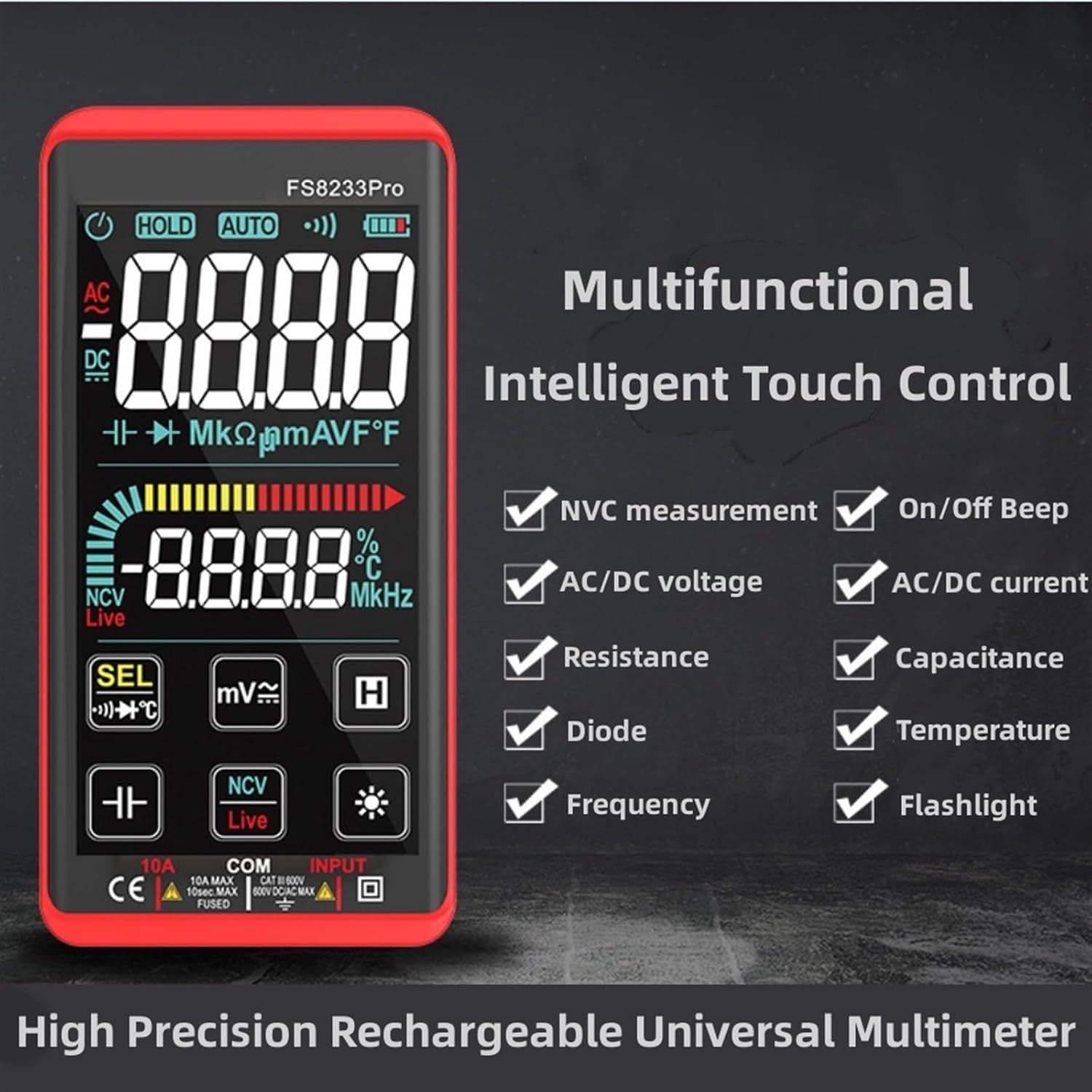
Hình ảnh: Một hình ảnh quảng cáo giới thiệu sản phẩm.asing the multifunctional intelligent touch control features of the FS8233Pro, including NVC measurement, AC/DC voltage, resistance, diode, frequency, on/off beep, AC/DC current, capacitance, temperature, and flashlight.
5. Thiết lập
5.1 Sạc ban đầu
Before first use, fully charge the multimeter's internal lithium battery. Connect the provided USB charging cable to the multimeter's charging port and to a standard USB power adapter (not included) or a computer USB port. The battery indicator on the display will show charging status.
5.2 Kết nối dây dẫn thử nghiệm
Insert the red test lead into the "INPUT" jack and the black test lead into the "COM" (common) jack. Ensure they are securely inserted.
6. Hướng dẫn vận hành
The FS8233Pro features automatic detection, simplifying measurement selection. Simply turn on the device and it will automatically identify the measurement type for most common functions.

Image: A hand interacting with the touch-sensitive display of the FS8233Pro multimeter, demonstrating its "Intelligent Movement Touch Sensing" for sensitive and fast measurements.
6.1 Bật/Tắt nguồn
Press the power button (usually indicated by a power symbol) to turn the multimeter on or off. The device will automatically shut down after approximately 15 minutes of inactivity to conserve battery life.
6.2 Điện áp ACtage (ACV) Đo lường
- Nối các đầu dây thử nghiệm song song với điện áp AC.tagnguồn e.
- Đồng hồ vạn năng sẽ tự động phát hiện điện áp AC.tage.
- Range: 0.5V-750V (Accuracy: 1%+5)
6.3 Dòng điện một chiềutage (DCV) Đo lường
- Nối các đầu dây thử nghiệm song song với điện áp DC.tage source, observing polarity.
- Đồng hồ vạn năng sẽ tự động phát hiện điện áp DC.tage.
- Range: 0.5V-1000V (Accuracy: 0.5%+3)
6.4 Đo điện trở
- Hãy đảm bảo mạch điện đã được ngắt điện trước khi đo điện trở.
- Kết nối các dây dẫn thử nghiệm qua linh kiện cần đo.
- Range: 0.1Ω-99.999MΩ (Accuracy: 1%+3)
6.5 Đo tần số
- Nối các đầu dây thử nghiệm vào nguồn tín hiệu.
- Range: 40Hz-10000Hz (Accuracy: 0.5%+3)
6.6 Đo điện dung
- Hãy đảm bảo tụ điện đã được xả hết điện trước khi đo.
- Kết nối các dây thử nghiệm qua các đầu tụ điện.
- Range: 10nF-60000μF (Accuracy: 4.5%+5)
6.7 Đo nhiệt độ
- Use the appropriate temperature probe (if included, or purchased separately) and connect it to the multimeter.
- Range: -40°C to 1000°C (Accuracy: 2%+5)
6.8 On & Off Beep (Continuity)
- Nối các đầu dây đo vào mạch hoặc linh kiện.
- If the resistance of the tested circuit is less than 50Ω, the auxiliary buzzer will sound, indicating continuity.
6.9 Kiểm tra Diode
- Nối các đầu dây đo vào hai đầu của điốt.
- The display will show the approximate diode forward voltaggiá trị e.
6.10 NCV (Khối lượng không tiếp xúc)tage) Phát hiện
- Select the NCV function.
- Đưa đầu kim của đồng hồ vạn năng lại gần điện áp AC.tagnguồn e.
- There are three alarm modes (visual and audible) according to the detected voltagsức mạnh.
6.11 Live Line Identification
- Select the Live function.
- Insert the red test lead into the suspected live line.
- If it is a live line, "Live" will appear on the screen, and an alarm sound will be emitted.
7. Bảo trì
7.1 Vệ sinh
Wipe the multimeter's casing với quảng cáoamp cloth. Do not use abrasive cleaners or solvents. Ensure the device is off and disconnected from any power source before cleaning.
7.2 Lưu trữ
Store the multimeter in a cool, dry place, away from direct sunlight and extreme temperatures. If storing for extended periods, ensure the battery is partially charged (around 50%) to prolong its lifespan.
7.3 Chăm sóc pin
The built-in lithium battery is designed for long life. Avoid fully discharging the battery frequently. Recharge as needed. If the device will not be used for a long time, charge it every 3 months to maintain battery health.
KHAI THÁC. Xử lý sự cố
| Vấn đề | Nguyên nhân có thể | Giải pháp |
|---|---|---|
| Đồng hồ vạn năng không bật nguồn. | Pin đã hết. | Charge the multimeter using the provided USB cable. |
| Các bài đọc không chính xác. | Incorrect measurement mode; Damaged test leads; Environmental interference. | Ensure correct mode is selected (though often automatic); Check test leads for damage; Move away from strong electromagnetic fields. |
| Không có tiếng bíp báo hiệu liên tục. | Resistance is too high; Test leads not making good contact. | Ensure resistance is below 50Ω; Re-seat test leads firmly. |
| Quá trình tắt máy tự động diễn ra quá nhanh. | Inactivity timer. | The device is designed to shut down after approximately 15 minutes of inactivity. This is normal operation. |
9. Thông số kỹ thuật
| Tham số | Phạm vi / Giá trị | Sự chính xác |
|---|---|---|
| điện áp xoay chiềutagđiện tử (ACV) | 0.5V-750V | (1% + 5) |
| Tập DCtage (DCV) | 0.5V-1000V | (0.5% + 3) |
| Sức chống cự | 0.1Ω-99.999MΩ | (1% + 3) |
| Tính thường xuyên | 40Hz-10000Hz | (0.5% + 3) |
| Điện dung | 10nF-60000μF | (4.5% + 5) |
| Nhiệt độ | -40°C đến 1000°C | (2% + 5) |
| Continuity Beep Threshold | < 50Ω | Không có |
| Tự động tắt máy | Xấp xỉ. 15 phút không hoạt động | Không có |
| Nguồn điện | Pin Lithium có thể sạc lại | Không có |
| Nhà sản xuất | IXITAB | Không có |
| Người mẫu | FS8233Pro | Không có |
10. Bảo hành và Hỗ trợ
For warranty information and technical support, please refer to the contact details provided by your retailer or visit the official IXITAB webtrang web. Giữ lại biên lai mua hàng làm bằng chứng mua hàng khi yêu cầu bảo hành.
Để được hỗ trợ thêm, bạn có thể liên hệ trực tiếp với người bán thông qua nền tảng mà bạn đã mua sản phẩm.
Ask a question about this manual
Ask about setup, troubleshooting, compatibility, parts, safety, or missing instructions. Manuals+ will review the question and use this page’s manual context to help answer it.