
1. Giới thiệu
Thank you for choosing the TECLAST Mini PC N15. This compact and powerful mini computer is designed for a wide range of applications, from home entertainment and office tasks to creative work and light gaming. Featuring an Intel N5095 processor, 16GB DDR4 RAM, and a 512GB PCI-e 3.0 SSD, it offers efficient performance in a small form factor. This manual provides essential information for setting up, operating, maintaining, and troubleshooting your device.
2. Nội dung gói hàng
Please verify that all items listed below are included in your package. If any items are missing or damaged, please contact TECLAST customer support.
- 1x TECLAST N15 Mini PC
- 1x Hướng dẫn sử dụng
- 1x Cáp HDMI
- 1x Giá đỡ VESA
- 1x Bộ đổi nguồn
- 1x Cáp nguồn

Image: Package contents of the TECLAST N15 Mini PC.
3. Sản phẩm hếtview
3.1. Các tính năng chính
- Bộ xử lý: Intel N5095 (4 Cores, 4 Threads, up to 2.9GHz Turbo Frequency)
- Đồ họa: Đồ họa Intel UHD
- Ký ức: Bộ nhớ RAM DDR16 4GB
- Kho: 512GB PCI-e 3.0 SSD
- Kết nối: Dual 2.5GbE RJ45 Ethernet, Wi-Fi (2.4G+5G ac), Bluetooth 4.2
- Đầu ra video: Supports up to three 4K displays (HDMI, DisplayPort, Full-Function Type-C)
- Cổng: Multiple USB 3.2, USB 2.0, Full-Function Type-C, DisplayPort, HDMI, COM Port, Micro SD Card Reader, Headphone Output, Microphone Input
- Thiết kế: Compact (0.53L volume, 400g weight), Aluminum Body, VESA Mountable

Image: Intel N5095 Processor specifications and architecture.
3.2. Cổng và giao diện
The TECLAST N15 Mini PC offers a comprehensive set of ports for versatile connectivity:
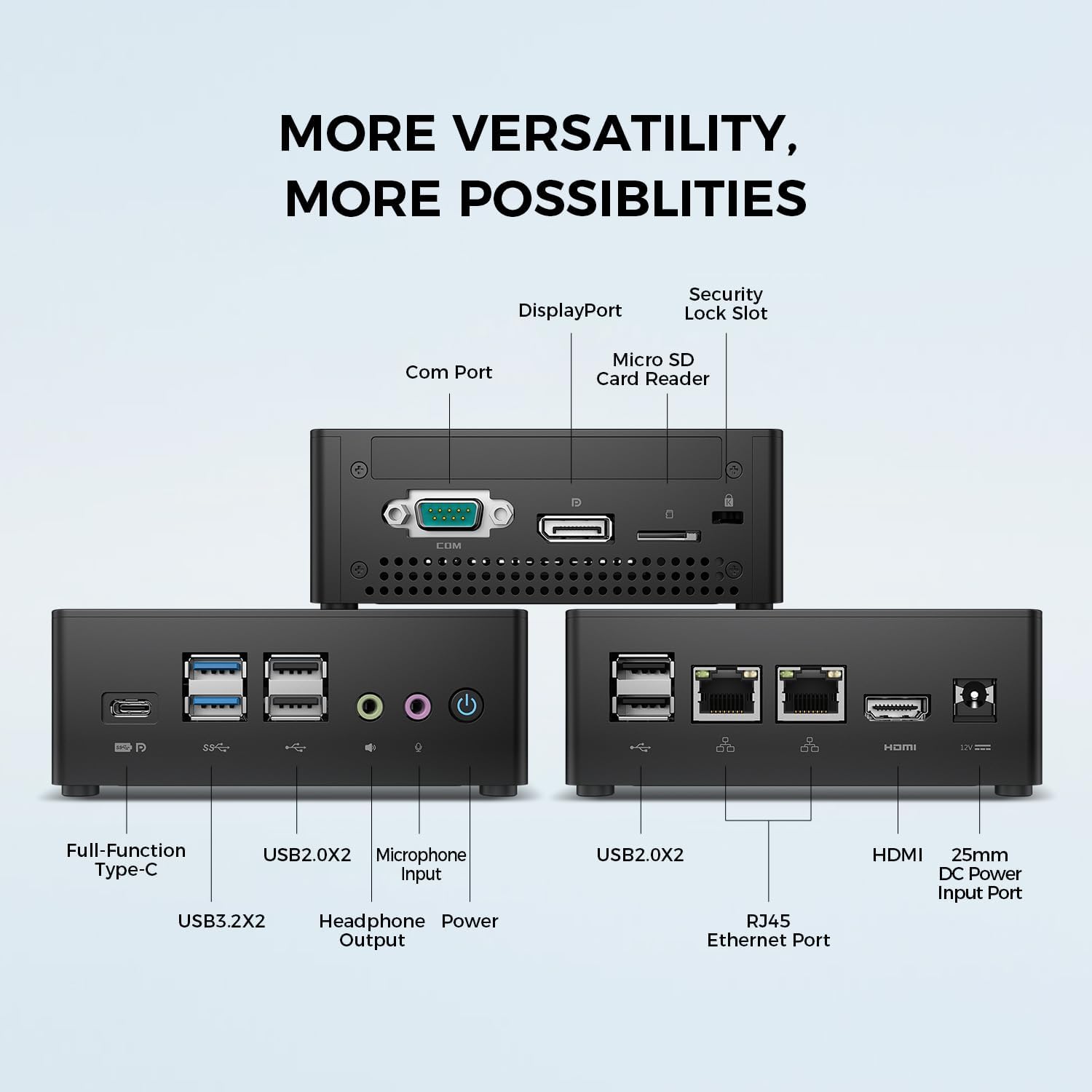
Hình ảnh: Chi tiết view of the TECLAST N15 Mini PC's front, side, and rear ports.
- Bảng điều khiển phía trước: Full-Function Type-C (supports charging, data, video, audio), 2x USB 3.2, 2x USB 2.0, Headphone Output, Microphone Input, Power Button.
- Bảng điều khiển bên: COM Port, DisplayPort, Micro SD Card Reader, Security Lock Slot.
- Bảng điều chỉnh sau: 2x USB 2.0, 2x RJ45 Ethernet Ports (2.5GbE), HDMI, DC Power Input.

Image: Dual 2.5GbE RJ45 Ethernet Ports for high-speed networking.
3.3. Hệ thống làm mát
The N15 Mini PC is designed for efficient heat dissipation to ensure stable and quiet operation. It features a 15W TDP, nickel-plated heat pipe, and a turbo fan, providing over 16000mm² of heat dissipation area.

Image: Internal cooling system design for quiet and efficient operation.
3.4. Thiết kế nhỏ gọn
With a compact volume of approximately 0.53L and a weight of 400g, the N15 Mini PC is highly portable and can be easily integrated into any workspace. Its aluminum body ensures durability.

Image: Compact size and lightweight design of the Mini PC.
4. Hướng dẫn thiết lập
4.1. Kết nối thiết bị ngoại vi
- Kết nối màn hình: Use the provided HDMI cable to connect your monitor to the HDMI port on the Mini PC. Alternatively, use a DisplayPort cable or a Full-Function Type-C cable for compatible monitors.
- Kết nối bàn phím và chuột: Plug your USB keyboard and mouse into any available USB ports on the Mini PC.
- Kết nối với mạng (Tùy chọn): For a wired connection, connect an Ethernet cable from your router or modem to one of the RJ45 ports on the Mini PC. For wireless, ensure your Wi-Fi network is available during initial setup.
- Kết nối nguồn: Connect the power adapter to the DC Power Input port on the Mini PC, then plug the power cable into a wall outlet.
4.2. Bật nguồn và thiết lập ban đầu
- Press the Power Button on the front of the Mini PC.
- The system will boot up. If it's the first time, it will guide you through the Windows operating system setup process. Follow the on-screen instructions to configure language, region, network, and user accounts.
- Ensure all drivers are installed. Windows Update typically handles this automatically.
5. Hướng dẫn vận hành
5.1. Hoạt động cơ bản
Once setup is complete, your TECLAST N15 Mini PC functions like a standard desktop computer. You can launch applications, browse the internet, and manage files using your connected keyboard and mouse.
5.2. Thiết lập nhiều màn hình
The Mini PC supports connecting up to three 4K displays simultaneously, enhancing productivity and entertainment experiences.
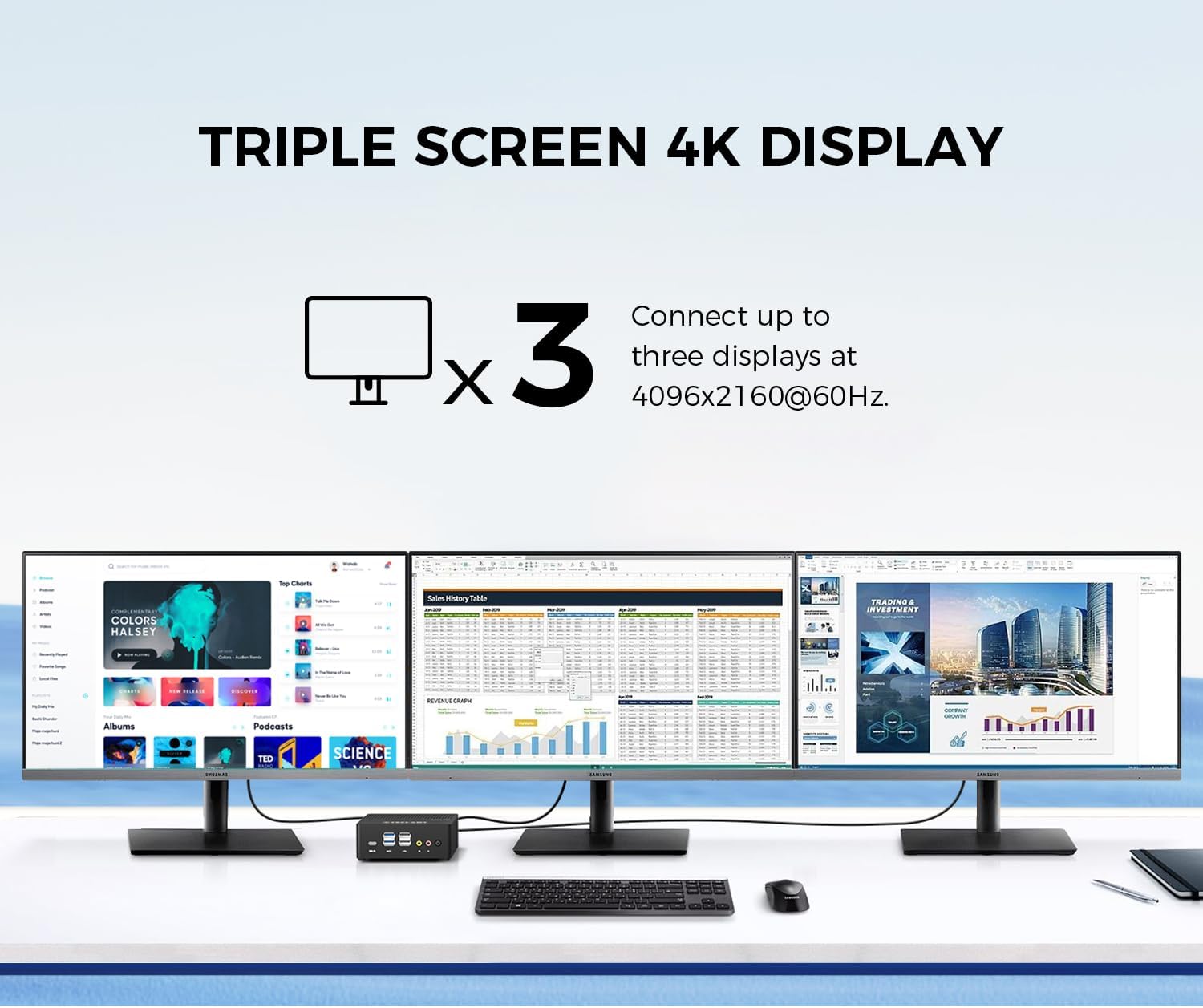
Image: Triple screen 4K display setup with the Mini PC.
- Connect your primary monitor via HDMI.
- Connect a second monitor via DisplayPort.
- Connect a third monitor via the Full-Function Type-C port (requires a compatible Type-C to DisplayPort/HDMI adapter or monitor).
- In Windows, right-click on the desktop and select "Display settings" to configure your multiple displays (extend, duplicate, or show only on one).
5.3. Kết nối không dây
The Mini PC supports 2.4G+5G ac Wi-Fi and Bluetooth 4.2 for wireless connections.
- Wi-Fi: Access Wi-Fi settings in Windows to connect to your preferred wireless network.
- Bluetooth: Ghép nối các thiết bị Bluetooth như bàn phím, chuột hoặc tai nghe thông qua cài đặt Bluetooth của Windows.
6. Bảo trì
Bảo trì thường xuyên giúp đảm bảo độ bền và hiệu suất tối ưu cho Mini PC của bạn.
- Vệ sinh: Dùng khăn mềm, khô để lau sạch bên ngoài. Đối với bụi bám trong các khe thông gió, hãy dùng khí nén. Đảm bảo thiết bị đã được tắt nguồn và rút phích cắm trước khi vệ sinh.
- Cập nhật phần mềm: Regularly check for and install Windows updates and driver updates to maintain system security and performance.
- Quản lý lưu trữ: Định kỳ dọn dẹp không cần thiết files and applications to free up storage space and improve system responsiveness.
- Thông gió: Ensure the Mini PC is placed in a well-ventilated area and that its vents are not obstructed to prevent overheating.
KHAI THÁC. Xử lý sự cố
If you encounter issues with your TECLAST N15 Mini PC, refer to the following common troubleshooting steps:
| Vấn đề | Giải pháp khả thi |
|---|---|
| Không hiển thị trên màn hình | Check all cable connections (HDMI, DisplayPort, Type-C). Ensure the monitor is powered on and set to the correct input source. Try a different cable or monitor if possible. |
| Máy tính mini không bật nguồn | Verify the power adapter is securely connected to both the Mini PC and a working power outlet. Try a different power outlet. |
| Không có kết nối internet (Wi-Fi) | Check if Wi-Fi is enabled in Windows settings. Ensure you are connected to the correct network and have entered the password correctly. Restart your router/modem. |
| No internet connection (Wired) | Ensure the Ethernet cable is securely connected to both the Mini PC and your router/modem. Check the network status in Windows. Restart your router/modem. |
| Hiệu suất chậm | Close unnecessary applications. Check for background processes consuming resources. Ensure sufficient free storage space. Run a system scan for malware. |
| Peripheral devices not recognized | Try connecting the device to a different USB port. Ensure device drivers are installed. Restart the Mini PC. |
If the issue persists after trying these steps, please contact TECLAST customer support for further assistance.
8. Thông số kỹ thuật
Detailed technical specifications for the TECLAST N15 Mini PC:
| Tính năng | Đặc điểm kỹ thuật |
|---|---|
| Thương hiệu | TỔNG HỢP |
| Số hiệu mẫu | N15 |
| Mô hình CPU | Intel® Celeron® N5095 |
| Tốc độ CPU | Up to 2.9 GHz (Turbo Frequency) |
| Bộ xử lý số lượng | 4 |
| Bộ nhớ RAM đã được cài đặt | 16GB DDR4 |
| Kích thước tối đa của bộ nhớ RAM | 16GB |
| Dung lượng lưu trữ bộ nhớ | 512 GB PCI-e 3.0 SSD |
| Bộ đồng xử lý đồ họa | Đồ họa Intel UHD |
| Độ phân giải màn hình tối đa | 3840 x 2160 pixel (4K) |
| Giao diện đầu ra video | HDMI, DisplayPort, Type-C |
| Công nghệ kết nối | Ethernet (Dual RJ45 2.5GbE), HDMI, LAN, Wi-Fi (802.11ac), Bluetooth 4.2 |
| Tổng số cổng USB | 6 (2 cổng USB 3.2, 4 cổng USB 2.0) |
| Trọng lượng sản phẩm | 400 gam |
| Tiêu thụ điện năng | 15 Watt |
| Phương pháp làm mát | Air (with Turbo Fan and Nickel-Plated Heat Pipe) |
| Màu sắc | Đen |
9. Bảo hành và Hỗ trợ
TECLAST products are designed for quality and reliability. For any product-related inquiries, technical support, or warranty claims, please contact TECLAST customer service. Most questions are answered within 24 hours.
For further assistance, please visit the official TECLAST webhoặc liên hệ trực tiếp với bộ phận hỗ trợ của họ qua trang web.
10. Video sản phẩm
Hãy xem video giới thiệu sản phẩm chính thức này để có cái nhìn trực quan hơn.view of the TECLAST N15 Mini PC's features and connectivity.
Video: Kết thúcview of the TECLAST N15 Mini PC, showcasing its design, ports, and internal components.