
1. Giới thiệu
Cảm ơn bạn đã muaasing the PRUNUS J-120 Retro Portable Radio. This device combines classic aesthetics with modern functionality, offering AM, FM, and SW radio reception, Bluetooth connectivity, and playback options via USB disk, TF card, and AUX input. This manual provides essential information for safe and efficient use of your radio.
2. Thông tin an toàn
- Không để radio tiếp xúc với mưa, hơi ẩm hoặc nhiệt độ quá cao hoặc quá thấp.
- Avoid placing the unit near heat sources or in direct sunlight for extended periods.
- Không được tự ý tháo rời hoặc sửa chữa thiết bị. Hãy giao việc bảo dưỡng cho nhân viên kỹ thuật có chuyên môn.
- Hãy đặt radio tránh xa các từ trường mạnh.
- Use only the provided power adapter and charging cable.
3. Nội dung gói hàng
Vui lòng đánh dấu vào ô cho các mục sau:
- Máy bộ đàm PRUNUS J-120 (x1)
- Hướng dẫn sử dụng (x1)
- Dây nguồn AC (x1)
- Cáp sạc USB (x1)
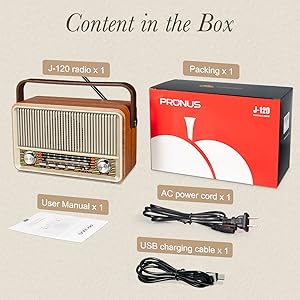
Image: Contents of the PRUNUS J-120 package.
4. Sản phẩm hếtview
Familiarize yourself with the controls and ports of your PRUNUS J-120 radio.
Bảng điều khiển phía trước:
- Núm âm lượng: Controls power ON/OFF and volume level.
- Núm điều chỉnh: Điều chỉnh tần số radio cho các băng tần AM/FM/SW.
- Band Selector Buttons: Switches between FM, AM, SW, Bluetooth, USB, TF, and AUX modes.
- Quay số điều chỉnh: Hiển thị tần số radio hiện tại.
Cổng bảng điều khiển phía sau:
- Ăng-ten kính thiên văn: Để cải thiện khả năng thu sóng radio.
- Đầu vào nguồn AC: Connects to the AC power cord for wall power.
- DC 5V Charging Port (USB-C): Dùng để sạc pin sạc bên trong.
- Cổng USB: For playing audio from a USB disk.
- Khe cắm thẻ TF: Để phát âm thanh từ thẻ TF (MicroSD).
- Jack đầu vào AUX: Để kết nối các thiết bị âm thanh bên ngoài.

Hình ảnh: Mặt trước view of the PRUNUS J-120 radio with dimensions.
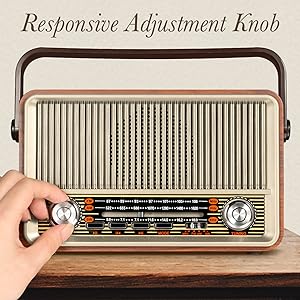
Image: Responsive Adjustment Knob.
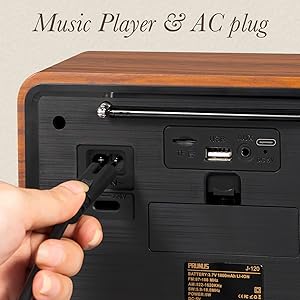
Image: AC power input and media ports.
5. Thiết lập
5.1 Cấp nguồn cho Radio
The PRUNUS J-120 offers two power options: AC power and a built-in rechargeable battery.
- Nguồn điện AC: Connect the provided AC power cord to the AC input on the rear of the radio and plug it into a standard wall outlet.
- Pin sạc: The radio has an internal 1800mAh rechargeable battery. To charge, connect the USB charging cable to the DC 5V charging port on the rear of the radio and a USB power source (e.g., computer, USB wall adapter). The charging indicator light will illuminate during charging.

Image: Two ways to supply power: AC plug-in and rechargeable battery.
Video: Demonstrates tuning the radio, connecting via Bluetooth, inserting a TF card, plugging in a USB disk, connecting an AUX cable, and charging the radio.
6. Hướng dẫn vận hành
6.1 Bật/Tắt nguồn và Điều khiển âm lượng
Rotate the Volume knob clockwise to turn the radio ON. Continue rotating to increase the volume. Rotate counter-clockwise to decrease volume and turn the radio OFF.
6.2 Chế độ Radio (AM/FM/SW)
- Press the corresponding band selector button (FM, AM, or SW) to choose your desired radio band.
- Kéo dài ăng-ten dạng ống lồng để thu sóng tối ưu, đặc biệt là đối với các băng tần FM và SW.
- Slowly rotate the Tuning knob to scan for stations. The tuning dial will indicate the frequency.

Image: Radio with extended antenna for great reception.
6.3 Chế độ Bluetooth
- Press the Bluetooth mode button. The radio will enter pairing mode, indicated by an audible prompt.
- On your mobile device, enable Bluetooth and search for available devices. Select "PRUNUS J-120" to pair.
- Sau khi ghép nối, bạn có thể phát âm thanh từ thiết bị của mình thông qua radio.

Image: Bluetooth connection setup.
6.4 Phát lại từ ổ đĩa USB / thẻ TF
- Insert a USB disk into the USB port or a TF (MicroSD) card into the TF card slot on the rear of the radio.
- Press the corresponding mode button (USB or TF) to switch to the playback mode.
- The radio will automatically detect and play audio files từ thiết bị lưu trữ được chèn vào.
6.5 đầu vào AUX
- Connect an external audio device (e.g., smartphone, MP3 player) to the AUX input jack on the rear of the radio using a 3.5mm audio cable (not included).
- Press the AUX mode button.
- Play audio from your external device, and the sound will be output through the radio's speaker.
7. Bảo trì
- Vệ sinh: Lau radio bằng vải mềm, khô. Không sử dụng chất tẩy rửa có tính ăn mòn hoặc dung môi.
- Chăm sóc pin: Để kéo dài tuổi thọ pin, tránh xả hết pin thường xuyên. Hãy sạc radio thường xuyên, ngay cả khi không sử dụng trong thời gian dài.
- Kho: When storing the radio for a long time, ensure it is fully charged and stored in a cool, dry place.
KHAI THÁC. Xử lý sự cố
| Vấn đề | Nguyên nhân có thể | Giải pháp |
|---|---|---|
| Đài phát thanh không bật được. | Battery is depleted or AC power is not connected. | Connect the AC power cord or charge the internal battery. |
| Bắt sóng vô tuyến kém. | Ăng-ten chưa được kéo dài, tín hiệu yếu hoặc bị nhiễu. | Extend the telescopic antenna fully. Try repositioning the radio. Avoid sources of electronic interference. |
| Bluetooth không kết nối được. | Radio not in pairing mode, device too far, or already connected to another device. | Ensure the radio is in Bluetooth mode and pairing. Move your device closer to the radio. Disconnect from other Bluetooth devices. |
| No sound from USB/TF/AUX. | Incorrect mode selected, file format not supported, or cable/device issue. | Ensure the correct mode (USB, TF, AUX) is selected. Check if audio files are in a supported format. Verify cable connections and external device functionality. |
9. Thông số kỹ thuật
| Tính năng | Chi tiết |
|---|---|
| Số hiệu mẫu | J-120 |
| Kích thước sản phẩm | 9 x 3.9 x 5.2 inch (Dài x Rộng x Cao) |
| Trọng lượng sản phẩm | 2.68 pound |
| Công nghệ kết nối | Bluetooth |
| Công nghệ Tuner | AM/FM/SW |
| Băng tần radio được hỗ trợ | 3-Band (FM: 87-108MHz, AM: 522-1620KHz, SW: 5.9-18.0MHz) |
| Nguồn điện | Battery Powered (1800mAh rechargeable) / AC Power |
| Các thành phần bao gồm | Owner's Manual, AC Power Cord, USB Charging Cable |
10. Bảo hành & Hỗ trợ
The PRUNUS J-120 radio comes with a standard manufacturer's warranty. For specific warranty details, please refer to the warranty card included in your package or contact PRUNUS customer support.
If you encounter any issues or have questions regarding your product, please contact PRUNUS customer support through the retailer's platform or the official PRUNUS website. Please have your model number (J-120) and purchase information ready when contacting support.