
SZSINOCAM B0CPXDFVRP
Szsinocam Wi-Fi Camera Outdoor/Indoor User Manual
Model: B0CPXDFVRP | Brand: SZSINOCAM
1. Giới thiệu
This manual provides detailed instructions for the installation, operation, and maintenance of your Szsinocam Wi-Fi Camera. Designed for both outdoor and indoor surveillance, this camera offers advanced features to enhance your security and monitoring needs. Please read this manual thoroughly before using the product to ensure proper setup and optimal performance.

Figure 1: Szsinocam Wi-Fi Camera and Mobile Application Interface
2. Tính năng sản phẩm
The Szsinocam Wi-Fi Camera is equipped with a range of features designed for comprehensive surveillance:
- Dual Lens & Dual Screen Monitoring: Features two independent lenses allowing simultaneous monitoring of two different areas.
- Hình ảnh độ phân giải cao: Chụp ảnh rõ nét và chi tiếttage with 4-megapixel resolution.
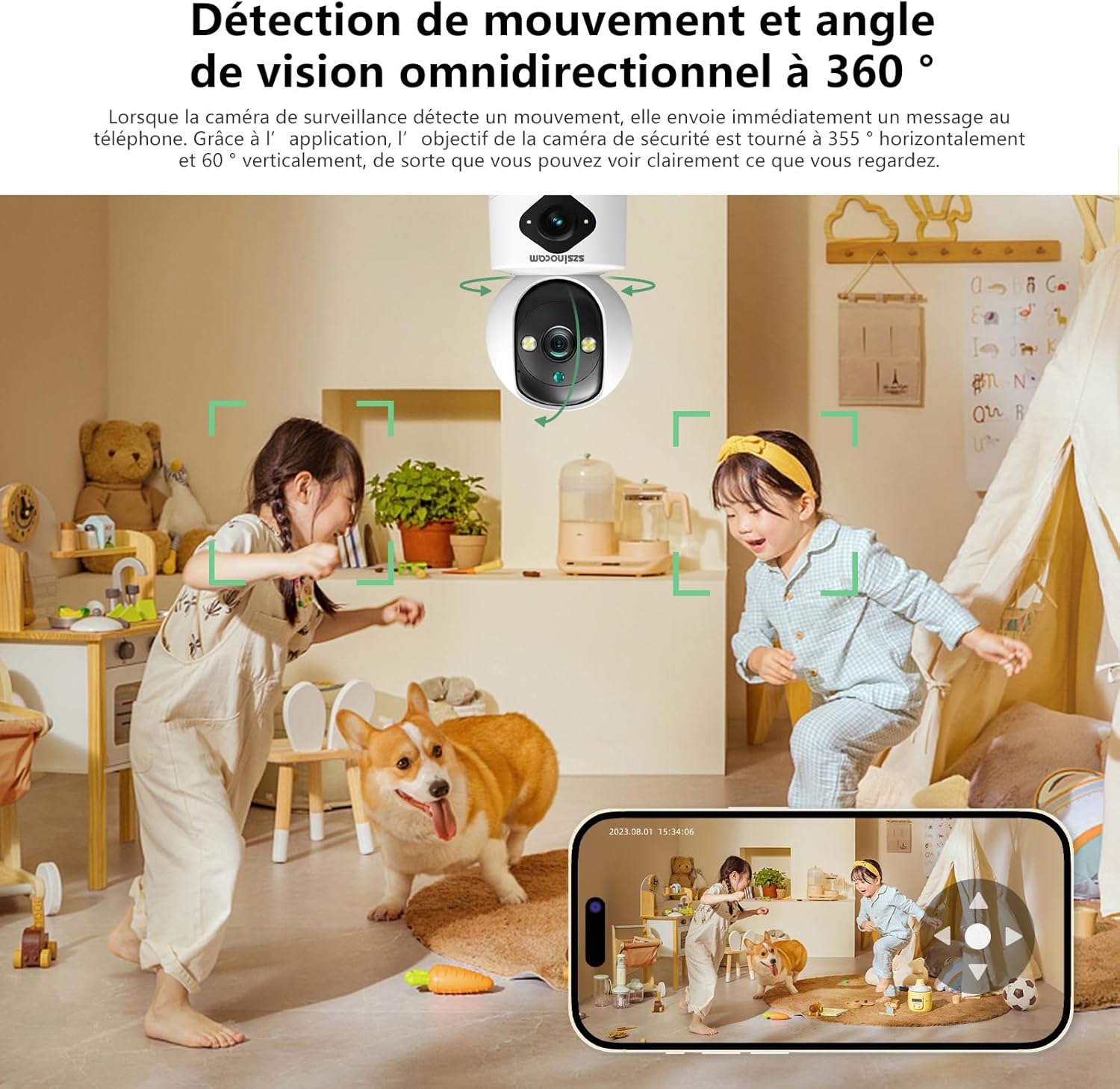
- Flexible Pan & Tilt: Offers a 355° horizontal rotation and 60° vertical tilt for extensive coverage.
- Zoom kỹ thuật số 6x: Allows for closer inspection of details within the monitored area.
- Ba chế độ nhìn ban đêm: Supports infrared, full-color, and intelligent night vision for clear viewtrong điều kiện ánh sáng yếu.
- Phát Hiện & Cảnh Báo Chuyển Động: Automatically detects movement and sends instant notifications to your connected device.
- Âm thanh hai chiều: Cho phép giao tiếp thời gian thực thông qua micro và loa tích hợp của camera.
- Nhiều tùy chọn lưu trữ: Supports both cloud storage and local storage via a Micro SD card (up to 256GB, sold separately).
- Cài đặt đa năng: Can be mounted on a wall, placed on a flat surface, or installed on the ceiling.

Figure 2: Dual Lens and Dual Screen Capability

Figure 3: High-Resolution 4MP Image Quality
Hình 4: Ba chế độ nhìn đêm
3. Hướng dẫn cài đặt
3.1 Nội dung gói
Trước khi tiếp tục, hãy đảm bảo tất cả các mục đều có trong gói hàng:
- Szsinocam Wi-Fi Camera
- Bộ đổi nguồn
- Cáp USB
- Giá đỡ và vít
- Hướng dẫn sử dụng (tài liệu này)
3.2 Khởi động máy ảnh
- Kết nối cáp USB vào cổng nguồn của máy ảnh.
- Cắm đầu còn lại của cáp USB vào bộ chuyển đổi nguồn được cung cấp.
- Cắm bộ chuyển đổi nguồn vào ổ cắm điện tiêu chuẩn. Máy ảnh sẽ bật nguồn và bắt đầu quá trình khởi động.
3.3 Cài đặt ứng dụng di động
Để kiểm soát và view your camera, you need to install the dedicated mobile application:
- Scan the QR code provided on the camera packaging or in the quick start guide to download the official application. Alternatively, search for the application name (e.g., "OKAM PRO" or similar) in your device's app store (App Store for iOS, Google Play Store for Android).
- Cài đặt ứng dụng trên điện thoại thông minh hoặc máy tính bảng của bạn.
- Đăng ký tài khoản mới hoặc đăng nhập nếu bạn đã có tài khoản.
3.4 Ghép nối máy ảnh
Follow these steps to pair your camera with the mobile application:
- Ensure your mobile device is connected to a 2.4GHz Wi-Fi network. The camera supports both 2.4GHz and 5GHz Wi-Fi.
- Open the mobile application and select "Add Device" or the '+' icon.
- Choose the camera type (e.g., "Wi-Fi Camera" or "Smart Camera").
- Follow the on-screen prompts to enter your Wi-Fi network name (SSID) and password.
- The application will generate a QR code. Position your camera's lens approximately 15-20 cm (6-8 inches) in front of your phone screen, ensuring the QR code is clearly visible to the camera.
- Wait for the camera to emit a confirmation sound or voice prompt indicating successful connection.
- Sau khi kết nối, bạn có thể đặt tên cho camera và bắt đầu phát trực tiếp viewđang.
4. Hướng dẫn vận hành
4.1 Trực tiếp View và Kiểm soát
After successful pairing, tap on the camera's name in the application to access the live viewTừ đây, bạn có thể:
- Xoay & Nghiêng: Use the directional controls on the screen to rotate the camera horizontally (355°) and vertically (60°).
- Thu phóng kỹ thuật số: Pinch to zoom in or out on the live feed (up to 6x).
- Âm thanh hai chiều: Chạm vào biểu tượng micro để nói qua loa của camera và nghe qua loa điện thoại.
- Chụp ảnh & Ghi lại: Capture still images or record video clips directly to your phone's gallery.
4.2 Ghi và Lưu trữ
The camera supports two primary recording methods:
- Bộ nhớ thẻ Micro SD: Insert a Micro SD card (up to 256GB, Class 10 or higher recommended) into the designated slot on the camera. The camera will automatically begin recording based on your settings (continuous, motion-triggered).
- Lưu trữ đám mây: Subscribe to the cloud storage service through the mobile application for secure, off-site video backup. This ensures your footage is safe even if the camera is damaged or stolen.

Figure 5: Recording Options: Cloud and Micro SD Card
4.3 Phát hiện chuyển động và cảnh báo
Configure motion detection settings in the application:
- Bật/Tắt: Bật hoặc tắt tính năng phát hiện chuyển động.
- Độ nhạy: Điều chỉnh độ nhạy phát hiện để giảm thiểu báo động sai.
- Cảnh báo: Nhận thông báo đẩy trên thiết bị di động khi phát hiện chuyển động.
- Khu vực hoạt động: Xác định các khu vực cụ thể bên trong camera. view để phát hiện chuyển động.

Figure 6: Motion Detection and Wide Angle View
4.4 Chế độ nhìn ban đêm
The camera offers three night vision modes for optimal viewing in various low-light conditions:
- Chế độ hồng ngoại: Cung cấp hình ảnh đen trắng rõ nét trong bóng tối hoàn toàn bằng đèn LED hồng ngoại.
- Tầm nhìn ban đêm đầy đủ màu sắc: Utilizes built-in spotlights to provide full-color images even in very low light.
- Chế độ thông minh: Tự động chuyển đổi giữa chế độ hồng ngoại và chế độ màu dựa trên chuyển động hoặc điều kiện ánh sáng được phát hiện.
5. Tùy chọn cài đặt
The Szsinocam Wi-Fi Camera offers flexible installation to suit your needs:
- Lắp trên tường: Sử dụng giá đỡ và ốc vít được cung cấp để cố định camera lên tường.
- Vị trí bề mặt phẳng: Chỉ cần đặt máy ảnh lên bất kỳ bề mặt phẳng nào như bàn, kệ hoặc bàn làm việc.
- Lắp đặt trần nhà: Attach the camera to the ceiling using the mounting bracket for an overhead view.

Hình 7: Tùy chọn cài đặt linh hoạt
6. Bảo trì
- Vệ sinh: Hãy dùng khăn mềm, khô để lau ống kính và thân máy ảnh. Không sử dụng chất tẩy rửa dạng lỏng hoặc vật liệu mài mòn.
- Cập nhật chương trình cơ sở: Regularly check the mobile application for firmware updates. Keeping your camera's firmware updated ensures optimal performance, new features, and security enhancements.
- Điều kiện môi trường: Ensure the camera is operated within its specified temperature and humidity ranges. Avoid direct exposure to extreme weather conditions if installed outdoors without proper protection.
KHAI THÁC. Xử lý sự cố
| Vấn đề | Nguyên nhân có thể | Giải pháp |
|---|---|---|
| Camera không bật được. | Power adapter or cable faulty; no power from outlet. | Check power connection. Try a different outlet or USB cable/adapter. |
| Unable to pair camera with app. | Incorrect Wi-Fi password; camera too far from router; 5GHz network used; QR code not scanned properly. | Ensure correct 2.4GHz Wi-Fi password. Move camera closer to router. Ensure QR code is clear and camera lens is clean. Reset camera if necessary. |
| Chất lượng hình ảnh kém. | Ống kính bẩn; ánh sáng không đủ; sự cố về băng thông mạng. | Clean the camera lens. Ensure adequate lighting or enable appropriate night vision mode. Check Wi-Fi signal strength. |
| Không nhận được cảnh báo phát hiện chuyển động. | Motion detection disabled; app notifications turned off; incorrect sensitivity. | Bật tính năng phát hiện chuyển động trong ứng dụng. Kiểm tra cài đặt thông báo trên điện thoại. Điều chỉnh độ nhạy. |
| Thẻ SD không ghi được. | SD card full, faulty, or not formatted; recording settings incorrect. | Format SD card via app. Replace SD card if faulty. Check recording schedule/settings. |
8. Thông số kỹ thuật
| Tính năng | Chi tiết |
|---|---|
| Thương hiệu | SZSINOCAM |
| Người mẫu | B0CPXDFVRP |
| Độ phân giải tĩnh hiệu quả | 3MP |
| Tốc độ màn trập tối đa | 1/30 giây |
| Kích thước gói hàng (L x W x H) | 12.8 x 10.6 x 8.7 cm |
| Trọng lượng gói hàng | 0.36 Kilôgam |
| Kết nối | Wi-Fi (2.4GHz/5GHz) |
| Kho | Thẻ Micro SD (tối đa 256GB), Lưu trữ đám mây |
| Ngày đầu tiên có sẵn | 16 tháng 2023 năm XNUMX |
Lưu ý: Thông số kỹ thuật có thể thay đổi mà không cần thông báo trước.
9. Bảo hành và Hỗ trợ
For warranty information and technical support, please refer to the contact details provided with your purchase or visit the official SZSINOCAM webtrang web. Giữ lại biên lai mua hàng làm bằng chứng mua hàng khi yêu cầu bảo hành.
Để được hỗ trợ thêm, bạn cũng có thể liên hệ với người bán thông qua nền tảng mà bạn đã mua sản phẩm.
Ask a question about this manual
Ask about setup, troubleshooting, compatibility, parts, safety, or missing instructions. Manuals+ will review the question and use this page’s manual context to help answer it.