
BT201
BT201 Dual Mode Bluetooth Audio AmpHướng dẫn sử dụng mô-đun lifier
Mẫu: BT201
1. Giới thiệu
The BT201 5.0 Bluetooth-compatible module is a versatile 4-in-1 single chip solution supporting Bluetooth audio, USB flash drive, and TF card playback. This module is designed for lossless music playback and features simple, clear serial port control, along with BLE and SPP pass-through functions. It significantly simplifies the development of embedded Bluetooth solutions in various products.
This manual provides detailed instructions for the setup, operation, maintenance, and troubleshooting of your BT201 module.
2. Các tính năng chính
- Supports Bluetooth-compatible audio, BLE data transmission, U disk playback, TF card playback, and SPIFLASH.
- Decodes MP3, WAV, FLAC, and APE audio formats.
- Serial port AT command control for modifying baud rate, Bluetooth name, specifying device playback, and mobile phone data passthrough.
- Supports BLE and SPP dual-mode data transmission simultaneously with Bluetooth-compatible audio playback without conflict.
- Supports Bluetooth-compatible call functions and multi-button control (previous/next music, play/pause, volume adjustment).
- Ability to retrieve full file names for serial port specified path playback, with loop or single play options.
- 128KBS recording function to TF card or U disk, including recording deletion and playback.
- Designed with super simple peripherals, requiring only 5 capacitors for completion.
- Easy integration with existing applications or development of new mobile phone control applications.
- Flexible functional firmware, with options for communication and development for specific needs.
3. Thiết lập và Cài đặt
This section guides you through the initial setup of your BT201 module.
3.1. Thành phần hơnview
Familiarize yourself with the various components and connection points on the BT201 module.
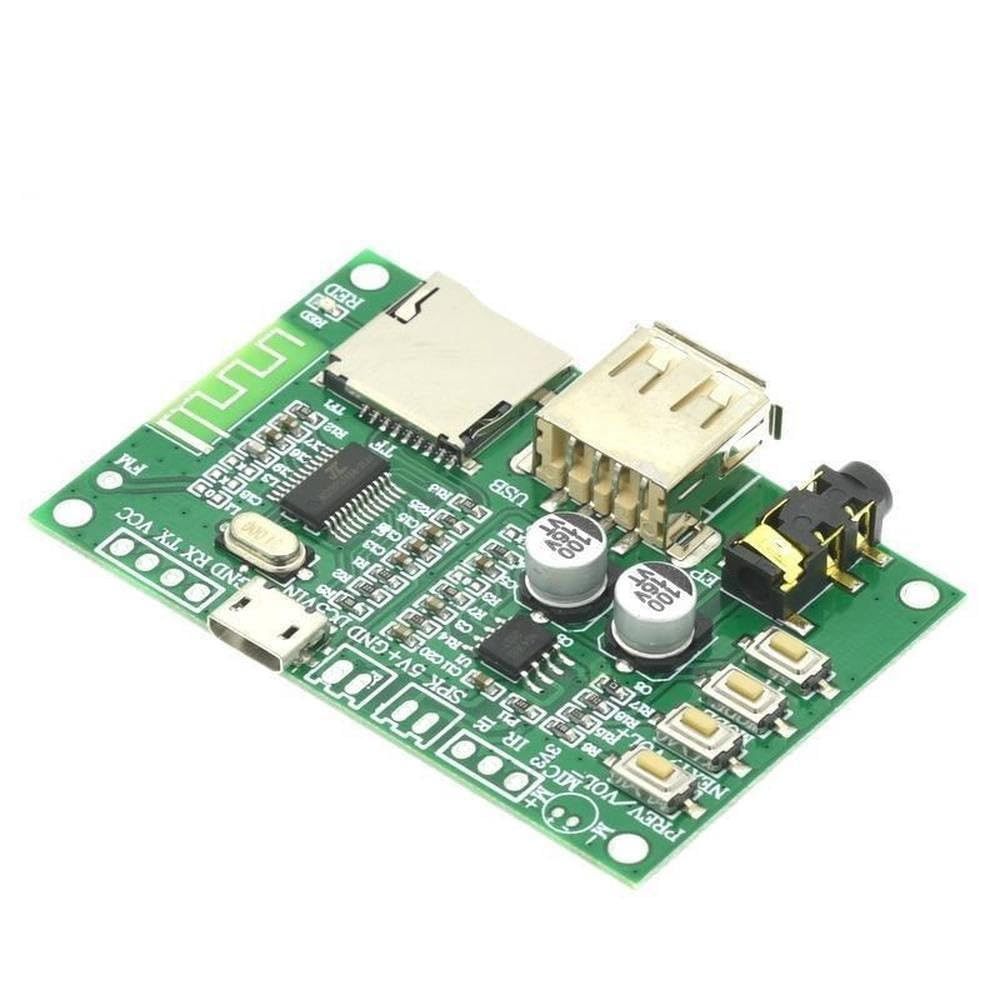
Hình 3.1: Trên cùng view of the BT201 module. This image displays the main components including the USB port, TF card slot, audio jack, and control buttons. Key connection pins for power, ground, and data are also visible.

Hình 3.2: Góc cạnh view of the BT201 module. This perspective provides a clearer look at the USB host port and the TF card slot, essential for media playback.

Hình 3.3: Dưới cùng view of the BT201 module. This image shows the printed circuit board (PCB) traces and the model designation "BT201 KTI025" printed on the board.

Figure 3.4: BT201 module with accessories. This image displays the module along with the included pin headers for easy integration and an infrared (IR) receiver component.
3.2. Nguồn điện
The BT201 module typically operates on a 5V DC power supply. Connect the power source to the designated VCC Và GND pins. Ensure correct polarity to prevent damage to the module.
3.3. Đầu ra âm thanh
Connect your audio output device (e.g., speakers, headphones) to the 3.5mm audio jack or the designated SPK + Và SPK- pins for direct speaker connection. The module supports 16-bit stereo audio output.
3.4. Data Interfaces
- Cổng USB: Cắm ổ USB để phát lại âm thanh.
- Khe cắm thẻ TF: Insert a TF (microSD) card for audio playback or recording.
- Serial Port (UART): Sử dụng TX Và RX pins for AT command control and data passthrough. Connect to a microcontroller or PC via a UART-to-USB converter.
4. Hướng dẫn vận hành
This section details the operation of the BT201 module for various functions.
4.1. Phát lại âm thanh Bluetooth
- Power on the BT201 module.
- Trên thiết bị hỗ trợ Bluetooth của bạn (ví dụ: điện thoại thông minh), hãy tìm kiếm các thiết bị Bluetooth khả dụng.
- Select "BT201" (or the customized Bluetooth name) from the list to pair.
- Once paired, audio from your device will be streamed to the BT201 module.
4.2. Phát nhạc từ USB/Thẻ TF
- Insert a USB flash drive or TF card containing MP3, WAV, FLAC, or APE audio files vào khe tương ứng.
- The module will automatically detect the storage device and begin playback.
- Use the onboard buttons (PREV, NEXT, VOL+, VOL-, PLAY/PAUSE) or serial AT commands to control playback.
4.3. Serial AT Command Control
The BT201 module supports AT commands for advanced control and configuration. Connect the module's TX/RX pins to a serial terminal (e.g., via Arduino, USB-to-UART converter).
- Tốc độ truyền: Default baud rate is typically 9600 or 115200. Refer to the module's documentation for specific default and configurable rates.
- Example Lệnh:
AT+NAME=NewBTName: Change Bluetooth name.AT+PLAY: Bắt đầu phát lại.AT+PAUSE: Tạm dừng phát lại.AT+VOL=XX: Set volume (XX is a value).
- For a comprehensive list of AT commands, refer to the detailed technical documentation provided by the manufacturer.
4.4. Chức năng ghi âm
The module supports 128KBS recording to TF card or U disk.
- Ensure a TF card or U disk with sufficient free space is inserted.
- Initiate recording via specific AT commands or dedicated control pins if available.
- Recordings can be played back or deleted using appropriate commands.
5. Bảo trì
Proper maintenance ensures the longevity and optimal performance of your BT201 module.
- Vệ sinh: Use a soft, dry cloth to clean the module. Avoid using liquids or abrasive cleaners.
- Kho: Bảo quản mô-đun ở nơi khô ráo, thoáng mát, tránh ánh nắng trực tiếp và nhiệt độ quá cao hoặc quá thấp.
- Xử lý: Handle the module by its edges to avoid touching sensitive electronic components. Static electricity can damage the module; use anti-static precautions when handling.
- Nguồn điện: Always use a stable and regulated 5V DC power supply. Fluctuations or incorrect voltagNó có thể làm hỏng mô-đun.
KHAI THÁC. Xử lý sự cố
If you encounter issues with your BT201 module, refer to the following common problems and solutions.
| Vấn đề | Nguyên nhân có thể | Giải pháp |
|---|---|---|
| Mô-đun không bật nguồn. | Incorrect power connection or insufficient power supply. | Xác minh nguồn điện voltage (5V DC) and polarity. Ensure connections are secure. |
| Không thể ghép nối qua Bluetooth. | Module not in pairing mode, or interference. | Ensure the module is powered on. Try restarting both the module and the pairing device. Reduce distance between devices. |
| Không có đầu ra âm thanh. | Incorrect audio connection, low volume, or unsupported audio format. | Check audio cable connections. Increase volume on both the module and the playback device. Ensure audio files are in supported formats (MP3, WAV, FLAC, APE). |
| Thẻ USB/TF không được nhận diện. | Improperly formatted storage, corrupted files, or incompatible device. | Ensure the storage device is formatted to FAT32. Check for corrupted files. Try a different USB drive or TF card. |
| AT commands not responding. | Incorrect serial port settings (baud rate, parity, stop bits) or wiring. | Verify TX/RX connections. Confirm baud rate and other serial settings match the module's requirements. |
7. Thông số kỹ thuật
| Tính năng | Chi tiết |
|---|---|
| Số hiệu mẫu | BT201 |
| Phiên bản Bluetooth | 5.0 (Chế độ kép) |
| Định dạng âm thanh được hỗ trợ | MP3, WAV, FLAC, APE |
| Hỗ trợ lưu trữ | USB Flash Drive, TF Card |
| Truyền dữ liệu | BLE, SPP (Serial Port Profile) |
| Giao diện điều khiển | Serial AT Commands |
| Đầu ra âm thanh | 16-bit Stereo DA |
| Chức năng ghi âm | 128KBS to TF card or U disk |
| Kiểu lắp đặt | Lắp đặt bề mặt |
| Số lượng kênh | 2 |
8. Thông tin bảo hành
This product is sold by a third-party seller. For specific warranty details, please refer to the seller's return policy or contact the seller directly. Standard return policy for this product is 30 days for refund/replacement.
Note: Warranty terms may vary based on the seller and region. Please retain your proof of purchase.
9. Hỗ trợ và Liên hệ
For technical support, additional documentation, or inquiries regarding the BT201 module, please contact the seller directly through the platform where the product was purchased.
Người bán: LiLeiTrade
Rich use information, reference PCB, use video tutorial, mobile phone passthrough video tutorial, serial port AT video tutorial are mentioned in the product description. Please refer to the product listing for links to these resources if available.
Ask a question about this manual
Ask about setup, troubleshooting, compatibility, parts, safety, or missing instructions. Manuals+ will review the question and use this page’s manual context to help answer it.