
GOOJODOQ M02
GOOJODOQ M02 3-in-1 Bluetooth Keyboard and Mouse Kit User Manual
Model: M02 | Brand: GOOJODOQ
Giới thiệu
Thank you for choosing the GOOJODOQ M02 3-in-1 Bluetooth Keyboard and Mouse Kit. This versatile kit is designed to enhance your productivity across multiple devices, offering seamless connectivity with Android, iOS, and Windows systems. This manual provides detailed instructions for setup, operation, and maintenance to ensure optimal performance of your new device.
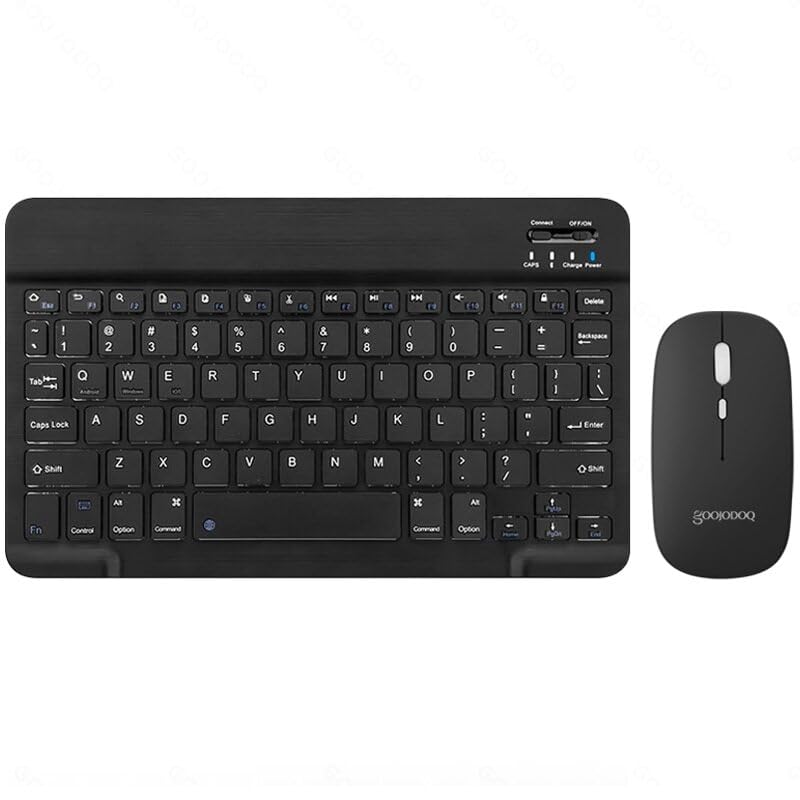
Image: The GOOJODOQ M02 3-in-1 Bluetooth Keyboard and Mouse Kit, featuring a black compact keyboard and a matching black mouse. The keyboard has a standard QWERTY layout with function keys and system-specific keys. The mouse is sleek with a scroll wheel and two buttons.
Nội dung gói
Vui lòng kiểm tra gói hàng để biết các mục sau:
- 1 x GOOJODOQ M02 Bluetooth Keyboard
- 1 x GOOJODOQ Bluetooth Mouse
- 1 x Cáp sạc USB
- 1 x Hướng dẫn sử dụng (tài liệu này)
Cài đặt
1. Sạc thiết bị
Before first use, ensure both the keyboard and mouse are fully charged. Use the provided USB charging cable to connect the devices to a power source (e.g., computer USB port, USB wall adapter).
- Bàn phím: Connect the USB charging cable to the charging port on the keyboard. The charge indicator light will illuminate during charging and turn off when fully charged.
- Chuột: Connect the USB charging cable to the charging port on the mouse. The charge indicator light will illuminate during charging and turn off when fully charged.
2. Bật nguồn
- Bàn phím: Locate the power switch on the keyboard (usually on the top right, labeled "ON/OFF"). Slide it to the "ON" position.
- Chuột: Locate the power switch on the mouse (usually on the bottom). Slide it to the "ON" position.
Hướng dẫn sử dụng
Kết nối Bluetooth
The GOOJODOQ M02 keyboard supports connecting up to three devices simultaneously via Bluetooth. Follow these steps to pair your devices:
- Kích hoạt Chế độ ghép nối:
- For Device 1: Nhấn Fn + 1 on the keyboard. The Bluetooth indicator light will start blinking, indicating it's ready for pairing.
- For Device 2: Nhấn Fn + 2 on the keyboard. The Bluetooth indicator light will start blinking, indicating it's ready for pairing.
- For Device 3: Nhấn Fn + 3 on the keyboard. The Bluetooth indicator light will start blinking, indicating it's ready for pairing.
- Bật Bluetooth trên thiết bị của bạn: Go to the Bluetooth settings on your smartphone, tablet, or computer.
- Tìm kiếm Thiết bị: Scan for available Bluetooth devices. You should see "Bluetooth Keyboard" or a similar name appear in the list.
- Chọn và ghép cặp: Select the "Bluetooth Keyboard" from the list to connect.
- Lựa chọn hệ thống: After successful connection, press the corresponding key combination to select your device's operating system for optimal functionality:
- FN + Q vì Android thiết bị
- FN + W vì Cửa sổ thiết bị
- FN + E vì iOS thiết bị
- Tự động kết nối lại: Once successfully paired, the keyboard will automatically connect to the last used device when powered on.
Ghi chú: Để chuyển đổi giữa các thiết bị được kết nối, chỉ cần nhấn Fn + 1, Fn + 2, hoặc Fn + 3, corresponding to the device's pairing slot.
Thao tác chuột
The GOOJODOQ Bluetooth mouse connects independently via Bluetooth. Follow your device's standard Bluetooth pairing procedure to connect the mouse. Once connected, it functions as a standard wireless mouse.
BẢO TRÌ
- Vệ sinh: Sử dụng khăn mềm, khô để lau bàn phím và chuột. Đối với vết bẩn cứng đầu, hãy dùng khăn mềm lau nhẹ.ampLau khăn bằng nước hoặc dung dịch tẩy rửa nhẹ. Tránh để khăn ẩm quá mức.
- Kho: Bảo quản thiết bị ở nơi khô ráo, thoáng mát, tránh ánh nắng trực tiếp và nhiệt độ cao.
- Chăm sóc pin: Để kéo dài tuổi thọ pin, tránh xả hết pin thiết bị thường xuyên. Hãy sạc pin khi chỉ báo pin yếu.
- Tránh chất lỏng: Do not expose the keyboard or mouse to liquids, as this can cause damage.
Xử lý sự cố
| Vấn đề | Giải pháp khả thi |
|---|---|
| Thiết bị không kết nối được qua Bluetooth. |
|
| Các phím không phản hồi hoặc nhập liệu không chính xác. |
|
| Mouse cursor is erratic or not moving. |
|
| Cannot switch between connected devices. |
|
Thông số kỹ thuật
| Người mẫu | M02 |
| Kết nối | Bluetooth (kết nối tối đa 3 thiết bị) |
| Vật liệu | ABS + Kim loại |
| Màu sắc | Đen |
| Kích thước bàn phím | 10 inch (đường chéo) |
| Cổng sạc | Loại USB |
| Hệ thống tương thích | Android, iOS, Windows |
| Tính năng bàn phím | Scissor-switch keys, Silent operation |
Bảo hành và Hỗ trợ
Để biết thông tin bảo hành và hỗ trợ kỹ thuật, vui lòng tham khảo thẻ bảo hành có trong gói hàng hoặc truy cập trang web chính thức của GOOJODOQ. webtrang web. Giữ lại biên lai mua hàng làm bằng chứng mua hàng khi yêu cầu bảo hành.
If you encounter any issues not covered in this manual, please contact GOOJODOQ customer service for assistance.