
Zenwire A10
Hướng dẫn sử dụng máy chiếu mini di động Zenwire A10
Mẫu: A10
1. Giới thiệu
Cảm ơn bạn đã muaasing the Zenwire A10 Mini Portable Projector. This device is designed to provide a versatile and convenient projection experience, allowing you to display content from various sources, including smartphones, tablets, and computers. Please read this manual carefully before using the projector to ensure proper operation and to maximize its lifespan.
2. Hướng dẫn an toàn quan trọng
- Không nhìn trực tiếp vào ống kính máy chiếu khi lamp đang bật.
- Đảm bảo thông gió tốt xung quanh máy chiếu để tránh quá nhiệt. Không được chặn các lỗ thông gió.
- Chỉ sử dụng bộ đổi nguồn đi kèm với máy chiếu.
- Để máy chiếu tránh xa nước, hơi ẩm và vật liệu dễ cháy.
- Không nên tự ý tháo rời hoặc sửa chữa máy chiếu. Hãy liên hệ với nhân viên kỹ thuật có chuyên môn để được hỗ trợ.
- Đặt máy chiếu trên bề mặt bằng phẳng, ổn định.
- Rút phích cắm máy chiếu khi có sấm sét hoặc khi không sử dụng trong thời gian dài.
3. Nội dung gói hàng
Vui lòng kiểm tra nội dung kiện hàng ngay khi mở hộp. Nếu thiếu hoặc hư hỏng bất kỳ mặt hàng nào, hãy liên hệ với nhà bán lẻ.
- Zenwire A10 Mini Portable Projector
- Điều khiển từ xa
- Bộ đổi nguồn
- Hướng dẫn sử dụng
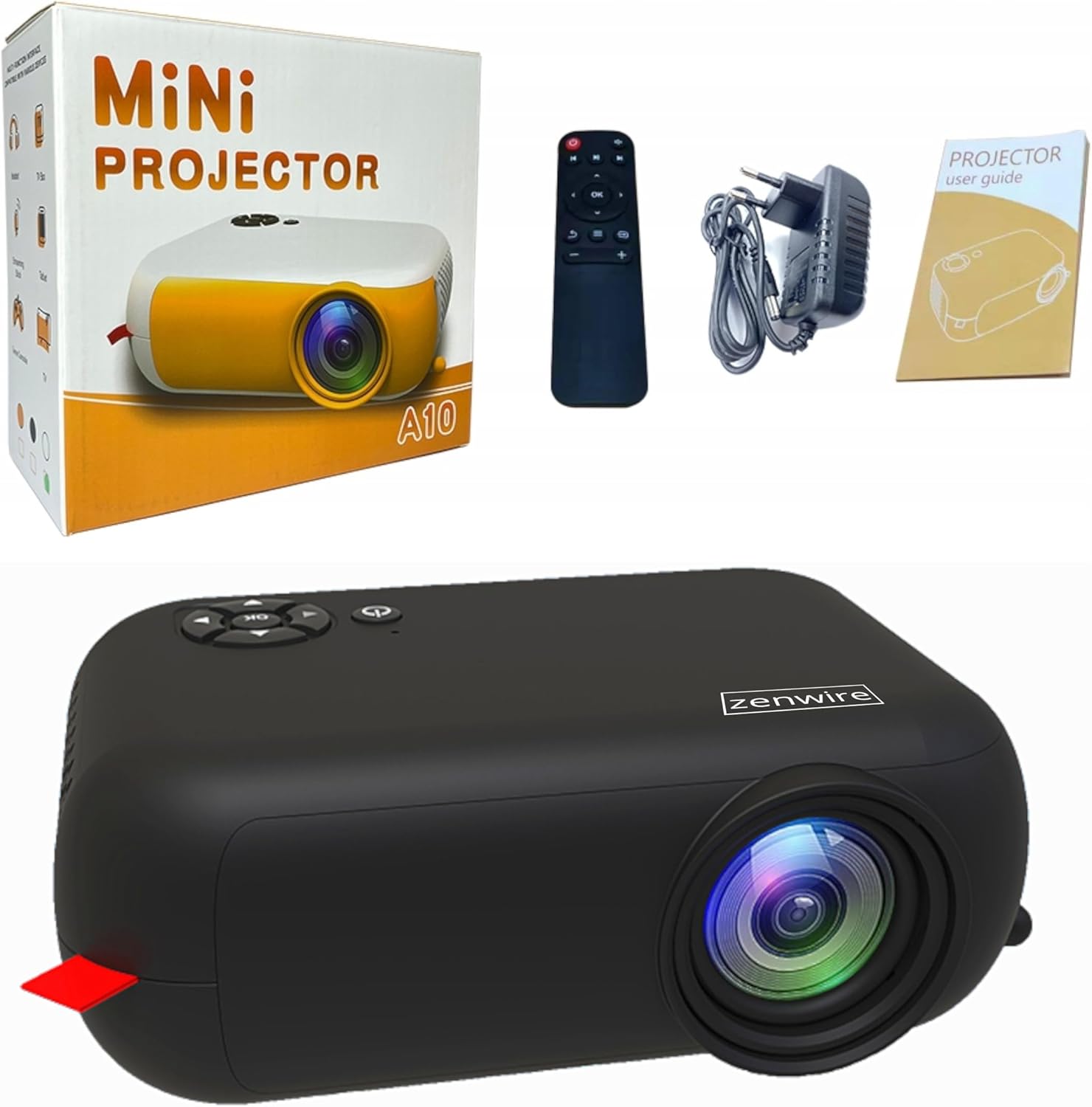
Image: Contents of the Zenwire A10 Mini Projector package, including the projector, remote control, power adapter, and user manual.
4. Sản phẩm hếtview
4.1 Projector Dimensions and Design
The Zenwire A10 is designed for portability, featuring a compact and lightweight form factor. Its dimensions are approximately 14cm x 10cm x 5.5cm, making it easy to carry and set up in various locations.

Image: The Zenwire A10 Mini Projector held in a hand, illustrating its compact size and portability.
4.2 Cổng và Điều khiển
The projector features a range of input and output ports for versatile connectivity, along with intuitive controls.

Image: Rear panel of the Zenwire A10 Mini Projector, showing the 5V-IN DC power input, IR receiver, USB port, 3.5mm audio jack, HDMI port, and SD card slot.
- 5V-IN DC: Đầu vào nguồn điện cho máy chiếu.
- HỒNG NGOẠI: Bộ thu hồng ngoại cho điều khiển từ xa.
- USB: Kết nối thiết bị lưu trữ USB để phát lại phương tiện.
- Giắc cắm tai nghe (3.5mm): Kết nối loa ngoài hoặc tai nghe.
- HDMI: Connect devices such as laptops, gaming consoles, or streaming sticks.
- Thẻ: Insert Micro SD cards for media playback.
- Bánh xe lấy nét: Adjust image sharpness (located on the side).
- Bảng điều khiển: Buttons on top for navigation and selection.
5. Thiết lập
5.1 kết nối nguồn
- Kết nối bộ chuyển đổi nguồn được cung cấp với 5V-IN DC cổng trên máy chiếu.
- Cắm bộ đổi nguồn vào ổ cắm trên tường.
- Nhấn nút nguồn trên máy chiếu hoặc điều khiển từ xa để bật máy.
5.2 Placement and Focus Adjustment
- Place the projector on a stable surface or mount it according to your preference. Ensure the projector lens is facing the projection surface (wall or screen).
- Adjust the distance between the projector and the screen to achieve your desired image size. The projector supports screen sizes up to 100 inches.
- Rotate the focus wheel (typically located near the lens) until the projected image appears clear and sharp.

Image: Diagram illustrating the Zenwire A10 Mini Projector's capability to project various screen sizes, from 13 inches up to 100 inches, depending on the projection distance.
6. Vận hành máy chiếu
6.1 Wireless Connection (Miracast & Airplay)
The Zenwire A10 supports wireless screen mirroring via 2.4/5GHz WiFi, compatible with Android (Miracast) and iOS (Airplay) devices.
- Hãy đảm bảo máy chiếu và thiết bị di động của bạn được kết nối với cùng một mạng Wi-Fi.
- On the projector's main menu, select the 'Screen Mirroring' or 'Wireless Display' option.
- Đối với Android: On your Android phone/tablet, enable 'Wireless Display', 'Screen Mirroring', 'Smart View', or similar function (names may vary by device). Select the projector from the list of available devices.
- Đối với iOS: On your iPhone/iPad, open Control Center and tap 'Screen Mirroring'. Select the projector from the list of available devices.
- The content from your mobile device should now be mirrored on the projector screen.
6.2 Kết nối có dây
The projector offers multiple wired input options for various devices.

Image: The Zenwire A10 Mini Projector connected to various devices such as smartphones, tablets, laptops, desktop computers, gaming consoles, and media players, highlighting its versatile connectivity.
- HDMI: Connect a laptop, PC, gaming console (e.g., Xbox, PlayStation), or streaming device (e.g., Amazon Fire TV Stick, Google Chromecast) using an HDMI cable. Select the HDMI input source on the projector.
- USB: Insert a USB flash drive or external hard drive into the USB port. The projector's media player will allow you to browse and play supported video, audio, and image files.
- Thẻ nhớ MicroSD: Insert a Micro SD card into the SD card slot. Similar to USB, you can access media files through the projector's interface.
- Ngõ ra âm thanh (giắc cắm 3.5mm): Connect external speakers or headphones to enhance the audio experience.
6.3 Điều hướng menu
Use the remote control or the buttons on the projector to navigate through the on-screen menu. Select input sources, adjust picture settings (brightness, contrast, color), sound settings, and other system preferences.
7. Bảo trì
- Vệ sinh ống kính: Hãy dùng một miếng vải mềm, không xơ, được thiết kế đặc biệt cho thấu kính quang học để lau nhẹ nhàng thấu kính máy chiếu. Tránh sử dụng chất tẩy rửa có tính mài mòn hoặc dùng lực quá mạnh.
- Loại bỏ bụi: Regularly clean the projector's exterior with a soft, dry cloth. Use a small brush or compressed air to clear dust from the ventilation openings to ensure proper airflow.
- Kho: Khi không sử dụng, hãy bảo quản máy chiếu ở nơi khô ráo, thoáng mát, tránh ánh nắng trực tiếp và nhiệt độ quá cao hoặc quá thấp. Sử dụng bao bì gốc hoặc hộp bảo vệ để tránh bụi bám và hư hỏng.
KHAI THÁC. Xử lý sự cố
If you encounter issues with your Zenwire A10 projector, refer to the following common problems and solutions:
| Vấn đề | Nguyên nhân có thể | Giải pháp |
|---|---|---|
| Không có hình ảnh trên màn hình | Không có nguồn điện; Nguồn đầu vào không chính xác; Thiết bị không được kết nối đúng cách. | Check power cable; Select correct input source (HDMI, USB, etc.); Reconnect source device. |
| Hình ảnh bị mờ | Tiêu cự chưa được điều chỉnh; Máy chiếu quá gần/quá xa màn hình. | Adjust the focus wheel; Adjust projection distance. |
| Không có âm thanh | Âm lượng quá nhỏ; Đã tắt tiếng; Thiết bị âm thanh ngoài chưa được kết nối/chọn. | Increase volume; Unmute; Check external speaker connection or select internal speaker. |
| Sự cố kết nối không dây | Not on same Wi-Fi network; Device not compatible; Interference. | Ensure both devices are on the same Wi-Fi; Verify device compatibility; Try moving closer to Wi-Fi router. |
9. Thông số kỹ thuật
| Tính năng | Chi tiết |
|---|---|
| Thương hiệu | Zenwire |
| Số hiệu mẫu | A10 |
| Loại sản phẩm | Compact and Portable Projector |
| Độ phân giải gốc | 480 x 360p |
| Độ phân giải hiển thị tối đa | 1920 x 1080 (Full HD) |
| Độ sáng | 1800lm / 60 ANSI |
| Tỷ lệ tương phản | 2000:1 |
| Kiểu hiển thị | DẪN ĐẾN |
| Công nghệ kết nối | Wi-Fi (2.4/5GHz), HDMI, USB, Micro SD, 3.5mm Audio Jack |
| Tính năng không dây | Miracast, Airplay |
| Thiết bị tương thích | Smartphones (Android, iOS), Tablets, Laptops, PCs, Gaming Consoles |
| Sử dụng được đề xuất | Rạp chiếu phim tại nhà |
| Kích thước (Xấp xỉ) | 14cm x 10cm x 5.5cm |
10. Bảo hành và Hỗ trợ
The Zenwire A10 Mini Portable Projector comes with a standard manufacturer's warranty. For specific warranty terms and conditions, please refer to the documentation provided at the time of purchase or contact your retailer. For technical support or service inquiries, please reach out to Zenwire customer service through their official webtrang web hoặc thông tin liên hệ được cung cấp kèm theo sản phẩm của bạn.
Ask a question about this manual
Ask about setup, troubleshooting, compatibility, parts, safety, or missing instructions. Manuals+ will review the question and use this page’s manual context to help answer it.