
1. Giới thiệu
The AIOMEST AI-7200D is a versatile digital clamp meter designed for precision electrical measurements. This handheld multimeter offers a wide range of functions including AC/DC current, AC/DC voltage, resistance, capacitance, temperature, diode testing, audible continuity, and non-contact AC voltage (NCV) detection. Its compact design, auto-ranging capability, and large 6000-count digital & analog bar graph LCD display ensure ease of use and clear readability for various applications.
2. Thông tin an toàn
Always adhere to safety precautions when using electrical testing equipment. This device is rated CAT II 600V or CAT III 300V. Ensure proper test lead connection and mode selection before making any measurements. Do not attempt to measure voltages or currents exceeding the specified maximum limits. Always inspect the meter and test leads for any damage before use. Replace batteries promptly when the low battery indicator appears.
3. Sản phẩm hếtview
The AIOMEST AI-7200D features a user-friendly layout with essential components for efficient operation.
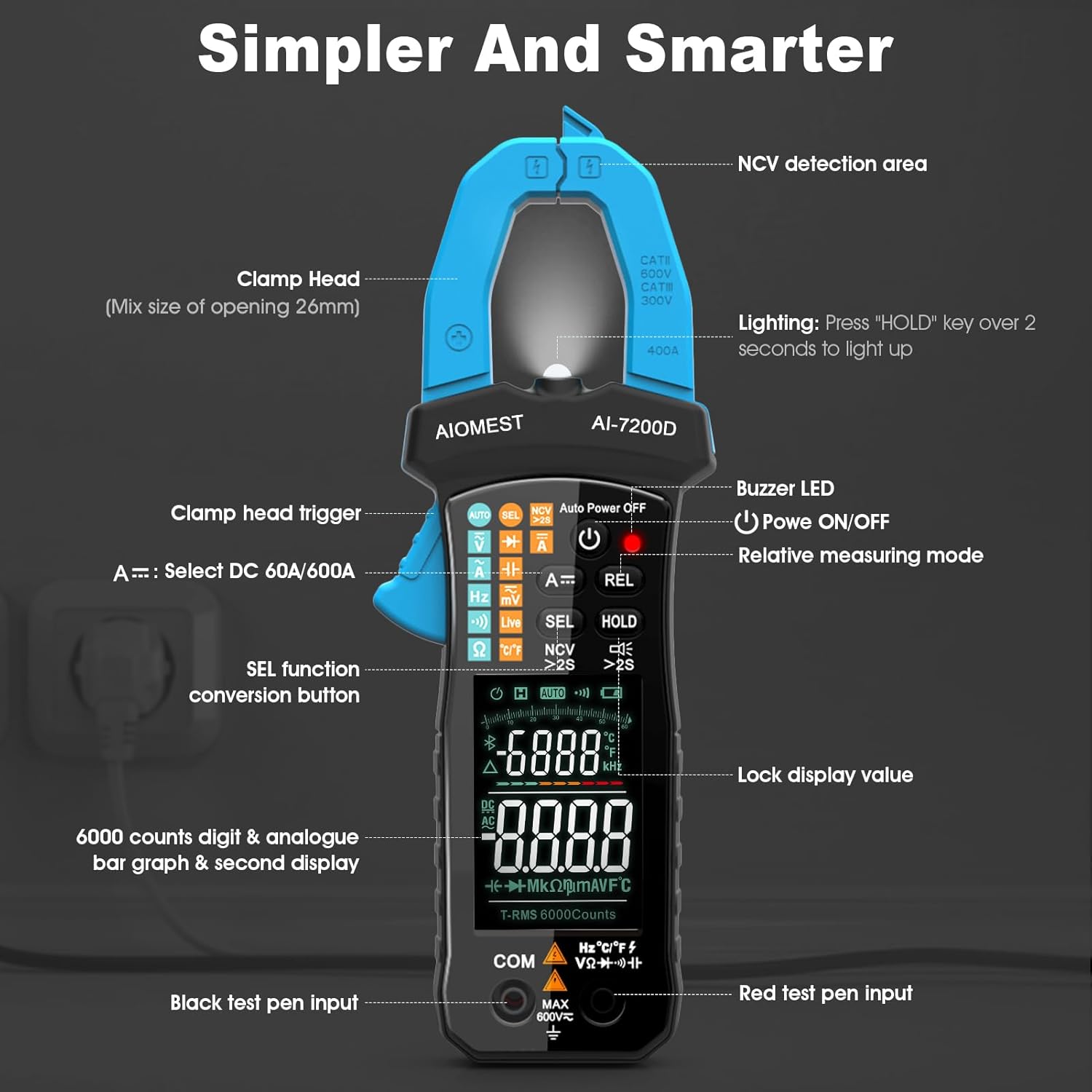
Figure 3.1: Key components of the AIOMEST AI-7200D Digital Clamp Meter, including the clamp head, trigger, NCV detection area, display, and input terminals.
- Clamp Cái đầu: Used for non-contact AC/DC current measurement. Features a 26mm opening.
- Clamp Kích hoạt não: Nhấn để mở clamp các hàm.
- Khu vực phát hiện NCV: Phát hiện vol AC không tiếp xúctage.
- Trưng bày: Large 6000-count LCD with digital and analog bar graph, showing primary and secondary measurements.
- Các nút chức năng: AUTO, SEL, HOLD, REL, MAX/MIN, Backlight/Flashlight.
- Quay số quay: Chọn các chức năng đo (Thể tích)tage, Current, Resistance, Capacitance, Diode, Continuity, Temperature).
- Thiết bị đầu cuối đầu vào: For connecting test leads (COM, VΩmA).
4. Thiết lập
4.1 Lắp đặt pin
The AIOMEST AI-7200D requires two 1.5V AAA batteries (included). To install or replace batteries, locate the battery compartment on the back of the device, open it, insert the batteries according to polarity markings, and close the compartment securely.
4.2 Kết nối dây dẫn thử nghiệm
Đối với hầu hết các phép đo (thể tíchtage, resistance, capacitance, diode, continuity, temperature), connect the black test lead to the 'COM' terminal and the red test lead to the 'VΩmA' terminal. Ensure connections are firm.

Figure 4.1: Proper connection of test leads for circuit measurements.
5. Chế độ hoạt động và phép đo
5.1 Hoạt động chung
Turn the rotary dial to the desired function. The meter typically defaults to AUTO mode, automatically selecting the appropriate range for measurement. Press the 'SEL' button to cycle through sub-functions within a mode (e.g., AC/DC voltage, diode/tính liên tục).

Figure 5.1: The Auto Range feature simplifies operation by automatically detecting the measurement type and range.
5.2 Đo dòng điện AC/DC (Cl)amp)
To measure AC or DC current, rotate the dial to the 'A~' or 'A=' position. Press the clamp trigger to open the jaws and enclose a single conductor (not a bundle of wires). The current reading will appear on the display. For DC current, ensure the conductor is placed in the correct orientation if polarity is critical.

Figure 5.2: Measuring current using the clamp function on a single conductor.
Video 5.1: Demonstration of current measurement using a similar clamp meter. (FNIRSI DMC-100 Digital Clamp Mét)
Video 5.2: Demonstration of DC current measurement using a similar clamp meter. (KAIWEETS HT206D DC Clamp Mét)
5.3 Âm lượng AC/DCtage Đo lường
Connect the test leads as described in Section 4.2. Rotate the dial to 'V~' for AC voltage hoặc 'V=' cho điện áp DCtage. Touch the probes to the points where voltage needs to be measured. The reading will be displayed.
Video 5.3: Minh họa âm lượngtage measurement using a similar digital multimeter. (Ljpxhhu Digital Multimeter)
5.4 Resistance, Capacitance, Diode, Continuity, NCV, Temperature
Rotate the dial to the corresponding symbol for Resistance (Ω), Capacitance (∔), Diode (→|), Continuity (•))), or Temperature (°C/°F). For NCV, select the NCV mode and bring the clamp head near the AC voltage source. The meter will beep and light up to indicate voltage hiện diện.

Hình 5.3: Thể tích không tiếp xúctage (NCV) detection in action, showing visual and audible alerts.
Video 5.4: Demonstration of continuity testing using a similar digital multimeter. (AstroAI Multimeter TRMS 6000 Counts)
5.5 Chức năng giữ dữ liệu
Nhấn nút 'HOLD' để giữ nguyên giá trị hiện tại trên màn hình. Nhấn lại nút đó để bỏ chức năng giữ.
6. Bảo trì
6.1 Thay thế pin
When the low battery indicator appears on the display, replace the two 1.5V AAA batteries promptly to ensure accurate measurements and proper device function.
6.2 Vệ sinh
Wipe the device with a dry, soft cloth. Do not use abrasive cleaners or solvents. Ensure the device is powered off and disconnected from any electrical source before cleaning.
KHAI THÁC. Xử lý sự cố
- Màn hình "OL": Indicates an over-range condition. The measured value exceeds the current range selected. Switch to a higher range or ensure the measurement is within the device's capabilities.
- Không hiển thị/Màn hình mờ: Kiểm tra việc lắp đặt và sạc pin. Thay pin nếu cần thiết.
- Đọc không chính xác: Ensure test leads are properly connected and not damaged. Verify the correct measurement mode and range are selected.
- Tự động tắt nguồn: The meter will automatically power off after 15 minutes of inactivity to conserve battery life. Press any button or rotate the dial to turn it back on.
8. Thông số kỹ thuật
| Tính năng | Đặc điểm kỹ thuật |
|---|---|
| Khối lượng tối đatage (Input to Earth Ground) | CAT II 600V or CAT III 300V |
| Max LCD Display | 6000 counts digit |
| Clamp Kích thước mở | 26mm (1.03in) |
| Tự động tắt nguồn | Sau 15 phút không hoạt động |
| Nguồn điện | 2 x 1.5V AAA R03P battery |
| Nhiệt độ hoạt động | 0℃ đến 40℃ (độ ẩm tương đối <85%) |
| Nhiệt độ lưu trữ | -10℃ đến 50℃ (độ ẩm tương đối <85%) |
| Guaranteed Precision Temperature | 23±5℃ (độ ẩm tương đối <70%) |
| Kích thước | 207(H)×75(W)×37(S)mm |
| Cân nặng | Khoảng 280g (bao gồm cả pin) |
9. Bảo hành và Hỗ trợ
Specific warranty information for the AIOMEST AI-7200D Digital Clamp Meter was not provided in the product data. Please refer to the included 'Operator’s Manual' or contact AIOMEST customer support for detailed warranty terms and technical assistance.