
1. Sản phẩm hếtview
The Dioche 1080P HD Smart Camera is designed for home security and monitoring, offering high-definition video, motion detection, and night vision capabilities. This manual provides essential information for setting up, operating, and maintaining your camera.

Hình ảnh 1.1: Mặt trước view of the Dioche 1080P HD Smart Camera.
Video 1.1: Một kết thúcview of the Dioche 1080P HD Smart Camera's design and features.
2. Các tính năng chính
- Video HD 1080P: Captures clear, high-definition video for detailed monitoring.
- Tầm nhìn ban đêm nâng cao: Provides clear images in low-light conditions, extending visibility up to 40ft.
- Phát hiện chuyển động: Automatically detects movement and sends alerts to your mobile device.
- Âm thanh hai chiều: Allows for communication through the camera via the mobile application.
- Giám sát từ xa: Truy cập nguồn cấp dữ liệu video trực tiếp và ghi lại footage from anywhere using your smartphone.
- Lưu trữ đám mây: Offers an option for secure storage of surveillance footage.
- Cài đặt dễ dàng: Được thiết kế để thiết lập nhanh chóng và đơn giản.
3. Nội dung gói hàng
Vui lòng kiểm tra xem có đầy đủ các mục trong gói hàng của bạn không:
- 1 x Dioche 1080P HD Smart Camera
- 1 x Cáp sạc
- 1 x Hướng dẫn sử dụng (tài liệu này)
- 2 ống giãn nở
- 2 x Vít

Hình 3.1: Tất cả các thành phần có trong gói sản phẩm.
4. Sơ đồ sản phẩm
Familiarize yourself with the different parts of your Dioche Smart Camera:
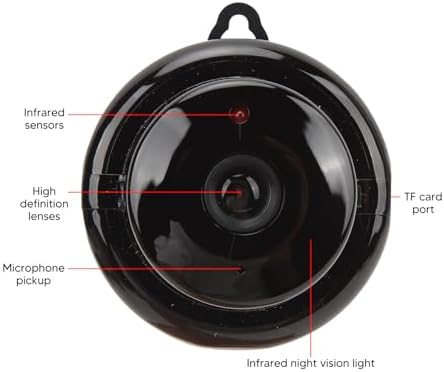
Image 4.1: Labeled diagram of the camera's components.
- Cảm biến hồng ngoại: Detect ambient light levels for automatic night vision activation.
- High Definition Lenses: Capture 1080P resolution video.
- Nhận micrô: Ghi lại âm thanh và cho phép giao tiếp hai chiều.
- Cổng thẻ TF: Slot for inserting a MicroSD card (not included) for local storage.
- Infrared Night Vision Light: Emits infrared light for clear viewtrong điều kiện tối.
5. Hướng dẫn thiết lập
Follow these steps to set up your Dioche Smart Camera:
- Bật nguồn: Connect the camera to a power source using the provided charging cable. The camera will power on automatically.
- Tải ứng dụng: Download the recommended mobile application (e.g., "V380 Pro" or similar, refer to packaging for specific app name) from your smartphone's app store (Android or iOS).
- Tạo tài khoản: Mở ứng dụng và đăng ký tài khoản mới hoặc đăng nhập nếu bạn đã có tài khoản.
- Thêm thiết bị: Follow the in-app instructions to add your new camera. This typically involves scanning a QR code on the camera or manually selecting the device type and connecting to its Wi-Fi hotspot.
- Kết nối với Wi-Fi: Configure the camera to connect to your home 2.4GHz Wi-Fi network. Ensure your smartphone is also connected to the same network during setup.
- Gắn Camera: Choose a suitable location for your camera. It can be placed on a flat surface or mounted to a wall or ceiling using the included screws and expansion tubes. Ensure the camera has a clear view của khu vực bạn muốn theo dõi.

Hình ảnh 5.1: Ví dụample of mounting the camera to a surface.
6. Hướng dẫn vận hành
Once set up, you can control and monitor your camera using the mobile application:
- Sống View: Mở ứng dụng và chọn máy ảnh của bạn để view nguồn cấp video trực tiếp.
- Cảnh báo phát hiện chuyển động: Enable motion detection in the app settings to receive push notifications on your phone when movement is detected. Adjust sensitivity as needed.
- Tầm nhìn ban đêm: The camera automatically switches to night vision mode in low light. You can typically toggle this feature manually within the app if desired.
- Âm thanh hai chiều: Use the microphone and speaker icons in the app to listen to the camera's environment or speak through the camera.
- Ghi và Phát lại: Truy cập foo đã ghitage from the cloud storage or MicroSD card (if installed) through the app's playback feature.
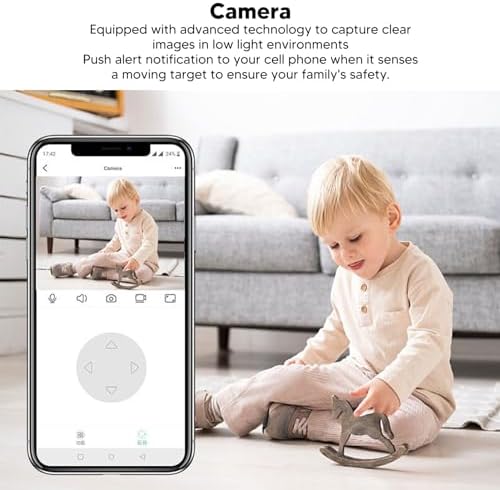
Image 6.1: Using the mobile application for live monitoring.
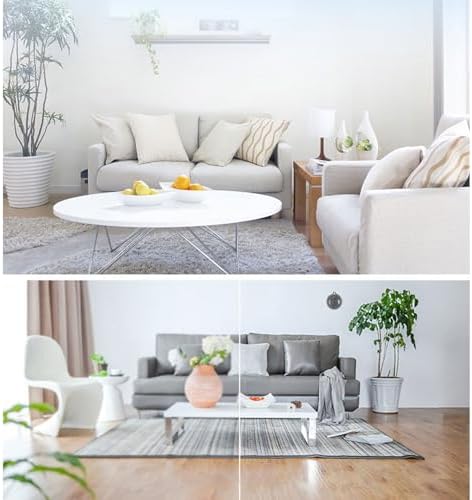
Image 6.2: Demonstration of the camera's night vision capability.
7. Bảo trì
Để đảm bảo hiệu năng tối ưu và tuổi thọ của máy ảnh:
- Vệ sinh: Nhẹ nhàng lau ống kính và thân máy ảnh bằng vải mềm, khô. Tránh sử dụng hóa chất mạnh hoặc vật liệu mài mòn.
- Vị trí: Hãy đảm bảo đặt máy ảnh ở vị trí ổn định, tránh ánh nắng trực tiếp, nhiệt độ quá cao hoặc quá thấp và độ ẩm.
- Cập nhật phần mềm: Regularly check the mobile application for firmware updates for your camera to ensure you have the latest features and security enhancements.
KHAI THÁC. Xử lý sự cố
Nếu bạn gặp sự cố với máy ảnh, hãy tham khảo các sự cố và giải pháp phổ biến sau đây:
| Vấn đề | Giải pháp khả thi |
|---|---|
| Camera ngoại tuyến/Không thể kết nối | Ensure the camera is powered on. Check your Wi-Fi connection and signal strength. Restart the camera and your router. Re-add the camera in the app if necessary. |
| Không có cảnh báo phát hiện chuyển động | Verify motion detection is enabled in the app settings. Adjust sensitivity. Check app notification settings on your phone. |
| Chất lượng video kém | Ensure the lens is clean. Check your internet connection speed. Adjust video quality settings in the app if available. |
| Âm thanh hai chiều không hoạt động | Check microphone and speaker permissions for the app on your phone. Ensure volume is up on both ends. |
Nếu sự cố vẫn tiếp diễn, vui lòng liên hệ bộ phận hỗ trợ khách hàng.
9. Thông số kỹ thuật
Detailed technical specifications for the Dioche 1080P HD Smart Camera:

Image 9.1: Camera dimensions.
| Tính năng | Chi tiết |
|---|---|
| Tên mẫu | Diocherkmcdyn6vq |
| Độ phân giải quay video | 1080p |
| Giao thức kết nối | Wi-Fi (2.4 GHz) |
| Tính năng đặc biệt | Cảm biến chuyển động, tầm nhìn ban đêm, âm thanh hai chiều |
| Thiết bị tương thích | Điện thoại thông minh (Android, iOS) |
| Kiểu gắn kết | Treo tường |
| Vật liệu bao vây | Acrylonitrile Butadiene Styrene (ABS) |
| Sử dụng được đề xuất | Baby Monitoring, Home Security, Pet Monitoring |
| Có cần pin không | No (Powered via USB cable) |
10. Bảo hành và Hỗ trợ
For warranty information and technical support, please refer to the product packaging or contact the retailer where you purchased the Dioche 1080P HD Smart Camera. Keep your proof of purchase for warranty claims.