
Giới thiệu
Cảm ơn bạn đã muaasing the Funistree Cell Phone Stand with Wireless Bluetooth Speaker. This device combines a versatile phone stand with a high-quality Bluetooth speaker and a white noise machine, designed to enhance your audio and viewing experience. Please read this manual carefully before use to ensure proper operation and to maximize the product's lifespan.
Sản phẩm trênview
The Funistree H77 is a multi-functional device featuring a detachable phone stand and a wireless Bluetooth speaker. Its innovative design allows for independent use of the speaker and the stand, or combined for an integrated entertainment solution.
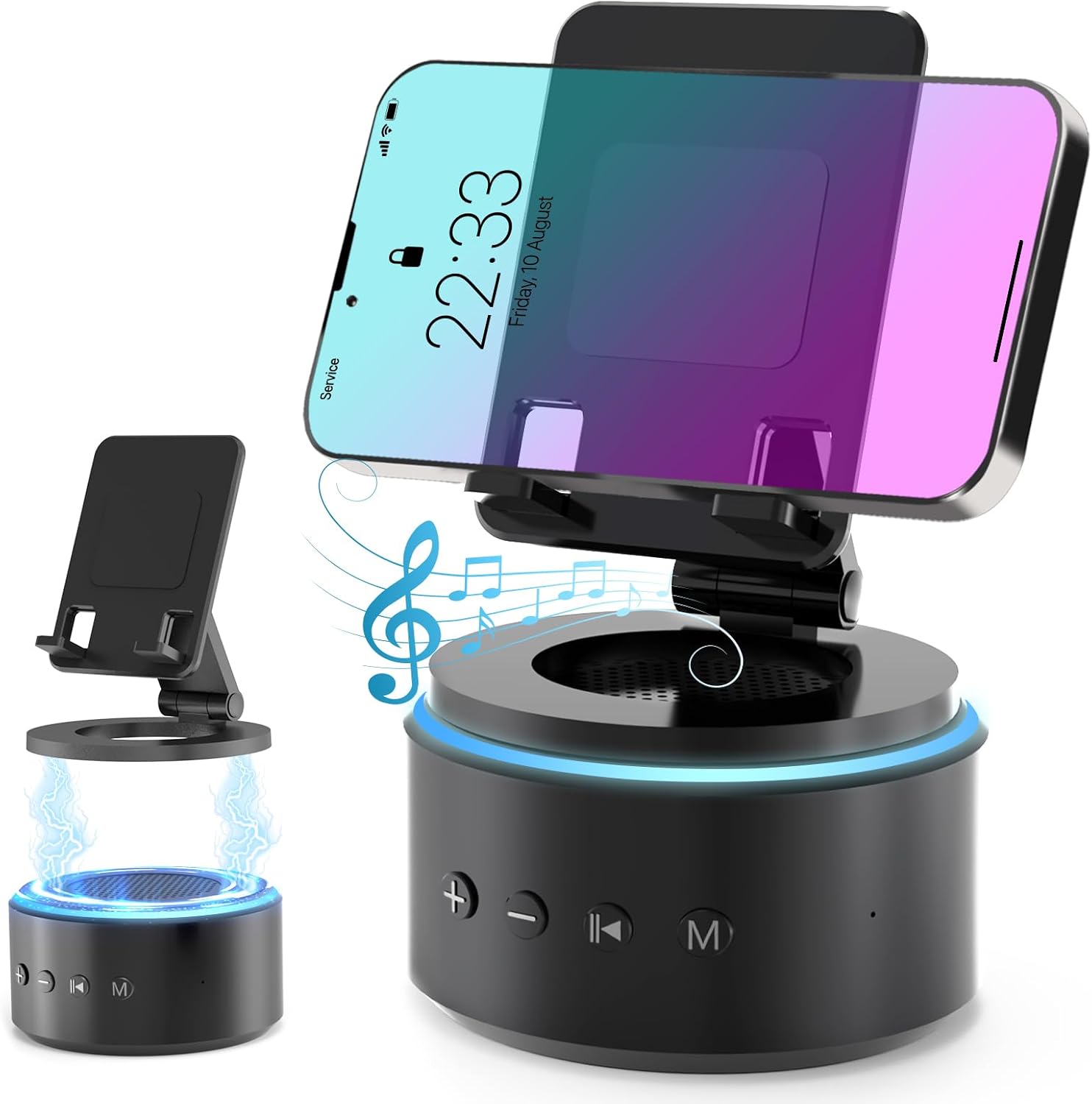
Image: The Funistree H77 device, illustrating its 2-in-1 design with the phone stand attached to the speaker base and also shown detached.
Các tính năng chính:
- 2-in-1 Detachable Design: The phone stand magnetically connects to the Bluetooth speaker, allowing for combined or separate use.
- Adjustable & Portable Stand: Cung cấp nhiều viewing angles and includes a hanging design for easy portability.
- Âm thanh nổi HD: Equipped with a dual stereo system for enhanced bass, clear highs, and balanced midrange.
- Máy tạo tiếng ồn trắng: Features 10 soothing white noise sounds with an auto-off timer (15, 30, or 60 minutes).
- Cơ sở ổn định: Anti-slip silicone pads ensure device stability.
- Tuổi thọ pin dài: Optimized 1800 mAh battery for extended use.
Nội dung gói
Vui lòng kiểm tra gói hàng để biết các mục sau:
- Funistree Cell Phone Stand with Wireless Bluetooth Speaker (Model H77)
- Cáp sạc USB
- Hướng dẫn sử dụng
Note: Contents may vary slightly. If any items are missing or damaged, please contact customer support.
Cài đặt
Sạc thiết bị:
- Locate the charging port on the speaker base.
- Connect the provided USB charging cable to the speaker.
- Cắm đầu còn lại của cáp USB vào bộ chuyển đổi nguồn USB tương thích (không bao gồm) hoặc cổng USB của máy tính.
- Đèn báo sạc sẽ sáng. Khi sạc đầy, đèn có thể đổi màu hoặc tắt.
Initial charge time is approximately 2-3 hours.
Assembling the Phone Stand and Speaker:
The phone stand and speaker connect magnetically.
- Align the magnetic base of the phone stand with the top surface of the speaker.
- The magnets will snap the two components together securely.
- To detach, simply pull the phone stand upwards from the speaker base.

Hình ảnh: Cận cảnh view demonstrating the magnetic connection between the phone stand and the speaker base.
Hướng dẫn sử dụng
Bật/Tắt nguồn:
- To power on, press and hold the Power button (usually marked with a power symbol) on the speaker base for a few seconds until you hear an audible prompt or see an indicator light.
- To power off, press and hold the Power button again for a few seconds.
Ghép nối Bluetooth:
- Ensure the speaker is powered on and in pairing mode (indicated by a flashing LED light, usually blue). If not, briefly press the Bluetooth button (if available) or power cycle the device.
- Trên thiết bị di động của bạn (điện thoại thông minh, máy tính bảng, v.v.), hãy vào cài đặt Bluetooth.
- Tìm kiếm available devices. The speaker will appear as "H77" or "Funistree H77".
- Select the speaker from the list to pair. Once paired, you will hear a confirmation sound, and the LED light will become solid.
- Bây giờ bạn có thể phát âm thanh từ thiết bị của mình qua loa.

Image: The Funistree H77 in use, with a smartphone mounted on the stand, playing music, and a laptop nearby, illustrating its versatile functionality.
White Noise Function:
The speaker includes 10 built-in white noise sounds to aid relaxation or concentration.
- Press the 'M' (Mode) button to cycle through the white noise sounds.
- To set a timer for the white noise, press the Timer button (if available) or refer to the specific button layout on your device. The available timer settings are 15, 30, or 60 minutes. The device will automatically turn off after the selected duration.

Image: Visual representation of the 10 white noise options (Ocean, Wind, Rain, Bird, Heartbeat, Campfire, Thunderstorm, Brook, Fan, Piano) and timer settings, with a person sleeping, indicating the relaxation benefits.
Điều chỉnh âm lượng và phát lại:
- Tăng âm lượng: Nhấn nút '+'.
- Giảm âm lượng: Nhấn nút '-'.
- Phát/Tạm dừng: Press the Play/Pause button (usually marked with a triangle/two vertical bars).
- Bài hát tiếp theo: Press the '>>|' button.
- Bản nhạc trước: Press the '|<<' button.
Sử dụng giá đỡ điện thoại:
The phone stand is adjustable to provide optimal viewgóc nghiêng.
- Place your smartphone or tablet securely on the stand's cradle.
- Adjust the angle of the stand by gently pushing or pulling the articulated arm to your desired viewvị trí đang ở.
- The stand features anti-slip silicone pads to prevent your device from sliding.

Hình ảnh: Chi tiết view highlighting the adjustable angle mechanism and the anti-slip silicone pads on the phone stand and base for secure device placement.
Tính di động:
The speaker can be carried easily using its integrated hanging design.

Image: A woman outdoors, holding the Funistree speaker by its hanging rope, demonstrating its portability for outdoor activities.
BẢO TRÌ
- Vệ sinh: Use a soft, dry cloth to wipe the surface of the device. Do not use abrasive cleaners, alcohol, or chemical solvents, as these may damage the finish.
- Kho: Khi không sử dụng trong thời gian dài, hãy bảo quản thiết bị ở nơi khô ráo, thoáng mát, tránh ánh nắng trực tiếp và nhiệt độ cao.
- Chăm sóc pin: Để kéo dài tuổi thọ pin, tránh xả pin thường xuyên. Hãy sạc thiết bị thường xuyên, ngay cả khi không sử dụng.
- Tránh nước: This device is not waterproof. Keep it away from water, moisture, and excessive humidity.
- Xử lý cẩn thận: Tránh làm rơi hoặc để thiết bị chịu tác động mạnh.
Xử lý sự cố
| Vấn đề | Nguyên nhân có thể | Giải pháp |
|---|---|---|
| Thiết bị không bật nguồn. | Pin yếu. | Sạc đầy thiết bị. |
| Không thể ghép nối qua Bluetooth. | Speaker not in pairing mode; Bluetooth disabled on source device; device too far. | Ensure speaker is in pairing mode. Enable Bluetooth on your device. Move devices closer (within 10 meters). Forget previous pairings and try again. |
| Không có âm thanh hoặc âm lượng thấp. | Volume too low on speaker or source device; device not properly paired. | Increase volume on both speaker and source device. Re-pair the device. |
| White noise function not working. | Chọn chế độ không đúng. | Press the 'M' (Mode) button to cycle to the white noise function. |
| Giá đỡ điện thoại không ổn định. | Device not placed correctly; surface is uneven. | Ensure phone is centered on the cradle. Place the stand on a flat, stable surface. |
If the problem persists, please contact Funistree customer support.
Thông số kỹ thuật
| Số hiệu mẫu | H77 |
| Kích thước sản phẩm | 4.53 x 4.13 x 4.37 inch |
| Trọng lượng sản phẩm | 15.8 ounce |
| Loại pin | 1 pin Lithium Ion (đi kèm) |
| Dung lượng pin | 1800mAh |
| Kết nối | Bluetooth |
| Âm thanh tiếng ồn trắng | 10 types (Ocean, Wind, Rain, Bird, Heartbeat, Campfire, Thunderstorm, Brook, Fan, Piano) |
| Cài đặt hẹn giờ | 15, 30, 60 phút |
| Thiết bị tương thích | Smartphones, Tablets (iPhone, Galaxy, LG, iPad, Samsung Tab, Sony, etc.) |
Thông tin an toàn
- Không được tháo rời, sửa chữa hoặc thay đổi thiết bị. Việc này có thể gây hư hỏng, điện giật hoặc cháy nổ.
- Keep the device away from heat sources, direct sunlight, and high temperatures.
- Không để thiết bị tiếp xúc với nước hoặc các chất lỏng khác.
- Do not use the device in environments with strong electromagnetic interference.
- Để xa tầm tay trẻ em và vật nuôi.
- Hãy vứt bỏ thiết bị và pin của thiết bị một cách có trách nhiệm theo quy định của địa phương. Không vứt chung với rác thải sinh hoạt.
Bảo hành và Hỗ trợ
Funistree products are designed and manufactured to the highest quality standards. For warranty information and customer support, please refer to the warranty card included with your purchase or visit the official Funistree website. If you encounter any issues or have questions regarding your product, please contact our customer service team.
Để được hỗ trợ thêm, vui lòng truy cập: Funistree Official Store on Amazon