
1. Giới thiệu
The DETONGER P2 is a portable Bluetooth thermal label printer designed for various labeling needs in small businesses, retail, offices, and homes. This device utilizes inkless thermal technology, providing clear and cost-effective label printing. It supports connection via Bluetooth for smartphones and tablets, and USB for PC, offering versatile editing and printing capabilities through dedicated applications.

Hình 1: Mặt trước view of the DETONGER P2 Portable Bluetooth Thermal Machine.
2. Bắt đầu
2.1 Nội dung gói
Xác minh rằng tất cả các mục đều có trong gói hàng của bạn:
- DETONGER P2 Machine
- 1 Roll of 1.57'' x 1.18'' Labels (200 pcs)
- Cáp USB loại C
- Hướng dẫn sử dụng (tài liệu này)
2.2 Sạc thiết bị
Before first use, ensure the P2 machine is fully charged. Connect the provided Type-C USB cable to the printer and a suitable power source (e.g., USB wall adapter, computer USB port). The charging indicator light will show the charging status.
2.3 App Installation (Mobile Devices)
For smartphone and tablet connectivity, install the "WePrint" ứng dụng:
- Open the App Store (for iOS devices) or Google Play Store (for Android devices).
- Tìm kiếm "WePrint".
- Tải xuống và cài đặt ứng dụng.

Figure 2: WePrint App download instructions for mobile devices.
2.4 Software Installation (PC)
For PC connectivity (Windows 10/11 and above), download the "WeiDa" software and P2 Series Label Printer Windows Driver:
- Visit the official DETONGER webđịa điểm.
- Tìm và tải xuống "WeiDa" phần mềm.
- Download the P2 Series Label Printer Windows Driver.
- Install both the software and the driver on your PC.
2.5 Tải nhãn
The P2 printer uses thermal labels. To load a new roll:
- Open the label compartment cover on the printer.
- Insert the label roll, ensuring the labels feed correctly through the printing mechanism.
- Đóng nắp an toàn.
The included labels are waterproof, oil-proof, tear-proof, and wear-resistant. For optimal longevity, avoid exposing thermal paper to bright light, as this can cause fading.
3. Hoạt động
3.1 Kết nối với thiết bị di động (Bluetooth)
- Ensure your P2 printer is powered on.
- Bật Bluetooth trên điện thoại thông minh hoặc máy tính bảng của bạn.
- Mở "WePrint" ứng dụng.
- Within the app, search for and select your P2 printer to establish a Bluetooth connection.
3.2 Connecting to PC (USB)
- Ensure your P2 printer is powered on.
- Connect the P2 printer to your PC using the provided Type-C USB cable.
- Khởi chạy "WeiDa" software on your PC. The software should detect the connected printer.
3.3 Designing and Printing Labels
The WePrint app and WeiDa software offer extensive tools for label design:
- Text and Numbers: Create custom text, numbers, and symbols.
- Graphics and Logos: Import or design graphics and logos.
- Barcodes and QR Codes: Tạo ra nhiều loại mã vạch và mã QR khác nhau.
- Nhận dạng thông minh: Utilize voice and picture recognition features for quick label creation.
After designing your label, select the correct label size within the application to prevent printing errors, then initiate the print command.
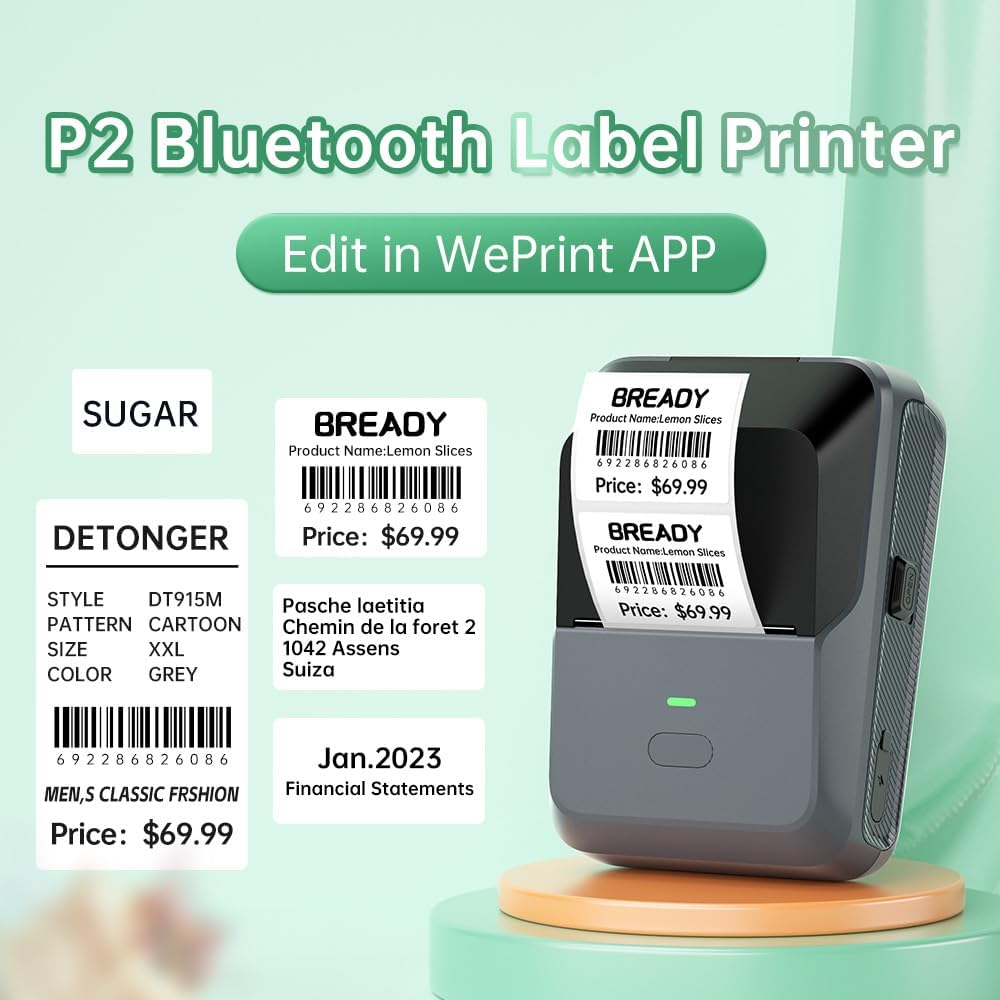
Hình 3: Ví dụample labels created and printed using the WePrint App.
3.4 Ứng dụng nhãn
The DETONGER P2 is suitable for creating a wide range of labels, including:
- Price labels for retail and supermarkets.
- Expiration date labels for food products.
- Cable labels for organization.
- Name labels for personal or office use.
- Brand logos and stickers for small businesses.
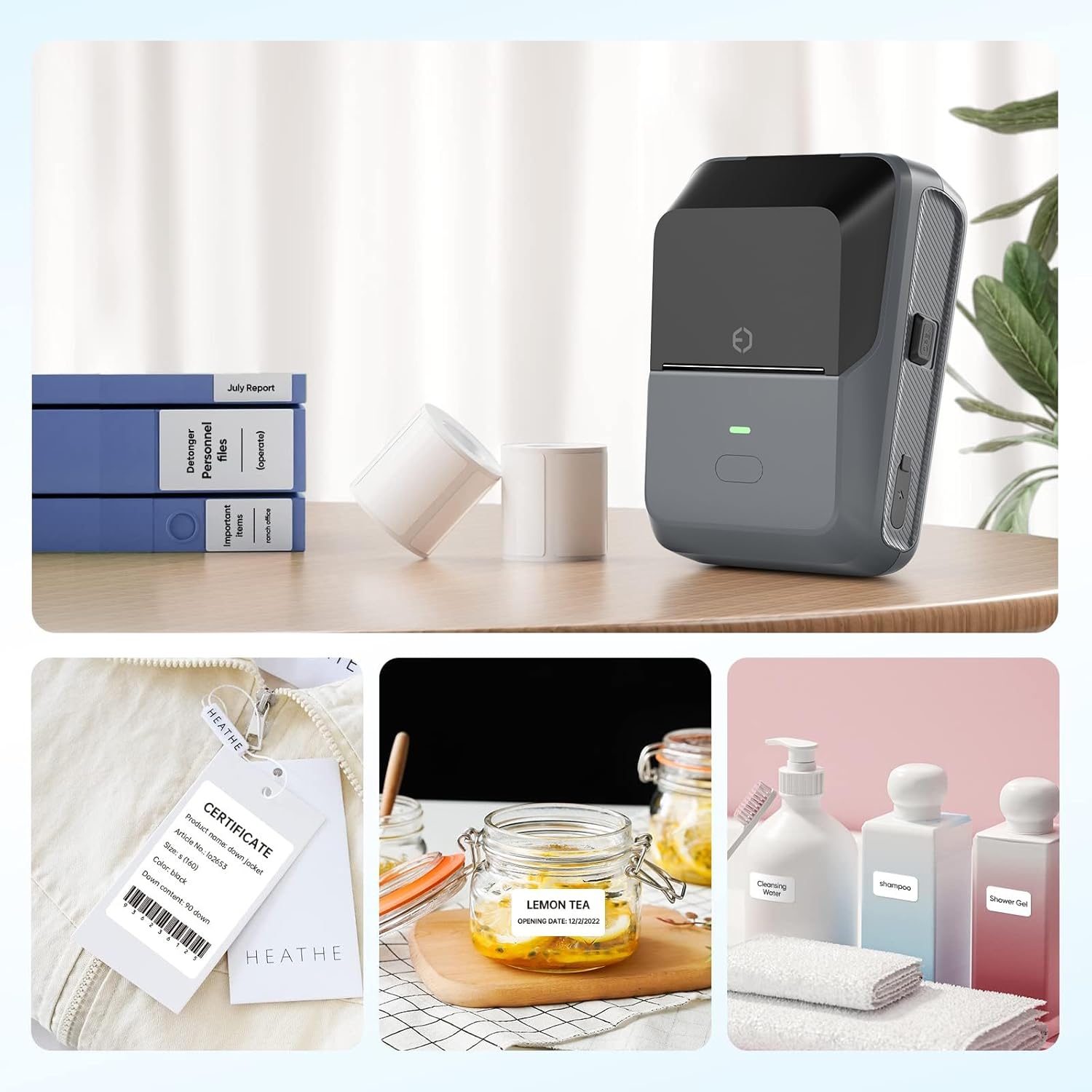
Figure 4: The P2 printer in use, demonstrating various label applications.

Figure 5: Commercial price tag examples for various products.

Hình 6: Ví dụamples of transparent label options.

Hình 7: Ví dụamples of colored label options.
4. Bảo trì
4.1 Chăm sóc chung
To ensure the longevity and optimal performance of your DETONGER P2 printer:
- Giữ thiết bị luôn sạch sẽ và không bám bụi. Sử dụng khăn mềm, khô để lau chùi bên ngoài.
- Tránh để máy in tiếp xúc với nhiệt độ quá cao hoặc quá thấp, hoặc ánh nắng trực tiếp.
- Không sử dụng chất tẩy rửa hoặc dung môi có tính mài mòn.
4.2 Lưu trữ nhãn
Thermal labels are sensitive to light and heat. Store unused label rolls in a cool, dry place away from direct sunlight to prevent premature fading.
KHAI THÁC. Xử lý sự cố
5.1 Các vấn đề thường gặp và giải pháp
- Máy in không kết nối được qua Bluetooth:
Ensure Bluetooth is enabled on your mobile device and the P2 printer is powered on. Connect through the "WePrint" app, not directly through your device's Bluetooth settings, to avoid incompatibility issues. - Chất lượng in kém hoặc nhãn trắng:
Check if the label roll is loaded correctly and that the thermal paper is facing the print head. Ensure the printer has sufficient battery charge. - Labels not printing correctly (e.g., cut off, misaligned):
Verify that you have selected the correct label size within the "WePrint" or "WeiDa" application before printing. - Máy tính không nhận diện được máy in:
Ensure the USB cable is securely connected and that the "WeiDa" software and P2 Series Label Printer Windows Driver are correctly installed on your PC.
6. Thông số kỹ thuật
| Tính năng | Chi tiết |
|---|---|
| Thương hiệu | KHỬ MÙI |
| Người mẫu | P2 |
| Công nghệ kết nối | Bluetooth, USB |
| Công nghệ in ấn | Nhiệt |
| Đầu ra máy in | Đơn sắc |
| Tốc độ in đơn sắc tối đa | 70 trang/phút |
| Kích thước phương tiện tối đa | 1.77 x 2.16 inch (45mm x 55mm) |
| Phương tiện in ấn | Nhãn |
| Độ phân giải máy quét | 203 DPI |
| Thiết bị tương thích | Laptop Computer, PC, Smartphones |
| Hệ điều hành | Android, Windows, iOS |
| Dung lượng pin | 1800 mAh (Ion Li-ti) |
| Trọng lượng sản phẩm | 310.5 gam |
| Kích thước sản phẩm | 6.2 x 8.59 x 12.78cm |
| Kiểu hiển thị | Màn hình OLED |
7. Bảo hành và Hỗ trợ
7.1 Free Replacement Service
DETONGER offers a free replacement service for your P2 Label Printer for up to 12 months if the machine fails to start or is too faulty to fix. This service covers manufacturing defects and significant operational failures.
7.2 Dịch vụ khách hàng
You can enjoy lifetime prime customer service and technical support. For any inquiries, technical assistance, or to create a cloud account for managing and sharing labels, please contact DETONGER customer service through their official webtrang web hoặc thông tin liên lạc được cung cấp trên bao bì sản phẩm của bạn.