
1. Giới thiệu
This manual provides detailed instructions for the safe and effective operation of your Dragonhawk Wireless Tattoo Gun Machine, Model YZBTD. Please read this manual thoroughly before using the device to ensure proper setup, operation, and maintenance. This machine is designed for professional tattoo artists and beginners, offering versatility and reliable performance.
2. Thông tin an toàn
Always prioritize safety when operating tattoo equipment. Failure to follow these guidelines may result in injury or damage to the device.
- Chỉ sử dụng ngoài da: This device is intended for tattooing on skin.
- Khử trùng: Ensure all needles, cartridges, and contact surfaces are properly sterilized before each use.
- Nguồn điện: Use only the provided charging cable and compatible power adapters.
- An toàn pin: Do not expose batteries to extreme temperatures or puncture them. Dispose of used batteries responsibly.
- Xử lý: Handle the machine with care. Avoid dropping or subjecting it to strong impacts.
- Độ ẩm: Keep the device dry. It is water-resistant, but not waterproof. Avoid submerging it in liquids.
- Những đứa trẻ: Để xa tầm tay trẻ em.
3. Sản phẩm hếtview & Các thành phần
The Dragonhawk Wireless Tattoo Gun Machine YZBTD is a cordless pen-style rotary tattoo machine featuring an adjustable stroke length and a powerful coreless motor.

Hình 3.1: Hếtview of the tattoo machine's control panel and battery.
Các thành phần chính:
- Cơ thể máy: Main housing containing the motor and drive system.
- Bộ pin: Detachable power source with OLED display and control buttons.
- Tay cầm có thể điều chỉnh: Rotates to adjust needle depth.
- Stroke Adjustment Knob: Allows selection of 7 stroke lengths (2.4mm - 4.2mm).
- Needle Cartridge Slot: Where tattoo needle cartridges are inserted.
- Cổng sạc Type-C: Để sạc pin.
4. Thiết lập
4.1 Lắp đặt pin
The machine comes with two replaceable batteries to ensure continuous operation.
- Đảm bảo máy đã tắt nguồn.
- Gently twist the battery pack counter-clockwise to detach it from the machine body.
- Align a charged battery pack with the machine body and twist clockwise until securely fastened.

Figure 4.1: The machine is equipped with two replaceable batteries for extended use.
4.2 Lắp đặt hộp kim
Use only compatible Dragonhawk cartridge needles for optimal performance.
- Chọn hộp kim mong muốn.
- Insert the needle cartridge into the machine's slot, pushing firmly until it clicks into place.
- To remove, twist the cartridge slightly and pull it out.

Figure 4.2: Proper insertion of a needle cartridge into the machine.
5. Hướng dẫn vận hành
Familiarize yourself with the control panel for efficient operation.
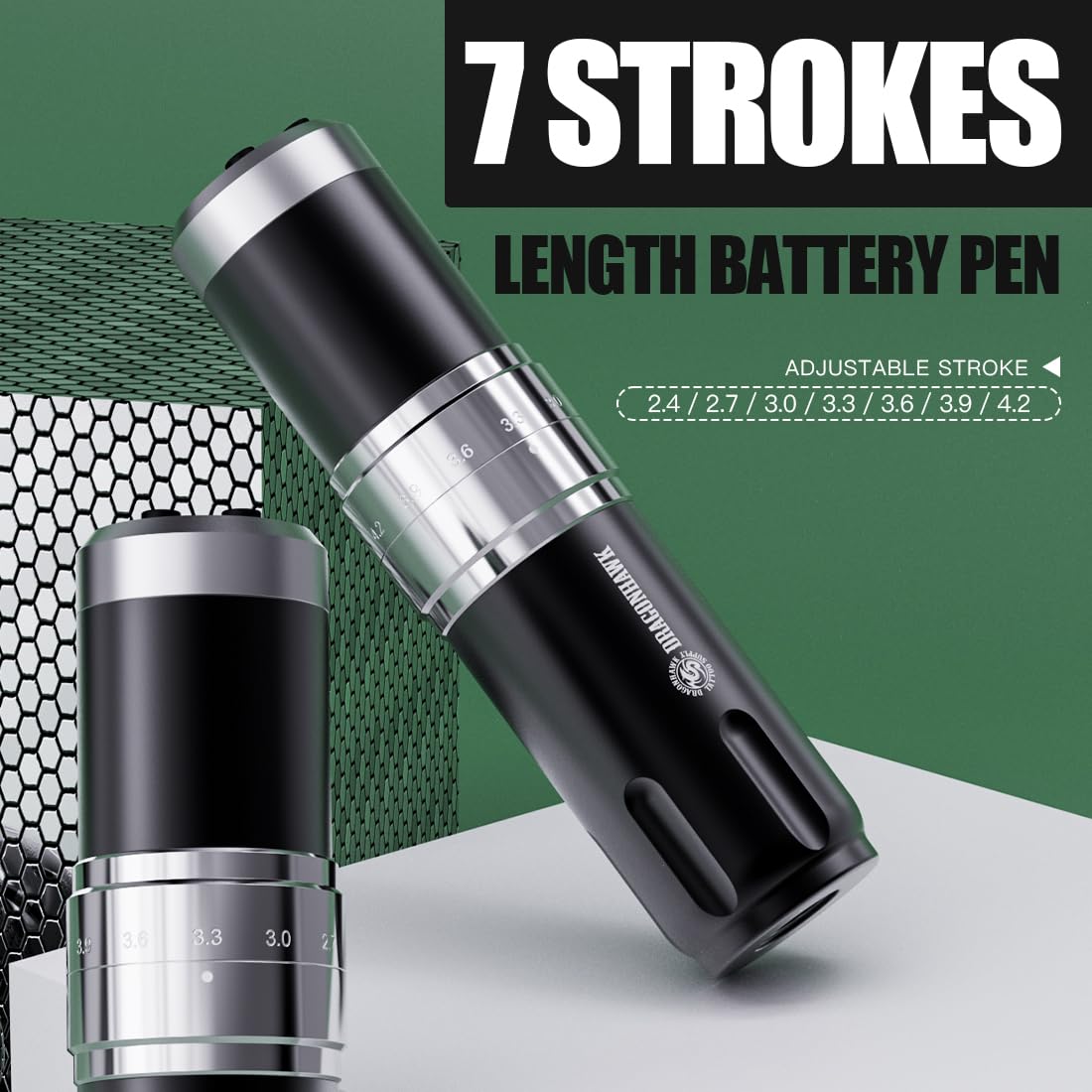
Figure 5.1: Control panel and stroke adjustment.
5.1 Bật/Tắt nguồn
- Nhấn và giữ 'O' (Switch Button) for a few seconds to power the machine on or off.
- The OLED display will show the current voltage và mức pin.
5.2 Điều chỉnh âm lượngtage
- Sử dụng '+' (Voltage Increase Key) Và '-' (Voltage Reduction Key) buttons to adjust the voltage với gia số 0.1V.
- Tập sách được đề xuấttage dải là 4V-12V.
5.3 Changing Mode (Liner/Shader)
- Nhấn nút 'M' (Switch Mode) button to switch between Liner (L) and Shader (S) gears.
- The machine automatically memorizes the voltage settings for each mode.
5.4 Điều chỉnh độ dài hành trình
Máy có 7 mức chiều dài hành trình điều chỉnh được, từ 2.4mm đến 4.2mm.
- Rotate the adjustment knob located on the machine body to select the desired stroke length.
- Available lengths: 2.4mm, 2.7mm, 3.0mm, 3.3mm, 3.6mm, 3.9mm, 4.2mm.

Figure 5.2: Adjusting the stroke length by rotating the knob.
5.5 Video sản phẩm chính thức
Video 5.1: An official video demonstrating the features and operation of the Dragonhawk Fold3 Wireless Tattoo Gun.
6. Bảo trì
6.1 Vệ sinh
- Luôn ngắt nguồn điện trước khi vệ sinh.
- Wipe the machine body with a soft, damp khăn lau và chất khử trùng nhẹ.
- Do not use abrasive cleaners or submerge the machine in liquid.
- Ensure no liquid enters the motor or charging port.
6.2 Sạc
The machine is equipped with a Type-C charging port.
- Connect the provided Type-C cable to the charging port on the battery pack.
- Connect the other end to a compatible USB power adapter.
- Sạc đầy mất khoảng 1.5 giờ.
- The battery indicator on the OLED display will show charging status.
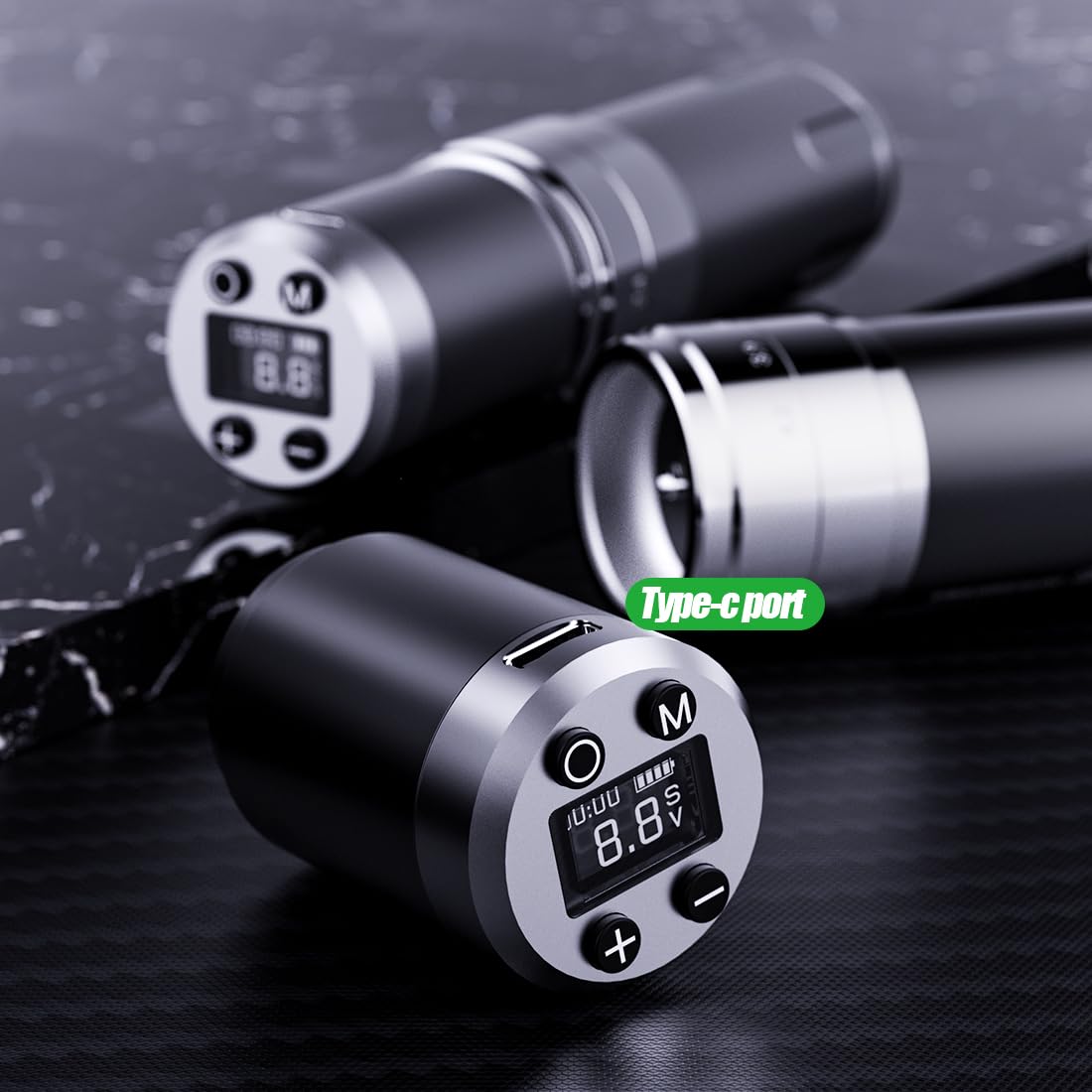
Figure 6.1: Type-C charging port on the battery pack.
6.3 Chăm sóc pin
- Để kéo dài tuổi thọ pin, tránh xả pin hoàn toàn thường xuyên.
- Store the machine and spare batteries in a cool, dry place when not in use.
- If storing for an extended period, charge the batteries to about 50-60% capacity.
KHAI THÁC. Xử lý sự cố
Tham khảo bảng dưới đây để biết các vấn đề thường gặp và giải pháp.
| Vấn đề | Nguyên nhân có thể | Giải pháp |
|---|---|---|
| Máy không bật | Low battery; Battery not properly installed; Power button not pressed correctly. | Charge the battery; Reinstall the battery pack securely; Press and hold the power button firmly. |
| Needle not moving | Needle cartridge not installed correctly; Stroke length set too low; Motor issue. | Reinstall needle cartridge; Adjust stroke length; Contact support if motor issue persists. |
| Tậptage display flickering | Loose battery connection; Low battery. | Ensure battery is securely attached; Charge the battery. |
| Máy quá nóng | Prolonged continuous use; High voltage thiết lập. | Allow machine to cool down; Reduce voltage nếu cần thiết. |
8. Thông số kỹ thuật
Technical details of the Dragonhawk Wireless Tattoo Gun Machine YZBTD.
| Tính năng | Chi tiết |
|---|---|
| Số hiệu mẫu | YZBTD |
| Kích thước sản phẩm | 3.94 x 3.94 x 7.87 inch |
| Trọng lượng sản phẩm | 10.58 ounce (300 gram) |
| Động cơ | Mcore Coreless Motor |
| Độ dài nét vẽ | 7 adjustable (2.4mm - 4.2mm) |
| Tậptage Phạm vi | 4V - 12V |
| Dung lượng pin | 1500mAh (mỗi pin) |
| Tuổi thọ pin | 6-8 hours (per battery) |
| Thời gian sạc | Xấp xỉ 1.5 giờ |
| Cổng sạc | Loại C |
| Mức độ chống nước | Chống nước |
9. Bảo hành & Hỗ trợ
Dragonhawk is committed to providing high-quality products and excellent customer service.
- Bảo hiểm sản phẩm: Dragonhawk products typically include coverage for manufacturing defects. Please refer to your purchase documentation for specific warranty terms.
- Hỗ trợ kỹ thuật: For video tutorials, setup guides, and professional tips, visit Youtube.com/@Dragonhawkofficial.
- Dịch vụ khách hàng: For any inquiries or issues with your order, please reach out through Amazon's messaging system.
- Trả về: This product has a 30-day return policy for refund/replacement.