
Star Micronics MCL32CBI
Hướng dẫn sử dụng máy in nhiệt trực tiếp Star Micronics mC-Label3 MCL32CBI
Model: MCL32CBI
Giới thiệu
This manual provides essential information for the setup, operation, maintenance, and troubleshooting of your Star Micronics mC-Label3 MCL32CBI Direct Thermal Printer. Please read this manual thoroughly before using the printer to ensure proper and safe operation.
Nội dung gói
Xác minh rằng tất cả các mục được liệt kê dưới đây đều có trong gói hàng của bạn:
- mC-Label3 Multifunctional Printer
- Bộ đổi nguồn AC
- Cáp nguồn
- USB Cables (C-C 1.0m and C-A 1.8m)
- Cáp LAN (1m)
- Simple Setup Sheet Safety Guide

Hình ảnh: Mặt trước view of the Star Micronics mC-Label3 printer, showcasing its compact design and label output slot.
Cài đặt
1. Kết nối máy in
The mC-Label3 MCL32CBI printer offers multiple connectivity options:
- USB-C: Connect the printer directly to your PC, Android, or iOS device using the provided USB-C to USB-C or USB-C to USB-A cables.
- Ethernet (LAN): For network connectivity, connect the printer to your router or network switch using the supplied LAN cable.
- Bluetooth: The MCL32CBI model supports Bluetooth connectivity for iOS and Android devices. Ensure Bluetooth is enabled on your device and pair with the printer.

Hình ảnh: Phía sau view of the mC-Label3 printer, highlighting the LAN, USB, and power ports for various connection types.
2. Đang tải phương tiện
The printer supports various media types, including linerless labels, die-cut labels, continuous labels, and thermal receipt paper.
- Open the top cover of the printer by lifting the latch.
- Place the media roll into the media compartment, ensuring the leading edge feeds out from the top.
- Pull a small amount of media past the print head and close the top cover securely.
- Ensure the media is properly aligned within the guides.

Hình ảnh: Từ trên xuống view of the mC-Label3 printer with its cover open, illustrating the internal mechanism for loading thermal paper or label rolls.
Hướng dẫn sử dụng
1. Bật / Tắt nguồn
Connect the power cable to the printer and a power outlet. Press the power button located on the front of the printer to turn it on. The status indicator light will illuminate.
2. Printing Labels and Receipts
The mC-Label3 MCL32CBI printer is designed for efficient label and receipt printing. It supports various applications and cloud services.
- Tương thích phần mềm: Works seamlessly with PC, Android, and iOS applications.
- Dịch vụ điện toán đám mây: Utilize Star Micronics Cloud Services to design and manage labels.
- One Touch Label: This feature allows storing pre-made receipts and labels for quick and easy printing directly from the printer.
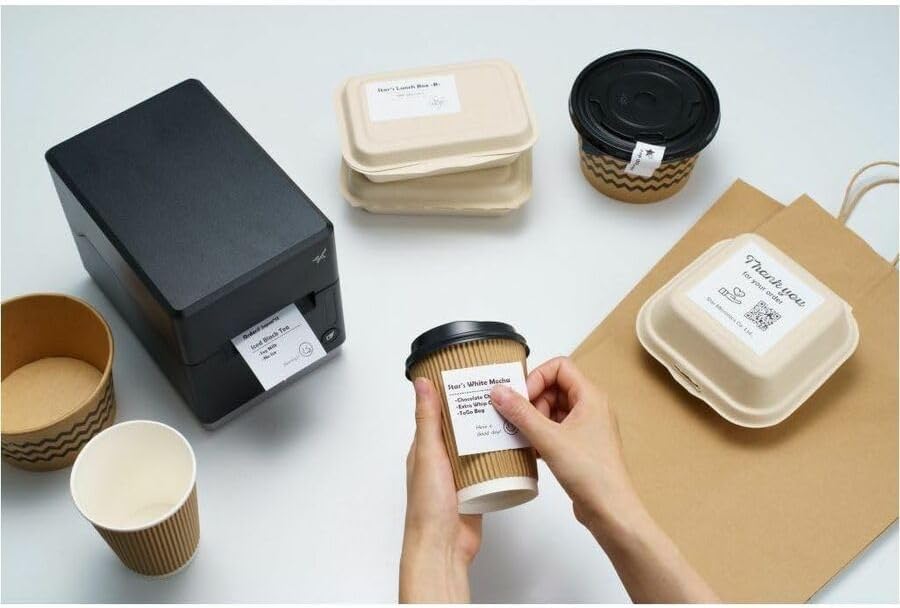
Image: A hand pressing the feed button on the mC-Label3 printer, demonstrating the printing of a 'Thank you' label.

Image: The mC-Label3 printer shown in a practical setting, printing labels for food containers and coffee cups, illustrating its versatility.
BẢO TRÌ
1. Vệ sinh máy in
Regular cleaning ensures optimal performance and extends the life of your printer.
- Sử dụng vải mềm, không có xơ dampened with isopropyl alcohol to clean the print head.
- Dùng khăn mềm, khô lau sạch bên ngoài máy in.
- Tránh sử dụng chất tẩy rửa hoặc dung môi có tính ăn mòn.
2. Thay thế phương tiện lưu trữ
When the media roll is depleted, follow the media loading instructions in the Setup section to replace it.
3. Effortless Repairs
The mC-Label3 is designed for effortless, no-tools-required repairs with minimal upkeep, simplifying any necessary component replacements.
Xử lý sự cố
Phần này cung cấp giải pháp cho những vấn đề thường gặp mà bạn có thể gặp phải.
| Vấn đề | Nguyên nhân có thể | Giải pháp |
|---|---|---|
| Máy in không bật nguồn | Cáp nguồn không được kết nối; Sự cố ổ cắm điện | Hãy đảm bảo dây nguồn được kết nối chắc chắn; Thử cắm vào ổ cắm điện khác. |
| Không có đầu ra in | Out of media; Media loaded incorrectly; Driver issue | Load new media; Re-load media correctly; Reinstall printer drivers. |
| Chất lượng in kém | Dirty print head; Low quality media | Clean the print head; Use recommended thermal media. |
| Các vấn đề kết nối | Incorrect cable connection; Bluetooth not paired; Network configuration | Check USB/Ethernet cables; Re-pair Bluetooth; Verify network settings. |
Thông số kỹ thuật
| Tính năng | Chi tiết |
|---|---|
| Tên mẫu | mC-Nhãn3 |
| Số hiệu mẫu sản phẩm | MCL32CBI |
| Công nghệ in ấn | Nhiệt trực tiếp |
| Đầu ra máy in | Đơn sắc |
| Tốc độ in tối đa đơn sắc | 23 trang/phút |
| Độ phân giải in đen trắng tối đa | 203 DPI (203 x 203 DPI) |
| Phương tiện in ấn | Labels (Linerless, Die-Cut, Continuous), Thermal Receipt |
| Công nghệ kết nối | Bluetooth, Wired (USB, Ethernet) |
| Giao diện phần cứng | USB-Ethernet |
| Thiết bị tương thích | PC, Android, iOS |
| Loại bộ điều khiển | iOS, Android |
| Kích thước sản phẩm | 6.7"D x 5.6"W x 8.3"H (17.0 x 14.2 x 21.1 cm) |
| Trọng lượng sản phẩm | 7.2 pound (3.27 kg) |
| Dung lượng lưu trữ bộ nhớ | 64MB |
| Màu sắc | Đen |
| Nhà sản xuất | STAR MICRONICS |
| Nước xuất xứ | Trung Quốc |
Thông tin bảo hành
The Star Micronics mC-Label3 MCL32CBI printer comes with a manufacturer's warranty. For specific terms and conditions, please refer to the warranty card included in your package or visit the official Star Micronics webđịa điểm.
Loại bảo hành: Nhà sản xuất
Ủng hộ
For further assistance, technical support, or to download the latest drivers and firmware, please visit the official Star Micronics support webtrang web hoặc liên hệ với dịch vụ khách hàng của họ.
Star Micronics Official Webđịa điểm: www.starmicronics.com
Liên kết hỗ trợ: www.starmicronics.com/support
Ask a question about this manual
Ask about setup, troubleshooting, compatibility, parts, safety, or missing instructions. Manuals+ will review the question and use this page’s manual context to help answer it.