
Xprinter XP-Q801K
Hướng dẫn sử dụng máy in hóa đơn nhiệt Xprinter XP-Q801K
Model: XP-Q801K
1. Giới thiệu
This manual provides comprehensive instructions for the setup, operation, and maintenance of your Xprinter XP-Q801K Thermal Receipt Printer. This printer is designed for efficient and reliable receipt printing in various business environments, featuring high-speed direct thermal printing and a USB interface for easy connectivity.

Hình 1: Mặt trước view of the Xprinter XP-Q801K Thermal Receipt Printer, showing the paper output slot and control buttons.
2. Thiết lập
2.1 Tháo dỡ
Cẩn thận lấy máy in và tất cả phụ kiện ra khỏi bao bì. Kiểm tra xem tất cả các bộ phận có đầy đủ hay không:
- Xprinter XP-Q801K Thermal Receipt Printer
- Bộ đổi nguồn
- Cáp USB
- Paper Roll (starter)
- Hướng dẫn sử dụng (tài liệu này)
2.2 Kết nối máy in
Before connecting, ensure the printer is powered off. Locate the ports on the rear of the printer.
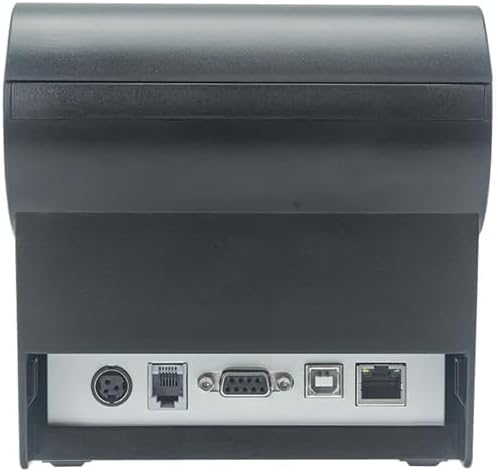
Hình 2: Phía sau view of the printer, highlighting the power, USB, and other interface ports.
- Kết nối nguồn: Insert the power adapter cable into the printer's power input port (DC 24V/2.5A) and plug the adapter into a suitable electrical outlet (AC 100-240V, 50-60Hz).
- Kết nối USB: Connect one end of the provided USB cable to the USB port on the printer and the other end to an available USB port on your computer.
- Cash Drawer (Optional): If using a cash drawer, connect its cable to the cash drawer port (DC 24V/1A) on the printer.
2.3 Lắp cuộn giấy
The printer uses 80mm wide thermal paper rolls.
- Open the paper cover by pushing the cover open button (usually located on the side or front).
- Insert the thermal paper roll with the printing surface facing the print head. Ensure the roll is seated correctly in the paper compartment.
- Kéo một lượng giấy nhỏ ra khỏi máy cắt.
- Đóng chặt nắp giấy cho đến khi nghe tiếng "tách".
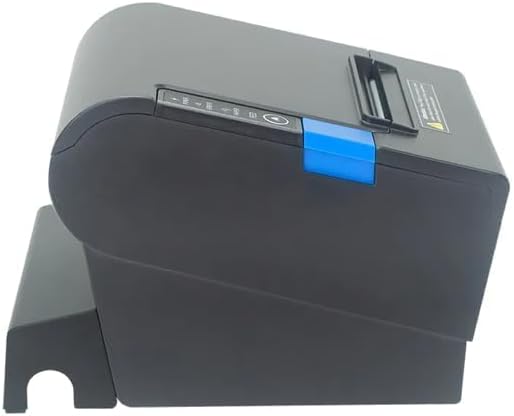
Hình 3: Mặt bên view of the printer, illustrating the paper cover mechanism.
2.4 Cài đặt trình điều khiển
The printer requires a driver to communicate with your computer. Drivers are typically available for Windows, Linux, Android, and Mac operating systems.
- For Windows users, the printer often supports plug-and-play installation or requires a specific Windows driver.
- For Linux, Android, and Mac, SDKs (Software Development Kits) are usually provided for integration.
Tham khảo hướng dẫn của nhà sản xuất. website or the included driver CD/USB drive for the latest drivers and installation instructions specific to your operating system.
3. Vận hành máy in
3.1 Bật / Tắt nguồn
Locate the power switch on the side or rear of the printer. Flip the switch to the 'ON' position to power on the printer. The 'POWER' indicator light will illuminate. Flip to 'OFF' to power down.
3.2 Indicator Lights and Buttons
The front panel typically features several indicator lights and buttons:
- QUYỀN LỰC: Cho biết máy in đang được bật nguồn.
- LỖI: Illuminates or flashes to indicate an error condition (e.g., paper out, print head overheating, cutter error).
- GIẤY: Indicates that the paper roll is low or out.
- Nút FEED: Press to manually feed paper. Hold to perform a self-test print (if supported by model).
3.3 In ấn cơ bản
Once the printer is connected and drivers are installed, you can print receipts from your POS software or application. Ensure the printer is selected as the default or active printer in your system settings.
The printer supports various print speeds up to 300 mm/s and automatic paper cutting after each print job.
4. Bảo trì
Bảo trì thường xuyên đảm bảo hiệu suất tối ưu và kéo dài tuổi thọ của máy in.
4.1 Vệ sinh đầu in
The print head should be cleaned regularly, especially if print quality degrades.
- Tắt máy in và ngắt kết nối cáp nguồn.
- Mở nắp giấy.
- Sử dụng tăm bông nhẹ nhàngampened with isopropyl alcohol (ethanol) to gently wipe the thermal elements of the print head.
- Để đầu in khô hoàn toàn trước khi đóng nắp và cắm lại nguồn điện.
4.2 Cleaning the Cutter
Paper dust can accumulate around the cutter blade, affecting its performance.
- Tắt máy in và ngắt kết nối cáp nguồn.
- Carefully remove any visible paper dust or debris from around the cutter blade using a soft brush or compressed air.
- Do not use liquids on the cutter.
4.3 Tổng vệ sinh
Lau sạch bên ngoài máy in bằng vải mềm,amp vải. Tránh sử dụng hóa chất mạnh hoặc chất tẩy rửa mài mòn.
KHAI THÁC. Xử lý sự cố
Phần này đề cập đến những vấn đề thường gặp mà bạn có thể gặp phải với máy in của mình.
| Vấn đề | Nguyên nhân có thể | Giải pháp |
|---|---|---|
| Máy in không bật được. | Dây nguồn chưa được kết nối; Ổ cắm điện bị hỏng; Công tắc nguồn đã tắt. | Ensure power cable is securely connected. Test power outlet. Turn power switch to 'ON'. |
| No printing. | Paper out; Paper loaded incorrectly; Driver not installed or incorrect; USB cable loose; Printer not selected. | Load new paper roll. Re-load paper correctly. Install/reinstall correct driver. Check USB connection. Select printer in software. |
| ERROR light is on/flashing. | Paper out; Paper jam; Print head overheating; Cutter error. | Load paper. Clear paper jam. Allow printer to cool down. Check cutter for obstructions. |
| Chất lượng in kém. | Dirty print head; Low quality paper; Old paper roll. | Clean the print head (see Section 4.1). Use high-quality thermal paper. Replace old paper rolls. |
Nếu sự cố vẫn tiếp diễn sau khi đã thử các giải pháp này, vui lòng liên hệ với bộ phận hỗ trợ khách hàng.
6. Thông số kỹ thuật
| Tính năng | Chi tiết |
|---|---|
| Phương pháp in | Nhiệt trực tiếp |
| Chiều rộng giấy | 80mm |
| Tốc độ in | 230 mm/giây, 260 mm/giây, 300 mm/giây |
| Giao diện | USB |
| Khoảng cách dòng | 3.75 mm (adjustable by commands) |
| Character Size (ANK) | Font A: 1.5 × 3.0 mm (12 × 24 dots) Font B: 1.1 × 2.1 mm (9 × 17 dots) |
| Character Size (Chinese/Traditional Chinese) | 3.0 × 3.0 mm (24 × 24 dots) |
| Các loại mã vạch | UPC-A / UPC-E / JAN13 (EAN13) / JAN8 (EAN8) / CODE39 / ITF / CODABAR / CODE93 / CODE128 |
| Mã vạch 2D | QR Code / PDF417 |
| NV Flash Memory | 256KB |
| Công suất đầu vào | AC 100-240V, 50-60Hz |
| Công suất đầu ra | Điện áp một chiều 24V/2.5A |
| Đầu ra ngăn kéo đựng tiền | Điện áp một chiều 24V/1A |
| Cân nặng | 1.0kg |
| Kích thước (D × W × H) | 194.5 × 145 × 146.4mm |
| Nhiệt độ hoạt động | 0~45°C |
| Độ ẩm hoạt động | 10~80% RH |
| Cuộc sống của máy cắt | Cắt giảm 1.5 triệu |
| Tuổi thọ đầu in | 150km |
| Khả năng tương thích của hệ điều hành | Windows, Linux, Android, Mac |
Ask a question about this manual
Ask about setup, troubleshooting, compatibility, parts, safety, or missing instructions. Manuals+ will review the question and use this page’s manual context to help answer it.