
1. Giới thiệu
This manual provides essential instructions for setting up, operating, maintaining, and troubleshooting your VIBOX VI-63 PC Gamer. Please read this guide thoroughly before using your new computer to ensure optimal performance and longevity.
2. Thông tin an toàn
- Ensure the PC is placed on a stable, flat surface with adequate ventilation.
- Do not block any ventilation openings on the PC case.
- Keep the PC away from direct sunlight, heat sources, and liquids.
- Use only the power adapter supplied with your PC.
- Hãy ngắt nguồn điện trước khi vệ sinh hoặc thực hiện bất kỳ công việc bảo trì nào.
- Avoid opening the PC case unless instructed by VIBOX support, as this may void your warranty.
3. Nội dung gói hàng
Xác minh rằng tất cả các mục được liệt kê dưới đây đều có trong gói hàng của bạn:
- VIBOX VI-63 PC Gamer Tower
- Màn hình 22 inch
- Bàn phím chơi game RGB
- Chuột chơi game RGB
- Black Mouse Pad
- Tai nghe chơi game có micrô
- Wireless WiFi Network Adapter (600 Mbps)
- Dây cáp điện)
- Display Cable (HDMI or VGA, depending on monitor)
- Tài liệu (sách hướng dẫn này)
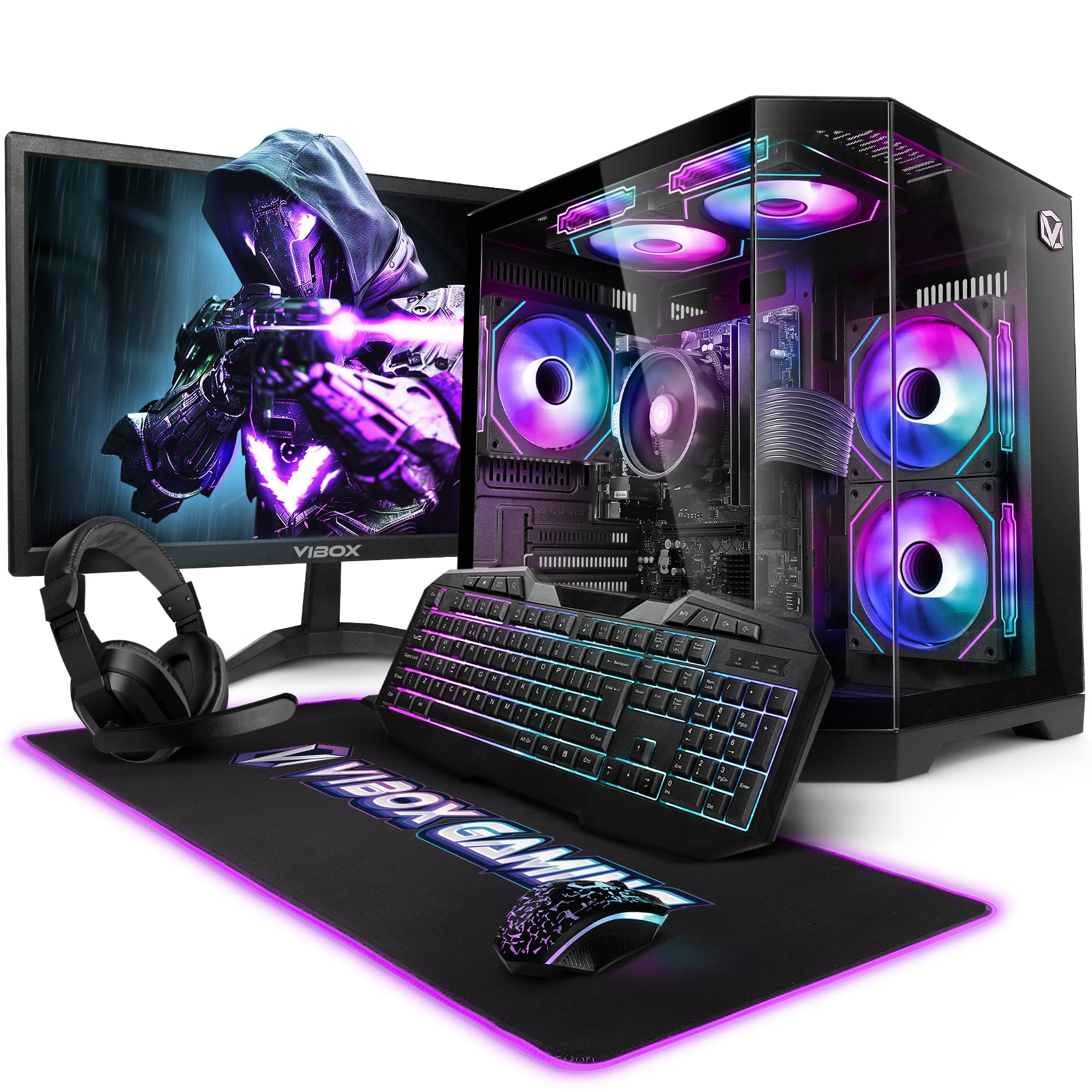
Image 3.1: VIBOX VI-63 PC Gamer Tower with internal RGB lighting.
4. Hướng dẫn thiết lập
4.1. Tháo dỡ và sắp xếp
- Cẩn thận lấy tất cả các bộ phận ra khỏi bao bì.
- Place the PC tower on a flat, stable surface. Ensure there is sufficient space around the tower for proper airflow.
- Place the monitor on a stable surface at a comfortable viewchiều cao ing.
4.2. Kết nối thiết bị ngoại vi
- Màn hình: Connect one end of the display cable (HDMI or VGA) to the corresponding port on the back of the PC and the other end to the monitor.
- Bàn phím và chuột: Connect the USB cables of the keyboard and mouse to any available USB ports on the PC.
- tai nghe: Connect the headset to the audio jacks (headphone and microphone) on the front or rear of the PC.
- Bộ chuyển đổi WiFi: Insert the wireless WiFi network adapter into an available USB port.
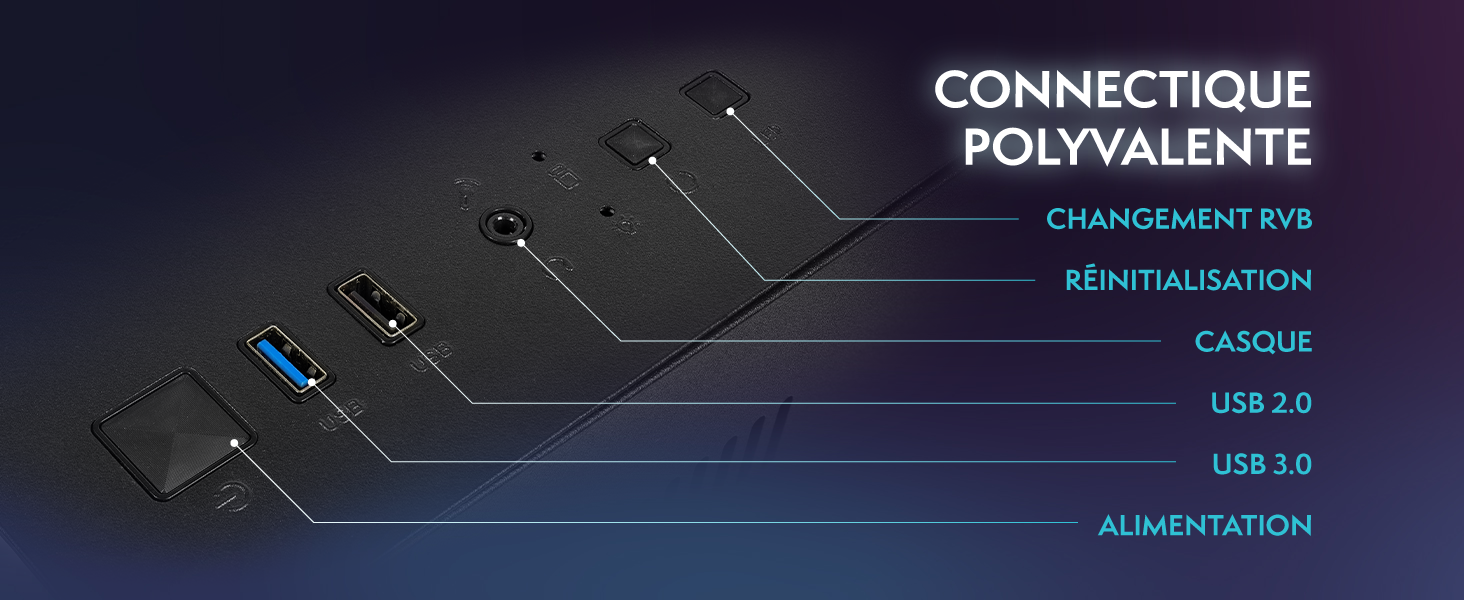
Image 4.1: Front panel connections including USB 2.0, USB 3.0, headset jack, reset button, and RGB change button.
4.3. Kết nối nguồn điện
- Connect the power cable to the power supply unit (PSU) at the back of the PC.
- Connect the other end of the power cable to a wall outlet.
- Connect the monitor's power cable to a wall outlet.
4.4. Khởi động ban đầu và thiết lập Windows 11
- Press the power button on the front of the PC tower.
- Bật màn hình.
- Follow the on-screen instructions to complete the Windows 11 Home setup. This typically involves selecting your region, language, creating a user account, and connecting to a Wi-Fi network.
5. Hướng dẫn vận hành
5.1. Hoạt động cơ bản
- Bật/Tắt nguồn: Nhấn nút nguồn để bật máy tính. Để tắt máy, hãy nhấn nút Bắt đầu trong Windows, sau đó chọn Nguồn > Tắt máy.
- Khởi động lại: Từ menu Bắt đầu, chọn Nguồn > Khởi động lại.
- Chế độ ngủ: Từ menu Bắt đầu, chọn Nguồn > Chế độ ngủ.
5.2. Windows 11 Features
Your VIBOX VI-63 PC Gamer comes with Windows 11 Home pre-installed, offering features designed to enhance your computing and gaming experience:
- DirectStorage: Enables faster loading times for compatible games.
- AutoHDR: Automatically enhances visuals for a wider range of games.
- Xbox Game Pass Integration: Seamless access to a library of games (subscription may be required).
- Optimized CPU Performance: Windows 11 is designed to optimize CPU usage for gaming and multitasking.
5.3. Hiệu suất chơi game
The VIBOX VI-63 is equipped with an AMD Ryzen 3 3200GE processor and integrated Radeon Vega 8 graphics, providing solid performance for everyday computing and gaming at 720p to 1080p resolutions.

Hình 5.1: Hếtview of internal components including CPU, GPU, RAM, and storage.
5.4. Điều khiển ánh sáng RGB
Your PC features RGB lighting. Use the dedicated RGB change button on the front panel (refer to Image 4.1) to cycle through different lighting modes and colors.
6. Bảo trì
6.1. Cleaning the PC
- Bên ngoài: Sử dụng một mềm, damp cloth to wipe down the exterior of the PC case and monitor. Avoid abrasive cleaners.
- Bụi: Periodically use compressed air to clear dust from the ventilation openings and fan grilles. Ensure the PC is powered off and unplugged before doing so.
- Thiết bị ngoại vi: Clean your keyboard and mouse regularly to prevent dust and debris buildup.
6.2. Cập nhật phần mềm
- Thường xuyên kiểm tra và cài đặt bản cập nhật Windows để đảm bảo tính ổn định và bảo mật của hệ thống. Vào Cài đặt > Cập nhật Windows.
- Keep your graphics drivers updated for optimal gaming performance. You can usually download the latest drivers from the AMD webđịa điểm.
6.3. Chăm sóc hệ thống
- Avoid installing unnecessary software to keep your system lean and fast.
- Run regular antivirus scans to protect against malware. Windows Defender is pre-installed.
- Ensure proper airflow around the PC to prevent overheating. The inverted airflow design helps with cooling.
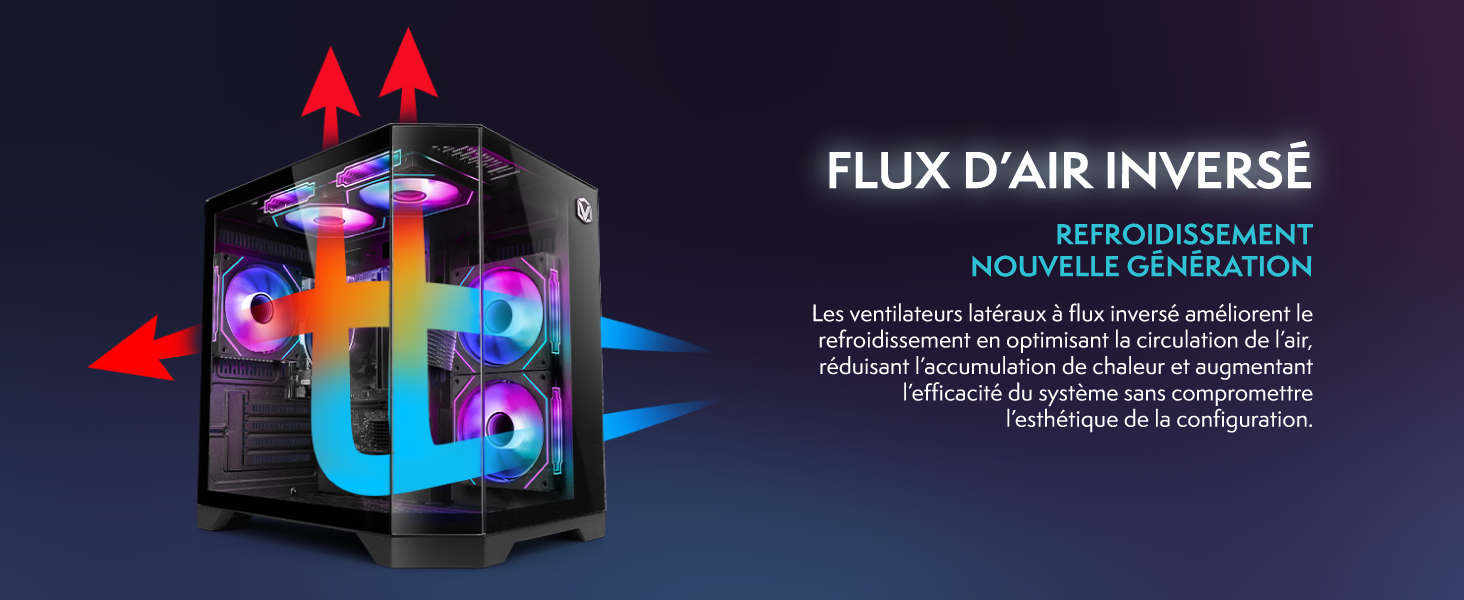
Image 6.1: Inverted airflow design for efficient cooling.
KHAI THÁC. Xử lý sự cố
- Không có điện: Check all power cable connections. Ensure the wall outlet is functional.
- Không hiển thị: Ensure the monitor is powered on and the display cable is securely connected to both the PC and the monitor. Try a different display cable or port if available.
- Không có kết nối Internet: Verify the WiFi adapter is properly installed. Check your router and internet service. In Windows, go to Settings > Network & internet to troubleshoot.
- PC Freezes/Crashes: Restart the PC. Ensure all drivers are updated. Check for overheating (ensure good airflow).
- Các thiết bị ngoại vi không hoạt động: Try connecting the keyboard, mouse, or headset to different USB/audio ports. Ensure drivers are installed if required.
8. Thông số kỹ thuật
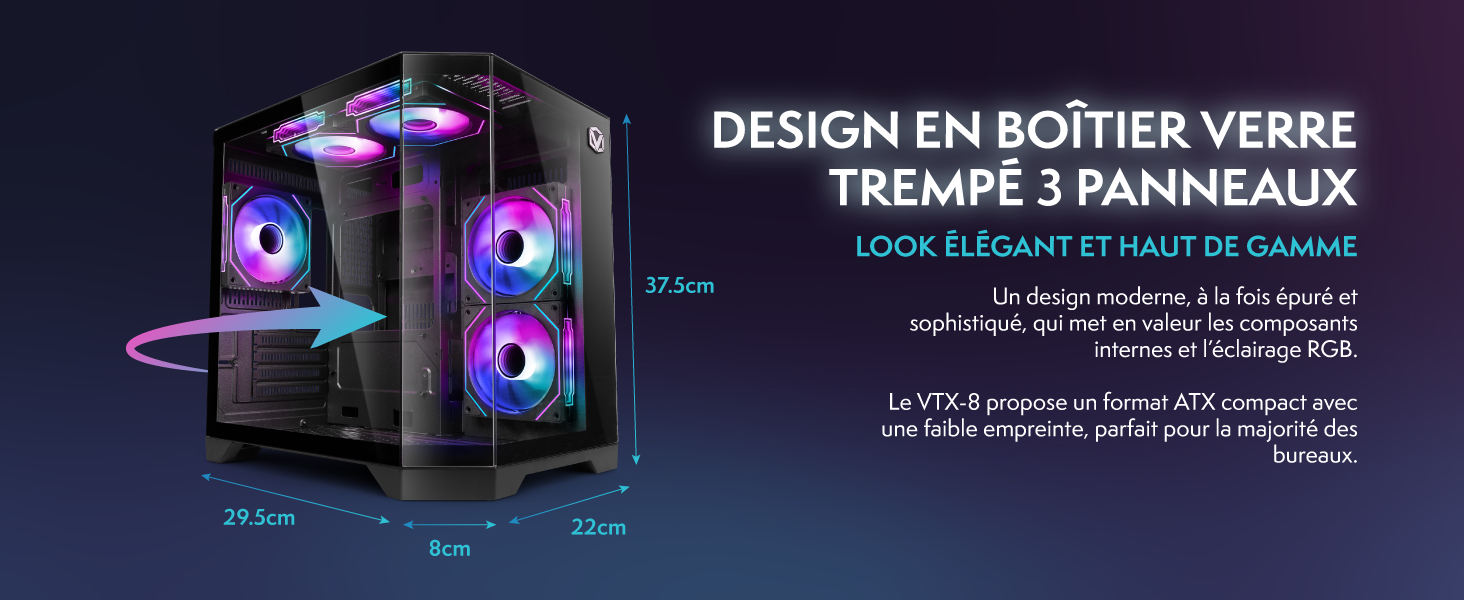
Image 8.1: VIBOX VI-63 PC Gamer case dimensions.
| Tính năng | Đặc điểm kỹ thuật |
|---|---|
| Thương hiệu | VIBOX |
| Tên mẫu | Vibox VI-63 Gaming PC |
| Hệ điều hành | Windows 11 Trang chủ |
| Mô hình CPU | AMD Ryzen 3 3200G |
| Tốc độ CPU | 3.6 GHz (Tốc độ tăng áp 4 GHz) |
| Lõi CPU | 4 |
| Bộ đồng xử lý đồ họa | Radeon Vega 8 (Integrated) |
| RAM đồ họa | 2 GB (Shared) |
| RAM Installed | 16GB DDR4 |
| RAM Speed | 2666MHz |
| Dung lượng lưu trữ | Ổ cứng SSD 1 TB |
| Công nghệ ổ cứng | Ổ cứng thể rắn |
| Kích thước màn hình | 22 inch |
| Độ phân giải màn hình tối đa | 1920x1080 pixel |
| Giao diện đầu ra video | hdmi, vga |
| Công nghệ kết nối | AMD Radeon Vega 8, Ethernet, HDMI, USB, Wi-Fi |
| Kích thước (D x R x C) | 32.6 x 19.5 x 42cm |
| Màu sắc | VTX-1 Black |
9. Bảo hành và Hỗ trợ
9.1. Thông tin bảo hành
Your VIBOX VI-63 PC Gamer comes with a Bảo hành 2 năm on spare parts. This warranty covers manufacturing defects and component failures under normal use. Please retain your proof of purchase for warranty claims.
9.2. Hỗ trợ khách hàng
For technical assistance, troubleshooting, or warranty inquiries, please contact VIBOX customer support. Refer to the contact information provided with your purchase documentation or visit the official VIBOX webtrang web để biết chi tiết hỗ trợ.
Tài nguyên trực tuyến: For additional support and FAQs, please visit the VIBOX official webđịa điểm.