
1. Giới thiệu
The IHSENO Mini WiFi Smart Switch Relay is a compact and intelligent device designed to integrate your traditional lighting and appliances into a smart home system. It operates on 2.4GHz WiFi and is compatible with the Tuya Smart Life App, allowing for remote control, voice commands via Alexa and Google Home, and intelligent scheduling.

Hình 1.1: Hếtview of the IHSENO Mini WiFi Smart Switch Relay and its packaging.
Các tính năng chính:
- Mini WiFi Smart Switch: Designed for 2.4GHz WiFi, enabling whole-house intelligence through the Tuya APP.
- Tuya Smart Life App Control: Connects with other smart devices for intelligent scene linkage.
- Customize Different Scene Modes: Allows setting scenes like 'Reading' or 'Movie' and controlling various smart devices.
- Alexa & Google Home Enabled: Supports voice control for hands-free operation.
- Thiết kế nhỏ gọn: Fits into most standard electrical boxes, even with existing wiring.
2. Thông tin an toàn
Vui lòng đọc kỹ tất cả hướng dẫn an toàn trước khi lắp đặt và vận hành. Việc không tuân thủ các hướng dẫn này có thể dẫn đến điện giật, hỏa hoạn hoặc các nguy hiểm khác.
- Khuyến nghị cài đặt chuyên nghiệp: Công việc điện cần được thực hiện bởi thợ điện có trình độ chuyên môn.
- Tắt nguồn trước khi cài đặt: Luôn ngắt nguồn điện tại cầu dao trước khi lắp đặt hoặc bảo dưỡng thiết bị.
- Chỉ sử dụng trong nhà: Thiết bị này được thiết kế để sử dụng trong nhà, ở những nơi khô ráo.
- Tậptage và Xếp hạng hiện tại: Không vượt quá vol đã chỉ địnhtage (AC 100-240V) and current (3 Amps) ratings.
- Dây điện: Ensure all wiring connections are secure and comply with local electrical codes. Input and output connections cannot be reversed.

Image 2.1: Safety and Certification details for the Mini Smart Switch.
3. Thiết lập và Cài đặt
The IHSENO Mini WiFi Smart Switch Relay is designed for easy integration into your existing electrical system. It supports both 1-way and 2-way control setups.
Sơ đồ đấu dây:
Quan trọng: Always ensure the power is OFF at the circuit breaker before performing any wiring. Input and output connections cannot be reversed.

Image 3.1: Wiring Method 1 - Direct connection to a lamp and mains power.

Image 3.2: Wiring Method 2 - Connection with a 1-way wall switch.

Image 3.3: Wiring Method 3 - Connection with a 2-way wall switch.
Ghép nối ứng dụng:
- Tải xuống Tuya thông minh or Cuộc sống thông minh Tải ứng dụng từ cửa hàng ứng dụng trên điện thoại thông minh của bạn.
- Đăng ký hoặc đăng nhập vào tài khoản của bạn.
- Đảm bảo điện thoại thông minh của bạn được kết nối với mạng WiFi 2.4 GHz.
- Power on the smart switch. The indicator light should blink rapidly, indicating it's in pairing mode. If not, refer to the troubleshooting section for resetting the device.
- In the app, tap '+' to add a device. Select 'Electrical' > 'Switch (Wi-Fi)' or allow the app to auto-discover the device.
- Làm theo hướng dẫn trên màn hình để hoàn tất quá trình ghép nối.
4. Hướng dẫn vận hành
Once installed and paired, you can control your IHSENO Mini WiFi Smart Switch Relay through various methods.
4.1. Điều khiển từ xa qua ứng dụng
Control your connected devices from anywhere using the Tuya Smart Life App, as long as your smartphone and the switch are connected to the internet.

Image 4.1: WiFi Remote Control functionality.

Image 4.2: App Remote Control in action, showing control of a lamp.
4.2. Điều khiển bằng giọng nói
Integrate your smart switch with Amazon Alexa or Google Assistant for convenient voice commands.
- Mở ứng dụng Alexa hoặc Google Home.
- Link your Tuya Smart Life account to the voice assistant.
- Khám phá các thiết bị.
- Use commands like "Alexa, turn on the lamp" or "Hey Google, turn off the kitchen light."
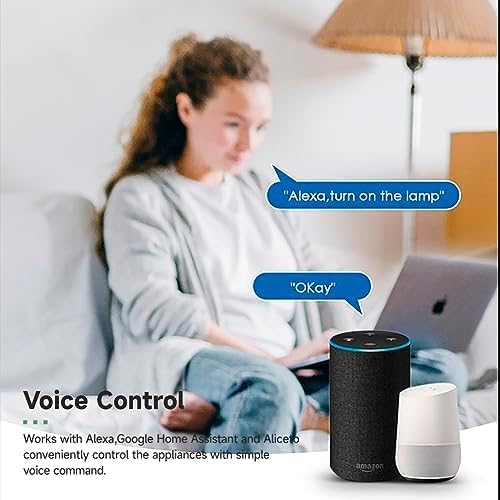
Image 4.3: Voice control with Alexa and Google Home.
4.3. Intelligent Timing and Scene Modes
Set schedules, countdowns, and create custom scene modes within the Tuya Smart Life App.
- Thời gian: Schedule devices to turn on/off at specific times (e.g., 23:30 Off).
- Đạp xe: Set recurring schedules (e.g., 08:00 ON Everyday).
- Đếm ngược: Đặt hẹn giờ để thiết bị tự tắt sau một khoảng thời gian nhất định.
- Chế độ cảnh: Combine multiple smart devices to activate with a single command or schedule (e.g., 'Movie Night' scene dims lights and turns on entertainment).
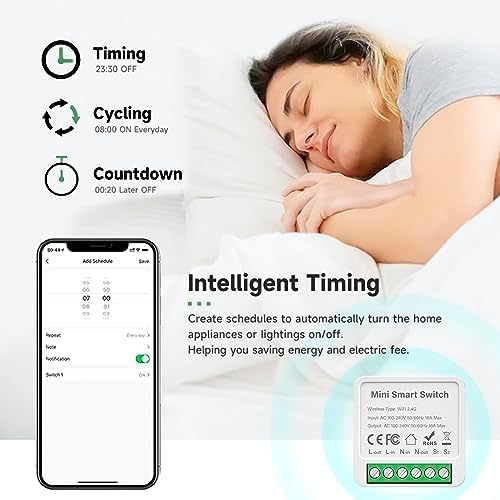
Image 4.4: Intelligent Timing features in the app.
4.4. Chức năng chia sẻ
Share control of your smart devices with family members through the Tuya Smart Life App.

Image 4.5: Sharing function for family members.
5. Bảo trì
To ensure the longevity and optimal performance of your IHSENO Mini WiFi Smart Switch Relay, follow these simple maintenance guidelines:
- Vệ sinh: Dùng khăn mềm, khô để vệ sinh thiết bị. Không sử dụng chất tẩy rửa dạng lỏng hoặc bình xịt.
- Môi trường: Tránh để thiết bị tiếp xúc với độ ẩm quá mức, nhiệt độ khắc nghiệt hoặc ánh nắng trực tiếp.
- Điều tra: Thường xuyên kiểm tra các mối nối dây điện xem có dấu hiệu hao mòn hoặc lỏng lẻo hay không.
KHAI THÁC. Xử lý sự cố
If you encounter issues with your IHSENO Mini WiFi Smart Switch Relay, refer to the following common problems and solutions:
- Thiết bị không thể ghép nối:
- Ensure your WiFi network is 2.4GHz. The device does not support 5GHz WiFi.
- Check that the device is powered on and the indicator light is blinking rapidly. If not, power cycle the device or perform a factory reset (refer to app instructions for reset procedure).
- Move the device closer to your WiFi router during pairing.
- Thiết bị ngoại tuyến trong ứng dụng:
- Verify your home WiFi network is active and has internet access.
- Check the power supply to the smart switch.
- Khởi động lại bộ định tuyến WiFi của bạn.
- Điều khiển bằng giọng nói không hoạt động:
- Ensure your Tuya Smart Life account is correctly linked to Alexa or Google Home.
- Check the device name in the voice assistant app; ensure it's easy to pronounce and recognize.
- Verify your voice assistant device is connected to the internet.
- Physical switch not responding:
- Ensure all wiring connections are secure and correct according to the diagrams.
- Check if the physical switch itself is functional.
7. Thông số kỹ thuật
Technical specifications for the IHSENO Mini WiFi Smart Switch Relay:

Hình 7.1: Thông số kỹ thuật chi tiết của sản phẩm.
| Đặc điểm kỹ thuật | Chi tiết |
|---|---|
| Thương hiệu | IHSENO |
| Người mẫu | B0CF1FYYBN |
| Loại không dây | Wi-Fi 2.4G |
| Đầu vào Voltage | Điện áp xoay chiều 100-240V 50/60Hz |
| Đầu ra Voltage | Điện áp xoay chiều 100-240V 50/60Hz |
| Định mức dòng điện tối đa | 3 Amps (Note: Product image shows 16A Max, but product specifications list 3 Amps. Please verify with product packaging.) |
| Kiểu lắp đặt | Lắp đặt bề mặt |
| Vật liệu liên hệ | Đồng |
| Vật liệu | PC V0 (Fireproof) |
| Kích cỡ | 41x20x41mm (approx. 1.6*0.8*1.6 inches) |
| Chế độ hoạt động | (ON)-ON-OFF |
| Loại công tắc | 1 chiều |
| Chuyển kiểu | Nút nhấn |
| Khả năng tương thích ứng dụng | Smart Life (Support iOS & Android) |
8. Bảo hành và Hỗ trợ
IHSENO is committed to providing high-quality products and customer satisfaction.
If you have any questions about this product, please feel free to contact our customer service team. We aim to reply within 24 hours to assist you with any inquiries or issues.
Vui lòng tham khảo tài liệu mua hàng của bạn để biết các điều khoản và điều kiện bảo hành cụ thể.