
1. Giới thiệu
This manual provides detailed instructions for the installation, operation, and maintenance of your COMMAX CDV-77M 7-inch Fine View Monitor. Please read this manual thoroughly before using the product to ensure proper function and safety. Keep this manual for future reference.
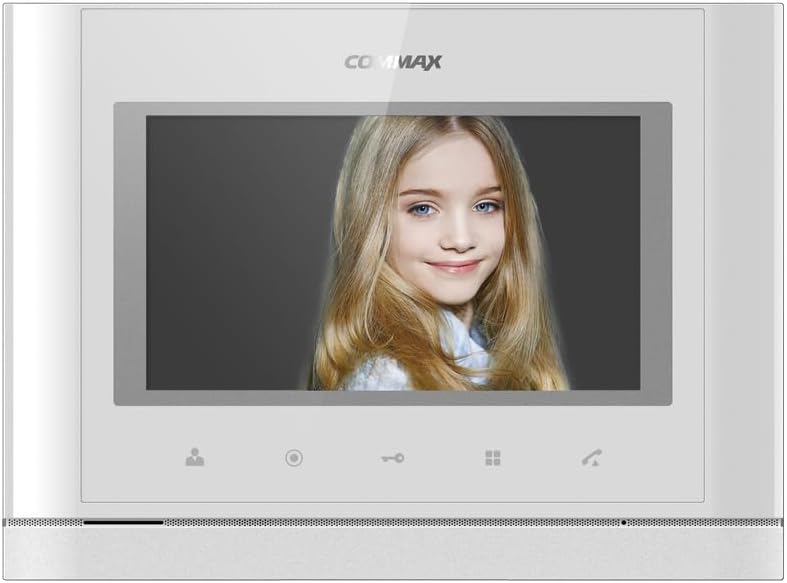
Đằng trước view of the COMMAX CDV-77M monitor, showcasing its 7-inch TFT LCD screen and sleek design. The screen is active, displaying an image.
2. Tính năng sản phẩm
- 7-inch TFT LCD screen for clear video display.
- Supports video communication and door lock release functions.
- Expandable system: Connects with up to 2 door cameras, 2 additional monitors, and 2 interphones.
- PAL/NTSC video format conversion capability.
- Hand-free operation for convenience.
- Wall-mounted design for easy installation.
3. Thông tin an toàn
Please observe the following safety precautions to prevent damage to the product and ensure user safety:
- Không để thiết bị tiếp xúc với nước hoặc độ ẩm quá mức.
- Tránh đặt thiết bị dưới ánh nắng trực tiếp hoặc gần nguồn nhiệt.
- Không tự ý mở hoặc sửa chữa thiết bị. Hãy giao việc bảo dưỡng cho nhân viên kỹ thuật có chuyên môn.
- Hãy đảm bảo nguồn điện phù hợp với điện áp đã chỉ định.tage (AC 100-240V, 50/60Hz).
- Giữ thiết bị tránh xa từ trường mạnh.
- Operate within the specified temperature range of 0℃ to 40℃.
4. Cài đặt
4.1 Nội dung gói
Xác minh rằng tất cả các thành phần đều có mặt:
- COMMAX CDV-77M Monitor Unit
- Giá treo tường
- Vít lắp và neo
- Hướng dẫn sử dụng (tài liệu này)
- Cáp nguồn
4.2 Lắp đặt màn hình
The CDV-77M monitor is designed for wall-mounted installation. Choose a suitable location indoors, away from direct sunlight and moisture.
- Secure the wall mounting bracket to the desired location using the provided screws and anchors.
- Hãy đảm bảo giá đỡ được đặt thẳng hàng và cố định chắc chắn.
- Refer to the dimensions diagram for proper spacing and fit:

Technical drawing showing the dimensions of the COMMAX CDV-77M monitor: 244 mm width and 180 mm height.
4.3 Kết nối dây
Before making any connections, ensure the power supply is disconnected.
- Door Camera Connection: Connect the door camera using a 4-wire cable. The maximum recommended distance is 28 meters (using 0.5Ø wire).
- Interphone Connection: Connect the interphone unit using a 4-wire cable.
- Additional Monitor Connection: If connecting additional monitors, refer to the specific wiring diagram provided with your system.
- Kết nối nguồn điện: Connect the AC 100-240V, 50/60Hz power cable to the monitor and a suitable power outlet.
After all connections are made, carefully attach the monitor unit to the wall mounting bracket.
5. Hướng dẫn vận hành
Familiarize yourself with the monitor's controls:

Detailed diagram illustrating the front panel of the COMMAX CDV-77M monitor, with labels for the TFT LCD, Speaker, Microphone, Power Switch, and control buttons: Monitoring, Interphone, Door Release, Menu, and Talk.
- Bật/Tắt nguồn: Use the Power Switch located on the side/bottom of the unit.
- Nhận cuộc gọi: When a visitor calls from the door camera, the monitor will display their image and ring. Press the Nút nói chuyện to communicate.
- Giám sát: Nhấn nút Nút giám sát ĐẾN view the feed from the connected door camera at any time.
- Mở cửa: Trong khi đang gọi điện hoặc đang theo dõi, hãy nhấn nút Nút mở cửa to unlock the connected door.
- Interphone Communication: Nhấn nút Interphone Button to initiate communication with another connected interphone or monitor.
- Điều hướng Menu: Sử dụng Nút Menu to access settings and adjustments for the monitor.
6. Bảo trì
- Vệ sinh: Dùng khăn mềm, khô để lau màn hình và các bộ phận khác.asing. Không sử dụng chất tẩy rửa hoặc dung môi có tính mài mòn.
- Loại bỏ bụi: Regularly dust the unit to prevent accumulation, especially around ventilation areas.
- Tránh chất lỏng: Không xịt trực tiếp chất lỏng lên màn hình.
KHAI THÁC. Xử lý sự cố
| Vấn đề | Nguyên nhân có thể | Giải pháp |
|---|---|---|
| Màn hình không có nguồn điện. | Power cable disconnected; power outlet faulty; power switch off. | Check power cable connection; test outlet with another device; ensure power switch is on. |
| No video from door camera. | Camera cable loose or damaged; camera faulty. | Check camera wiring connections; ensure camera is powered and functioning. |
| Không có âm thanh trong quá trình giao tiếp. | Microphone/speaker faulty; wiring issue. | Check audio wiring; ensure volume settings are appropriate. |
| Door lock not releasing. | Door lock wiring issue; lock mechanism faulty. | Verify door lock wiring; test door lock mechanism independently. |
Nếu sự cố vẫn tiếp diễn sau khi đã thử các giải pháp này, vui lòng liên hệ với bộ phận hỗ trợ khách hàng.
8. Thông số kỹ thuật
| Tính năng | Chi tiết |
|---|---|
| Người mẫu | CDV-77M |
| Kích thước màn hình | Màn hình TFT LCD 7 inch |
| Nguồn điện | Điện áp xoay chiều 100-240V, 50/60Hz |
| Kiểu gắn kết | Loại treo tường |
| Nhiệt độ hoạt động | 0℃ ~ 40℃ |
| Wiring (Door Camera) | 4 wires (Distance: 28m with 0.5Ø wire) |
| Wiring (Interphone) | 4 dây |
| Tối đa. Kết nối | 2 Cameras, 2 Monitors, 2 Interphones |
| Sự tiêu thụ | Max. 15W / Standby 3W |
| Kích thước (Rộng × Cao × Sâu) | 244mm × 180mm × 18mm |
| Định dạng video | PAL/NTSC convertible |
9. Bảo hành và Hỗ trợ
For warranty information, please refer to the warranty card included with your product or contact your local COMMAX distributor. For technical support or service inquiries, please visit the official COMMAX webtrang web hoặc liên hệ với bộ phận dịch vụ khách hàng của họ.
Nhà sản xuất: COMMAX
Ngày đầu tiên có sẵn: 7 tháng 2023 năm XNUMX