
BERIBES WH305B
Hướng dẫn sử dụng tai nghe chống ồn chủ động lai BERIBES WH305B
Mã sản phẩm: WH305B
1. Giới thiệu
Thank you for choosing the BERIBES WH305B Hybrid Active Noise Cancelling Headphones. These headphones are designed to provide a superior audio experience with advanced noise cancellation, transparent mode, and comfortable wear. This manual will guide you through the setup, operation, and maintenance of your new headphones to ensure optimal performance.

Đằng trước view of the BERIBES WH305B headphones in black.
2. Nội dung gói hàng
Vui lòng kiểm tra nội dung gói hàng để đảm bảo có đầy đủ tất cả các mục:
- BERIBES WH305B Wireless Bluetooth Headphones
- Cáp âm thanh 3.5mm
- Cáp sạc USB Type-C
- Hướng dẫn sử dụng

This image displays all items included in the product package: the BERIBES WH305B wireless Bluetooth headphones, a 3.5mm audio cable, a USB charging cable, and the user manual.
3. Sản phẩm hếtview
3.1 Điều khiển và Cổng
Hãy làm quen với các nút điều khiển và cổng tai nghe:

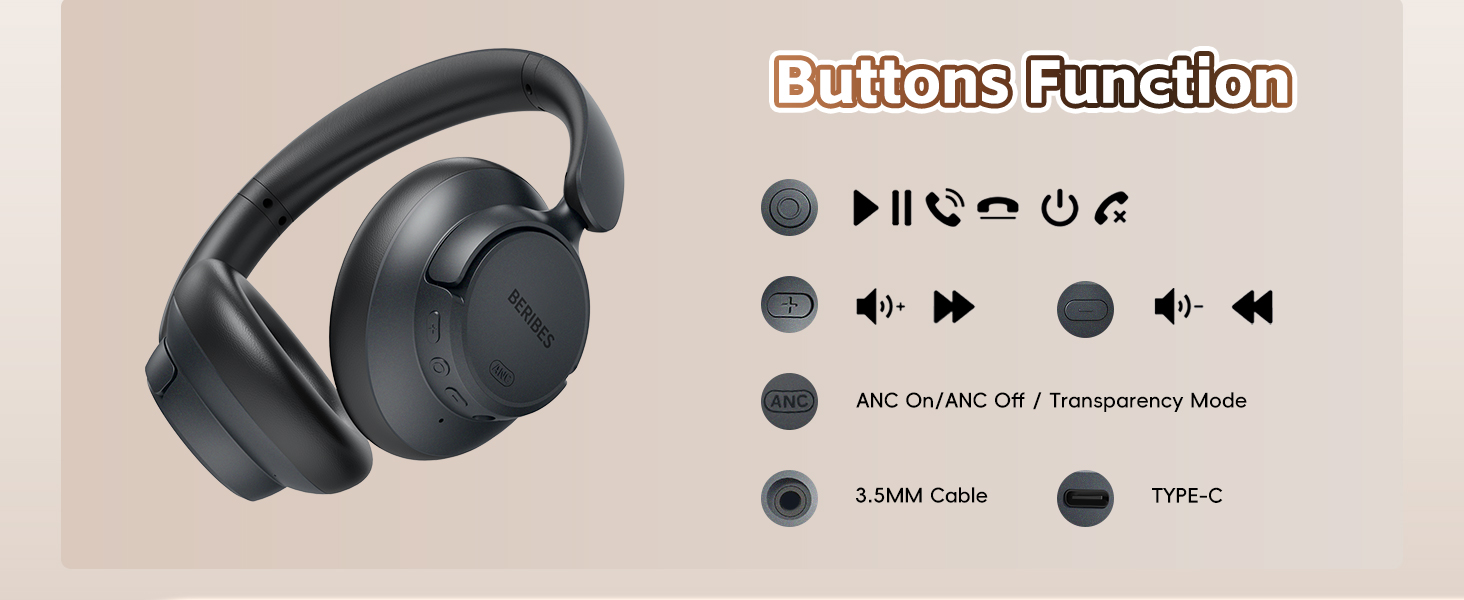
An illustration detailing the various buttons and ports on the headphones, including controls for power, volume adjustment, track navigation, ANC/Transparency mode switching, the 3.5mm audio jack, and the Type-C charging port.
- Nút đa chức năng: Power On/Off, Play/Pause, Answer/End Call, Reject Call, Voice Assistant.
- Nút Tăng âm lượng/Chuyển bài hát tiếp theo: Nhấn nhanh để tăng âm lượng, nhấn giữ để chuyển sang bài hát tiếp theo.
- Nút Giảm âm lượng/Quay lại bài hát trước: Nhấn nhanh để giảm âm lượng, nhấn giữ để chuyển sang bài hát trước.
- Nút ANC: Toggle Active Noise Cancellation (ANC) On/Off or Transparent Mode.
- Giắc cắm âm thanh 3.5 mm: Dành cho kết nối có dây.
- Cổng sạc USB Type-C: Để sạc tai nghe.
3.2 Thiết kế công thái học
The BERIBES WH305B headphones are designed for comfort and portability:
- 90° Swiveling Earcups: Allows for flat storage and comfortable fit.
- Thiết kế có thể gập lại: Compact for easy storage and travel.
- Băng đô có thể điều chỉnh: Đảm bảo sự vừa vặn an toàn và thoải mái cho nhiều kích cỡ đầu khác nhau.
- Đệm tai mềm mại: Professional-grade protein ear-pads for extended comfort.

This image illustrates the ergonomic design of the headphones, highlighting the 90-degree swiveling earcups, foldable structure for portability, and the adjustable headband for a comfortable fit.
4. Thiết lập
4.1 Sạc tai nghe
- Kết nối cáp sạc USB Type-C với cổng sạc trên tai nghe.
- Kết nối đầu còn lại của cáp vào bộ chuyển đổi nguồn USB (không bao gồm) hoặc cổng USB của máy tính.
- Đèn LED sẽ hiển thị trạng thái sạc. Sạc đầy mất khoảng 2.5 giờ.
- Once fully charged, the headphones provide up to 70 hours of playtime in standard mode or 45 hours with ANC enabled. A 5-minute quick charge provides approximately 4 hours of listening.

The headphones are shown connected to a power source via a Type-C cable, demonstrating the charging process. An overlay indicates a 2.5-hour charging time provides up to 70 hours of playback.
4.2 Bật / Tắt nguồn
- Bật nguồn: Nhấn và giữ Nút đa chức năng trong 3 giây cho đến khi đèn LED nhấp nháy màu xanh.
- Tắt nguồn: Nhấn và giữ Nút đa chức năng trong 3 giây cho đến khi đèn LED tắt.
4.3 Ghép nối Bluetooth
- Đảm bảo tai nghe đã được tắt nguồn.
- Press and hold the Multi-function Button for 5 seconds until the LED indicator flashes red and blue alternately, indicating pairing mode.
- Trên thiết bị của bạn (điện thoại thông minh, máy tính bảng, máy tính xách tay), hãy bật Bluetooth và tìm kiếm các thiết bị khả dụng.
- Select "WH305B" from the list of devices.
- Sau khi kết nối, đèn báo LED sẽ nhấp nháy màu xanh lam từ từ.

The image shows the headphones successfully paired with a smartphone via Bluetooth, with the device name 'WH305B' visible on the screen.
4.4 Kết nối có dây (Cáp âm thanh 3.5mm)
Để sử dụng tai nghe với kết nối có dây:
- Kết nối một đầu của cáp âm thanh 3.5mm với giắc cắm âm thanh trên tai nghe.
- Kết nối đầu còn lại với cổng đầu ra âm thanh 3.5mm trên thiết bị của bạn.
- In wired mode, the headphones function passively, and ANC features may not be available or require power.
The headphones are shown connected to a device using the included 3.5mm audio cable, illustrating the wired listening option.
5. Hướng dẫn vận hành
5.1 Active Noise Cancellation (ANC) and Transparent Mode
The headphones feature Hybrid Active Noise Cancellation and a Transparent Mode:
- ANC Bật: Press the ANC button once to activate Active Noise Cancellation. This mode reduces ambient noise by up to 95%.
- Chế độ trong suốt: Press the ANC button again to switch to Transparent Mode. This mode allows you to hear your surroundings without removing the headphones.
- ANC Tắt: Press the ANC button a third time to turn off both ANC and Transparent Mode.

This graphic explains how the Hybrid Active Noise Cancellation technology works, depicting the reduction of external noise by up to 95% to enhance audio clarity.

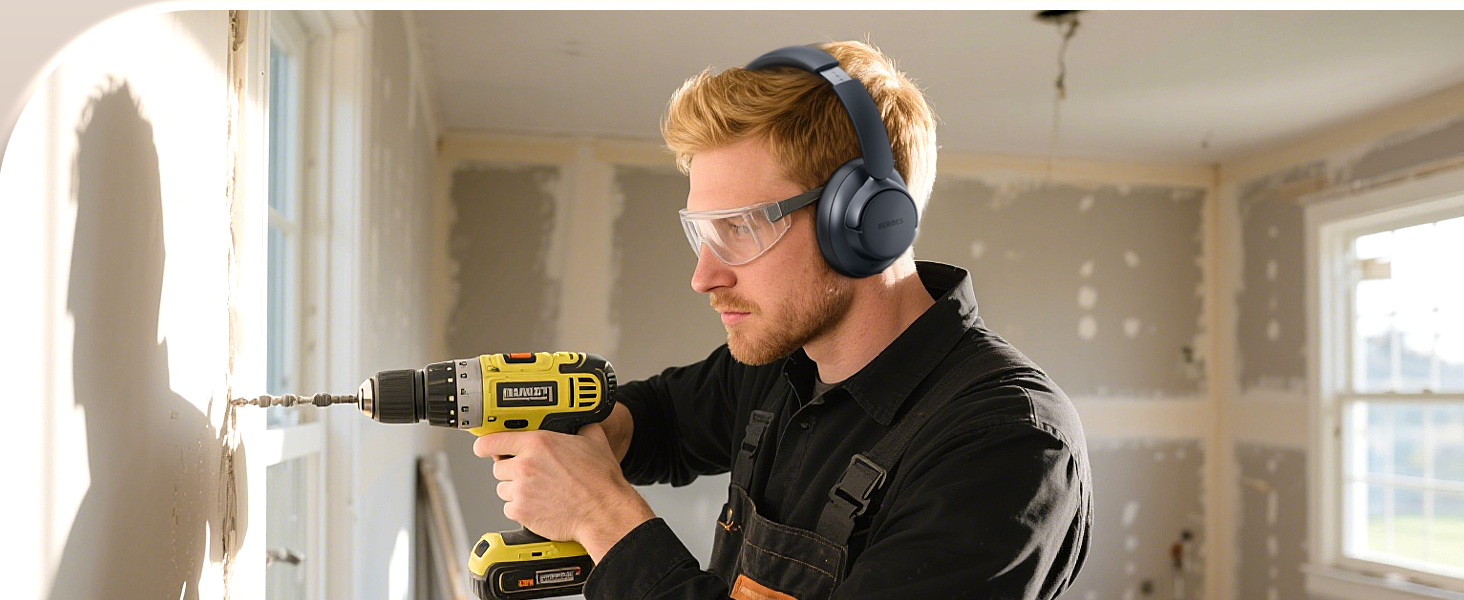
Users are depicted wearing the headphones in different scenarios, such as on a bus, in a library, and during lawn mowing, illustrating the effectiveness of noise reduction in various environments.
5.2 Phát lại nhạc
- Phát/Tạm dừng: Nhấn nhanh Nút Đa chức năng.
- Tăng âm lượng: Nhấn nhanh nút Tăng âm lượng.
- Giảm âm lượng: Nhấn nhanh nút Giảm âm lượng.
- Bài hát tiếp theo: Nhấn và giữ nút Tăng âm lượng.
- Bản nhạc trước: Nhấn và giữ nút Giảm âm lượng.
5.3 Quản lý cuộc gọi
- Trả lời/Kết thúc cuộc gọi: Nhấn nhanh Nút Đa chức năng.
- Từ chối cuộc gọi: Long press the Multi-function Button for 2 seconds.
- Kích hoạt Trợ lý giọng nói: Nhấn đúp vào nút Đa chức năng.
5.4 Smart One Connect Two
The headphones support simultaneous connection to two Bluetooth devices:
- Pair the headphones with the first device (e.g., smartphone) as described in Section 4.3.
- Tắt Bluetooth trên thiết bị đầu tiên. Tai nghe sẽ tự động chuyển sang chế độ ghép nối.
- Pair the headphones with the second device (e.g., tablet).
- Hãy bật lại Bluetooth trên thiết bị đầu tiên. Tai nghe sẽ tự động kết nối với cả hai thiết bị.
- You can now switch between audio sources by pausing playback on one device and starting it on the other.
The 'Smart One Connect Two' feature is demonstrated, showing the headphones wirelessly connected to two devices (a smartphone and a tablet) at the same time, allowing for easy switching between audio sources.
6. Bảo trì
- Vệ sinh: Hãy dùng khăn mềm, khô để lau tai nghe. Không sử dụng hóa chất mạnh hoặc vật liệu mài mòn.
- Kho: Khi không sử dụng, hãy bảo quản tai nghe ở nơi khô ráo, thoáng mát, tránh ánh nắng trực tiếp và nhiệt độ cao. Thiết kế có thể gập lại giúp cất giữ gọn gàng.
- Chăm sóc pin: Để kéo dài tuổi thọ pin, tránh xả hết pin tai nghe thường xuyên. Hãy sạc pin định kỳ, ngay cả khi không sử dụng liên tục.
- Tiếp xúc với nước: Tai nghe này không chống nước. Tránh tiếp xúc với nước hoặc độ ẩm quá mức.
KHAI THÁC. Xử lý sự cố
| Vấn đề | Giải pháp |
|---|---|
| Tai nghe không bật được. | Hãy đảm bảo tai nghe đã được sạc đầy. Kết nối tai nghe với nguồn điện bằng cáp USB Type-C. |
| Không thể ghép nối với thiết bị Bluetooth. |
|
| Không có âm thanh hoặc âm lượng thấp. |
|
| Chế độ ANC không hoạt động hiệu quả. |
|
8. Thông số kỹ thuật
| Tính năng | Chi tiết |
|---|---|
| Tên mẫu | WH305B |
| Kiểm soát tiếng ồn | Khử tiếng ồn lai |
| Công nghệ kết nối | Kết nối không dây (Bluetooth), kết nối có dây (jack 3.5mm) |
| Công nghệ truyền thông không dây | Bluetooth 5.3 |
| Phạm vi Bluetooth | 10 mét |
| Tuổi thọ pin | Up to 70 Hours (Standard Mode) |
| Thời gian sạc | Khoảng 2.5 giờ |
| Loại trình điều khiển âm thanh | Trình điều khiển động (40mm) |
| Dải tần số | 20 Hz - 20,000 Hz |
| Trở kháng | 32 Ohm |
| Vị trí tai | Trên tai |
| Trọng lượng sản phẩm | 0.73 pound (khoảng 331g) |
| Vật liệu | Plastic, Protein Leather (ear-pads) |
9. Bảo hành và Hỗ trợ
BERIBES products are designed and manufactured to the highest quality standards. For detailed warranty information and customer support, please refer to the warranty card included in your package or visit the official BERIBES website. If you encounter any issues or have questions regarding your headphones, please contact BERIBES customer service for assistance.
Ask a question about this manual
Ask about setup, troubleshooting, compatibility, parts, safety, or missing instructions. Manuals+ will review the question and use this page’s manual context to help answer it.